Logseq 2.0: A Local-First Knowledge Base That Now Splits Into Two Products
GitHub describes it as A privacy-first, open-source platform for knowledge management and collaboration. Download link: http://github.com/logseq/logseq/releases. roadmap: https://logseq.io/p/NX4mc ggEV. The repository metadata lists Clojure as its primary language. The metadata lists the AGPL-3.0 license. This article stays within the project description and details documented in the GitHub repository README.
At a glance
- What is it?
- Logseq is a privacy-first, open-source knowledge management platform built on plain Markdown and Org-mode files. The new Database version adds DB graphs and RTC (Real Time Collaboration) sync, but it is still in beta and data loss is possible.
- Who is it for?
- Adopt Logseq if you want a local-first, plain-text knowledge base with Markdown and Org-mode support, and you accept the AGPL-3.0 license. Do not adopt the Database version for critical work yet: it is beta, data loss is possible, and you need automated backups.
- Can I use it commercially?
- Yes, with strict conditions. AGPL-3.0 is a network copyleft licence: if people use a modified version over a network, for example as a hosted service, you must offer them its source code under the same licence.
- Is it still maintained?
- Yes. The repository received new commits within the last day.
- What is it written in?
- Mainly Clojure, according to GitHub's language statistics.
Answers come from the project's GitHub data, last synced on November 15, 2026, and from our analysis. They are not legal advice.
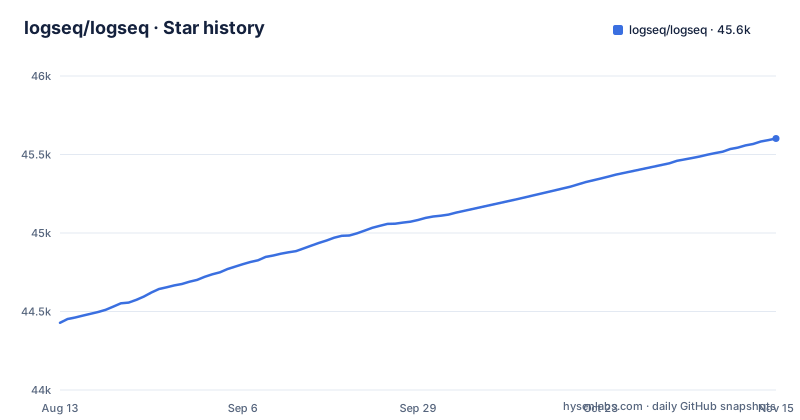
Star history
- logseq/logseq45,602 ★ · +1,174
| Repository | 2026-08-13 | 2026-11-15 |
|---|---|---|
| logseq/logseq | 44.4k | 45.6k |
1,174 Stars in the last 94 days, measured from the daily GitHub snapshot. Compare with other projects
Editorial analysis
What Logseq Actually Is
Logseq is a knowledge management and collaboration platform that stores your notes as plain files. It supports Markdown and Org-mode, and it runs as a desktop app, a web app, and a mobile app. The project homepage calls it privacy-first and open-source. The core promise is that your data lives on your device, not on a server you do not control. The README lists PDF annotation and task management as part of the feature set. It is built primarily in Clojure, which matters if you plan to contribute code or build from source. The audience is anyone who wants a local-first alternative to cloud note apps, especially people who already use plain text for notes.
The Split: Classic File-Based Graphs vs. the Database Version
The most important thing to understand about Logseq in 2026 is that it is becoming two products. The classic version stores each note as a Markdown or Org-mode file. You can open the folder with any text editor and your data is readable without Logseq. The new Database version, called DB graphs, stores data in SQLite. The README points to a separate document for DB version features and a separate document for changes from the classic version. This split means you must choose which model fits your workflow. If you want plain files you can grep and version with Git, the classic version is the safe choice. If you want real-time sync, the DB version is the future, but it is not ready for production.
How the Database Version Works
The DB version is built on SQLite. The README mentions automated backups and regular SQLite DB backups as recommended practices, which tells you the data model is a database file rather than a folder of text files. The new sync approach is called RTC, Real Time Collaboration. It lets you sync graphs between devices or collaborate with others in real time. Both the new mobile app and RTC are in alpha. The DB version itself is in beta. The README is explicit: data loss is possible. That is a strong warning. If you try the DB version, you should use a dedicated test graph and pick a project that is not important to you. The release cadence reflects the beta state: the latest nightly release is dated 2026-10-25, and the latest desktop release is 2.0.2 from October 2026, which is labeled Beta Testing.
Getting It Running: Commands and Options
There are three ways to run Logseq. The simplest is to download the installer from the releases page. For Linux, the README provides an automated installer script. You can also try the latest web version at app.logseq.com. If you want to build from source, you have two branches. Use test/db for stable releases, which update every few days or weeks. Use master for the latest updates, which change every few hours or days. The master branch will have more bugs. The README's table of contents also lists a development environment setup section. For the DB version, you can join the mobile alpha by filling out a form, and the RTC alpha has its own form. Bug reports for the DB version go to a separate issue tracker at github.com/logseq/db-test.
The Real Limitation: Beta Data Loss and Feature Gaps
The biggest limitation is the explicit warning that data loss is possible in the DB version. That is not a vague risk; it is a direct statement in the README. The DB version is beta, and the mobile app and RTC are alpha. Alpha software is by definition unstable. If you rely on Logseq for daily work, weigh the DB version's beta status carefully. Another limitation is the split itself. Features that exist in the DB version may not exist in the classic version, and vice versa. The README points to a separate document for changes with the DB version, which suggests there are breaking differences. If you need real-time collaboration, the classic version does not offer it. If you need plain text files, the DB version may not give you that. You have to pick one model and accept the trade-off.
Alternatives and the Difference in Approach
The main alternative is Obsidian, which also uses local Markdown files and has a plugin ecosystem. The difference is that Obsidian is proprietary and not open-source, while Logseq is AGPL-3.0. Another alternative is a self-hosted tool like Trilium, which stores notes in a database but offers a web interface. Logseq's approach is to give you plain files plus a structured database layer, which is unusual. Most note apps choose either files or a database. Logseq tries to offer both, but the current state is that you must choose one. If you want a pure file-based system, the classic Logseq works. If you want a pure database system, you could use a dedicated note app that is stable, but you lose the open-source and privacy-first angle.
Maintenance, License, and Upgrade Cost
Logseq is licensed under AGPL-3.0. That means if you modify the source and run it as a network service, you must release your modifications under the same license. For personal use, this is not an issue. For a company that wants to embed Logseq in a proprietary product, it is a dealbreaker. The project is actively maintained: the last push is 2026-11-01, and nightly releases are frequent. The upgrade cost depends on which version you use. The latest desktop release, 2.0.2, is labeled Beta Testing. The DB version requires you to follow the beta and alpha channels, and you must set up automated backups. The README recommends regular SQLite backups, which is an extra operational step. If you are not prepared to handle backups and occasional breakage, the DB version is not for you.
Editorial conclusion
Adopt Logseq if you want a local-first, plain-text knowledge base with Markdown and Org-mode support, and you accept the AGPL-3.0 license. Do not adopt the Database version for critical work yet: it is beta, data loss is possible, and you need automated backups. Before committing, verify that your workflow does not depend on features that only exist in the DB version, and check whether the RTC alpha meets your collaboration needs. If you need a stable, production-grade collaborative database, look elsewhere until the DB version leaves beta.
Frequently asked questions
What is Logseq used for?
It is a knowledge management and collaboration platform that focuses on privacy, longevity and user control, with tools for notes, collaboration, PDF annotation and task management. It supports Markdown and Org-mode, has a plugin and theme ecosystem, and mobile apps that reach most of the desktop features.
Is Logseq fully free?
The project is licensed AGPL-3.0, and the download links in the README go to the GitHub releases page. It also asks for support, with backer and sponsor badges pointing at Open Collective.
What are Logseq's disadvantages?
The README names them. The DB version is in beta and the mobile app and RTC sync are in alpha, and the text says data loss is possible, which is why it recommends automated or regular SQLite backups. The mobile app for DB graphs is on iOS with Android coming soon, and DB bug reports go to the separate logseq/db-test repository rather than to this one.
how to install logseq
Download the latest version from the GitHub releases page, install it on the device and launch it. Linux users are pointed at an automated installer script instead of a package, and there is also a web version at app.logseq.com plus a Dockerfile that builds the static web app behind nginx.
how to use logseq db version
Try it at app.logseq.com for the web build, or download the artifact for your operating system from the nightly release tag. To build from source, use test/db for stable releases with fewer bugs and days or weeks of update frequency, or master for the latest changes with more bugs and hourly or daily updates.
Official sources
Where this project is recommended
Add this badge to your README
If you maintain this project, the badge below links readers to this analysis and shows its maintenance status from the daily GitHub snapshot. Paste the markdown into your README; add ?metric=license or ?metric=stars to the image URL for a different field.

[](https://hysenlabs.com/projects/logseq-logseq)Star history chart for your README
[](https://hysenlabs.com/projects/logseq-logseq)Was this useful?