Data Machine: WordPress as an Agent Runtime, Not Just a CMS
Agentic operating system for WordPress.
At a glance
- What is it?
- Data Machine layers an agentic operating system onto WordPress, adding pipelines, memory files, and policy-gated tools. This review covers its architecture, CLI entry points, and where its autonomy model may be overkill.
- Who is it for?
- Adopt Data Machine if you run WordPress as a content operations hub and need autonomous pipelines with human approval gates, and you are comfortable with a PHP codebase that depends on the Automattic Agents API substrate. Skip it if you only need simple scheduled publishing or if you cannot tolerate a runtime that injects markdown memory into every AI context.
- Can I use it commercially?
- Yes, with conditions. GPL-2.0 is a copyleft licence: if you distribute software that includes it, you must release that software's source code under the same licence. Running it internally without distributing it does not trigger that obligation.
- Is it still maintained?
- Yes. The repository received new commits within the last day.
- What is it written in?
- Mainly PHP, according to GitHub's language statistics.
Answers come from the project's GitHub data, last synced on October 22, 2026, and from our analysis. They are not legal advice.
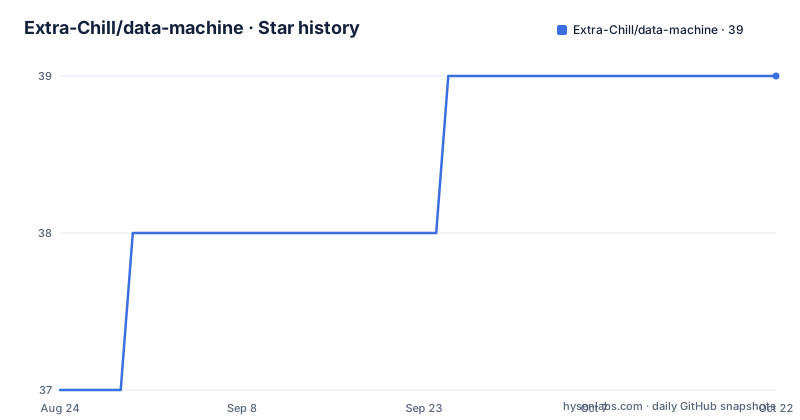
Star history
- Extra-Chill/data-machine39 ★ · +2
| Repository | 2026-08-24 | 2026-10-22 |
|---|---|---|
| Extra-Chill/data-machine | 37 | 39 |
2 Stars in the last 59 days, measured from the daily GitHub snapshot. Compare with other projects
Editorial analysis
The Problem: WordPress Is a Publishing Tool, Not an Agent Host
WordPress excels at storing content and rendering pages, but it has no native concept of an autonomous workflow. A site that wants to fetch an RSS feed, transform it with AI, and publish the result needs custom cron jobs, a queue, and glue code. Data Machine addresses that gap by turning the WordPress install itself into an agent runtime. The intended user is a developer or site operator who wants AI agents to act on WordPress content with persistence and memory, not a casual blogger. The README positions it as a product layer on top of the Agents API, which means you are adopting two layers of abstraction, not a single plugin.
Architecture: Product Layer on Top of Agents API
The repository layout shows a clear separation. Data Machine owns the WordPress automation surface: pipelines, flows, jobs, handlers, tools, abilities, memory files, and admin/CLI interfaces. Underneath sits the Agents API, which provides generic agent contracts, a durable conversation loop, transcripts, memory-store interfaces, approval vocabulary, locks, and event sinks. Below that, wp-ai-client and provider adapters handle model calls. This layering means Data Machine does not reimplement agent primitives. Instead, it focuses on orchestration: defining workflow templates, scheduling them, and persisting execution state. The trade-off is dependency. If the Agents API changes its contracts, Data Machine must track those changes. The README does not mention a fallback if you want to run without that substrate.
Pipelines, Flows, and Jobs: The Core Execution Model
Data Machine's workflow model uses three distinct concepts. A pipeline defines the template, such as fetch, process, publish. A flow configures and schedules that pipeline with specific inputs and parameters. A job tracks each execution, including artifacts, retries, status, and undo support. The engine processes work in a bounded cycle: it claims due work, advances jobs, and exits. That design avoids unbounded requests. For long-running work, you have three entry points: cycle runs once, drain repeats until the queue is empty or a budget is reached, and worker wraps cycles under configured limits. This is a sensible pattern for shared hosting where long processes get killed. The README gives the CLI commands: `wp datamachine cycle`, `wp datamachine drain`, `wp datamachine worker`, and `wp datamachine jobs summary` for oversight.
Agent Modes and Memory: Same Identity, Different Tools
Data Machine defines three operational modes for a single agent identity. Pipeline mode runs automated workflows with handler-specific tools scoped to the current step. Chat mode provides a conversational interface in wp-admin with 30 or more management tools for flows, pipelines, jobs, logs, memory, and content. System mode handles background tasks like alt text generation, daily memory synthesis, and retention. The same memory files are injected into every context, but the tool set changes per mode. Memory is stored as layered markdown: SITE.md for site-wide context, SOUL.md for identity and rules, MEMORY.md for durable knowledge, daily files for append-only journals, and USER.md for human-specific information. This design is explicit and inspectable. You can see exactly what the agent knows by reading those files. The downside is that every AI context carries this memory, which could bloat token usage on large sites.
Policy-Gated Tools and Pending Actions: Control Without Hardcoding
Tool access is not a static allow-list. The runtime resolves permissions through policy classes that combine tool sources, mode policy, handler adjacency, memory policy, and action policy. When an operation requires human approval, it becomes a pending action, backed by the Agents API approval vocabulary and Data Machine storage adapters. You can inspect and resolve pending actions via REST, abilities, chat tools, or the CLI command `wp datamachine pending-actions`. This approach is more flexible than a hardcoded list because extensions can add tools and policies without touching core. But it also means the security model is only as strong as the policies you configure. The README does not provide examples of writing a custom policy class, so you will need to read the source or the docs site to understand the exact interface.
Getting Started: Playground, Install, and CLI
The quickest way to evaluate Data Machine is the Playground badge in the README. It opens a browser-only WordPress instance, installs Data Machine plus its substrate (Agents API and the WordPress AI Provider for OpenAI), and takes you to the admin. You add your own OpenAI key in Settings to start chatting or running a pipeline. Nothing persists after the tab closes, which is useful for a trial. For a real install, you need WordPress, the Agents API plugin, and the AI provider adapter. The README does not list the exact installation commands beyond the Playground, but it references WP-CLI entry points extensively, so a typical setup would involve `wp plugin install` and `wp plugin activate`. The documentation homepage at https://chubes.net/docs/data-machine likely covers the full install procedure, but the README alone does not give a step-by-step. You should check that before deploying.
Limitations and Wrong Tool Cases
Data Machine is not a lightweight scheduling plugin. It introduces a multi-agent runtime with memory files, policy resolution, and pending actions, which is significant complexity for a typical WordPress site. If you only need to publish a post at a fixed time, the built-in WordPress cron is simpler. The bounded cycle model means you must run `wp datamachine worker` or set up a cron job to invoke `wp datamachine cycle`; the README does not mention a built-in scheduler that runs automatically without external cron. Another limitation is the dependency on the Agents API. If you are not willing to adopt that substrate, Data Machine is not an option. Also, the memory injection into every AI context could increase token costs, and the README gives no cost estimates or performance benchmarks. The Playground is ephemeral, so you cannot test long-running persistence there.
Alternatives: WP-CLI and Action Scheduler vs. a Full Agent Runtime
A direct alternative is to build workflows with WP-CLI scripts and Action Scheduler, the background job library used by WooCommerce. That approach gives you scheduled tasks and retries without an agent layer. The difference is that Action Scheduler runs PHP callbacks, not AI agents with memory and policy. If your workflow is deterministic, such as importing posts from an RSS feed and publishing them, Action Scheduler is simpler and has no dependency on an external AI provider. If you need autonomous decision-making, Data Machine's agent runtime is the point. Another alternative is the Agents API alone, if you want generic agent primitives without WordPress-specific automation. Data Machine adds the product layer, so you would skip pipelines, flows, and the admin UI. The choice depends on whether your automation is rule-based or genuinely agentic.
Maintenance and Licensing
The repository is under GPL-2.0, which is standard for WordPress plugins. That means derivative works must also be GPL-compatible, which is fine for most WordPress projects but worth noting if you plan to embed it in a proprietary product. The project is actively updated, with releases like v0.175.28 from August 2026, so maintenance appears ongoing. The README mentions a separate extension called data-machine-code that tracks GitHub issues, but the core repository does not list a changelog in the README. Upgrade cost is a real concern: because Data Machine sits on top of the Agents API and provider adapters, each upstream change may require a Data Machine release. You should pin versions and test upgrades in a staging environment. The CLI surface is stable enough to script, but the policy and ability registries are extensible, so you will need to audit custom policies after each major upgrade.
Editorial conclusion
Adopt Data Machine if you run WordPress as a content operations hub and need autonomous pipelines with human approval gates, and you are comfortable with a PHP codebase that depends on the Automattic Agents API substrate. Skip it if you only need simple scheduled publishing or if you cannot tolerate a runtime that injects markdown memory into every AI context. Before committing, verify that your hosting supports WP-CLI and Action Scheduler, and test the Playground blueprint to see if the multi-agent model fits your workflow.
Frequently asked questions
What is Data Machine in this repository?
A WordPress plugin for agentic workflow automation. It turns a site into an agent runtime with pipelines, flows, jobs, markdown memory files, policy-gated tools and a typed abilities API, layered on the generic Agents API substrate.
What kinds of data does Data Machine store?
The project does not discuss machine data as a concept. What it persists is agent state: markdown memory files, job, log and artifact records for each execution, transcripts from the conversation loop, and pending actions awaiting approval.
How do I run one round of Data Machine work from the command line?
Use `wp datamachine cycle` for a single bounded pass that claims due work and exits, `wp datamachine drain` to keep running due work until the queue empties or a budget is reached, and `wp datamachine worker` for ongoing background processing under configured limits.
Where does Data Machine keep an agent's memory?
In layered markdown files: shared/SITE.md, agents/{slug}/SOUL.md and MEMORY.md, append-only journals under agents/{slug}/daily/YYYY/MM/DD.md, and users/{id}/USER.md. Paths can be listed with `wp datamachine memory paths --allow-root`.
Official sources
Add this badge to your README
If you maintain this project, the badge below links readers to this analysis and shows its maintenance status from the daily GitHub snapshot. Paste the markdown into your README; add ?metric=license or ?metric=stars to the image URL for a different field.

[](https://hysenlabs.com/projects/extra-chill-data-machine)Star history chart for your README
[](https://hysenlabs.com/projects/extra-chill-data-machine)