microsoft/mcp-for-beginners: a cross-language MCP curriculum, and its clone-size problem
This open-source curriculum introduces the fundamentals of Model Context Protocol (MCP) through real-world, cross-language examples in .NET, Java, TypeScript, JavaScript, Rust and Python. Designed for developers, it focuses on practical techniques for building modular, scalable, and secure AI workflows from session setup to service orchestration.
At a glance
- What is it?
- Microsoft's MIT-licensed curriculum teaches Model Context Protocol fundamentals through examples in .NET, Java, TypeScript, JavaScript, Rust and Python. The teaching material is broad; the repository's 50+ translations make the default clone heavy, and the README itself tells you to work around that.
- Who is it for?
- Adopt this curriculum if you need a language-agnostic starting point for MCP and you are willing to verify the pinned specification revision before relying on any behaviour described in the notebooks. Skip it if you need a production reference implementation or an upgrade path with tagged releases.
- Can I use it commercially?
- Yes. MIT is a permissive licence: you can use, modify and sell software built on it, as long as you keep its copyright and licence notices.
- Is it still maintained?
- Yes. The repository received new commits within the last day.
- What is it written in?
- Mainly Jupyter Notebook, according to GitHub's language statistics.
Answers come from the project's GitHub data, last synced on November 13, 2026, and from our analysis. They are not legal advice.
Star history
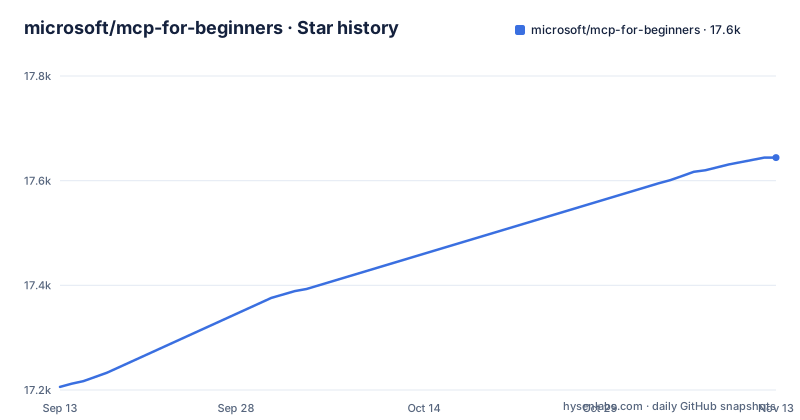
- microsoft/mcp-for-beginners17,644 ★ · +438
| Repository | 2026-09-13 | 2026-11-13 |
|---|---|---|
| microsoft/mcp-for-beginners | 17.2k | 17.6k |
438 Stars in the last 61 days, measured from the daily GitHub snapshot. Compare with other projects
Editorial analysis
The gap this curriculum fills: MCP has a specification, not a tutorial
Model Context Protocol defines how AI applications talk to tools and services. A specification tells you what a conforming implementation must do. It does not tell you how to set up a session in Python, then repeat the exercise in C#, and compare the two. That is the space microsoft/mcp-for-beginners occupies. The README frames the protocol as a universal translator, comparing it to USB ports that let you connect any device to your computer, and the curriculum is built around that analogy rather than around protocol text. The audience is developers who already write code in at least one of the six supported languages and want to build MCP servers and clients without reading the specification end to end first. The top-level folders run as numbered modules, from 00-Introduction and 01-CoreConcepts through 02-Security and 03-GettingStarted to 11-MCPServerHandsOnLabs and 12-tooling.
Six languages, one protocol: how the examples are arranged
The curriculum covers .NET, Java, TypeScript, JavaScript, Rust and Python. The repository's primary language is listed as Jupyter Notebook, which suggests that at least part of the material is delivered as notebooks. The README states that the curriculum teaches the current 2026-07-28 concepts, including stateless behaviour, and notes that the specification uses date-based versioning in YYYY-MM-DD format to make protocol compatibility explicit. That versioning choice is worth internalising before you read the notebooks: the README says the curriculum teaches 2026-07-28 concepts, but some hands-on examples remain explicitly versioned to 2025-11-25 while SDK support catches up.
Getting the course onto disk without the translation payload
The README's first three steps are fork the repository, clone it, and join the Discord. The clone command is `git clone https://github.com/microsoft/mcp-for-beginners.git`. The README then warns that the repository includes 50+ language translations which significantly increase the download size, and offers a sparse checkout instead. On Bash, macOS or Linux the documented sequence is `git clone --filter=blob:none --sparse https://github.com/microsoft/mcp-for-beginners.git`, then `cd mcp-for-beginners`, then `git sparse-checkout set --no-cone '/*' '!translations' '!translated_images'`. On Windows CMD the same three commands appear with double quotes around the patterns. The README describes the result as everything you need to complete the course with a much faster download. Two details in that pattern set are easy to miss. The `--filter=blob:none` flag defers blob downloads, so files arrive on demand rather than all at once. The `--no-cone` flag switches sparse checkout to pattern matching rather than directory-based rules, which is what allows the negation patterns to exclude the translations and translated_images directories while keeping everything at the repository root. If you later want a translation, you re-run `git sparse-checkout set` with the path added. The README does not document that reversal, so plan for it if you need a translated README alongside the English lessons.
The translations table is generated, and that changes what you can trust
The README lists more than fifty translated READMEs, from Arabic and Bengali through to Vietnamese, each as a relative link under ./translations/. The table is bracketed by CO-OP TRANSLATOR comments, and the section heading says the translations are maintained with Co-op Translator. That is a maintenance statement, not a quality claim. Automated translation of a technical curriculum will render protocol terms inconsistently across languages, and the README gives no indication that a human reviews each translated page. For a reader who needs MCP vocabulary to match the specification exactly, the English lessons are the safer reference. The translations are useful for orientation, for deciding whether a topic is worth reading in English, and for sharing a link with a colleague who prefers another language. They are not a substitute for the source text when the distinction between a tool and a resource matters. The README does not say which languages receive human review, if any, so treat the table as a navigation aid rather than a second edition.
Where the curriculum stops being the right tool
This is teaching material, and the repository shows no releases. There are no GitHub releases, so there are no tagged versions to pin and no upgrade path other than pulling the default branch, although a changelog.md sits at the repository root. If your team needs to reproduce a build from six months ago, the curriculum cannot give you that. The notebook format compounds the problem: notebooks are excellent for explanation and poor for dependency management. The README also points readers to a Discord server, which is where questions about the material presumably land. That is a reasonable support model for a course. It is not a support model for a system you depend on in production. A second limitation is scope. The description mentions modular, scalable and secure AI workflows from session setup to service orchestration, and the repository has dedicated folders such as 02-Security, 05-AdvancedTopics and 11-MCPServerHandsOnLabs. Check those modules for how far the orchestration material goes and whether the security chapter covers authentication, authorisation, or both before you plan a team training around it.
How this differs from reading the specification or using an SDK
The obvious alternative is the MCP specification itself, which the README references and dates at 2026-07-28. The difference is one of shape rather than content. The specification is normative: it defines what conforms, and it does not care which language you write in. The curriculum is pedagogical: it picks six languages, shows the same ideas in each, and accepts that the examples will diverge in style. A second alternative is the official SDK for your language, if one exists for your track. An SDK gives you typed interfaces and a release cadence you can pin; it assumes you already understand the protocol. The curriculum assumes the opposite. Choosing between them is not a matter of quality. If you are evaluating whether MCP fits a design, the curriculum gets you to a working mental model faster. If you are implementing against a frozen protocol revision for a product, the specification plus an SDK is the shorter path, and the curriculum becomes background reading. The README's own framing supports that split: it describes the material as designed for a learning journey that starts with simple concepts and builds through hands-on practice, which is not the register of a reference document.
Maintenance, licensing, and what to check before you adopt it
The repository is MIT licensed, which permits commercial use, modification and redistribution provided the licence notice is retained. That is the standard permissive position, and it applies to the curriculum text and examples. It does not automatically extend to any third-party code the lessons pull in, so a legal review of the notebooks themselves is the only way to confirm what ships alongside the MIT-licensed content. Do not treat this paragraph as legal advice. On maintenance: the last push recorded is 2026-10-01, and there are no releases, so the project's health is visible only through commit activity and the generated translations table. A curriculum that tracks a dated specification needs to be updated whenever the specification revision changes; the README currently pins 2026-07-28, and that date is the single most useful thing to check on a return visit. If the README still says 2026-07-28 a year from now while the specification has moved, the lessons describe a protocol revision that no longer matches what you are implementing against. Before you build a training plan on this repository, clone it with the sparse checkout, open the module list, and confirm two things: that the security material covers the threat model you care about, and that the language track you intend to teach has examples that run in your environment.
Editorial conclusion
Adopt this curriculum if you need a language-agnostic starting point for MCP and you are willing to verify the pinned specification revision before relying on any behaviour described in the notebooks. Skip it if you need a production reference implementation or an upgrade path with tagged releases. Before committing, run the sparse checkout, read the chapter on MCP security, and check whether the README's stated revision of 2026-07-28 still matches the specification you are building against.
Frequently asked questions
Is MCP outdated?
The curriculum pins the current protocol revision as MCP Specification 2026-07-28 and says the specification uses date-based versioning to make compatibility explicit. That revision adds stateless requests and the Extensions framework, and deprecates Roots, Sampling and Logging, so the protocol is moving and the lessons are dated rather than timeless.
How do I learn MCP?
Fork the repository, clone it, and join the Discord, then work through the numbered modules from 00-Introduction through 12-tooling, which include core concepts, security, getting started, practical implementation and hands-on labs. The file also links the official MCP documentation and the dated specification as references to return to.
Can I write my own MCP?
That is the stated outcome of the course, which says you will finish with the confidence to build your own MCP servers and integrate them with popular AI platforms. The practical material is in 04-PracticalImplementation and 11-MCPServerHandsOnLabs, with a further walkthrough in the module about building a server with an AI toolkit.
What is an MCP server for dummies?
The curriculum's own explanation is a USB port analogy: MCP is a universal translator for AI applications, the way a USB port lets any device connect to a computer, so a model can reach any tool or service in a standardised way. The rest of the course is the detail behind that idea, in six languages, from session setup to service orchestration.
Official sources
Add this badge to your README
If you maintain this project, the badge below links readers to this analysis and shows its maintenance status from the daily GitHub snapshot. Paste the markdown into your README; add ?metric=license or ?metric=stars to the image URL for a different field.

[](https://hysenlabs.com/projects/microsoft-mcp-for-beginners)Star history chart for your README
[](https://hysenlabs.com/projects/microsoft-mcp-for-beginners)Was this useful?