Vimb 4.0: GTK4 and WebKitGTK 6.0 for keyboard-driven browsing
Vimb - the vim like browser is a webkit based web browser that behaves like the vimperator plugin for the firefox and usage paradigms from the great editor vim. The goal of vimb is to build a completely keyboard-driven, efficient and pleasurable browsing-experience.
At a glance
- What is it?
- Vimb is a Vim-like browser built around modal keyboard control, hints, command history, and runtime configuration. Version 4.0 requires GTK4 and WebKitGTK 6.0, adds native GTK tabs, and removes the previous embedding option.
- Who is it for?
- Vimb fits users who already know Vim and want browser navigation centered on modes, commands, and hints rather than conventional window controls. It is a poor fit for someone expecting a mainstream graphical browser or an embeddable browsing component.
- Can I use it commercially?
- Yes, with conditions. GPL-3.0 is a copyleft licence: if you distribute software that includes it, you must release that software's source code under the same licence. Running it internally without distributing it does not trigger that obligation.
- Is it still maintained?
- Yes. The repository last received commits 49 days ago.
- What is it written in?
- Mainly C, according to GitHub's language statistics.
Answers come from the project's GitHub data, last synced on October 23, 2026, and from our analysis. They are not legal advice.
Star history
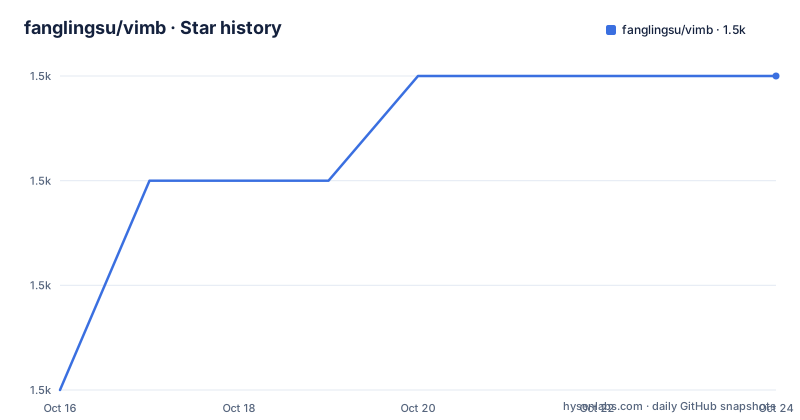
- fanglingsu/vimb1,484 ★ · +3
| Repository | 2026-10-16 | 2026-10-23 |
|---|---|---|
| fanglingsu/vimb | 1.5k | 1.5k |
3 Stars in the last 7 days, measured from the daily GitHub snapshot. Compare with other projects
Editorial analysis
Vimb's modal browser model for Vim users
Vimb addresses people who want to operate a web browser with the interaction model they use in Vim. Rather than treating keyboard input as a collection of browser shortcuts, it organizes interaction around browser modes, Vim-like key bindings, and a command interface. The README says bindings can be assigned for each mode, so navigation behavior is configurable state rather than a fixed set of global keys.
The target is efficient interaction, not a claim about measured browser performance. The project description mentions low memory and CPU use, but the README and repository files contain no benchmark results or resource measurements. What can be confirmed is the interface design: users can set most configuration options at runtime with Vim-like `set` syntax, while history for Ex commands, searches, and URLs supports repeated actions.
Vimb also draws on related concepts from browser add-ons for Firefox. The README names Pentadactyl and Vimprobable as inspirations. Adoption should be judged from Vimb's own modes, commands, and documented interaction features.
How Vimb routes commands, completions, and page interaction
Vimb combines a WebKitGTK browser view with modal input and command processing. The documented interaction path has two broad parts. Commands and navigation accept text, while hinting identifies interactive elements in the rendered page. The README does not expose the internal C modules or event-processing sequence, so it does not support a more detailed claim about widget ownership or renderer callbacks.
Several mechanisms reduce repeated typing. Vimb keeps history for Ex commands, search queries, and URLs. Completion covers commands, URLs, bookmarked URLs, setting variable names, and search queries. A user can enter a partial command or destination and select from the relevant completion source rather than remembering every accepted spelling.
Hinting serves a different role. It marks links, form fields, and other clickable elements so they can be clicked, opened, or inspected. This gives keyboard users a way to target page content without reproducing the page's pointer workflow. Vimb also supports user-defined URL shortcuts with placeholders and multiple yank and paste registers.
Events can trigger commands through Vim-like autocmd rules for specific URIs. The README does not document the complete syntax, event catalog, or ordering rules. Those details would need to be checked in `doc/` before relying on complex automation. The confirmed design is event-driven command execution, not a general scripting API.
Runtime configuration, SSL checks, and saved material
Configuration is integrated into Vimb's command language. The README states that nearly every configuration can be changed at runtime through Vim-like `set` syntax, and completion can suggest setting variable names. This distinguishes runtime settings from the build-time preferences in `src/config.h`. It also means users can adjust browser behavior without first editing a configuration file between sessions.
Vimb validates SSL certificates against a CA certificate file, according to the feature list. The README does not identify the default certificate path, reload behavior, or procedure for adding a private certificate authority. Certificate errors and site compatibility can also depend on the WebKitGTK installation and system configuration, but those details are not documented in the project instructions.
Two features cover collecting and moving material. A read-it-later queue accepts URIs for later use. Multiple yank and paste registers follow a Vim interaction model for text and other browser content. The README does not say whether the queue synchronizes across installations, how entries are named, or whether registers persist after restart. Vimb therefore should not be treated as a cross-device reading service based on the documentation available here.
The `set` interface also changes how support questions should be framed. A missing key binding may be a mode-specific mapping issue rather than a browser defect. Likewise, a configuration that appears unchanged after an upgrade may reflect the custom `src/config.h` protection described in the build instructions. The README points to `doc/` for further command documentation, but its installation section does not provide a complete configuration reference.
Building Vimb 4.0 with GTK4 and WebKitGTK 6.0
Vimb 4.0 has moved from GTK3 and WebKit2GTK-4.1 to GTK4 and WebKitGTK 6.0. This is the main installation constraint. The optional `gst-libav` and `gst-plugins-good` packages are listed as dependencies for media decoding among other things, but the README does not state which formats or playback paths work without them.
Before compiling, edit `config.mk` to match the local toolchain. Edit `src/config.h` only for personal build preferences, such as loading-bar characters or fonts. A customized `src/config.h` is not automatically replaced from `config.def.h`, so users must compare it after pulling a newer version and carry over relevant changes.
The documented build and install commands are:
make PREFIX=/usr
make PREFIX=/usr install
Run the second command as root if system-wide installation is required. The README warns that `PREFIX` must be supplied to both stages when it differs from the configured default.
For a non-installed test, the documented target is:
make runsandboxThe `Makefile` shows that this cleans the build, installs into a sandbox tree derived from `PREFIX`, and invokes `sandb`. A first real use can therefore begin with `make runsandbox`, then exercise a normal-mode navigation command or a page hint. The README does not provide the exact URL-opening shortcut or explain `sandb` setup, so those details cannot be added as commands here.
Native GtkNotebook tabs replace external tab embedding
Version 4.0 includes native tab support built on GTK4's `GtkNotebook`. Tabs share one Vimb window and a command input at the bottom. The commands `:tabopen [uri]` or `:tabo [uri]`, `:tabclose`, `:tabnext` or `:tabn`, `:tabprev` or `:tabp`, `:tabfirst`, and `:tablast` provide explicit tab control.
Normal mode also has the documented sequences `gt` for the next tab, `gT` for the previous tab, `g0` for the first tab, and `g$` for the last. These mappings fit Vimb's modal design and avoid requiring the user to move focus through conventional desktop tab controls.
The external-tool approach named in the README is `tabbed`, which hosted browser windows through XEmbed. GTK4 removed XEmbed and its `GtkPlug` and `GtkSocket` support, so Vimb's `-e, --embed` option is no longer functional. The architectural difference is clear: Vimb now owns multiple tabs inside one GTK4 window rather than relying on an external embedding tool to combine separate browser instances.
That change removes an integration path. Users whose workflow depends on `-e, --embed`, external tab containers, or XEmbed-specific behavior cannot migrate transparently to 4.0. They need native tabs or a different browser architecture. The project page can be checked for screenshots and additional interaction examples, but the README does not claim that native tabs reproduce every feature of an external tab manager.
Vimb packaging, releases, and upgrade cost
The README lists packages for Arch Linux, Debian trixie and sid, Fedora, Gentoo through two overlays, openSUSE, pkgsrc, and Slackware. Package names include `extra/vimb`, `trixie/vimb`, `fedora/vimb`, and `pkgsrc/www/vimb`. Distribution packages may reduce the need to edit `config.mk`, but the README does not document package versions or whether every listed package targets Vimb 4.0 and GTK4.
The repository is not archived, and its last push was on 2026-09-04. Release 4.0.0 was published on 2026-08-10, following 3.7.1 on 2026-02-18. These dates show recent repository and release activity. They do not establish how quickly each distribution package will adopt the new major version, so a source user should still check that system's package metadata.
For source builds, the clearest upgrade cost is configuration maintenance. Custom edits to `src/config.h` survive a pull by design, which protects local preferences but also means new defaults in `config.def.h` are not applied automatically. The README explicitly requires users to compare those files. Changes in the GTK and WebKitGTK major-version boundary can also require a different system dependency set.
Vimb is distributed under GPL-3.0. The repository identifies the license and points to `LICENSE`. The README does not make separate licensing claims about distribution packages or bundled dependencies, so users should review those project and distribution files for their installation method. This is a source-level licensing fact, not advice about how to comply with a particular deployment model.
Choosing between Vimb and other browser interfaces
Vimb is the documented fit for a Vim user who wants a self-contained browser controlled through modes, Ex-style commands, completion, and page hints. Native tabs now remove the need for an XEmbed-based tab wrapper within Vimb itself. Compared with that external-tab approach, `GtkNotebook` keeps tabs in Vimb's single window and ties them to the shared command input.
The README lists luakit, qutebrowser, surf, uzbl, and wyeb as similar projects. It does not document their architectures, supported platforms, configuration languages, or feature differences, so a detailed comparison would go beyond the available project documentation. qutebrowser is therefore a relevant named alternative for further investigation, but the Vimb README does not establish whether it matches Vimb's GTK4 requirement, tab model, hint behavior, or runtime configuration syntax.
A conventional pointer-oriented browser is the practical alternative when direct visual controls and graphical settings matter more than Vim modes. Vimb does not remove the WebKit page itself, but its documented interaction layer expects users to understand modal state and command selection. For existing Vim users, that can reduce switching between input styles. For everyone else, it can add friction.
Before committing, check native tab behavior in the target desktop session, verify the required GTK4 and WebKitGTK 6.0 libraries, and test the workflows that matter most, especially typing in web forms, certificate handling, media playback, and any prior use of `-e, --embed`.
Editorial conclusion
Vimb fits users who already know Vim and want browser navigation centered on modes, commands, and hints rather than conventional window controls. It is a poor fit for someone expecting a mainstream graphical browser or an embeddable browsing component. Before adoption, verify that the target system provides GTK4 and WebKitGTK 6.0, review local changes to `config.mk` and `src/config.h`, and account for the removal of `-e, --embed`. For this configuration, the GTK4 and WebKitGTK 6.0 requirement is the decisive boundary.
Frequently asked questions
What are the GTK and WebKit dependencies for Vimb 4.0?
Vimb 4.0 requires GTK4 and WebKitGTK 6.0 or later. The README also lists `gst-libav` and `gst-plugins-good` as optional dependencies for media decoding.
Does Vimb 4.0 still support browser embedding with `-e, --embed`?
No. GTK4 removed XEmbed and `GtkPlug`/`GtkSocket` support, so the README states that `-e, --embed` is no longer functional. Native tabs replace the need for external tools such as `tabbed`.
How can I build and try Vimb without installing it system-wide?
The README provides `make runsandbox` for a test run without system-wide installation. The Makefile shows that this target creates a sandbox tree and invokes `sandb`.
What keyboard features does Vimb provide for Vim users?
Vimb provides modal editing, assignable key bindings for browser modes, Vim-like `set` syntax, command and URL completions, yank and paste registers, and hinting for links and form fields.
Official sources
Add this badge to your README
If you maintain this project, the badge below links readers to this analysis and shows its maintenance status from the daily GitHub snapshot. Paste the markdown into your README; add ?metric=license or ?metric=stars to the image URL for a different field.

[](https://hysenlabs.com/projects/fanglingsu-vimb)Star history chart for your README
[](https://hysenlabs.com/projects/fanglingsu-vimb)Was this useful?