µStreamer: MJPEG over HTTP for PiKVM capture hardware
µStreamer - Lightweight and fast MJPEG-HTTP streamer
At a glance
- What is it?
- µStreamer is the C daemon inside PiKVM that turns any V4L2 capture device into an MJPEG stream a browser opens directly. It wins on frame quality and on what happens when the cable comes out, and gives up every webcam control endpoint.
- Who is it for?
- µStreamer is built for one job, feeding a browser the cleanest picture a PiKVM capture box can produce, and it does that job with more control over threads, sockets and hardware encoders than mjpg-streamer. It is the wrong choice for a controllable webcam on a plain server, where focus, servo and brightness endpoints simply do not exist here.
- Can I use it commercially?
- Yes, with conditions. GPL-3.0 is a copyleft licence: if you distribute software that includes it, you must release that software's source code under the same licence. Running it internally without distributing it does not trigger that obligation.
- Is it still maintained?
- Yes. The repository last received commits 13 days ago.
- What is it written in?
- Mainly C, according to GitHub's language statistics.
Answers come from the project's GitHub data, last synced on October 23, 2026, and from our analysis. They are not legal advice.
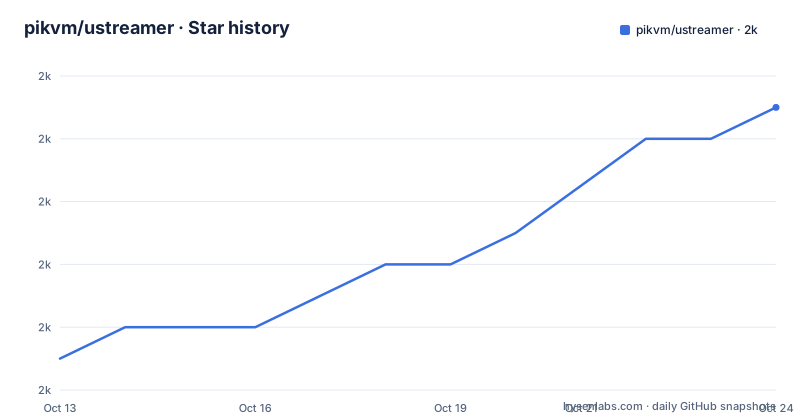
Star history
- pikvm/ustreamer2,040 ★ · +7
| Repository | 2026-10-13 | 2026-10-23 |
|---|---|---|
| pikvm/ustreamer | 2k | 2k |
7 Stars in the last 10 days, measured from the daily GitHub snapshot. Compare with other projects
Editorial analysis
The capture gap a bare V4L2 device leaves open
A webcam on Linux normally needs a chain of moving parts before anyone can watch it: a capture library, an encoder, and something that pushes frames to a viewer. µStreamer is one C daemon that does all three. It opens any V4L2 device and serves the result as MJPEG over HTTP. Browsers decode that format natively, as do players such as mplayer and VLC, so the far end needs no plugin, no native helper and no companion application.
The hardware it was built for is not a laptop camera. µStreamer is one component of PiKVM, which drives VGA and HDMI capture hardware inside a KVM-over-IP box that an operator watches from a browser. That job wants a sharp image and a high frame rate, and both compete for the CPU time of a single-board computer.
Its own summary draws a narrow line. If the plan is to live-stream a backyard webcam and drive its controls, take mjpg-streamer. If image quality and frame rate are what matter, µStreamer is the answer.
Defaults are conservative, which makes a first run harmless. With no arguments at all the daemon tries to open /dev/video0 at 640x480 resolution and starts streaming on `http://127.0.0.1:8080`, and you override that behaviour with `--device`, `--host` and `--port`. Loopback address and a low resolution are sensible on a laptop, and useless for a KVM screen that you intend to read text from.
Multithreaded JPEG encoding and the Raspberry Pi hardware path
The comparison against mjpg-streamer, running with `input_uvc.so` and `output_http.so` plugins, is where the architecture shows through. µStreamer does multithreaded JPEG encoding and the older server does not. It also drives hardware image encoding on a Raspberry Pi, which the older server cannot do at all.
For a TC358743 capture board the recommended invocation is specific, and every flag on it carries an inline comment:
$ ./ustreamer \
    --format=uyvy \ # Device input format
    --encoder=m2m-image \ # Hardware encoding on V4L2 M2M driver
    --workers=3 \ # Workers number
    --persistent \ # Suppress repetitive signal source errors (fo
uyvy is the device input format, m2m-image names the V4L2 M2M driver behind hardware encoding, and 3 workers split the JPEG work across threads. That last comment is truncated in the README itself, stopping after the opening parenthesis, so the exact reach of `--persistent` is only half spelled out there. It has to do with repetitive signal source errors rather than with encoding.
The hardware encoder also carries a hard floor. M2M hardware encoding on Raspberry Pi needs at least kernel 5.15.32, and OpenMAX and MMAL support on older kernels is deprecated and removed. Below that version a board has no hardware encoder path left to switch to, and the daemon runs on the CPU instead.
Byte-wise frame skipping and the twenty dropped frame ceiling
HDMI is a fully digital interface, so each captured frame can be identical to the previous one byte-wise. Sending that same picture across the network several times a second wastes bandwidth, and `--drop-same-frames=20` exists for that case. Each new frame is matched with the previous one first by length, then using `memcmp()`, and when the two match the frame is dropped, with a limit of 20 dropped frames in a row.
The footnote is honest about both sides of the trade. The option cuts outgoing traffic several-fold when streaming HDMI but increases CPU usage a little, because frames that would have gone out untouched are now compared. mjpg-streamer has no equivalent option.
Two details decide whether it is worth switching on. Matching is byte-wise rather than pixel-wise, so the comparison only fires when the source hands back an identical buffer, which is exactly the digital HDMI case described above. And the ceiling is 20: after 20 consecutive matches the stream starts sending again even if the screen is still frozen, so a stuck source cannot silence the output indefinitely.
A black screen when the capture device disappears
When the device is disconnected while streaming, the two servers behave differently. µStreamer keeps the endpoint alive and shows a black screen with `NO LIVE VIDEO` on it until the device is reconnected. mjpg-streamer stops the streaming.
That behaviour came out of a patch. The author contributed DV-timings support and a fix to stop the server hanging up on device disconnection to mjpg-streamer, as pull request 164, then wrote that the patch is far from perfect and cannot be guaranteed to work every time. The stated reason for going a different way is that mjpg-streamer's source code is very complicated and its structure is hard to understand, which also blocked the multithreading and JPEG hardware acceleration work that came later.
DV-timings are the other half of that patch's story. The feature is the ability to change resolution on the fly driven by the source signal, marked as full support here and only partially supported in the older server.
The consequence shows up in how a client reads health. An endpoint that stays open and paints a black screen counts as live for anything that watches only for a closed socket, so an operator has to read the picture rather than the connection to know whether the capture hardware is attached.
UNIX sockets, systemd activation and GPIO stream signalling
Several capabilities exist to make the daemon embeddable in a larger appliance rather than a standalone streamer. It can stream over a UNIX domain socket instead of TCP, and it supports systemd socket activation, so the listening socket can be handed over by the unit rather than opened by the process itself. Both need their own build switch and library: `libsystemd-dev` next to `WITH_SYSTEMD=1`, `libgpiod-dev` next to `WITH_GPIO=1`.
GPIO carries one specific piece of information, the state of the stream, exposed through libgpiod so other hardware on the board can react to it. Logging is part of the same story, with debug logs available without recompiling, a performance statistics log, and access to the HTTP streaming parameters while the daemon runs.
File serving is another difference rather than an extra. µStreamer can serve files with a built-in HTTP server, where the older project is limited to regular files only. Combine that with runtime parameter access and the same process can hand out a snapshot and change how the following snapshot is captured, without a restart or a second web server on the same box.
Build switches the Makefile resolves before any compilation
The build is driven by a small set of switches, and getting one wrong is quiet rather than loud. The Makefile opens with `-include config.mk`, then defines 9 flags that all default to 0 or 1:
WITH_PYTHON ?= 0
WITH_JANUS ?= 0
WITH_V4P ?= 0
WITH_GPIO ?= 0
WITH_SYSTEMD ?= 0
WITH_PTHREAD_NP ?= 1
WITH_SETPROCTITLE ?= 1
WITH_PDEATHSIG ?= 1
Each one is normalised through a helper before any of them is read, and the helper is short enough to quote in full: `$(filter $(shell echo $(1) | tr A-Z a-z), yes on 1)`. Only yes, on and 1 survive that filter. Anything else, TRUE among them, collapses to an empty string, and every build step is guarded by a test that reads an empty value as off. A wrong switch value therefore does not stop the compiler; it removes a feature from the binary while make still reports success.
Past those, the file falls back to gcc, python3 and pkg-config when the environment sets nothing, compiles at -O3, defaults the install prefix to `/usr/local`, and installs manual pages into share/man before gzipping them. pkg-config is checked before anything is built, so a machine without it stops immediately with a named error instead of a wall of missing headers.
The source tree follows that structure, with the daemon itself in src/ and separate trees beside it:
.dockerignore
.editorconfig
.gitattributes
.github/
.gitignore
LICENSE
Makefile
README.md
bump.py
docs/
janus/
linters/
man/
pkg/
python/
src/
tools/
The python and janus trees are the two that the switch list above leaves off by default, so a plain `make` builds the daemon from src/ and nothing else.
Building from sources, then a first stream on any box
Dependencies come first. The build needs make, gcc, pkg-config, libevent with pthreads support, libjpeg9 or libjpeg-turbo, and libbsd on Linux. Distribution lines name the packages, and the three most common look like this:
sudo apt install build-essential libevent-dev libjpeg-dev libbsd-dev
sudo apt install libevent-dev libjpeg62-turbo libbsd-dev
sudo apk add libevent-dev libbsd-dev libjpeg-turbo-dev musl-dev
Those three lines are Debian and Ubuntu, Raspberry OS Bullseye, and Alpine respectively. Note the drift between them: the library named in the preconditions is libjpeg9 or libjpeg-turbo, while the package installed on Raspberry OS is named libjpeg62-turbo, and Bookworm asks for libjpeg62-turbo-dev in place of it.
Build and check the binary in one pass:
$ git clone --depth=1 https://github.com/pikvm/ustreamer
$ cd ustreamer
$ make
$ ./ustreamer --help
Alpine needs one override on top of its packages: `WITH_PTHREAD_NP=0`. That same switch answers a missing `pthread_get_name_np()` symbol elsewhere, and `WITH_SETPROCTITLE=0` covers the analogous `setproctitle()` error. Both default to 1, and neither is optional on a platform that lacks the function.
Point the daemon at a real device and a reachable address:
# ./ustreamer --device=/dev/video1 --host=0.0.0.0 --port=80Binding to 0.0.0.0 publishes the stream to your network, so pair it with a firewall rather than an open port. One behaviour change will bite an existing browser page: since µStreamer v2.0 cross-domain requests are disabled by default for security reasons, and `--allow-origin=\*` restores the old behaviour.
Upgrading from an existing clone takes a clean rebuild, not a plain pull:
$ cd ustreamer
$ git pull
$ make clean
$ make
The clean step belongs to that upgrade path for a reason on a PiKVM image, where the same tree may already carry GPIO or systemd support from an earlier build.
What the move from mjpg-streamer takes away
Two rows in the feature grid pull in opposite directions, and they are the first pair to read when choosing a replacement. Compatibility with the mjpg-streamer API is marked as full support, yet the row directly above it records no access to webcam controls, focus, servos, or settings such as brightness via HTTP. Those are the only entries where µStreamer is the missing side, and they are not small: a control panel written for the older server has nothing to call when it turns a servo.
An API-compatible request surface does not carry control endpoints with it. Treat the compatibility row as meaning that stream URLs and streaming parameters transfer, not that a feature-complete replacement exists.
Project state is thin. The last push was on 2026-09-17, the repository has no GitHub releases, and the code is GPL-3.0, so anything linked into the same process or shipped as a derivative carries copyleft obligations for the combined work. With no published versions to fall back on, an operator upgrading a working install has no documented rollback: the update path is a pull, a clean and a rebuild, and nothing describes how to get back to the previous state if a new kernel, a different capture chip or one changed switch value breaks the stream.
Editorial conclusion
µStreamer is built for one job, feeding a browser the cleanest picture a PiKVM capture box can produce, and it does that job with more control over threads, sockets and hardware encoders than mjpg-streamer. It is the wrong choice for a controllable webcam on a plain server, where focus, servo and brightness endpoints simply do not exist here. Before you commit, check two things on your own hardware: that the stream survives a yanked capture cable, and that your kernel sits at 5.15.32 or newer if you plan to use the M2M encoder.
Frequently asked questions
What does µStreamer do when I run it with no arguments?
It tries to open `/dev/video0` at 640x480 resolution and starts streaming on `http://127.0.0.1:8080`. Override that with `--device`, `--host` and `--port`.
Can µStreamer control a webcam's focus, servos or brightness over HTTP?
No. Access to webcam controls (focus, servos) and settings such as brightness via HTTP is recorded as missing in µStreamer and present in mjpg-streamer, which is why the project's own summary points a backyard webcam with controls at the older server.
Which Raspberry Pi kernel does M2M hardware encoding need?
At least kernel 5.15.32. OpenMAX and MMAL support on older kernels is deprecated and removed, so `--encoder=m2m-image` is only available on a recent kernel.
Why did cross-origin requests from my browser stop working after updating µStreamer?
Since µStreamer v2.0 cross-domain requests are disabled by default for security reasons. Pass `--allow-origin=\*` to restore the old behaviour.
How do I cut network traffic when the HDMI picture never changes?
Enable `--drop-same-frames=20`. Each new frame is matched with the previous one first by length, then with `memcmp()`, and matching frames are dropped up to 20 in a row, which cuts outgoing traffic several-fold at the cost of a little CPU time.
Official sources
Add this badge to your README
If you maintain this project, the badge below links readers to this analysis and shows its maintenance status from the daily GitHub snapshot. Paste the markdown into your README; add ?metric=license or ?metric=stars to the image URL for a different field.

[](https://hysenlabs.com/projects/pikvm-ustreamer)Star history chart for your README
[](https://hysenlabs.com/projects/pikvm-ustreamer)Was this useful?