Fastify 6: A Node.js Framework That Puts Schema Compilation and Plugin Encapsulation First
Fast and low overhead web framework, for Node.js
At a glance
- What is it?
- Fastify is a Node.js web framework that claims high throughput and a plugin architecture built on encapsulation. This review looks at how it works, where the v6 alpha stands, and where its design choices create real trade-offs.
- Who is it for?
- Adopt Fastify if you need a schema-validated, low-overhead HTTP framework for Node.js and you are comfortable with its opinionated plugin encapsulation model. Skip it if you want a minimal, unopinionated core like Koa, or if you rely on Express-style middleware chains.
- Can I use it commercially?
- Yes. MIT is a permissive licence: you can use, modify and sell software built on it, as long as you keep its copyright and licence notices.
- Is it still maintained?
- Yes. The repository last received commits 2 days ago.
- What is it written in?
- Mainly JavaScript, according to GitHub's language statistics.
Answers come from the project's GitHub data, last synced on November 14, 2026, and from our analysis. They are not legal advice.
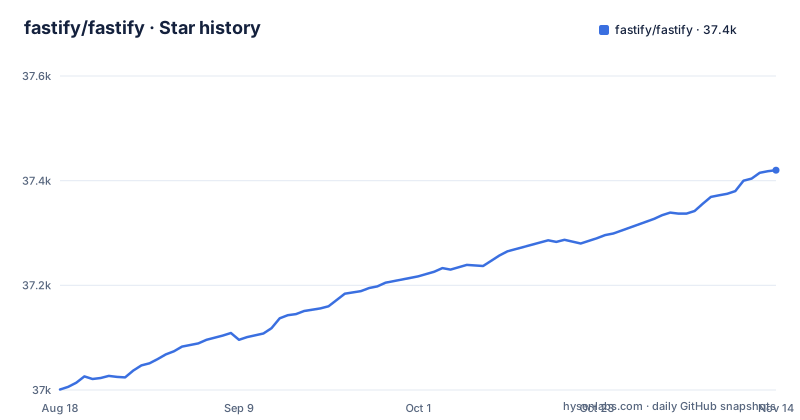
Star history
- fastify/fastify37,420 ★ · +419
| Repository | 2026-08-18 | 2026-11-14 |
|---|---|---|
| fastify/fastify | 37k | 37.4k |
419 Stars in the last 88 days, measured from the daily GitHub snapshot. Compare with other projects
Editorial analysis
What Fastify Actually Solves
Fastify targets a specific pain point: Node.js HTTP servers that are easy to write but slow under load. The README frames the problem as infrastructure cost: an efficient server means lower cost and better responsiveness. The framework is for developers who want a router, request validation, and serialization without the overhead of heavier frameworks. It is not a minimal wrapper around http.Server, nor is it a full MVC stack. It sits in the middle, with a plugin system that lets you add features without bloating the core. The primary audience is Node.js backend teams building REST APIs or microservices that need predictable performance and structured validation.
The Core Mechanism: Schema Compilation and the Lifecycle
Fastify's performance story rests on two mechanisms visible in the README. First, it uses JSON Schema to validate routes and serialize outputs. The README says Fastify compiles the schema into a highly performant function internally. That means your validation logic is not interpreted at runtime; it is turned into a dedicated function at startup. Second, the framework has a defined lifecycle that runs hooks, validation, and serialization in a fixed order. The documentation lists a Lifecycle reference, which suggests that every request passes through a predictable sequence of steps. This is different from Express, where middleware order is entirely up to the developer. Fastify's fixed lifecycle makes performance more predictable, but it also means you must learn its flow rather than just stacking functions.
Getting Started: Commands and Configuration
The README gives a clear path to a running app. Use `npm init fastify` to generate a project, then `npm i` to install dependencies. For development, run `npm run dev`; for production, `npm start`. That scaffold uses Fastify Create and Fastify CLI under the hood. For an existing project, `npm i fastify` installs the core. The minimal example shows the key config: `Fastify({ logger: true })` enables Pino logging. Routes are declared with `fastify.get('/', (request, reply) => { reply.send({ hello: 'world' }) })`. The async version returns an object and sets the content type explicitly. One config detail stands out: `.listen` binds to localhost by default, which is a security default. The README warns that in Docker or cloud environments you need to bind to `0.0.0.0`, and it flags the security risk of listening on all interfaces. That is a concrete gotcha for containerized deployments.
Plugin Encapsulation: The Real Differentiator
Fastify's plugin architecture is not just a way to share code. The documentation lists Encapsulation as a core reference, which means plugins create isolated contexts. When you register a plugin, its decorators, hooks, and routes do not leak to the parent unless you explicitly expose them. This is a deliberate design choice that prevents global state pollution. It is also a source of friction: developers coming from Express, where middleware and app.use are globally ordered, must rethink how to share functionality. The README says Fastify is inspired by Hapi and Express, but its encapsulation model is closer to Hapi's plugin isolation. This is a strength for large codebases, but it adds a learning curve for small projects where global state is simpler.
Performance Claims and Their Limits
The README includes a benchmark table comparing Fastify 4.0.0 to Express, hapi, Restify, Koa, and raw http.Server. Fastify shows 77,193 requests per second on a synthetic hello world benchmark, with raw http.Server at 74,513. That is a notable result: Fastify outperforms the bare Node HTTP server in that test. But the README itself warns that this is a synthetic benchmark and that you should always benchmark for your own application. The numbers depend on code complexity and the machine. The benchmark method uses autocannon with 100 connections and 40 seconds, taking the second average. That is a specific setup, not a general guarantee. The v6 release may change these numbers, and the README's table is from v4. Treat the 76k figure as a point of reference, not a promise for your workload.
Logging with Pino: A Cost-Reduction Choice
Fastify bakes in Pino as its logger. The README says logs are important but costly, and Pino is chosen to almost remove that cost. This is a concrete integration: enabling `logger: true` gives you structured JSON logs without adding a separate library. The trade-off is that you are tied to Pino's API and output format. If your team already uses a different logger like Winston, you either adapt or configure Fastify to use a custom logger. The documentation likely covers that, but the default is Pino. For performance-sensitive apps, this is a reasonable default, but it is an opinionated choice that may not fit every logging workflow.
The v6 Alpha: What Changes and What to Verify
The repository's main branch points to Fastify v6, with v5.12.8 (2026-11-02) as the latest stable release. The recent releases include v6.0.0-alpha.6, with the last push on 2026-11-02. That means v6 is in active development, and the README explicitly says to check the 5.x branch for v5. This is a maintenance flag: if you adopt Fastify today, you have a choice between stable v5 and alpha v6. The README does not list specific v6 changes. The alpha status means APIs may shift. Before using v6, verify that your plugins support it, and check the v6 alpha release notes. The project is not archived, and the last push is recent, so development is active, but the alpha label signals instability.
Alternatives and When Fastify Is the Wrong Tool
The benchmark table directly compares Fastify to Express, Koa, Restify, and hapi. Express is the most common alternative, with a simpler middleware model and a huge ecosystem, but it shows 14,200 requests per second in the same benchmark, about five times slower. Koa is lighter and has no built-in router, which can be faster for simple cases but requires more assembly. The real difference is approach: Express and Koa give you a bare core and let you compose middleware freely, while Fastify gives you a structured lifecycle and schema compilation. If your project is a tiny internal tool with a few routes, Fastify's plugin encapsulation and optional schema tooling are overhead you do not need. If you need raw control over every request, raw http.Server or a thin wrapper may be simpler. Fastify is the wrong tool when you want minimal abstraction and no opinionated logging or validation.
Editorial conclusion
Adopt Fastify if you need a schema-validated, low-overhead HTTP framework for Node.js and you are comfortable with its opinionated plugin encapsulation model. Skip it if you want a minimal, unopinionated core like Koa, or if you rely on Express-style middleware chains. Before adopting v6, verify your plugin dependencies: the alpha label signals possible change, and the README points to the 5.x branch for v5. Test your existing plugins against v6.0.0-alpha.6 before committing.
Frequently asked questions
What is Fastify used for?
Fastify is a Node.js web framework for building HTTP servers and APIs. It is built around JSON Schema based validation and serialization, Pino for logging, and an extension model of hooks, plugins, and decorators, and the project describes it as inspired by Hapi and Express.
how to install fastify
In an existing project, `npm i fastify`. For a new one, run `npm init fastify`, which downloads and runs Fastify Create using the generate functionality of Fastify CLI, then run `npm i` and start with `npm run dev` or `npm start`.
Is Fastify better than Express?
The published table puts Fastify at 77,193 requests per second against Express at 14,200, measured with autocannon on an Intel Core i7. The project itself calls this a synthetic hello world benchmark aimed at framework overhead, states that the overhead depends on your application, and advises you to always benchmark if performance matters.
how to use middleware in fastify
The documentation gives Middleware its own reference page alongside Hooks, Decorators, Encapsulation, and Lifecycle. The example files include hooks.js, plugin.js, and use-plugin.js, which show the extension points the framework expects you to reach for rather than a middleware chain.
how to use fastify with typescript
The package ships a type declaration file, fastify.d.ts, and the repository includes an example named typescript-server.ts. Note that the package itself is CommonJS, with a main entry of fastify.js and a type field of commonjs, while the quick start shows both ESM import and CommonJS require side by side.
Official sources
Add this badge to your README
If you maintain this project, the badge below links readers to this analysis and shows its maintenance status from the daily GitHub snapshot. Paste the markdown into your README; add ?metric=license or ?metric=stars to the image URL for a different field.

[](https://hysenlabs.com/projects/fastify-fastify)Star history chart for your README
[](https://hysenlabs.com/projects/fastify-fastify)Was this useful?