TerrainEngine-OpenGL renders terrain, water and volumetric clouds in one scene
An OpenGL 4 and C++ program which renders a procedural scene.
At a glance
- What is it?
- TerrainEngine-OpenGL is a C++ OpenGL 4 program that renders a procedural scene with distance adaptive terrain LOD, water surface simulation and volumetric clouds. The repository ships its dependencies and a Visual Studio project alongside the CMake build, but it has no releases and asks for contributors.
- Who is it for?
- TerrainEngine-OpenGL suits a graphics programmer who wants a readable OpenGL 4 reference implementation of terrain LOD, water simulation and volumetric clouds, with the framework and dependencies committed to the repository so it can be cloned and built without hunting for packages. It does not suit a production graphics stack, if you need a maintained engine with release guarantees; there are no published releases, although you can pin a Git commit.
- Can I use it commercially?
- Yes. MIT is a permissive licence: you can use, modify and sell software built on it, as long as you keep its copyright and licence notices.
- Is it still maintained?
- Yes. The repository last received commits 138 days ago.
- What is it written in?
- Mainly C++, according to GitHub's language statistics.
Answers come from the project's GitHub data, last synced on November 6, 2026, and from our analysis. They are not legal advice.
Star history
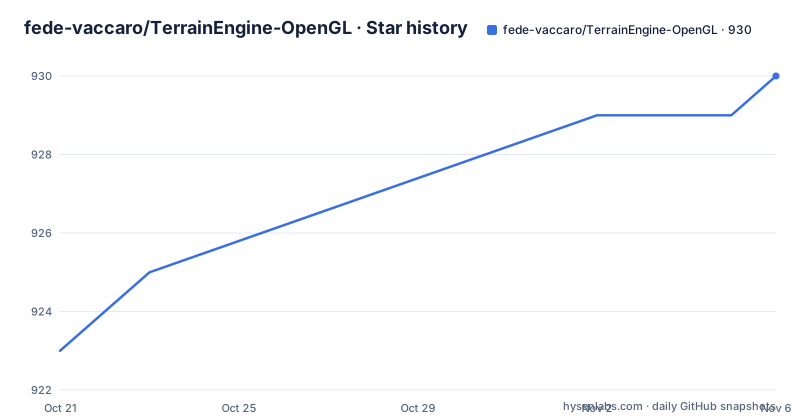
- fede-vaccaro/TerrainEngine-OpenGL930 ★ · +7
| Repository | 2026-10-21 | 2026-11-06 |
|---|---|---|
| fede-vaccaro/TerrainEngine-OpenGL | 923 | 930 |
7 Stars in the last 16 days, measured from the daily GitHub snapshot. Compare with other projects
Editorial analysis
Three hard parts of a real-time scene in one program
TerrainEngine-OpenGL is described as an OpenGL 4 and C++ program which renders a procedural scene, and the README expands that into the three pieces it actually contains: a terrain with distance adaptive LOD, water surface simulation and volumetric clouds.
That combination is the point of the project. Each of the three is a well-known exercise in real-time graphics on its own, and seeing them side by side in one scene is more instructive than three separate toy demos. The scene is described as almost procedural, which is the sort of caveat that usually means the geometry is generated while the shading and placement of some elements are authored.
The project is also honest about its lineage. The README says it is based on the framework from learnopengl.com, and it credits Joey DeVries for that, along with a special thanks to Prof. Stefano Berretti for introducing the author to the discipline at the University. It started as a course project made in collaboration with @rickie95, and the author kept working on it after delivery, implementing the volumetric clouds rendering.
The audience is a reader who wants to see how these techniques are wired together in working code, and a graphics programmer who wants a starting point rather than a finished engine.
Distance adaptive LOD is the terrain's central mechanism
The terrain uses level of detail selected by distance, which is the standard way to draw a large landscape in a real-time renderer. Rather than tessellating one mesh uniformly, the renderer picks a resolution based on how far the patch is from the camera, so nearby ground carries detail and distant ground does not.
The repository layout is where you look for how that is implemented. The top level holds Engine/, DrawableObjects/, Compile/, Include/, Libraries/, imgui/, resources/ and shaders/, alongside Main.cpp and CMakeLists.txt.
The division of directories describes the architecture. Engine/ is the framework layer, DrawableObjects/ holds the things that get drawn, shaders/ holds the GPU programs, resources/ holds assets and the images the README embeds, Compile/ appears to be an intermediate build area, and Include/ and Libraries/ are the vendored dependency headers and binaries.
Two things about this layout matter for an evaluation. First, the shaders are separated from the C++ objects, so the rendering model is visible as files rather than buried in string literals in the source. Second, the vendored Include/ and Libraries/ directories mean the repository carries third-party code and compiled artefacts, which is convenient for building and is exactly the kind of thing you check before shipping anything derived from it.
The README does not describe the LOD algorithm itself, the noise function used to generate the heightfield, or the resolution of the tessellation grid, so those are questions the source has to answer.
Building on Linux is one cmake command
The README states that you can build it and run it on Linux, and gives the whole sequence.
cmake -B build && cmake --build build && mv build/bin/TerrainEngine .Three steps in one line: configure into a build directory, compile, then move the resulting binary up one level so it sits next to the resources it needs at run time. That last move is not cosmetic, because a program that loads files relative to its working directory will not find its shaders or textures if it is still inside build/bin.
The credit for the Linux build goes to @feishengfei, and the note that it was tested on WLS2 is worth noting: that means the instructions were confirmed under the Windows Subsystem for Linux rather than on a native Linux installation, so distribution-specific differences in the OpenGL stack may still turn up.
The repository also carries a Visual Studio project, Terrain.sln, with Terrain.vcxproj, its filters file and a.user file, so the same source can be opened on Windows without configuring anything. With the CMakeLists.txt at the root and the Visual Studio project files committed together, the two build paths sit side by side in the same tree.
GLFW, Dear ImGui and Outcome_V2 come with the repository
The dependency story is unusually self-contained for a graphics project, and the README is explicit about what is bundled and what is not.
GLFW is described as a compiled library in the files, and the alternative is to install it from the system packages.
sudo apt install libglfw3 libglfw3-dev libglew-dev libgl1-mesa-devThat command is the one the README marks as tested on WSL2, and it covers the OpenGL extension loader, the OpenGL library and the development headers together.
Dear ImGui is also in the files, described as the framework from which the GUI is made. Having the immediate-mode GUI in the tree means the controls for whatever the renderer exposes are part of the project rather than a separate dependency to version.
The README lists Outcome_V2 under other dependencies and marks it as already included, linking to ned14's outcome repository. Outcome is a C++ library for handling errors and results without exceptions, which is the standard reason a modern C++ engine picks it.
The third requirement is not a package at all. The README asks for an OpenGL 4 ready graphics card, which is the one dependency you cannot install your way out of, and so check that the available graphics implementation supports the required OpenGL features; some software renderers can provide OpenGL 4.
A single scene graph object set, plus a GUI for the parameters
The repository is built on the learnopengl.com framework, and the consequences of that choice are visible in the directory names.
DrawableObjects/ is the entity layer, so scene objects live in one place rather than inside the renderer. Engine/ holds the machinery. The imgui/ directory at the root is a full copy of the GUI framework rather than a git submodule reference, and the README's comment about it being the framework from which the GUI is made is written with affection.
The GUI is the interactive surface of the project, and that is what makes the demo compelling: a terrain, a water surface and volumetric clouds with parameters you can change while the scene renders. The README also mentions that the demo has been updated as of 27/03/19, and it links to a video on YouTube showing the program in motion.
What the repository does not contain is any measurement of what the renderer costs. There are no frame timing figures, no profiling output, no hardware requirements beyond the OpenGL 4 statement and no list of supported graphics drivers. For a reader deciding whether to learn from the code that is fine, and for a reader hoping to put it on a modern GPU and hit a frame rate target it is not, because there is no baseline to compare against.
The project asks for help, which tells you what is missing
The README closes with an open request for contributors, and the specific list is more informative than a generic call for help.
The author is looking for someone to help add features such as Procedural Grass, Cascading Shadow Map, SSAO and Motion Blur, or to improve the terrain or the water. Each of those is a well-known rendering technique and its absence says something about the current state of the renderer.
Procedural grass in particular points at how the terrain is generated, since grass usually implies either scattering instances over the terrain surface or extending the terrain shading with vegetation. Cascading shadow maps imply there is shadowing but at a resolution that does not hold up at distance, which is the usual limitation of a single shadow map over a landscape. SSAO and motion blur are post-processing stages that a renderer of this type typically adds later.
Read together, the list describes a working prototype with a clear roadmap rather than a finished engine. That is useful information for an evaluation, because it tells you the code is structured to be extended, and it tells you what the author considers unfinished.
The project started as a course project with @rickie95 and continued afterwards, which is also the kind of provenance that predicts how the code will read: didactic, with the reasoning visible in the structure.
MIT licence, no releases, and the last push was on 2026-06-22
The licence field on the repository says MIT, and there is a LICENSE file at the root. That is permissive, with attribution as the only condition, which makes the code straightforward to study, modify and reuse in a portfolio or a tutorial of your own.
The repository has no GitHub releases; record a commit hash to pin a source snapshot and review the commit history for changes.
The repository is not archived, and the last push was on 2026-06-22. That is within six months of today, so the project is still receiving changes, but the absence of releases means there is no stable artefact to depend on and no indication of which commit a tutorial or video was written against. The video referenced in the README is described as updated in March 2019, so the moving picture and the current code are years apart.
One more practical point for anyone reading the tree. Because Include/ and Libraries/ are committed with compiled dependencies, and because the build can use either the bundled GLFW or the system packages, a fresh clone is larger than a source-only project would be, and it is worth checking what is actually in those directories before you decide how to use the code.
Editorial conclusion
TerrainEngine-OpenGL suits a graphics programmer who wants a readable OpenGL 4 reference implementation of terrain LOD, water simulation and volumetric clouds, with the framework and dependencies committed to the repository so it can be cloned and built without hunting for packages. It does not suit a production graphics stack, if you need a maintained engine with release guarantees; there are no published releases, although you can pin a Git commit. Before you rely on it, check that you have an OpenGL 4 capable graphics card, since the README lists that as a requirement, and read the Include/ and Libraries/ directories before building, because those are committed binaries rather than something your package manager will provide.
Frequently asked questions
How do I build TerrainEngine-OpenGL on Linux?
The README gives one command sequence: cmake -B build && cmake --build build && mv build/bin/TerrainEngine . The final move puts the binary next to the resources it loads at run time. A Visual Studio solution, Terrain.sln, is included for Windows.
What dependencies does TerrainEngine-OpenGL need?
GLFW is bundled as a compiled library in the files and can also be installed with sudo apt install libglfw3 libglfw3-dev libglew-dev libgl1-mesa-dev, which the README marks as tested on WSL2. Dear ImGui and Outcome_V2 are already included, and an OpenGL 4 ready graphics card is required.
What features are missing from the TerrainEngine-OpenGL renderer?
The README asks for help with Procedural Grass, Cascading Shadow Map, SSAO and Motion Blur, and with improving the terrain or the water. The scene otherwise covers distance adaptive terrain LOD, water surface simulation and volumetric clouds.
Official sources
Add this badge to your README
If you maintain this project, the badge below links readers to this analysis and shows its maintenance status from the daily GitHub snapshot. Paste the markdown into your README; add ?metric=license or ?metric=stars to the image URL for a different field.

[](https://hysenlabs.com/projects/fede-vaccaro-terrainengine-opengl)Star history chart for your README
[](https://hysenlabs.com/projects/fede-vaccaro-terrainengine-opengl)Was this useful?