felt/tippecanoe for building GeoJSON vector tilesets
Build vector tilesets from large collections of GeoJSON features.
At a glance
- What is it?
- Tippecanoe is a C++ command-line tool for converting large or small GeoJSON, FlatGeobuf, and CSV collections into scale-independent vector tilesets. Its main trade-off is explicit control over zoom levels, detail, and feature dropping when tile size limits force decisions.
- Who is it for?
- Tippecanoe fits engineers who need a self-hosted, command-line tileset builder and are prepared to choose zoom and detail policies. It is less suitable when automatic aggregation is more important than preserving feature density, or when the team needs an API service instead of local tooling.
- Can I use it commercially?
- Yes. BSD-2-Clause is a permissive licence: you can use, modify and sell software built on it, as long as you keep its copyright and licence notices.
- Is it still maintained?
- Yes. The repository last received commits 27 days ago.
- What is it written in?
- Mainly C++, according to GitHub's language statistics.
Answers come from the project's GitHub data, last synced on October 23, 2026, and from our analysis. They are not legal advice.
Star history
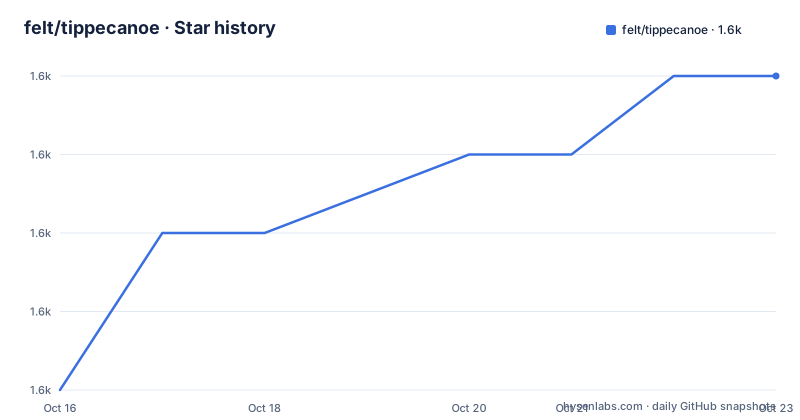
- felt/tippecanoe1,625 ★ · +4
| Repository | 2026-10-16 | 2026-10-23 |
|---|---|---|
| felt/tippecanoe | 1.6k | 1.6k |
4 Stars in the last 7 days, measured from the daily GitHub snapshot. Compare with other projects
Editorial analysis
Why Tippecanoe targets dense geographic data
Tippecanoe addresses the problem of turning geographic feature collections into vector tiles that remain useful across the full zoom range. The project documentation specifically targets data such as roads, building footprints, and point locations. Its stated goal is a scale-independent view in which the density and texture of the source data remain visible, rather than a low-zoom tileset that simply drops or clusters features.
That distinction matters for map data with many small or overlapping features. A conventional tileset might keep a few large or prominent items at low zoom and lose the broader pattern. Tippecanoe instead offers controls for selecting a maximum zoom, retaining detail, dropping the least visible features when necessary, or coalescing dense polygon features. Those are explicit compromises, not automatic guarantees that every feature will survive at every scale.
The project is intended for engineers and geospatial teams who already understand map layers, zoom levels, tile size constraints, and vector tile output. It is a local build tool, not a hosted mapping service. The README also points to Felt for a self-hosted, API-driven version, but the open repository described here is the command-line implementation.
Input parsing and vector tile generation
The documented input formats are GeoJSON, FlatGeobuf, and CSV. Tippecanoe can read GeoJSON from standard input when no files are named. When multiple files are supplied, the README states that each file is placed in its own layer. GeoJSON input does not need to be a FeatureCollection, and concatenated features or files can be parsed while other objects are ignored.
At a high level, the tool reads features, assigns them to zoom levels, simplifies or clips geometry as required, encodes vector tiles, and writes an MBTiles file. The repository layout supports this pipeline with dedicated source files for JSON parsing, CSV handling, FlatGeobuf input, clipping, geometry processing, MBTiles output, compression, and tile encoding. The `Makefile` also identifies companion executables, including `tippecanoe-enumerate`, `tippecanoe-decode`, `tile-join`, `tippecanoe-json-tool`, and `tippecanoe-overzoom`.
The important behavior is controlled through options. `-zg` asks Tippecanoe to choose a maximum zoom based on the precision of the input. `-z` sets a maximum zoom directly, while the examples use `-Z` when a dataset should begin and remain at a particular zoom level. `--drop-densest-as-needed` removes less visible features when tiles become too large. `--coalesce-densest-as-needed` merges features instead. `-x` excludes selected attributes, which can reduce the amount of data carried in each tile.
Installing Tippecanoe and creating a first tileset
On macOS, the README identifies Homebrew as the easiest installation route. This installs the package manager's version of the tool rather than requiring a local source build. The command is:
brew install tippecanoeOn Ubuntu, the documented source build clones the repository, changes into its directory, builds with `make -j`, and installs the executables. The Makefile uses `PREFIX ?= /usr/local`, so the default installation prefix is `/usr/local` unless the environment or Make invocation changes it.
git clone https://github.com/felt/tippecanoe.git
cd tippecanoe
make -j
make install
The first practical example creates `out.mbtiles` from `in.geojson`. The `-zg` option asks Tippecanoe to select a maximum zoom that reflects the source precision. `--drop-densest-as-needed` allows the tool to reduce feature density when a tile exceeds its size target.
tippecanoe -zg -o out.mbtiles --drop-densest-as-needed in.geojsonAfter the command completes, the expected result is an MBTiles file named `out.mbtiles`. The README does not describe a required inspection command for that file, so the next verification step should use the project's documented companion tools or an MBTiles reader rather than assuming a particular viewer command.
Choosing feature reduction and attribute policies
Tile size constraints make feature reduction unavoidable for some datasets. Tippecanoe exposes several policies, and each changes what a map consumer sees at low zoom.
`--drop-densest-as-needed` is intended for point and mixed-feature datasets where retaining separate features matters more than merging them. The README describes it as dropping the least visible features at each zoom level when tiles are too big. For linear and discontinuous polygon examples, the documentation also uses `--extend-zooms-if-still-dropping`, which adds zoom levels if high zoom tiles still cannot represent all features.
For continuous polygons, such as states or provinces, the documented alternative is `--coalesce-densest-as-needed`. This merges features when needed so that the remaining features can still be distinguished. It is a different cartographic result from dropping features, and the choice should follow the intended visualization.
Attributes also affect tile size. The README's TIGER roads example uses `-x LINEARID -x RTTYP` to leave those attributes out. That can make a tileset smaller, but it also removes information from the published tiles. The release notes for version 2.79.0 refer to tracking clipped-away features while deduplicating in overzoom, which is relevant when overzoom and clipping interact. The README does not provide a complete rollback procedure, so teams should preserve their source data and build definitions independently.
Comparison with aggregation-oriented tile builders
Tippecanoe's difference is its emphasis on retaining the visual texture of the source collection while still producing bounded vector tiles. A workflow based on aggregation may cluster points or combine features according to density rules, producing fewer map objects as zoom decreases. That can be appropriate for thematic maps, incident maps, or datasets where representative clusters are more useful than individual features.
Tippecanoe offers a different route. It can choose zoom levels with `-zg`, preserve the original maximum detail when possible, drop only when tile size requires it, or coalesce dense continuous polygons. Its examples specifically distinguish dropping from coalescing, so the project treats reduction as a configurable compilation policy rather than a single preprocessing step.
This does not mean Tippecanoe preserves every feature at every zoom. If `-zg` is still insufficient, the README says to use a higher `-z`. If features are dropped excessively, it suggests removing less important attributes with `-x`, or selecting a different policy such as coalescing. The tool is therefore better suited to teams that understand the visual consequences of each policy than to teams seeking a single universal density rule.
Operational cost, license, and maintenance signals
Tippecanoe is implemented primarily in C++ and its Makefile selects the C++17 standard through `-std=c++17`. The build also uses a release configuration by default, with `BUILDTYPE ?= Release`, and compiles the main executable plus several supporting tools. Source builds therefore require a compatible C++ toolchain and a Unix-like build environment, while the README gives Homebrew as the simplest macOS path.
The repository is not archived, and the last push was on 2026-09-26. The listed release history includes version 2.79.0 dated 2025-07-24. These are repository activity signals, not proof that every deployment will be free of maintenance work. Upgrading can require checking CLI behavior, tile output, and any changes in reduction or overzoom handling. The README does not document a formal compatibility policy for every release.
The project uses the BSD-2-Clause license. That designation matters when integrating the code into a larger toolchain or distributing a modified build, but this article does not provide legal interpretation. The license file should be reviewed for the obligations that apply to the intended use.
Editorial conclusion
Tippecanoe fits engineers who need a self-hosted, command-line tileset builder and are prepared to choose zoom and detail policies. It is less suitable when automatic aggregation is more important than preserving feature density, or when the team needs an API service instead of local tooling. Verify the C++17 build requirements, input attributes, selected zoom range, and the amount of dropping or coalescing on a representative dataset before adopting it for production.
Frequently asked questions
What input formats does Tippecanoe support?
The README lists GeoJSON, FlatGeobuf, and CSV as supported inputs. GeoJSON can also be read from standard input when no files are specified.
How do I create a first Tippecanoe tileset?
Use `tippecanoe -zg -o out.mbtiles --drop-densest-as-needed in.geojson` as the README's first example. The command writes an MBTiles file and lets Tippecanoe choose a maximum zoom based on input precision.
What should I do if Tippecanoe tiles are too large?
The README documents `--drop-densest-as-needed` for dropping less visible features, `--coalesce-densest-as-needed` for merging dense polygons, and `-x` for excluding attributes. The appropriate option depends on whether the map should retain separate features or merge them.
Official sources
Add this badge to your README
If you maintain this project, the badge below links readers to this analysis and shows its maintenance status from the daily GitHub snapshot. Paste the markdown into your README; add ?metric=license or ?metric=stars to the image URL for a different field.

[](https://hysenlabs.com/projects/felt-tippecanoe)Star history chart for your README
[](https://hysenlabs.com/projects/felt-tippecanoe)Was this useful?