openapi-typescript-codegen: a deprecated TypeScript client generator and what to use instead
NodeJS library that generates Typescript or Javascript clients based on the OpenAPI specification
At a glance
- What is it?
- The Node.js library that turns an OpenAPI spec into a typed fetch, Axios, Angular, XHR or Node client is deprecated in favour of @hey-api/openapi-ts. Here is how it works, how to install it, and what to check before you keep it in a build.
- Who is it for?
- Use it only if you already ship it and cannot schedule a migration yet, or if you need its Angular and XHR client targets, which the README lists as supported. Do not start a new project on it: the README asks users to migrate to @hey-api/openapi-ts and states all versions will be deprecated in NPM.
- Can I use it commercially?
- Yes. MIT is a permissive licence: you can use, modify and sell software built on it, as long as you keep its copyright and licence notices.
- Is it still maintained?
- Yes. The repository last received commits 6 days ago.
- What is it written in?
- Mainly TypeScript, according to GitHub's language statistics.
Answers come from the project's GitHub data, last synced on November 21, 2026, and from our analysis. They are not legal advice.
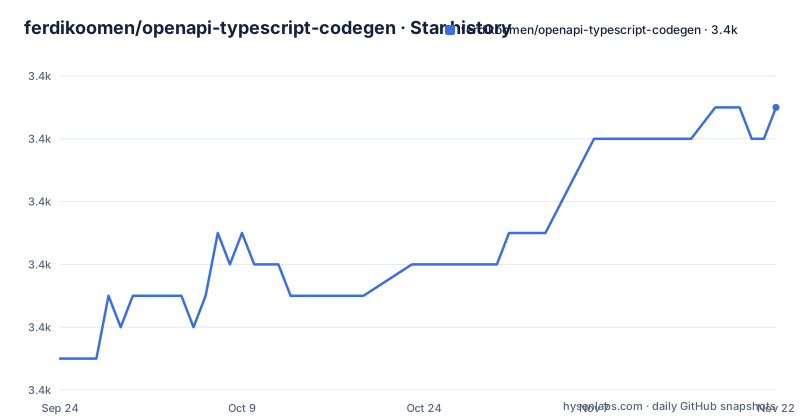
Star history
- ferdikoomen/openapi-typescript-codegen3,376 ★ · +7
| Repository | 2026-09-24 | 2026-11-21 |
|---|---|---|
| ferdikoomen/openapi-typescript-codegen | 3.4k | 3.4k |
7 Stars in the last 58 days, measured from the daily GitHub snapshot. Compare with other projects
Editorial analysis
What openapi-typescript-codegen generates, and for whom
The project is a Node.js library and CLI that reads an OpenAPI specification and writes a typed client. It targets frontend and Node developers who want their HTTP calls typed against a spec instead of hand-written. The README gives the motivation directly: "Frontend loves OpenAPI, but we do not want to use JAVA codegen in our builds". That is the audience: teams with a TypeScript build who do not want a JVM toolchain in CI.
The output is not just types. The generator emits three kinds of files, controlled by separate flags: core files (the HTTP client and request plumbing), services (one module per API tag, with a method per operation), and models (the TypeScript interfaces for request and response bodies). Schemas are off by default. The CLI exposes --exportCore, --exportServices, --exportModels and --exportSchemas, each defaulting to true except schemas. That split matters in practice: you can regenerate models without touching the hand-edited core, or the reverse.
Input can be a path, a URL or a string containing the spec, and both JSON and YAML are accepted. The README states support for OpenAPI v2.0 and v3.0, and external references are resolved through json-schema-ref-parser. Version 3.1 is not listed among the supported specifications, so a 3.1 document is not something the README claims to handle.
How the generator maps a spec onto client code
The pipeline is straightforward: parse the spec, resolve any external $ref values, walk the paths and components, and emit files per export category. The five client targets are fetch, xhr, node, axios and angular, selected with the -c flag and defaulting to fetch. Each target produces a different core request implementation while the service and model layers stay broadly the same shape, which is why switching clients is a regeneration rather than a rewrite.
Two flags change the generated code more than the rest. --useUnionTypes replaces generated enums with union types, and --useOptions makes service methods take a single options object instead of positional arguments. Both are opt-in, so an existing codebase that calls service methods positionally will break if you turn --useOptions on without updating call sites. --indent controls whether output uses four spaces, two spaces or tabs, and --postfixServices (default "Service") and --postfixModels rename the generated classes and interfaces.
Requests use a cancelable promise pattern, which the README lists as a supported feature. That gives every generated call an abort handle without a separate AbortController wrapper. If your application already standardises on AbortSignal, the generated core is the layer you would edit, and --request lets you point the generator at a custom request file instead of the built-in one.
Installing openapi-typescript-codegen and generating a first client
The README gives one install command, as a development dependency. Run it at the root of the project that will consume the generated client.
npm install openapi-typescript-codegen --save-devAfter installation the package exposes an openapi binary, which is the CLI. Running it with --help prints the option list shown in the README, including the required -i and -o flags and the -c client selector.
openapi --helpThe smallest real invocation takes a local spec and an output directory. With no -c flag the generator produces a fetch client, which is the default.
openapi --input ./spec.json --output ./generatedThe README also shows the same command with an explicit client, which is how you would target XHR or, by substituting the value, axios, node or angular.
openapi --input ./spec.json --output ./generated --client xhrWhat you should see afterwards is a ./generated directory containing core, services and models, unless you disabled any of them. The repository ships a samples/codegen.sh script and a samples/spec directory, so there is a working example of the command in the tree. The README does not document what happens to a partially written output directory when generation fails, so treat the output directory as disposable and regenerate into a clean path.
The maintenance problem the README states outright
This is the part that decides whether you should use the library at all. The README opens with an announcement asking users to migrate to @hey-api/openapi-ts, and says the project "has been unmaintained for a while now" because of time limitations on the author's end. It states that all open pull requests and issues would be archived on the 1st of May 2024, and that all versions of the package will be deprecated in NPM.
The repository itself is not archived, and the last push was on 2026-09-12. Releases exist after the announcement: v0.31.0 on 2026-06-20, v0.30.0 on 2025-12-22, and v0.29.0 on 2024-04-07. So the package has received releases since the migration notice, but the notice has not been withdrawn, and the README still points elsewhere. Do not read the recent push date as a reversal of the stated position; the README is the source of that position and it still stands.
The practical consequence: bug reports against the generator are unlikely to be fixed upstream, and the migration path is documented by the successor project at its own migration page rather than here. If your spec uses a construct the generator mishandles, the README offers no triage process, no supported-version policy, and no rollback guidance.
Where it is the wrong tool, and what to use instead
It is the wrong tool for a new project, for a spec that is still moving quickly, and for any team that needs a maintained dependency with an active issue tracker. The README's own instruction is to migrate, so adopting it now means adopting a project that tells you to leave.
It is also a poor fit if your spec is OpenAPI 3.1. The README lists v2.0 and v3.0 only. And it is a poor fit if you want generated hooks or query-cache bindings: the generator produces service classes and models, not framework integration, so a React data layer is something you write on top.
The alternative the README names is @hey-api/openapi-ts, which the README describes as having "started as a fork with the goal to resolve the most pressing issues" and as planning to maintain the OpenAPI generator going forward. The difference in approach is lineage rather than architecture: the successor began from this codebase and took over the maintenance role, and the README points to its migration page for moving projects across. That is a different proposition from a clean-room competitor, because the migration is a documented path from one to the other, not a rewrite from first principles.
Licence, upgrade cost and what a migration actually involves
The package is MIT licensed, and the LICENSE file sits at the repository root. MIT is permissive, so generated output can be committed and shipped without the copyleft obligations a GPL-style licence would impose. This is a description of the licence text, not legal advice; if your organisation has a licence policy, the file to check is LICENSE in the repository.
The upgrade cost is concentrated in one place: the generated core. Models and services are regenerated output, so they follow the spec. The core is the file teams tend to edit, whether to inject auth headers, add interceptors or change error handling, and --request exists precisely so you can supply your own request file rather than patching generated code. If you have been editing generated core files by hand, expect to redo that work on every regeneration, and expect it again when you move to the successor.
Because the README states all versions will be deprecated in NPM, the concrete upgrade step is to confirm the deprecation state of whatever version you have pinned, then follow the migration page the README links to. Nothing in the README describes an automatic codemod, so plan for the change to be manual.
Editorial conclusion
Use it only if you already ship it and cannot schedule a migration yet, or if you need its Angular and XHR client targets, which the README lists as supported. Do not start a new project on it: the README asks users to migrate to @hey-api/openapi-ts and states all versions will be deprecated in NPM. Before adopting or keeping it, verify the deprecation status of the exact version you pin on npm and run the generator against your own spec, since the README does not document rollback or partial-failure behaviour.
Frequently asked questions
How do I use openapi-typescript-codegen?
Install it as a dev dependency, then run the openapi CLI with the required --input and --output flags. The README's minimal example is openapi --input ./spec.json --output ./generated, which produces a fetch client unless you pass --client with xhr, node, axios or angular.
What is openapi-typescript-codegen?
It is a Node.js library and CLI that generates TypeScript clients from an OpenAPI specification, supporting v2.0 and v3.0 and JSON or YAML input. The README describes it as framework-agnostic and lists fetch, Node-Fetch, Axios, Angular and XHR client targets.
How do I generate code from an OpenAPI specification with openapi-typescript-codegen?
Point the CLI at the spec and an output directory, for example openapi --input ./spec.json --output ./generated. The generator writes core files, services and models by default, with schemas disabled unless you pass --exportSchemas.
Official sources
Add this badge to your README
If you maintain this project, the badge below links readers to this analysis and shows its maintenance status from the daily GitHub snapshot. Paste the markdown into your README; add ?metric=license or ?metric=stars to the image URL for a different field.

[](https://hysenlabs.com/projects/ferdikoomen-openapi-typescript-codegen)Star history chart for your README
[](https://hysenlabs.com/projects/ferdikoomen-openapi-typescript-codegen)Was this useful?