Restyle: constraint-based theming for React Native, with wildcards for peers and a Mac-only iOS playground
A type-enforced system for building UI components in React Native with TypeScript.
At a glance
- What is it?
- A Shopify library for building UI libraries, where the type system carries the design system's colours and spacing constants so that a component cannot quietly invent a value. Installation is three commands, the peer dependencies are wildcards, the documentation site is a separate app published to GitHub Pages, and the example app needs CocoaPods before the iOS path will run.
- Who is it for?
- Restyle suits a team building a React Native component library that already has a design system expressed as colours and spacing constants, and that wants the compiler to catch a stray hex value rather than a code review to catch it.
- Can I use it commercially?
- Yes. MIT is a permissive licence: you can use, modify and sell software built on it, as long as you keep its copyright and licence notices.
- Is it still maintained?
- Yes. The repository last received commits 46 days ago.
- What is it written in?
- Mainly TypeScript, according to GitHub's language statistics.
Answers come from the project's GitHub data, last synced on November 14, 2026, and from our analysis. They are not legal advice.
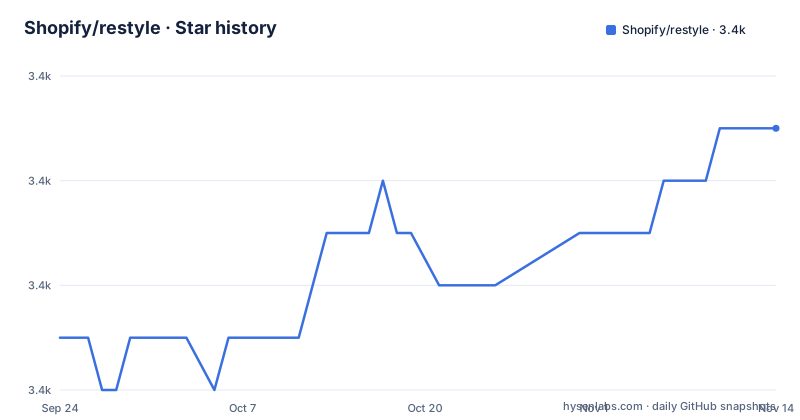
Star history
- Shopify/restyle3,429 ★ · +4
| Repository | 2026-09-24 | 2026-11-14 |
|---|---|---|
| Shopify/restyle | 3.4k | 3.4k |
4 Stars in the last 51 days, measured from the daily GitHub snapshot. Compare with other projects
Editorial analysis
A library for building libraries, not a component kit
The positioning sentence matters here, because it is not what most component libraries say. Restyle is described as a type-enforced system for building user interface components in React Native with TypeScript, and then, more precisely, as a library for building user interface libraries with themability as the core focus. So the output is your design system, not a screen. The mechanism it assumes is that the interface is built on a design system that, at the very least, defines a set of colour and spacing constants to act as a foundation. The type system then carries those constants, and the README is candid about the escape hatch: any style can be overridden, but the library keeps a developer most productive when those one-off values stay at a minimum.
Three install commands, one of them aimed at an Expo project
Installation is offered three times over, which is a small sign that the library expects more than one kind of React Native project. The package manager route is a single add command:
yarn add @shopify/restylenpm install @shopify/restyleand the third is written for a project that already has the Expo tooling available, since it installs through that command instead of a package manager:
npx expo install @shopify/restyleThe package is published under the Shopify scope with public access, which means the name in every one of those commands is scoped rather than bare. Usage documentation lives on the project site rather than in the README, and the README points at it instead of duplicating the API.
The manifest calls it constraint-based, the README calls it type-enforced
Two descriptions of the same library sit a click apart and both are worth reading. The repository description calls it a type-enforced system for building components in React Native with TypeScript, while the description field inside the package manifest calls it a system for building constraint-based components. Neither is wrong and the second is the more technical: the constraint is what the type system enforces. The rest of the manifest is conventional and short. The entry point and the type declarations are two paths into a build output directory, the package is marked as having no side effects so a bundler can drop unused imports, and the published file list contains only that build directory, which is why the TypeScript compiler is the build script and has nothing else to do.
Peer dependencies are wildcards, so the real floor is the dev environment
The peer dependencies are two wildcards, one for React and one for React Native, with no version range at all. That is a deliberate choice in a library whose whole point is to sit underneath a design system, but it means installation will not warn you about an unsupported combination; the constraint lives in the development environment instead. There, React is pinned to a specific patch, React Native is on a caret range in the zero seventy-two line, and TypeScript is on the four series. That is also where you can read the age of the toolchain: the linter is on the eight series, the formatter on the two series, and the test runner on the twenty-nine line, with React Native's own preset supplying the compiler configuration.
The playground needs CocoaPods before the iOS path will run
The example application in the fixture directory is the project's playground, and the script list shows what it takes to run it. One script starts the React Native packager inside the fixture, and two more launch the application on a device or emulator for iOS and for Android. The setup script is the interesting one: it builds the library, installs the fixture's dependencies, and then runs the CocoaPods installer against the fixture's iOS project directory. That last step is a Mac-only requirement, and it happens during setup rather than at run time, so the first thing a contributor on Linux or Windows hits is a script that assumes a toolchain that does not exist on their machine. The combined script simply chains dependency installation and that fixture setup.
The documentation site is its own app, published to GitHub Pages
Documentation is not generated from the source tree; it is a separate application in a documentation directory with its own dependencies and its own dev server. Running it locally is a four-step sequence: change into the documentation directory, install with the package manager, start it, and open a path under the development server's default port. Publishing is a single script that hands the built documentation folder to the GitHub Pages deploy tool, which is why the live site lives under a path segment rather than at a domain root. The repository root also holds the conventional documentation set: a changelog, a release guide, a contributing guide, a code of conduct, and the licence file the README points to for the MIT terms.
Three releases across three years, with commits in the last week
The release history is the fact to weigh before depending on this. Three tags are visible: a two point four point two in March 2023, a two point four point three in April 2024, and a two point four point five in March 2025, with no two point four point four among them. That is roughly one release a year, and the gaps are uneven: more than a year between the first two, then under a year to the third. Against that, the last commit on the default branch is dated 29 September 2026, so work is still landing even though the published versions are sparse. The README also links a migration guide for the second major version, which is where to look if you are moving from the earlier line.
Editorial conclusion
Restyle suits a team building a React Native component library that already has a design system expressed as colours and spacing constants, and that wants the compiler to catch a stray hex value rather than a code review to catch it. It does not suit a project without that foundation, since the library assumes one and only keeps you productive when one-off values are rare, and it does not suit someone looking for an actively versioned dependency, because the published releases are sparse while commits continue. Three things to check before adopting it: whether your React Native version is compatible with what the development environment pins, since the peer dependency range is a wildcard and will install happily against anything; whether the migration guide for the second major version describes changes you need to make; and whether you can build the playground, since the iOS path in the example app requires a Mac with CocoaPods.
Frequently asked questions
What is @shopify/restyle?
It is a Shopify library providing a type-enforced system for building user interface components in React Native with TypeScript. It is aimed at people building user interface libraries rather than single screens, with themability as the core focus, and it is released under the MIT licence.
How do I install @shopify/restyle?
With one of three commands: yarn add @shopify/restyle, npm install @shopify/restyle, or npx expo install @shopify/restyle if your project already has the Expo tooling. The package is published under the Shopify scope with public access.
What does @shopify/restyle assume about my design system?
That the interface is built on a design system which, at minimum, defines a set of colour and spacing constants as a foundation. Any style can be overridden, and the library acknowledges that exceptions happen, but it keeps a developer most productive when one-off values are kept to a minimum.
How do I run the Restyle documentation site locally?
Change into the documentation directory, install its dependencies with the package manager, start it, and open the restyle path on the development server's default port. The site is a separate application rather than generated files, and it is published by handing the built documentation folder to a GitHub Pages deploy tool.
What are the peer dependencies of @shopify/restyle?
React and React Native, both declared as wildcards with no version range, so installation will not warn you about an incompatible combination. The development environment is where the versions actually appear, with React pinned to a specific patch, React Native on a caret range, and TypeScript on the four series.
How do I run the Restyle example app?
The example app lives in the fixture directory and doubles as the playground. Scripts start the React Native packager there and launch it on iOS or Android, and the setup script builds the library, installs the fixture dependencies and then runs the CocoaPods installer against the fixture's iOS project, which means the iOS path needs a Mac.
Official sources
Add this badge to your README
If you maintain this project, the badge below links readers to this analysis and shows its maintenance status from the daily GitHub snapshot. Paste the markdown into your README; add ?metric=license or ?metric=stars to the image URL for a different field.

[](https://hysenlabs.com/projects/shopify-restyle)Star history chart for your README
[](https://hysenlabs.com/projects/shopify-restyle)Was this useful?