Filament: A Laravel UI Framework for Admin Panels, Judged on What the Repo Actually Shows
A powerful open-source UI framework for Laravel • Build and ship apps & admin panels fast with Livewire
At a glance
- What is it?
- Filament is an MIT-licensed PHP UI framework built on Laravel, Livewire and Tailwind CSS that ships tables, forms, infolists, notifications, dashboard widgets and action modals as reusable components. The repository supports two maintained release lines, 4.x and 5.x, and the README is a component list rather than an integration guide, which is the first thing to plan around.
- Who is it for?
- Adopt Filament if you already run a Laravel application on Livewire, and you want tables, forms and read-only record views assembled from components instead of written by hand. Do not adopt it if your front end is not Livewire-based, or if you need the README alone to justify the choice to a reviewer.
- Can I use it commercially?
- Yes. MIT is a permissive licence: you can use, modify and sell software built on it, as long as you keep its copyright and licence notices.
- Is it still maintained?
- Yes. The repository received new commits within the last day.
- What is it written in?
- Mainly PHP, according to GitHub's language statistics.
Answers come from the project's GitHub data, last synced on November 14, 2026, and from our analysis. They are not legal advice.
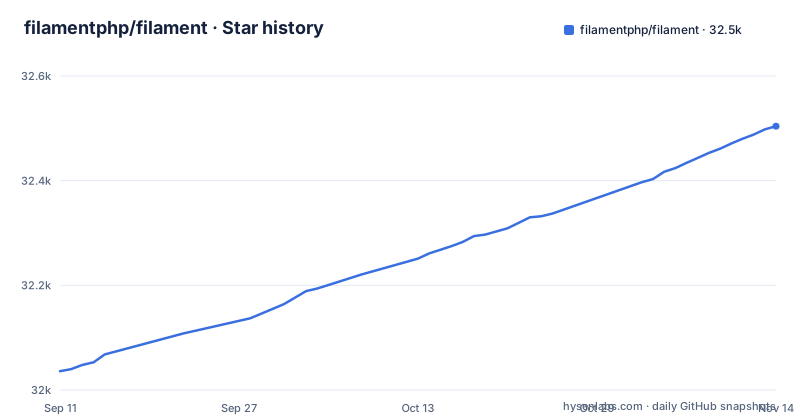
Star history
- filamentphp/filament32,504 ★ · +468
| Repository | 2026-09-11 | 2026-11-14 |
|---|---|---|
| filamentphp/filament | 32k | 32.5k |
468 Stars in the last 64 days, measured from the daily GitHub snapshot. Compare with other projects
Editorial analysis
The gap Filament fills for Laravel teams that keep rebuilding CRUD screens
Every Laravel application of a certain size grows the same set of screens: a paginated, filterable table over one or more Eloquent models, a create and edit form with validation and conditional fields, a read-only detail view, and a handful of confirm dialogs around destructive actions. None of that is hard, and all of it is repetitive. The interesting work in the product is usually somewhere else.
Filament targets that repetition directly. Its README describes it as a UI framework for building apps and admin panels, and lists six component families: tables for browsing and filtering large datasets with columns, actions and bulk operations; forms built from reusable, state-aware components; infolists for read-only record views with structured layouts and custom formatting; notifications for in-app feedback; dashboard widgets for metrics and trends; and action modals for confirmations and focused data entry.
The audience is narrower than "any Laravel developer". The README's badges link to Laravel, Livewire and PHP. That describes the team that gets value here: an existing Laravel codebase already on Livewire, where the panel is part of the product rather than a separate tool bolted on. If your application is a JSON API with a Vue or React front end, none of this applies, because the components render through Livewire rather than exposing an API surface.
Livewire is the data path, so the component set is also the request model
The repository description says Filament is built with Livewire, and that describes how a Filament screen behaves at runtime. A table row filter, a form field change, a bulk action, and a modal confirmation are Livewire interactions. State lives on the server component, the browser sends an update, the component re-renders, and Alpine handles the client-side behaviour that does not need a round trip.
The consequence is that Filament's component list is really a list of server-side objects that own state. A table definition describes columns, filters and bulk actions; a form definition describes fields and their reactive dependencies. The README calls the form components "state-aware", which is the accurate word: field visibility and validation follow the state held by the surrounding component rather than being recomputed in the browser.
This design also imposes a boundary. Anything that needs to run without a Livewire round trip, or that must be served to a non-Livewire client, sits outside the framework's model. The README does not describe an API layer, a headless mode, or a way to consume these components from a separate front end, and the repository layout gives no indication that one exists.
Installing it: the README points at the docs, and the docs are versioned
This is the weakest part of the repository as a standalone artefact. The README contains no installation command, no composer require line, no service provider registration, no configuration keys. It links to https://filamentphp.com/docs under "Get Started" and to a hosted demo at https://demo.filamentphp.com. The contributing guide is also a documentation link, and it is versioned: the README points at https://filamentphp.com/docs/5.x/introduction/contributing.
That versioned path matters more than it looks. The repository's default branch is 4.x, while the most recent releases are v5.11.0 and v4.16.0 from 2026-10-26, and v5.10.3 from 2026-10-20. So the default branch you land on when browsing the repository is not the newest release line. Anyone following the repository rather than the documentation site can end up reading 4.x source while installing a 5.x package, or the reverse.
The practical rule is to take install steps from the documentation site, matched to the major version you intend to run, and to treat the README as a component inventory. The one configuration-adjacent detail the README does give is the security policy path, https://github.com/filamentphp/filament/blob/4.x/SECURITY.md, for vulnerability reports. That is a 4.x path on the default branch, which is consistent but again not the 5.x line.
Two release lines in parallel, and what that costs you
The release list is the most operationally significant fact in the repository. In October 2026 the project published v5.10.3 on 2026-10-20, then v4.16.0 and v5.11.0 on 2026-10-26. Both majors are receiving releases. The default branch is 4.x while 5.x is the newer line.
Running two majors concurrently is a real maintenance cost, and it is borne by adopters as much as by maintainers. You have to decide which line you are on, and that decision is constrained by the packages around you. A third-party Filament plugin written for one major will not necessarily work on the other. A minor release on the line you did not choose does nothing for you. Bug reports and discussions, which the README routes to GitHub issues and discussions respectively, will be triaged against a moving target across two branches.
The upside is that a 4.x codebase is not abandoned. Teams that adopted 4.x can keep receiving fixes rather than being forced into a major upgrade on someone else's schedule. That is a genuine benefit and it is also the reason you cannot assume the newest version number is the one your project should target. Check what your other dependencies declare before you pick.
Where Filament is the wrong tool
The clearest failure case is architectural, not technical. Filament renders through Livewire. If your application's UI is a separate JavaScript client talking to a Laravel API, Filament's components have nowhere to mount. You would be adding Livewire to a stack that deliberately does not use it, and the README offers no path around that.
The second case is version drift. The README text states no version requirements, so a codebase on an older PHP, Laravel or Livewire has to check the versioned documentation for what is supported, and the README gives no migration guidance for that path.
The third case is scope. Filament gives you tables, forms, infolists, notifications, widgets and action modals. It does not, according to the README, give you a CMS, a workflow engine, or a permissions model. If your admin panel needs content versioning or a publishing workflow, that is code you write.
Compared with writing the admin panel by hand in Blade and Livewire
The realistic alternative for most teams evaluating Filament is not another framework. It is the same Laravel and Livewire stack with hand-written Blade views and Livewire components, plus a table library for sorting and pagination and a form package for validation rendering.
The difference in approach is where the abstraction sits. Hand-written components give you total control over markup and request behaviour, and no upgrade surface beyond Laravel and Livewire themselves. You pay for that with repetition: every list screen re-implements filtering, every form re-implements conditional field logic, and consistency across screens depends on team discipline rather than on shared primitives.
Filament inverts that. You describe columns, fields and actions, and the framework owns the rendering and the interaction model. Consistency comes from the framework rather than from convention. The cost is that your markup and your request behaviour are now governed by a dependency that ships two majors in parallel and whose install and configuration details live on a separate documentation site. Teams that have been burned by admin-panel frameworks before will want to weigh that specific trade: less code written, more upgrade surface owned.
Licence, maintenance surface, and what to check before you install
The licence is MIT, which is permissive and imposes no copyleft obligation on your application. It permits commercial and closed-source use. This is a factual statement about the licence identifier, not legal advice; if your organisation has specific compliance requirements, have counsel review the LICENSE file in the repository rather than relying on a summary.
The maintenance picture from the repository is active. The most recent push is dated 2026-11-02, and the latest releases, v5.11.0 and v4.16.0, landed on 2026-10-26. The repository is not archived. The project routes bugs to a GitHub issue template, questions and feature requests to GitHub discussions, and vulnerability reports to a SECURITY.md file, and it maintains a Discord community linked from the README. Those are the support channels you would actually use.
What the README does not support is any claim about how many people use it, how it performs under load, or how quickly issues are resolved. Those are absent, and they are the questions a reviewer will ask. The honest position is that the component scope and the version cadence are verifiable from the repository, and the operational track record is not. Verify the Livewire major against the Filament major you install, confirm which release line your other packages target, and read the versioned documentation page for your chosen major before running anything.
Editorial conclusion
Adopt Filament if you already run a Laravel application on Livewire, and you want tables, forms and read-only record views assembled from components instead of written by hand. Do not adopt it if your front end is not Livewire-based, or if you need the README alone to justify the choice to a reviewer. Before committing, verify the installed Livewire major against the Filament major, check which of the 4.x and 5.x lines your other packages target, and confirm the exact install command in the versioned documentation rather than the repository README.
Frequently asked questions
How do I install Filament for a Laravel project?
The README contains no install command. It links to https://filamentphp.com/docs for getting started and to https://demo.filamentphp.com for a running example.
What UI components does Filament provide?
Six component families: tables for browsing and filtering datasets, forms built from state-aware components, infolists for read-only record views, notifications, dashboard widgets, and action modals.
What does Filament require to run an upgrade?
The README does not say. The build-demo script in package.json runs php artisan filament:upgrade in a ../demo directory and in docs-assets/app, which is how the project builds its own demo rather than an upgrade procedure for users.
Which version of Filament is current?
The newest tags are v5.11.0 and v4.16.0, both released on 2026-10-26, and the default branch of the repository is 4.x.
Official sources
Add this badge to your README
If you maintain this project, the badge below links readers to this analysis and shows its maintenance status from the daily GitHub snapshot. Paste the markdown into your README; add ?metric=license or ?metric=stars to the image URL for a different field.

[](https://hysenlabs.com/projects/filamentphp-filament)Star history chart for your README
[](https://hysenlabs.com/projects/filamentphp-filament)Was this useful?