FirefoxCSS Store: a curated catalog of userChrome.css themes
A collection site of Firefox userchrome themes, mostly from FirefoxCSS Reddit community.
At a glance
- What is it?
- FirefoxCSS Store is a static Astro site that catalogs Firefox userChrome.css themes, with each entry pointing back to the author's own repository and a JSON export for integrations. It suits someone who wants to browse themes that are maintained rather than scraped, and it depends on the upstream theme repositories staying alive.
- Who is it for?
- Adopt FirefoxCSS Store when you want a browsable list of Firefox themes that someone has reviewed rather than a scraped pile, because the catalog publishes one entry per theme with the original repository, screenshots and tags, and the monthly audit removes themes whose repositories have gone away. Do not adopt it as a theme in itself, since the site is an index and the stylesheet you install always comes from the author's own project.
- Can I use it commercially?
- Not without permission. GitHub finds no licence file in the repository, and without a licence all rights are reserved by default: you may read the code but not reuse it. Check the README, or ask the authors, before using it.
- Is it still maintained?
- Yes. The repository received new commits within the last day.
- What is it written in?
- Mainly JavaScript, according to GitHub's language statistics.
Answers come from the project's GitHub data, last synced on November 7, 2026, and from our analysis. They are not legal advice.
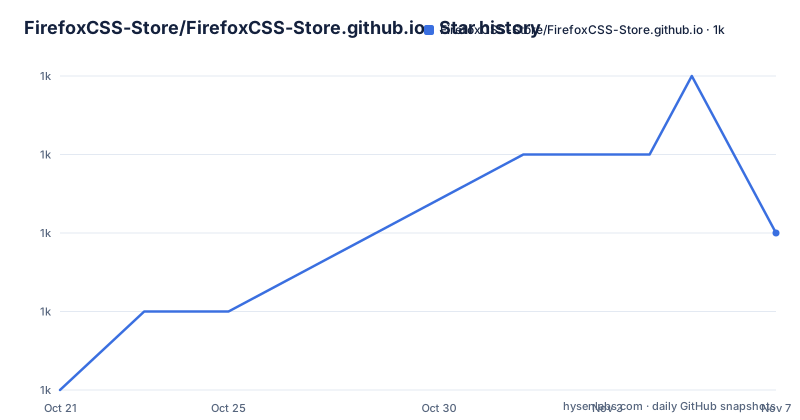
Star history
- FirefoxCSS-Store/FirefoxCSS-Store.github.io1,004 ★ · +2
| Repository | 2026-10-21 | 2026-11-07 |
|---|---|---|
| FirefoxCSS-Store/FirefoxCSS-Store.github.io | 1k | 1k |
2 Stars in the last 17 days, measured from the daily GitHub snapshot. Compare with other projects
Editorial analysis
A catalog that refuses to crawl
FirefoxCSS Store is a static community catalog for discovering and sharing Firefox userChrome.css themes, and the sentence that defines it is in the second paragraph of the README: it does not scrape, crawl, or auto-discover themes. Every public entry points back to the original repository submitted by an author, maintainer, or community user.
That single constraint shapes the entire project. The usual failure mode of a theme collection is a directory of dead links, because the collector took a snapshot and nobody came back to check it. This catalog takes the opposite approach, which is to have humans submit and then to keep checking the entries it already has.
What the project publishes is a list of five things. A searchable theme gallery built with Astro and TypeScript. One public detail page per published theme. A generated /themes.json endpoint for lightweight integrations. A GitHub Issue Form that collects theme submissions and opens candidate pull requests through automation. And validation scripts that keep catalog entries structured, reviewable, and safe to publish.
The topics attached to the repository are firefox, pug, scss, themes and userchrome. The primary language is JavaScript because the site itself is an Astro application, and the last push to the main branch was on 2026-10-18.
The entry format, and the three statuses
Theme entries live as JSON files in src/content/themes/, and the README specifies what a new submission should contain.
It needs a status of candidate, a submitterRole which is author, user or maintainer, the original repository URL, at least one screenshot in public/assets/img/themes/, and normalized lowercase tags. That is a short schema, and the two fields doing the real work are the submitterRole and the repository URL, because they are what make the entry traceable rather than anonymous.
The three statuses carry different consequences.
Only entries with status published are rendered in the public catalog and exported through /themes.json. Entries with status archived are rendered in /archive/ and remain available for historical discovery, but the UI marks them as unsupported, and archived entries must include retirement metadata with a reason, a check date, and reviewer-facing details. The third status, candidate, is the intake state, and it is not public.
The archive rule is the interesting one. A theme does not simply vanish when its repository dies, it moves to a marked area with a recorded reason, and the retirement metadata has to include when the check happened and who looked. That means the catalog keeps a dated record of its own decisions rather than a silent churn, and it means a search result that looks like a dead end usually has a documented explanation attached.
Submission through an issue form, and the automation behind it
The submission flow is the most engineered part of the project, and it is worth following because it removes almost all of the manual work from accepting a theme.
Community submissions use the Submit a theme GitHub Issue Form. When a complete issue is opened or edited, the workflow .github/workflows/create-theme-submission.yml runs scripts/create-theme-submission-from-issue.mjs, and that script does five things. It creates a candidate JSON entry in src/content/themes/. It downloads attached or linked screenshots into public/assets/img/themes/. It populates basic repository metadata such as stars, last update date, and owner avatar. It validates the catalog with npm test and npm run build. And it opens or updates a review pull request from a submissions/theme-<issue-number> branch.
So the person filing the issue does not write JSON or fetch screenshots by hand. The automation does the mechanical part and hands a maintainer a pull request that already passes the checks.
The generated entry stays as status candidate until a maintainer approves the submission pull request. Approval runs .github/workflows/publish-approved-theme-submission.yml, which switches the entry to status published and assigns the next available catalogIndex. Maintainers still merge the pull request explicitly after the checks pass, and merged submission pull requests close their source issue automatically.
The human step is preserved deliberately, and it is the one that matters. The automation prepares and verifies, and a person decides. The catalogIndex assignment is also a human-scale concern, because it is the ordering of the gallery and it has to be decided rather than computed from a timestamp.
Two maintenance commands with deliberately narrow scope
Beyond intake, the project has two scripts that keep the catalog honest, and the README is unusually precise about what they do not do.
The refresh command, npm run refresh:themes, updates only basic repository metadata for repositories already present in the catalog. It updates stars, the last update date, the owner avatar, and the accessibility status. And then the sentence that defines the project: it does not search for new themes, crawl topics, or change editorial fields such as title, description, tags, screenshots, or publication status.
That last restriction is the design. The stars count and the avatar are facts about a repository, so they can be machine-read. The title, the description, the tags and the screenshots are judgements about a theme, so a human makes them. A tool that kept the stars count in step with GitHub is doing bookkeeping; a tool that rewrote the descriptions would be making editorial decisions nobody reviewed, and the catalog is built on the opposite principle.
The audit command, npm run audit:theme-repos, checks the repositories already listed in the catalog, and it also does not discover new repositories. Its monthly GitHub Actions workflow opens a review pull request when it finds changes, and it sorts them into three cases. Repositories that still exist but are archived are moved to status archived and shown in /archive/. Repositories that return deleted, unavailable, or gone are removed from the catalog in the pull request. And repositories that cannot be checked because of transient API errors are listed in the pull request report for manual follow-up.
That third case is the one that shows care. A GitHub API rate limit or a network blip is not a deleted repository, and a tool that treated it as one would empty a catalog overnight. Listing the uncertainty for a human to resolve is the correct behaviour, and it is why the audit opens a pull request rather than pushing directly.
The site build, and where it is deployed
The build is Astro, and the local workflow is four commands:
npm ci
npm test
npm run build
npm run dev
The scripts in the package manifest show what each one does. The dev script is astro dev, the build is astro check and astro build, and the preview is astro preview. The test script is the interesting one, because it is not a test framework at all: it is node scripts/validate-themes.mjs, which validates the catalog entries themselves. The other two are node scripts/audit-theme-repositories.mjs and node scripts/refresh-theme-stats.mjs.
So the validation of this project is a schema check over its content, which is the right test for a catalog. A conventional unit test suite would tell you that the code behaves as before, and it would say nothing about whether a JSON entry has a screenshot path that exists or a tag list that is lowercase. Here, npm test is the thing that stops a malformed entry from being published.
The dependencies are minimal, four dev dependencies: astro, @astrojs/check, typescript and zod, plus a yaml override. The zod dependency is the schema library doing the validation work in the scripts, and the site is built with the type checking step folded into the build command, so astro check runs before astro build.
Deployment is GitHub Actions and GitHub Pages. Actions validates pull requests with npm test and npm run build, the production workflow builds Astro into dist/ and deploys that artifact to GitHub Pages, and generated site files are not committed back to the repository. The configuration is set for the original organization domain, with site set to the firefoxcss-store.github.io URL and no base because the site is served from the domain root, and the base layout and submit page point their navigation and submission links back at the GitHub repository.
That last set of details is the kind of thing that only shows up when a project has actually been deployed and someone went back to fix the links, and it is a small sign of a catalog that is in use rather than in progress.
Editorial conclusion
Adopt FirefoxCSS Store when you want a browsable list of Firefox themes that someone has reviewed rather than a scraped pile, because the catalog publishes one entry per theme with the original repository, screenshots and tags, and the monthly audit removes themes whose repositories have gone away. Do not adopt it as a theme in itself, since the site is an index and the stylesheet you install always comes from the author's own project. Before you install anything you find there, check the accessibility status field and the last update date for the source repository, because the catalog tracks both and they are the two signals that tell you whether a theme will still work on a current Firefox.
Frequently asked questions
What is FirefoxCSS Store and how does it collect themes?
It is a static Astro catalog of Firefox userChrome.css themes that does not scrape, crawl, or auto-discover themes. Every public entry points back to the original repository submitted by an author, maintainer, or community user, and submissions arrive through a Submit a theme GitHub Issue Form whose workflow generates a candidate entry, downloads screenshots, fetches repository metadata and opens a review pull request.
What do the published and archived statuses mean in the FirefoxCSS catalog?
Only entries with status published are rendered in the public catalog and exported through /themes.json. Entries with status archived are rendered in /archive/ and marked as unsupported, and they must carry retirement metadata with a reason, a check date and reviewer-facing details.
What does the monthly audit do to the FirefoxCSS catalog?
The npm run audit:theme-repos command checks only the repositories already listed and opens a review pull request when it finds changes: repositories that are now archived move to status archived and are shown in /archive/, repositories that are deleted, unavailable or gone are removed, and repositories that cannot be checked because of transient API errors are listed in the pull request report for manual follow-up.
How do I build the FirefoxCSS Store site locally?
Run npm ci, then npm test, npm run build and npm run dev. The test command is node scripts/validate-themes.mjs, which validates the catalog entries, and the build runs astro check before astro build. The production workflow builds into dist/ and deploys that artifact to GitHub Pages without committing generated files back to the repository.
Official sources
Add this badge to your README
If you maintain this project, the badge below links readers to this analysis and shows its maintenance status from the daily GitHub snapshot. Paste the markdown into your README; add ?metric=license or ?metric=stars to the image URL for a different field.

[](https://hysenlabs.com/projects/firefoxcss-store-firefoxcss-store-github-io)Star history chart for your README
[](https://hysenlabs.com/projects/firefoxcss-store-firefoxcss-store-github-io)Was this useful?