React Material Admin ships three chart libraries and two date libraries on purpose
☄️React Material Admin is a React template built with Material-UI
At a glance
- What is it?
- React Material Admin is an MIT-licensed React 19 and MUI 7 admin template on Vite 7, free after previously being a paid product. Its dependency list is heavier than a dashboard needs, which is both its main strength and the thing you inherit when you adopt it.
- Who is it for?
- React Material Admin fits a team that wants a complete admin interface in a weekend rather than a design system they will build themselves, and it fits React projects already on MUI 7 where the components drop in without a second design system. It does not fit a project that wants a minimal dependency tree, since the chart and date layers alone carry several overlapping libraries, and it does not fit a project pinned to an older React Router or MUI.
- Can I use it commercially?
- Yes. MIT is a permissive licence: you can use, modify and sell software built on it, as long as you keep its copyright and licence notices.
- Is it still maintained?
- Yes. The repository last received commits 2 days ago.
- What is it written in?
- Mainly JavaScript, according to GitHub's language statistics.
Answers come from the project's GitHub data, last synced on November 7, 2026, and from our analysis. They are not legal advice.
Star history
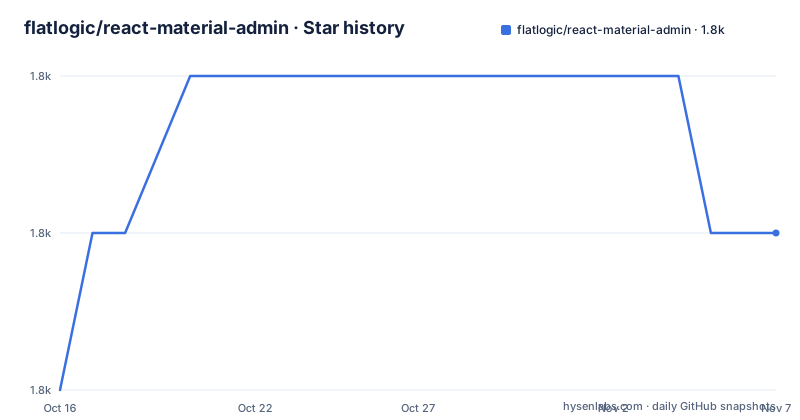
- flatlogic/react-material-admin1,757 ★ · +1
| Repository | 2026-10-16 | 2026-11-07 |
|---|---|---|
| flatlogic/react-material-admin | 1.8k | 1.8k |
1 Stars in the last 22 days, measured from the daily GitHub snapshot. Compare with other projects
Editorial analysis
From 99 dollars to free, with a stack rebuilt in the process
The README states plainly that the template was originally a premium product priced at $99 or more and is now free. That history matters for two reasons: it explains why the component set is deeper than a typical open admin starter, and it means the paid version's users will be arriving with expectations of a finished product rather than a scaffold.
The current stack is recent. The current stack lists React at 19.2.4, MUI 7.x with Emotion, React Router 7.x using BrowserRouter and the hooks API, context-based state for auth, users, layout and theme, Vite 7.x with the SWC React plugin, and Vitest 4.x smoke tests wired into GitHub Actions running lint, build and test.
package.json confirms the versions and adds constraints. The engines field reads ^20.19.0 || >=22.12.0, so the Node floor is a narrow band rather than simply a minimum: 20.19 or a 22.12 or newer. The README phrases it as Node 22.x recommended or 20.19+, which matches.
Releases show the same rebuild. v3.0.1 and v3.0.0 both shipped on 2026-02-22 minutes apart, after v2.0.1 from 2025-02-17. So the v3 line is new, and the repository you clone is a port rather than an incrementally maintained legacy template. The package name is still react-material-full and the version field reads 3.0.1, with private set to true since it is an application template rather than a published library.
Frontend-only by default, backend behind one env flag
The single most useful architectural decision in the template is that it runs with no backend at all.
In the default mode, `npm run dev` starts the Vite dev server and the app uses a frontend-only fallback for users and authentication. The README's stack snapshot names this explicitly: a frontend-only users and auth fallback is available when the backend is disabled.
That is what makes the template usable as a starting point rather than as an integration. You can run the whole interface, click through login, populate tables and see charts without standing up anything on the other side, then decide later whether you have a real API.
Switching to a real backend is one variable. Create .env.local:
VITE_BACKEND=trueThen start a backend API on http://localhost:8080 and run the dev server again. A matching Node.js backend is offered as a separate repository, flatlogic/nodejs-backend, so the full-stack path exists but is not required.
The Vite prefix in the variable name tells you these are build-time values baked into the bundle rather than runtime configuration, which is worth remembering: anything secret does not belong in a VITE_ prefixed variable, because it ends up in the shipped JavaScript.
Three charting libraries, three date libraries, one dependency bill
Look at package.json's dependency list with an eye on redundancy, because this is what you inherit.
For charts there are three. apexcharts and react-apexcharts are both present, and recharts is also present. That means the template can show a bar chart one way and a line chart another, and you will pick whichever the page you copied happened to use. There is no single chart abstraction over them.
For dates, date-fns and dayjs are both runtime dependencies. @mui/x-date-pickers is also installed, and MUI date pickers need a date adapter such as dayjs or date-fns. FullCalendar is also in the list, split across core, daygrid, interaction, list, timegrid and the React binding, so a calendar view brings its own date handling into the bundle as well.
Everything else follows the same pattern of breadth over minimalism. @mui/x-data-grid for tables, @mui/x-date-pickers for pickers, leaflet plus react-leaflet plus topojson-client for maps, formik with yup for forms, axios for HTTP, classnames and tinycolor2 as utilities, react-syntax-highlighter, sortablejs with react-sortablejs, uuid, prop-types and tss-react.
None of this is wrong for a template. It is a menu rather than a dependency budget. The practical consequence is that if you remove what you do not use, the removal work is part of adopting it, not something the template did for you.
The styling story in the repo does not match the feature list
The README's feature list says CSS-in-JS Styling. The repository root tells a different and more accurate story.
At the top level there is tailwind.config.cjs and postcss.config.cjs alongside eslint.config.cjs and .prettierrc. Tailwind is present in the build. So the styling picture is MUI with Emotion for component-level styling and a Tailwind layer configured for utility classes, not a pure CSS-in-JS project.
There is also a sketch/ directory, which is the design source the visual design was drawn in rather than a build artefact, and a docs/ directory. public/ holds static assets, jsconfig.json configures editor path resolution for JavaScript rather than TypeScript, and .nvmrc pins the Node version for version managers.
Two config files sharing the same basename are also present, .prettierrc and .prettierrc.js. That duplication resolves by precedence and is harmless, but it is the kind of thing that produces a confusing first hour if you change one and see nothing happen.
There is a .env file committed at the root as well as the .env.local you create for backend mode, which is worth a look before you assume what the defaults are.
The script surface tells you what is actually wired up
package.json defines nine scripts, and two of them have consequences you should know about.
The build is `vite build`, dev and start are both `vite`, and preview is `vite preview`. Formatting is `prettier --write src/`. Tests are `vitest run` and `vitest`.
The lint scripts are the interesting ones. Both are `cross-env NODE_ENV=development eslint src --ext.js,.jsx`, with lint:fix adding `--fix`. Setting NODE_ENV to development in the lint script means linting always runs with development conditionals active, and the --ext flag restricts ESLint to JavaScript and JSX. Neither is a defect, but both are the kind of inherited decision you should look at rather than inherit silently, particularly if you plan to write TypeScript, since the extension list would skip.ts and.tsx files entirely.
CI runs lint, build and test according to the README, with the Vitest tests described as smoke tests. That is a fair description of what a template can verify about itself: that it mounts and that the bundle builds. It tells you nothing about whether a page you add later works, and there is no test suite for the components you are about to modify.
The browserslist field targets greater than 0.2 percent, not dead, not ie 11 and not op_mini all, which is a reasonable modern baseline but does constrain what you can rely on in older corporate browsers.
What is actually in the component set
The components section is short enough to be honest about: UI elements covering buttons, modals and forms, charts covering line, bar and pie, authentication covering login and signup, tables in static and dynamic flavours, a profile page, and notifications.
Three color themes are listed, which for a Material-UI template means theme objects rather than a theming system, and there is full responsiveness plus a modular architecture claim.
The features worth taking seriously are the ones that come from dependencies rather than from hand-written code. The data grid from @mui/x-data-grid is what makes a dynamic table more than a map over an array. The FullCalendar set gives real calendar views. Leaflet gives a map page. Formik with yup gives validated forms with schema-defined rules rather than ad-hoc state.
The dashboard pages and the modular architecture claim are the vaguer parts, since neither is described concretely in the README. If the layout you want is close to a dashboard with cards and a table, this is a fast start. If you have a specific screen in mind, expect to replace the page components rather than restyle them.
The README also links three sibling templates for specific domains: an e-commerce frontend, a bookkeeper accounting dashboard and a user management template, each under the flatlogic organisation.
Where a component library or a scaffold tool fits better
Three alternatives, each winning on a different axis.
MUI plus its own templates is the narrower option. If you only need a table, a form and a dialog, taking the components from MUI directly and writing your own layout gives you a smaller dependency list and nothing extra to delete later. You lose the assembled admin shell, which is the part you would otherwise spend a day building.
A full-stack framework scaffold is the heavier option. If your team already uses a meta-framework that owns routing, data fetching and server rendering, bolting a Vite SPA with BrowserRouter and context-based state on top means running two models of the same concerns. The README's frontend-only fallback is exactly the kind of thing you would then have to rip out.
The commercial generator the author points to is the third comparison, and it is worth naming because the README promotes it. That is a separate product, and the free template does not require it.
The real decision is between starting from a designed shell and owning what is in it, versus starting from components and owning what you assemble. React Material Admin is the first option with the assembly already done, MIT licensed with LICENSE.txt at the root, and last pushed to on 2026-06-21.
Editorial conclusion
React Material Admin fits a team that wants a complete admin interface in a weekend rather than a design system they will build themselves, and it fits React projects already on MUI 7 where the components drop in without a second design system. It does not fit a project that wants a minimal dependency tree, since the chart and date layers alone carry several overlapping libraries, and it does not fit a project pinned to an older React Router or MUI. First step is npm install followed by npm run dev in frontend-only mode to confirm the template runs, then decide early which chart library you will keep and delete the other two before you write a line of page code.
Frequently asked questions
How do I run React Material Admin without a backend?
Run npm install and then npm run dev. The default frontend-only mode uses a built-in fallback for users and authentication, so the interface runs with no API behind it.
How do I connect React Material Admin to a real API?
Create .env.local containing VITE_BACKEND=true, start a backend API on http://localhost:8080, then run npm run dev. A separate Node.js backend is offered in the flatlogic/nodejs-backend repository.
What Node version does React Material Admin require?
package.json declares engines node ^20.19.0 || >=22.12.0, and the README recommends Node 22.x or 20.19 and newer. A .nvmrc file at the repository root pins a version for version managers.
Which chart library does React Material Admin use?
The dependency list carries more than one. Both apexcharts with react-apexcharts and recharts are installed, and charts are listed as line, bar and pie. There is no single chart abstraction in the template, so pages use whichever library they were written with.
What is the licence of React Material Admin?
It is MIT licensed, with LICENSE.txt at the repository root. The template was previously a paid product at $99 or more and the README states it is now free, and the package itself is marked private at version 3.0.1.
Official sources
Add this badge to your README
If you maintain this project, the badge below links readers to this analysis and shows its maintenance status from the daily GitHub snapshot. Paste the markdown into your README; add ?metric=license or ?metric=stars to the image URL for a different field.

[](https://hysenlabs.com/projects/flatlogic-react-material-admin)Star history chart for your README
[](https://hysenlabs.com/projects/flatlogic-react-material-admin)Was this useful?