FluentRead: a bilingual translation extension with an AI reading card
An open-source browser extension for bilingual translation.
At a glance
- What is it?
- FluentRead renders translations next to the original page and adds an AI reading card with contextual explanations and follow-up questions. It installs from the Chrome, Edge, Firefox and Greasy Fork stores, and its AI features need a configured provider.
- Who is it for?
- FluentRead suits readers who want the original text kept on screen and who already pay for or self-host a translation service, since the AI reading card and most provider options require one. It is the wrong tool for anyone who wants a single offline binary or who refuses to send page text to a third party.
- Can I use it commercially?
- Yes, with conditions. GPL-3.0 is a copyleft licence: if you distribute software that includes it, you must release that software's source code under the same licence. Running it internally without distributing it does not trigger that obligation.
- Is it still maintained?
- Yes. The repository received new commits within the last day.
- What is it written in?
- Mainly TypeScript, according to GitHub's language statistics.
Answers come from the project's GitHub data, last synced on November 23, 2026, and from our analysis. They are not legal advice.
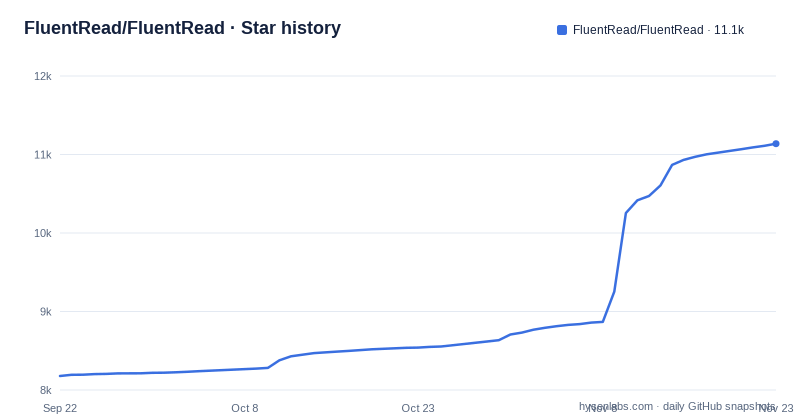
Star history
- FluentRead/FluentRead11,137 ★ · +2,959
| Repository | 2026-09-22 | 2026-11-23 |
|---|---|---|
| FluentRead/FluentRead | 8.2k | 11.1k |
2,959 Stars in the last 62 days, measured from the daily GitHub snapshot. Compare with other projects
Editorial analysis
What FluentRead solves, and who ends up using it
Reading a foreign-language page in a separate translation tab destroys the thing that made the page worth reading: the layout, the code samples, the inline links and the author's exact wording. FluentRead's stated approach is to display translations alongside the original webpage rather than replacing it. The original stays in place, the translation is inserted next to it, and the extension offers an original-text restoration control if you want the page back.
The audience is people who read technical or long-form material in a second language and want help in place. The feature table lists hover and selection translation, automatic translation rules for sites you visit often, a learning center that saves words, phrases and sentences together with their original context, and a reading card that gives meaning, sentence analysis, usage explanations and practice with paragraph context and follow-up questions. That combination points at language learners and at engineers reading documentation, not at someone who wants a one-shot machine translation of a paragraph they will never see again.
One boundary is worth stating early. The README says AI explanations require a configured AI service. The reading card is not a bundled model. You bring a provider.
How the translation pipeline and the reading card differ
FluentRead is not one engine applied to everything. The README lists webpage translation (bilingual page translation, hover and selection translation) and the AI reading card as separate features, and states that AI explanations require a configured AI service.
If you only care about reading a page in two languages, the card is overhead you can ignore.
Installing FluentRead and translating a page
FluentRead ships through browser stores rather than as a standalone binary. The README lists Chrome, Edge, Firefox and a userscript hosted on Greasy Fork, and states that the userscript provides core webpage translation features, so the store builds and the userscript are not feature-equivalent. Store updates may arrive at different times.
After installing the extension, refresh the webpage. The README's own three steps are: install the extension and refresh the webpage, open FluentRead and select a target language, then choose Translate page. The source language defaults to automatic detection and can be set manually. Selection translation and the other tools are enabled in settings as needed.
The project is built with WXT and pnpm. The README gives Node.js 20 or later and pnpm 9 as requirements, and the package.json engines field confirms `node >=20`. To run it from source:
pnpm install --frozen-lockfile
pnpm dev
The README lists `pnpm build` to build the Chrome extension, `pnpm compile` for type checking, and `pnpm docs:build` to build the website. The build script is wrapped in a resource-safe runner in package.json, so the build is gated by a script rather than calling the bundler directly. If you only want to use FluentRead, none of this matters: install from the store and pick a target language.
The provider dependency is the real constraint
The settings surface lists free translation services, DeepL, AI providers and local Ollama models, alongside glossaries, translation styles, shortcuts and menu layout. That is a wide menu, and it hides a cost decision. The README states plainly that third-party pricing and availability depend on the provider. Nothing in the repository promises that the free services stay free, stay reachable from your network, or stay accurate on your content.
If you run Ollama locally you control the endpoint and the data path, but you also inherit the quality and speed of whatever model you have the hardware to run. If you point FluentRead at a hosted AI provider, page text, selected text and paragraph context leave your machine. The README says the reading card works with paragraph context and that AI explanations require a configured AI service.
The other limitation is structural. FluentRead is a browser extension, so it sees what a browser page exposes. The README lists image and area translation, document translation for PDF, ePub and DOCX, and bilingual subtitles on YouTube and X. Anything outside those surfaces is out of scope. A command-line pipeline that translates a directory of files is a different tool, and FluentRead is not trying to be one.
How FluentRead compares with KISS Translator and Read Frog
FluentRead's own description puts weight on the reading card: meaning, sentence analysis, usage explanations and practice, with paragraph context and follow-up questions, plus a learning center that saves words, phrases and sentences with their original context. That is an assistant bolted onto a translator.
A translator that only renders bilingual pages will be lighter and easier to reason about. It has one job, one pipeline, and no session state to store or clear. FluentRead asks you to configure a model service before the feature it advertises most prominently does anything at all. Whether that trade is worth it depends on whether you want explanations and practice, or just the second language on screen.
Licence, releases and what upgrading costs
FluentRead is GPL-3.0. If you fork it, ship a modified build, or embed it in a product, the copyleft terms travel with the code, and the README says vendored OCR sources and licenses are listed in public/fluent-read-ocr/NOTICE.md. This is a description of what the repository states, not legal advice; if you plan to redistribute a modified build, read the LICENSE file and the vendored licence notices yourself.
On maintenance: the repository is not archived, and the last push was on 2026-11-02. Releases v0.0.34, v0.0.35 and v0.0.37 landed on 2026-09-13, 2026-10-08 and 2026-10-13, while package.json already carries version 0.0.40, so the source tree runs ahead of the published releases. That cadence matters for upgrades because the extension is distributed through browser stores, and the README warns that store updates may arrive at different times. A Firefox user and a Chrome user can be on different builds of the same release.
The upgrade cost is mostly configuration drift. Glossaries, translation styles, shortcuts, menu layout and any provider credentials live in the extension's settings, so check the user guide before a clean reinstall.
Editorial conclusion
FluentRead suits readers who want the original text kept on screen and who already pay for or self-host a translation service, since the AI reading card and most provider options require one. It is the wrong tool for anyone who wants a single offline binary or who refuses to send page text to a third party. Before adopting it, check the installation guide for whether your browser gets the full feature set or the reduced userscript, and confirm which translation service you will point it at, because the README states that third-party pricing and availability depend on the provider.
Frequently asked questions
Who is the best fluent translator?
FluentRead does not rank translators; it lets you choose one. The settings list free translation services, DeepL, AI providers and local Ollama models, and the README states that third-party pricing and availability depend on the provider.
Is immersive translate free?
The README lists free translation services as one option among several, and says third-party pricing and availability depend on the provider. It does not make a claim about any other product's pricing.
What is a 100% accurate translator?
The repository does not claim full accuracy for any pipeline. It separates full-page, hover and selection translation from the reading card, and states that AI explanations require a configured AI service.
Is immersive translate accurate?
The README does not evaluate accuracy for FluentRead or for other tools. It notes only that third-party pricing and availability depend on the provider, which leaves output quality to whichever service you configure.
Official sources
Add this badge to your README
If you maintain this project, the badge below links readers to this analysis and shows its maintenance status from the daily GitHub snapshot. Paste the markdown into your README; add ?metric=license or ?metric=stars to the image URL for a different field.

[](https://hysenlabs.com/projects/fluentread-fluentread)Star history chart for your README
[](https://hysenlabs.com/projects/fluentread-fluentread)Was this useful?