Tokyo Night for Neovim: four variants, plugin highlight groups, and how to install it
🏙 A clean, dark Neovim theme written in Lua, with support for lsp, treesitter and lots of plugins. Includes additional themes for Kitty, Alacritty, iTerm and Fish.
At a glance
- What is it?
- tokyonight.nvim is a Lua colorscheme ported from the VS Code TokyoNight theme, with four variants, highlight groups for a long list of plugins, and matching extras for Kitty, Alacritty, iTerm and Fish. Here is how the pieces fit together and where it stops being the right choice.
- Who is it for?
- Adopt tokyonight.nvim if you run Neovim 0.9.0 or newer and want a dark theme that already ships highlight groups for the plugins you load, plus matching palettes for your terminal. Skip it if you want a theme with no dependency on Neovim's Lua runtime.
- Can I use it commercially?
- Yes. Apache-2.0 is a permissive licence: you can use, modify and sell software built on it, as long as you keep its copyright and licence notices.
- Is it still maintained?
- Activity is slowing. The repository last received commits 7 months ago.
- What is it written in?
- Mainly Lua, according to GitHub's language statistics.
Answers come from the project's GitHub data, last synced on November 14, 2026, and from our analysis. They are not legal advice.
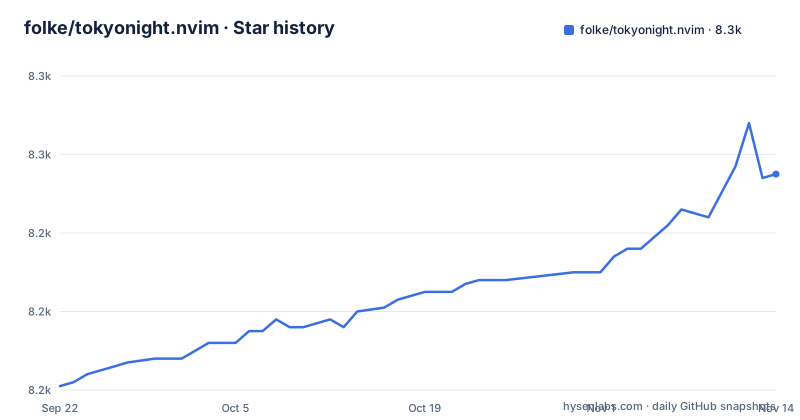
Star history
- folke/tokyonight.nvim8,255 ★ · +54
| Repository | 2026-09-22 | 2026-11-14 |
|---|---|---|
| folke/tokyonight.nvim | 8.2k | 8.3k |
54 Stars in the last 53 days, measured from the daily GitHub snapshot. Compare with other projects
Editorial analysis
What tokyonight.nvim actually solves
Most Neovim colorschemes cover the editor's built-in highlight groups and stop there. The moment you add a completion menu, a file tree, a git sign column or a statusline, those plugins fall back to whatever default groups they define, and the result is a palette that looks coherent in a plain buffer and inconsistent everywhere else. tokyonight.nvim is built around that gap. The README lists a supported plugins table, and each entry points at a Lua file under lua/tokyonight/groups/, so there is a dedicated file for aerial, blink.cmp, bufferline, cmp, dap, fzf-lua, gitsigns, lazy, the mini.* family and many more. The audience is Neovim users who run a plugin-heavy configuration and do not want to hand-write highlight overrides for every new plugin they add.
The secondary audience is people who want their terminal and their editor to match. The repository ships extras for Kitty, Alacritty, iTerm and Fish, which is unusual for a Neovim theme.
Four variants and the palette files behind them
Tokyo Night is not one palette. The README's screenshot table names four: Moon, Storm, Night and Day. Day is the light variant. Choosing between them is a single option in your setup rather than a separate plugin, which matters because switching variants for a screen-sharing session or a bright room does not mean rewriting your config.
The palette itself lives in Lua, and the theme is described in the README as ported from the Visual Studio Code TokyoNight theme by enkia. That port is the honest framing of what this is: the color decisions originate elsewhere, and this repository translates them into Neovim highlight groups and adds the plugin coverage. If you dislike the upstream VS Code theme's color choices, no amount of Neovim integration will change that, because the palette is the input, not the output.
Installing tokyonight.nvim and loading it once
The README states that the theme supports Neovim 0.9.0 features, so confirm your version before anything else. The repository ships a colors/ directory, which is the standard Neovim mechanism for colorschemes, so a plugin manager that puts the repository on the runtimepath is enough. With lazy.nvim, the setup is a plugin spec plus a colorscheme call. The README's own example uses lazy.nvim, and the plugin name in that spec is tokyonight.nvim.
Switching variants and making the background transparent
Variant selection and transparency are both setup options. The setup function accepts a table, and the variant is passed there. Transparency is a separate concern from variant choice, and it only looks right if your terminal emulator is also drawing a background you want to see through, which is where the Kitty, Alacritty and iTerm extras come in.
Extras: matching Kitty, Alacritty, iTerm and Fish to the editor
The extras directory is the part that distinguishes this project from a plain Neovim theme, and the README calls it out as a feature in its own right. It provides TokyoNight themes for Kitty, Alacritty, iTerm and Fish. The practical effect is that your terminal background, cursor color and ANSI palette can be generated from the same color decisions as your editor's highlight groups, so a split between a shell prompt and a buffer does not happen.
The trade-off is that extras are copies, not a live link. Nothing in the repository layout suggests the terminal themes are regenerated from the Neovim palette at runtime, so when you change variants in Neovim you also need to change the terminal theme file. That is a small amount of manual bookkeeping, and it is the price of not depending on a terminal that can read Lua.
Where tokyonight.nvim is the wrong tool
The supported plugins table is long, but it is a list of what is covered, not a guarantee of what is not. A plugin absent from that table may still use standard highlight groups that the theme styles, but its custom groups may need overrides. That is the same work you would do with any colorscheme, so it is not a defect, but it does undercut the main reason to pick this one.
The day variant deserves a direct statement. The README presents four variants with equal billing in the screenshot table, but the project's own description calls it "a clean, dark Neovim theme". If you need a light theme as your primary working environment, evaluate the day variant on your own buffer types before committing.
Finally, the README's feature list refers to Neovim 0.9.0 features, so check your version.
How this differs from a self-contained colorscheme
The clearest alternative in kind is a colorscheme that ships as a single file with no plugin-specific group files, where every highlight lives in one place and the author's scope is the core editor. The difference in approach is visible in the repository layout: this project has a lua/tokyonight/groups/ directory with one file per plugin, a tests/ directory, a scripts/ directory, stylua.toml and selene.toml for formatting and linting, and a CHANGELOG.md and NEWS.md. That is infrastructure for maintaining a large, structured set of highlight groups rather than a single palette file.
The consequence is a different maintenance model. A single-file theme is easy to read end to end and easy to fork; this one is organized so that plugin coverage can be added and reviewed file by file. The cost is that a change to the palette can ripple across dozens of group files, which is exactly why the repository carries formatting and lint configuration and a changelog. If you want to audit every color decision in one sitting, this layout works against you.
Maintenance, licence and upgrade cost
The repository is not archived, and the last push was on 2026-03-24. The most recent release listed is v4.14.1 from 2025-10-23, preceded by v4.14.0 the same day and v4.13.0 on 2025-09-27. No release has followed v4.14.1, and the presence of CHANGELOG.md and NEWS.md means version-to-version changes are written down rather than left to commit history.
Upgrade cost is low if you pin a version and read the changelog before moving. Because the theme is a colorscheme, a change to a highlight group cannot break your editing behavior, only your perception of the screen; the realistic failure mode is a plugin whose groups changed and now looks wrong until you adjust. That is a cosmetic upgrade, not a functional one.
The licence is Apache-2.0. That is a permissive licence with an explicit patent grant and a requirement to preserve notices when redistributing. If you vendor the palette into your own dotfiles repository or a product, read the LICENSE file in the repository root rather than relying on the identifier alone. This is a description of the licence, not legal advice.
Editorial conclusion
Adopt tokyonight.nvim if you run Neovim 0.9.0 or newer and want a dark theme that already ships highlight groups for the plugins you load, plus matching palettes for your terminal. Skip it if you want a theme with no dependency on Neovim's Lua runtime. Verify first that your Neovim reports 0.9.0 or newer, then check your plugin list against the supported plugins table in the README before you assume a given plugin is covered.
Frequently asked questions
How do I install tokyonight.nvim?
Add folke/tokyonight.nvim to your plugin manager, call require("tokyonight").setup({}) and then run vim.cmd.colorscheme("tokyonight"). The README's example uses lazy.nvim with lazy = false and priority = 1000 so the theme loads before the first buffer.
What are the different versions of TokyoNight?
The README's screenshot table names four variants: Moon, Storm, Night and Day. You pick one through the style option in setup, and the project describes itself as a dark theme with a light option.
Is TokyoNight good for coding?
The theme ships highlight groups for a long list of plugins, which is the property that usually decides whether a colorscheme stays readable in a plugin-heavy setup.
How to make neovim more colorful?
tokyonight.nvim ships four variants and a supported plugins table, so loading it styles plugin interfaces as well as core editor groups. The README's screenshot table shows Moon, Storm, Night and Day as the available palettes.
Official sources
Add this badge to your README
If you maintain this project, the badge below links readers to this analysis and shows its maintenance status from the daily GitHub snapshot. Paste the markdown into your README; add ?metric=license or ?metric=stars to the image URL for a different field.

[](https://hysenlabs.com/projects/folke-tokyonight-nvim)Star history chart for your README
[](https://hysenlabs.com/projects/folke-tokyonight-nvim)Was this useful?