Javalin 7: routes as plain lambdas on a config object, with annotations only where a plugin asks for them
A simple and modern Java and Kotlin web framework
At a glance
- What is it?
- Javalin is a lightweight web library for Java and Kotlin with WebSockets, HTTP2 and async requests. Its pitch is no base classes, no annotations and no reflection, and that design decides both what is pleasant and what you have to wire up yourself.
- Who is it for?
- Javalin fits Java or Kotlin developers who want an HTTP and WebSocket server whose routes, filters and error handlers are ordinary lambdas registered on a config object, with no base classes, annotations or reflection in the core. It fits less well if your team expects the framework to discover controllers for you, or if you want generated OpenAPI specs without bringing annotations and a compile time step into the codebase.
- Can I use it commercially?
- Yes. Apache-2.0 is a permissive licence: you can use, modify and sell software built on it, as long as you keep its copyright and licence notices.
- Is it still maintained?
- Yes. The repository last received commits 14 days ago.
- What is it written in?
- Mainly Kotlin, according to GitHub's language statistics.
Answers come from the project's GitHub data, last synced on November 14, 2026, and from our analysis. They are not legal advice.
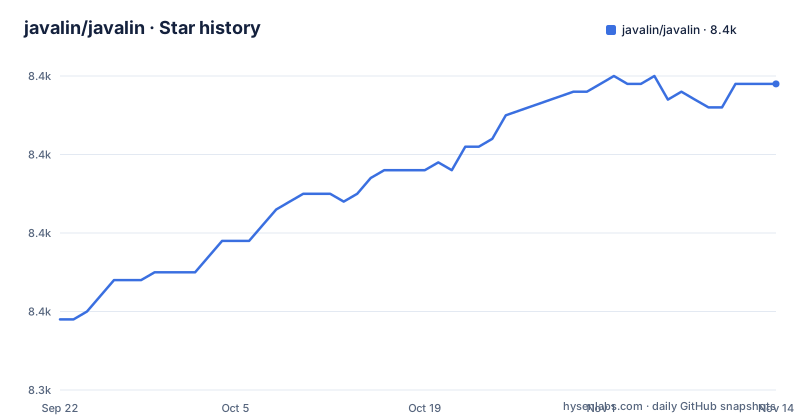
Star history
- javalin/javalin8,379 ★ · +30
| Repository | 2026-09-22 | 2026-11-14 |
|---|---|---|
| javalin/javalin | 8.3k | 8.4k |
30 Stars in the last 53 days, measured from the daily GitHub snapshot. Compare with other projects
Editorial analysis
No base classes, no annotations, no reflection in the core
Javalin calls itself more of a library than a framework, and it lists what that means: you do not need to extend anything, there are no annotations, there is no reflection, and there is no other magic, just code. Its stated goals are simplicity, a good developer experience, and first class interoperability between Kotlin and Java.
The dependency is a single artifact. For Maven:
<dependency>
    <groupId>io.javalin</groupId>
    <artifactId>javalin</artifactId>
    <version>7.2.4</version>
</dependency>
For Gradle:
implementation("io.javalin:javalin:7.2.4")The trade is visibility for convenience. Nothing gets registered behind your back, so every route, filter and handler in your app is a line you can find with a text search. The cost is that nothing gets registered for you either: there is no scanning step that discovers controllers, so a large API means a large, explicit routing block.
Every route hangs off config.routes inside Javalin.create
In Javalin 7, routing lives on the config lambda passed to Javalin.create, and start takes the port:
import io.javalin.Javalin;

public class HelloWorld {
    public static void main(String[] args) {
        var app = Javalin.create(config -> {
            config.routes.get("/", ctx -> ctx.result("Hello World"));
        }).start(7070);
    }
}
The same config object carries server settings. The larger example sets config.concurrency.useVirtualThreads = true, config.http.asyncTimeout = 10_000L, adds a static files folder with config.staticFiles.add("/public"), and turns on WebJars with config.staticFiles.enableWebjars(). For nested APIs, config.routes.apiBuilder lets you group handlers with path("/users") and path("/{userId}"), pointing get, post and patch at method references such as UserController::getAll. Handlers receive a ctx object: ctx.json serialises a value, ctx.bodyAsClass reads the request body into a type, and ctx.status sets the response code.
Filter order is explicit, and error handlers run after everything else
Cross cutting logic is registered the same way as routes. config.routes.before("/some-path/*") runs before requests to that path, a bare before runs before all requests, and after runs after all requests. config.routes.exception(Exception::class.java) runs when an exception goes uncaught, and config.routes.error(404) runs when the status is 404, after all other handlers.
That last detail matters when you debug. An error handler for a status code does not intercept the request early; it sees the response after your routes and after filters have had their turn. If a route sets 404 itself, the error handler still fires. Exception mappers only cover the classes you register, so an app that maps a specific exception type and forgets the general case leaves other failures to the default behavior. WebSockets get their own pair, wsBefore and wsAfter, so HTTP filters do not apply to WebSocket events.
WebSockets share the router and the JSON mapper
A WebSocket endpoint is declared next to HTTP routes with config.routes.ws("/websocket/{path}"), and the handler registers callbacks for onConnect, onMessage, onClose and onError. Inside onMessage, ctx.messageAsClass<User>() converts an incoming JSON string to an object, and ctx.send(user) converts it back to a JSON string and sends it.
The effect is that a WebSocket handler reads like an HTTP handler: same path syntax with parameters in braces, same JSON conversion on the context object. Path parameters such as {path} work in both. The practical limit is that the WebSocket API is callback based, one lambda per event type, so state that spans messages for a connection is yours to keep.
The OpenAPI plugin brings annotations back into your code
The core avoids annotations, but generating an OpenAPI 3.0 specification goes through the separate Javalin OpenAPI plugin, and that plugin works by annotating handlers with @OpenApi. You list summary, operationId, tags, responses, path and methods on each function, and the specification is produced at compile time. Swagger UI and ReDoc UI implementations are available for viewing it.
For a team that picked Javalin because of the no annotations rule, this is the place where the rule ends. Your route table still lives in config.routes, but the OpenAPI description of each route lives in an annotation on the handler, so the two can drift apart if someone edits one and not the other. If you need generated API documentation, budget for that duplication and for the compile time step.
Plugins and sibling modules, not a bigger core
Extra functionality comes through plugins, listed at javalin.io/plugins. Installing one means adding its dependency and registering it on the config:
Javalin.create { config ->
    config.registerPlugin(MyPlugin())
}
The SSL plugin configures SSL for the server and accepts PEM, PKCS12, DER, P7B and JKS formats. Inside the repository, the Maven build is split into modules: javalin, javalin-bom, javalin-bundle, javalin-micrometer, javalin-ssl, javalin-testtools and javalin-utils, with a Maven wrapper in mvnw and mvnw.cmd. The consequence is that io.javalin:javalin on its own is the core only. Metrics, SSL helpers and test tools are separate artifacts you choose to add, which keeps the base small but means a security or observability requirement is a dependency decision, not a configuration switch.
Kotlin-first examples and a file upload sample to adapt, not copy
The project is written mainly in Kotlin, and the examples in its README are Kotlin too. Java versions exist in the documentation at javalin.io/documentation, and more examples live in the javalin-samples repository. For a Java team, that means translating the shorter snippets yourself or keeping the documentation open.
The file upload example is worth a second look before reuse. It loops over ctx.uploadedFiles("files") and calls FileUtil.streamToFile with a path built from upload/ and uploadedFile.filename(), which is the name the client sent. That is fine as a demonstration and a poor default for a public endpoint, where you would choose the stored filename yourself.
Releases are steady: 7.2.2 on 2026-05-14, 7.2.3 on 2026-08-13 and 7.2.4 on 2026-10-25, with the last push on 2026-11-01. Snapshot builds are published to a Reposilite repository, and help is available on the project's Discord.
Editorial conclusion
Javalin fits Java or Kotlin developers who want an HTTP and WebSocket server whose routes, filters and error handlers are ordinary lambdas registered on a config object, with no base classes, annotations or reflection in the core. It fits less well if your team expects the framework to discover controllers for you, or if you want generated OpenAPI specs without bringing annotations and a compile time step into the codebase. Before adopting it, pin version 7.2.4 or later, check which features you need come from plugins rather than the core, and read the Java versions of the examples in the documentation if you are not writing Kotlin.
Frequently asked questions
What is Javalin used for?
Javalin is used to build web servers in Java or Kotlin, with HTTP routes, WebSockets, HTTP2 and async requests. Routes, filters and error handlers are registered as lambdas on config.routes inside Javalin.create.
Is Javalin still maintained?
Yes. Javalin 7.2.4 was released on 2026-10-25 after 7.2.3 in August and 7.2.2 in May 2026, the repository is not archived, and the last push was on 2026-11-01.
Is Javalin front end or backend?
Javalin is a backend library for Java and Kotlin. It serves HTTP and WebSocket endpoints, and can also serve static files from a folder such as /public and WebJars.
what is javalin
Javalin is a lightweight web framework for Kotlin and Java that describes itself as more of a library than a framework: no base classes to extend, no annotations and no reflection in the core.
Official sources
Add this badge to your README
If you maintain this project, the badge below links readers to this analysis and shows its maintenance status from the daily GitHub snapshot. Paste the markdown into your README; add ?metric=license or ?metric=stars to the image URL for a different field.

[](https://hysenlabs.com/projects/javalin-javalin)Star history chart for your README
[](https://hysenlabs.com/projects/javalin-javalin)Was this useful?