FooTable V3: jQuery responsive tables with per-breakpoint column hiding
jQuery plugin to make HTML tables responsive
At a glance
- What is it?
- FooTable is a jQuery plugin that hides table columns at configurable breakpoints and folds their values into expandable detail rows. V3 is a complete rewrite of V2 with no migration path, now at version 3.1.6 in package.json, and the V3 branch has published no downloadable GitHub packages.
- Who is it for?
- FooTable suits a front-end project that already depends on jQuery and needs table columns folded into expandable detail rows at narrower viewports. Skip it if you need a framework-independent solution, server-side data integration, or a versioned npm install without cloning the repository.
- Can I use it commercially?
- Check first. The repository uses a licence we do not classify automatically, so read its LICENSE file before any commercial use.
- Is it still maintained?
- Yes. The repository last received commits 180 days ago.
- What is it written in?
- Mainly JavaScript, according to GitHub's language statistics.
Answers come from the project's GitHub data, last synced on November 7, 2026, and from our analysis. They are not legal advice.
Star history
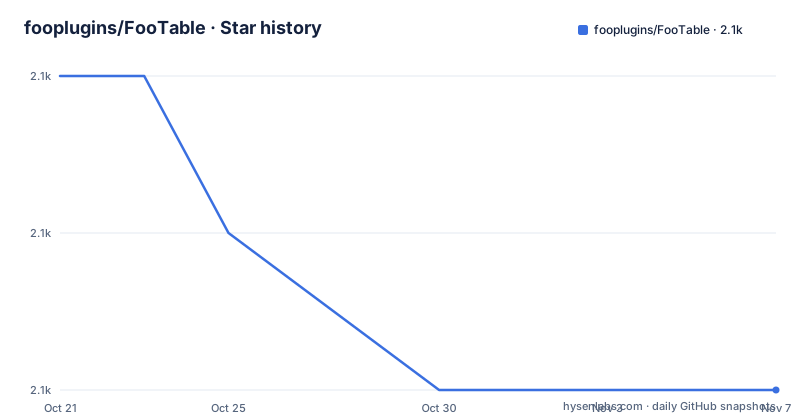
- fooplugins/FooTable2,103 ★ · -2
| Repository | 2026-10-21 | 2026-11-07 |
|---|---|---|
| fooplugins/FooTable | 2.1k | 2.1k |
-2 Stars in the last 17 days, measured from the daily GitHub snapshot. Compare with other projects
Editorial analysis
FooTable V3 hides columns at breakpoints and surfaces their values in expandable rows
FooTable solves a layout problem specific to HTML tables on narrow viewports: a multi-column table cannot shrink to a phone screen without either truncating columns or introducing horizontal scrolling. FooTable addresses this by hiding designated columns when the viewport falls below a configured breakpoint, and placing each hidden column's value into a detail row that the user can expand per table row.
Every row gains an expand control. When a row is expanded, the hidden columns appear as name-value pairs inside it. Columns assigned to a specific breakpoint show above that width and hide below it. Columns marked as always visible stay fixed regardless of viewport size.
FooTable wraps a standard HTML table element, reads column definitions from data-* attributes or a JavaScript options object, and manages the show/hide state in response to window resize events. No framework is involved beyond jQuery. FooTable is a jQuery plugin, and jQuery must already be present on the page for it to function.
FooTable V3 is a complete rewrite of V2. The two versions share no options schema and no code path, because the structure of V3 is inherently different from V2. An existing V2 integration cannot be migrated incrementally; it must be replaced entirely. The documentation for V3 is in the docs/ folder and at http://fooplugins.github.io/FooTable/.
The Export component adds .toJSON() and .toCSV() to the FooTable.Table object
Version 3.1.5 introduced the FooTable.Export component, which exposes two methods directly on the FooTable.Table object: .toJSON() and .toCSV(). Both methods operate on the table's current data as FooTable holds it, meaning any active filtering, sorting or paging state is reflected in the output.
A bug fixed in 3.1.6 addressed the Export component throwing an error when Moment.js and the DateColumn were not present on the page. Before 3.1.6, including FooTable.Export without Moment.js would cause a runtime error. The fix makes the DateColumn and Moment.js optional for Export to function.
The .formatter() function used by each column type was extended in 3.1.5 to accept a third parameter: rowData. This is an object whose properties match the column names for that row. For unnamed columns the properties are col1, col2 and so on. A formatter that needs to read other cell values in the same row to decide how to render its own can now access those through rowData without querying the DOM.
These two methods are the only documented data export paths. Direct DOM serialization is not a built-in feature, and neither .toJSON() nor .toCSV() is available outside of an initialized FooTable instance.
Include FooTable from the compiled/ directory; the README gives no install command
FooTable V3 distributes its JavaScript and CSS as built files in the compiled/ directory at the repository root. The package.json file shows version 3.1.6 and lists only Grunt-based build tools as dependencies, not the FooTable runtime itself. There is no documented npm install command for the FooTable runtime in the README or package.json.
To use FooTable, include the compiled JavaScript and CSS from the compiled/ directory in the page alongside jQuery. Column breakpoint definitions go into data-* attributes on the table's column headers, or into a JavaScript initialization options object. The full options reference and the JavaScript initialization API are in the docs/ folder and online at http://fooplugins.github.io/FooTable/.
Pull requests go against the develop branch, not master; the project uses GitFlow to keep submitted features testable before merging. The repository uses GitFlow, and the master branch holds only compiled output. Running grunt test from the repository root runs the test suite.
FooTable's dependency list in package.json includes grunt, grunt-contrib-uglify, grunt-contrib-concat, grunt-contrib-cssmin, grunt-contrib-clean, grunt-contrib-compress and grunt-contrib-copy. Those are all build-time tools. Nothing in package.json represents a runtime dependency; FooTable at runtime depends only on a jQuery version documented in the docs/, not in package.json.
The 3.1.4 XSS fix replaced .text() with .html() in the column parser
The 3.1.4 fix to FooTable.Column#parser is worth understanding before accepting FooTable into a project that handles user-supplied table data. The 3.1.4 fix to FooTable.Column#parser updated it to use jQuery's .html() method instead of .text() to close an XSS path.
The direction of that fix runs counter to the usual jQuery advice: in most contexts, .text() is the safe choice because it does not parse HTML, while .html() can introduce script execution. The reason it is reversed here is specific to how FooTable used .text() at that point. When .text() is used to read an element's content, jQuery decodes HTML entities in the process, converting < to < and & to &. That decoded string, now containing actual angle bracket characters, was then being inserted back into the DOM. Once in the DOM, those characters became live HTML markup rather than display text, creating a path for injected scripts to execute.
By switching to .html(), which returns the raw HTML string without decoding entities, the parser keeps markup as a string and prevents the decode-then-reinsert cycle.
Any integration on a version earlier than 3.1.4 carries this XSS exposure. If table data can come from user input or third-party sources, the project should be at 3.1.6, which is the version in package.json and the furthest along in the V3 branch history.
Filtering, paging and sorting use separate components with configurable rendering positions
FooTable V3 separates filtering, paging and sorting into distinct components. Each can be enabled or disabled independently and carries its own configuration options.
Version 3.1.5 added a container option to both the filtering and paging components. This option takes a CSS selector pointing to the element where that component's UI renders. If the selector matches more than one element, only the first is used. Without the container option, the filtering and paging UIs render at positions relative to the table; the container option moves them anywhere in the page layout.
The filtering component gained an exactMatch option in 3.1.3, a dropdownTitle option for the column select dropdown, and a change to the min option's default from 3 to 1. That last change affects how many characters a user must type before the filter takes effect.
A filtering.focus option, added in 3.1.5, controls whether the search input receives focus after the component performs a filter operation. It is true by default for internal use when a user types in the search box or clicks the search or clear buttons, and can be set to false to disable that auto-focus behavior.
For sorting, the sortValue column option added in 3.1.2 accepts a function to supply a custom sort value for a cell. This is the option to use when the displayed content of a cell differs from the value to sort on.
Row events fire after expansion and collapse; FooTable.Cell copies attributes into detail rows
Version 3.1.5 added two row events: expanded.ft.row and collapsed.ft.row. These fire after their paired events, expand.ft.row and collapse.ft.row respectively, giving a handler a point to act after the DOM change is complete rather than before it.
The FooTable.Cell#collapse method behavior was also updated in 3.1.4: when a cell is moved into the detail row during column hiding, its attributes are copied from the original element to the element displayed in the detail row. If the original element has an id attribute, the copied version has "-detail" appended to avoid duplicate IDs in the page. This matters for any code that queries elements by ID when some columns are hidden, because the ID in the detail row is not identical to the ID in the hidden column.
FooTable.Cell#val(value, redraw, redrawSelf) and FooTable.Row#val(value, redraw, redrawSelf) gained a redrawSelf parameter in 3.1.5. This controls whether the cell or row updates its own DOM when a value is set, independently of whether the parent redraws. Without this parameter, setting a value always triggered a full redraw.
FooTable.Paging#format(string) replaced the private FooTable.Paging#_countFormat method in 3.1.4, making it part of the public API. Custom paging UI implementations that call count formatting can now use the documented method rather than depending on a private one.
V3 ships no downloadable GitHub package, and where DataTables covers different ground
The complete list of GitHub packages attached to this repository shows three entries, all from 2014: V2.0.3, 2.0.1.5 and V2.0.1.4. V3 has never been packaged for GitHub's download history. Anyone using V3 clones the branch and uses the compiled/ directory directly, or builds from source with Grunt.
The licence file at the repository root is named LICENSE-GPLv3, but GitHub cannot classify it as a standard identifier; read that file directly before using FooTable in any redistributable project. The last push to the V3 branch was on 2026-05-12.
For a comparison: DataTables is the most commonly cited alternative for responsive or feature-rich HTML tables. DataTables publishes a versioned npm package (datatables.net), supports server-side data sources with a documented API, has its own CSS themes, and runs without jQuery in its standalone builds. FooTable's core premise, hiding columns at breakpoints and folding them into detail rows, is a narrower scope than DataTables' full feature set. A project that needs server-side pagination, or that cannot take jQuery as a dependency, will find DataTables' architecture better suited to those requirements. A project already in a jQuery context that needs only the column-folding behavior has less friction with FooTable.
Editorial conclusion
FooTable suits a front-end project that already depends on jQuery and needs table columns folded into expandable detail rows at narrower viewports. Skip it if you need a framework-independent solution, server-side data integration, or a versioned npm install without cloning the repository. Before adopting it, test the filtering component's exactMatch and container options against your actual table structure, and confirm the supported jQuery version in the docs/ folder, since the main README does not document that range.
Frequently asked questions
What is FooTable V3?
FooTable V3 is a jQuery plugin that makes HTML tables responsive by hiding designated columns at configurable breakpoints and showing their values in expandable detail rows per table row. It is a complete rewrite of V2 with no migration path between the two versions.
How do I install FooTable?
FooTable V3 distributes its compiled JavaScript and CSS in the compiled/ directory of the repository. There is no documented npm install command in the README. Include the compiled files in the page alongside jQuery, and follow the documentation at docs/ or at http://fooplugins.github.io/FooTable/ for column configuration.
Does FooTable V3 support exporting table data?
Version 3.1.5 added FooTable.Export, which exposes .toJSON() and .toCSV() methods on the FooTable.Table object. Both reflect the current filtered, sorted and paged state of the table data.
Is FooTable V3 still being maintained?
The V3 branch is not archived. V3 has no downloadable GitHub package and all listed GitHub entries are V2 packages from 2014. The last push was on 2026-05-12.
Does FooTable require jQuery?
Yes. FooTable is a jQuery plugin and requires jQuery to already be on the page. The repository's docs/ folder and the online documentation at http://fooplugins.github.io/FooTable/ document the supported jQuery version range.
Official sources
Add this badge to your README
If you maintain this project, the badge below links readers to this analysis and shows its maintenance status from the daily GitHub snapshot. Paste the markdown into your README; add ?metric=license or ?metric=stars to the image URL for a different field.

[](https://hysenlabs.com/projects/fooplugins-footable)Star history chart for your README
[](https://hysenlabs.com/projects/fooplugins-footable)Was this useful?