Eventyay Exhibition for exhibitors, sponsors, and lead scanning
Exhibition plugin to manage exhibitors and sponsors on eventyay, the open source event management solution
At a glance
- What is it?
- Eventyay Exhibition adds exhibitor and sponsor administration, public profiles, applications, proposals, and lead-scanning APIs to an eventyay installation. It suits event operators already running eventyay, but its undocumented dependency on a working host setup and narrow Python range limit adoption.
- Who is it for?
- Adopt this plugin when an eventyay operator needs public exhibitor listings, application review, sponsor management, and an exhibitor-facing lead workflow in one extension. Do not treat it as a standalone exhibition system or assume its installation works independently of eventyay.
- Can I use it commercially?
- Yes. Apache-2.0 is a permissive licence: you can use, modify and sell software built on it, as long as you keep its copyright and licence notices.
- Is it still maintained?
- Yes. The repository last received commits 2 days ago.
- What is it written in?
- Mainly Python, according to GitHub's language statistics.
Answers come from the project's GitHub data, last synced on November 7, 2026, and from our analysis. They are not legal advice.
Star history
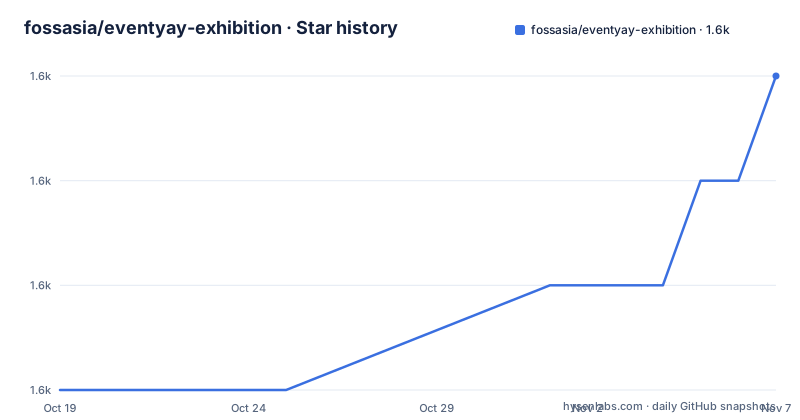
- fossasia/eventyay-exhibition1,558 ★ · +3
| Repository | 2026-10-19 | 2026-11-07 |
|---|---|---|
| fossasia/eventyay-exhibition | 1.6k | 1.6k |
3 Stars in the last 19 days, measured from the daily GitHub snapshot. Compare with other projects
Editorial analysis
Why Eventyay Exhibition belongs inside eventyay
Eventyay Exhibition addresses the administrative work that follows an event decides to host exhibitors or sponsors. The project adds records for organizations, booths, sponsor groups, proposals, applications, scanned leads, and lead tags. It also provides organizer screens and public event pages, so the same plugin can support an exhibitor directory, a public call for applications, proposal review, and data retrieval for lead-scanning applications.
The intended user is an event organizer already using eventyay. This is not a general-purpose customer relationship system presented as a separate application. Its Python package declares no runtime dependencies, while its build system requires `pretix-plugin-build` and its tests import Django through the host project's settings. Those details point to a plugin expected to run inside a prepared eventyay environment rather than beside an unrelated Python service.
Organizations can be exhibitors, sponsors, both, or partners without being exhibitors. That classification matters because an event may have sponsorship and exhibition activity without putting every partner into the public exhibitor list. Sponsor groups can be selected for display on the event front page, while public routes provide exhibitor lists, detail pages, application calls, and applicant proposal editing. The repository does not document a rollback procedure, deployment topology, or supported eventyay version range. Those omissions matter during installation planning because the plugin's actual compatibility is not stated in the available documentation.
How exhibitor proposals and public profiles move through the plugin
The documented workflow has two audiences. Organizers create exhibition settings, define sponsor groups, manage organizations and booths, and configure proposal fields or custom application questions. They can then publish a call for exhibitor and sponsor applications. Applicants use public routes to submit proposals and later edit them, after which organizers can review states including submitted, accepted, rejected, withdrawn, and draft.
The data model is split across repository responsibilities rather than concentrated in one view. According to the repository layout, `exhibition/models.py` contains exhibitor, sponsor, proposal, question, lead, and tag models. `exhibition/forms.py` handles organizer-facing and public application forms. `exhibition/views.py` contains organizer and public web views, while `exhibition/urls.py` separates public, organizer, and API routes. Templates under `exhibition/templates/` render exhibitor pages, settings, proposals, and public calls.
An exhibitor profile can include a description, website and contact links, a video, a logo, a header image, and promotional PDF slides. Public detail pages show the header image without cropping. The documented hero area has a `3:1` aspect ratio and recommends `1500 x 500 pixels`; images with other proportions are scaled to fit and centered against a plain background. List cards use a thumbnail of that banner and crop it to fill their own box. The ratio is centralized as the `--exhibition-banner-ratio` CSS custom property in `exhibition/static/exhibition/css/exhibitors-public-detail.css`, which is a practical customization point for maintainers.
Installing the plugin against a prepared eventyay checkout
The README begins with a requirement that cannot be replaced by the plugin's package installation alone: first establish a working `eventyay development setup`. It then gives the repository checkout and registration steps. These commands clone the project, select its default development branch, and install the package in editable mode so eventyay can discover the plugin.
Use the documented clone and branch sequence:
git clone https://github.com/fossasia/eventyay-exhibition.git local/eventyay-exhibition
cd local/eventyay-exhibition
git checkout dev
The checkout should end with the repository's `dev` branch selected. Activate the virtual environment used for eventyay development before installing anything, then register the application with the plugin registry:
uv pip install -e .Compile translations and restart the local eventyay server afterward:
makeAfter the restart, the README says the plugin can be enabled for an event in the `plugins` tab under settings. The project targets Python `3.12`, and `pyproject.toml` narrows the accepted range to `>=3.12, <3.13`. The package metadata declares an empty runtime dependency list, but this does not remove the need for the eventyay host, its settings, database, and plugin infrastructure. No production deployment command, reverse proxy example, database migration command, or environment-variable list appears in the documentation.
A first development pass with tests and Ruff
The first useful follow-up after registration is the repository's own test and formatting workflow. The optional `test` dependency group includes `pytest`, `pytest-django`, `pytest-env`, and `pytest-rerunfailures`. `pyproject.toml` selects `eventyay.config.settings` as `DJANGO_SETTINGS_MODULE` and points pytest at the `tests` directory. That means the documented test command depends on the surrounding eventyay development environment being correctly configured.
Install the test extras and run the suite with:
uv pip install -e ".[test]"
pytest
The command should be executed from an environment where eventyay's settings and required services are available. The repository also provides Ruff for formatting, import sorting, and linting. These checks are explicit repository commands rather than inferred quality claims:
ruff format --check .
ruff check .
For changes that Ruff can repair, the documented auto-fix commands are:
ruff format .
ruff check --fix .
`make localegen` generates translation files, while `make` compiles existing translations through `django-admin compilemessages`. Developers can install the repository's local commit hooks with `pre-commit install`. These commands give contributors a repeatable local path, but the README does not define a minimum database service, a CI service matrix, or a release publishing process. A first use should therefore start with plugin activation in a disposable eventyay development environment.
Lead scanning access and the API boundary
Lead scanning is exposed as an authenticated integration surface rather than merely a page for viewing names. The documented API endpoints cover exhibitor authentication by access key, exhibitor data, lead creation, lead retrieval, lead updates, and exhibitor lead tags. Organizers generate exhibitor access keys, while scanned leads can carry notes and tags. Repository files place serializers and lead-scanning endpoints in `exhibition/api.py`.
The intended consumers are exhibitor-facing tools such as lead-scanning applications. This creates a clear separation between event administration and client access, but it also makes access-key lifecycle decisions important. The documentation states that keys are generated; it does not explain expiration, rotation, revocation, scope, rate limiting, or recovery. It also does not publish request and response schemas in the README. An integrator would need to inspect `exhibition/api.py` and the URL definitions before committing an external scanner to this interface.
A real alternative is to keep exhibitor contacts and scan results in a dedicated customer relationship system, then expose only selected event information to eventyay. That approach requires a separate integration but gives lead pipelines, permissions, and account recovery their own application boundary. Eventyay Exhibition is the more direct choice when exhibitor scanning should remain part of the event's operational data and when its access-key workflow is sufficient.
Maintenance, upgrades, and the cost of plugin coupling
The repository is not archived, and the last push was on 2026-10-14. That supports the limited conclusion that recent repository activity exists, not a promise of compatibility, release cadence, or long-term support. No GitHub releases are listed, so there is no documented release train to cite. The `dev` branch is described as the branch for active development, while `main` is described as the stable branch for reviewed changes.
This branch policy creates a specific upgrade choice. Contributors normally target `dev`, but an operator considering the stable branch still needs to determine how plugin commits are synchronized with the host eventyay version. The repository does not provide a published compatibility matrix, migration guide, or rollback procedure. The editable installation command used during development is not, by itself, evidence of a production upgrade procedure.
The Apache-2.0 license is recorded in `pyproject.toml` and the README states that the project is released under the Apache License 2.0. That identifies the project's licensing terms, but it does not answer operational questions about data processing, exhibitor uploads, access-key handling, or obligations in a particular deployment. Review the license and privacy requirements for the event's own use rather than treating the package metadata as deployment guidance.
Editorial conclusion
Adopt this plugin when an eventyay operator needs public exhibitor listings, application review, sponsor management, and an exhibitor-facing lead workflow in one extension. Do not treat it as a standalone exhibition system or assume its installation works independently of eventyay. Before adoption, verify compatibility with the target eventyay setup, confirm that Python 3.12 is available, and inspect how access keys will be issued to exhibitors.
Frequently asked questions
How do I install Eventyay Exhibition?
The README requires a working eventyay development setup, then says to clone the repository, check out `dev`, activate the eventyay virtual environment, and run `uv pip install -e .`. Run `make` to compile translations and restart the eventyay server.
Does Eventyay Exhibition support public exhibitor applications?
Yes. The README documents public exhibitor and sponsor application calls, applicant proposal submission and editing, custom application questions, and organizer review states such as submitted, accepted, rejected, withdrawn, and draft.
Can Eventyay Exhibition provide lead-scanning APIs?
Yes. The documented API includes exhibitor authentication by access key, exhibitor data, lead creation, lead retrieval, lead updates, and exhibitor lead tags. The README says these endpoints are intended for integration with exhibitor-facing tools.
Official sources
Add this badge to your README
If you maintain this project, the badge below links readers to this analysis and shows its maintenance status from the daily GitHub snapshot. Paste the markdown into your README; add ?metric=license or ?metric=stars to the image URL for a different field.

[](https://hysenlabs.com/projects/fossasia-eventyay-exhibition)Star history chart for your README
[](https://hysenlabs.com/projects/fossasia-eventyay-exhibition)Was this useful?