Dissect treats a forensic image as one namespace, not a stack of tools
Dissect is a digital forensics & incident response framework and toolset that allows you to quickly access and analyse forensic artefacts from various disk and file formats, developed by Fox-IT (part of NCC Group).
At a glance
- What is it?
- Dissect is an AGPL-3.0 digital forensics and incident response framework from Fox-IT, part of NCC Group, whose target-query and target-shell tools read artefacts such as MFT entries, Runkeys, Prefetch and Windows Event Logs through a single interface regardless of container, filesystem or operating system. The dissect package itself is a meta package that pins the whole module family.
- Who is it for?
- Dissect fits an incident response team that has to move between evidence containers, filesystems and operating systems quickly and wants one query interface rather than a separate tool per format, and it fits a developer who wants to build an engagement-specific tool by combining individual dissect modules.
- Can I use it commercially?
- Yes, with strict conditions. AGPL-3.0 is a network copyleft licence: if people use a modified version over a network, for example as a hosted service, you must offer them its source code under the same licence.
- Is it still maintained?
- Yes. The repository last received commits 6 days ago.
- What is it written in?
- GitHub does not report a main language for this repository.
Answers come from the project's GitHub data, last synced on November 7, 2026, and from our analysis. They are not legal advice.
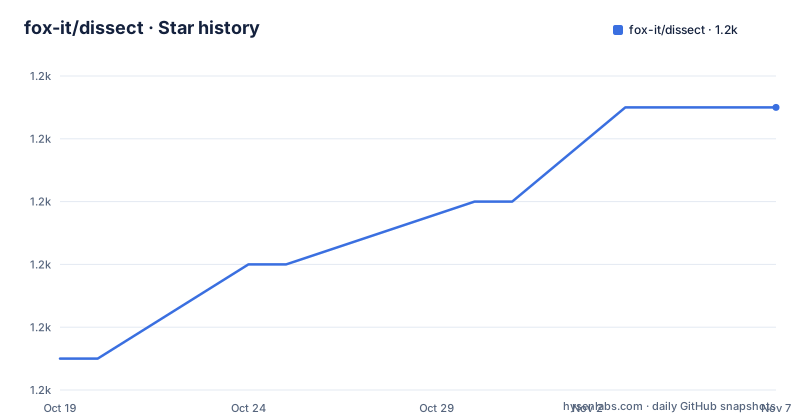
Star history
- fox-it/dissect1,181 ★ · +8
| Repository | 2026-10-19 | 2026-11-07 |
|---|---|---|
| fox-it/dissect | 1.2k | 1.2k |
8 Stars in the last 19 days, measured from the daily GitHub snapshot. Compare with other projects
Editorial analysis
One query interface across containers, filesystems and operating systems
Dissect is described as a digital forensics and incident response framework and toolset that allows you to quickly access and analyse forensic artefacts from various disk and file formats, developed by Fox-IT, part of NCC Group. The central design claim is a singular approach.
The README spells out what that means. You work with the tools target-query and target-shell to get access to forensic artefacts such as Runkeys, Prefetch files and Windows Event Logs, and you do it in a singular way regardless of the underlying container, which can be E01, VMDK or QCoW, the filesystem, which can be NTFS, ExtFS or FFS, or the operating system structure, which can be Windows, Linux or ESXi, and any combination of those.
The problem that solves is spelled out too. In a conventional workflow you extract files from the forensic container, mount them when the format requires mounting, retrieve the MFT, and parse it with a separate tool, and only then do you build a timeline to analyse. The README says all of that is handled under the hood in a user-friendly manner, and the example it gives is a single command.
target-query -f mft <PATH_TO_YOUR_IMAGE>One command, and you are looking at parsed MFT entries. The chain from image to artefact is the thing the framework removes, and the artefact list makes the scope concrete: Runkeys, Prefetch and Windows Event Logs are named, and the module list covers the registries, the event logs, the caches and the filesystems in between.
The other half of the value is that the same interface works whether the evidence is a disk image, a live machine, or something you collected yourself.
The dissect package is a manifest of pinned modules, not the code
This repository is a meta package, and the README says so directly: it will install all other Dissect modules with the right combination of versions.
So the code you actually run is in the individual modules, and this repository is the compatibility contract between them. The pyproject.toml lists the whole family as pinned dependencies, and the version ranges are per module, not a single shared version number.
dependencies = [
    "dissect.apfs>=1.1,<2",
    "dissect.archive>=1.8,<2",
    "dissect.btrfs>=1.10,<2",
    "dissect.cim>=3.13,<4",
    "dissect.ntfs>=3.16,<4",
    "dissect.target[full]>=3.25.1,<4",
]
That is the interesting engineering in this repository, and it is easy to underestimate. Every module in the family is released independently, and the meta package has to express a combination that is known to work together. The version floors are not arbitrary, they record the point at which a module gained a feature the meta package depends on, and the dissect.target[full] entry with its extra shows that the target layer itself has optional components, with full pulling in more than the default.
The module list covers a wide range of formats. There are filesystem parsers for apfs, btrfs, extfs, fat, ffs, fve, jffs, ntfs, qnxfs, squashfs, xfs and vmfs, plus cramfs and archive. There are Windows artefact parsers for cim, clfs, etl, eventlog, regf, shellitem and thumbcache, and for ole, executable and database. There is cstruct for binary structure definitions, evidence for evidence handling, hypervisor for virtual machine inspection, util for shared helpers and volume for volume abstraction.
The release history of the meta package is the visible result of that coordination. The tags are 3.20.1 on 2025-09-10, 3.21 on 2025-11-25 and 3.22 on 2026-02-26, and the last push to main was on 2026-10-09.
Every parser can be used on its own
The modular setup is described as a deliberate property rather than an implementation detail. Each individual project can be used on its own, or in combination, to create a completely new tool for your engagement or future use.
That is the design decision that makes Dissect different from a single monolithic forensics application. A team that needs to answer one question about a Linux server filesystem can install dissect.extfs and nothing else. A team building a custom triage tool can assemble dissect.target with the specific parsers it needs, and the README frames that as an intended use rather than an accident of the packaging.
The practical effect is a dependency profile you control. The meta package installs around thirty modules, and each brings its own transitive requirements. If you only need a registry parser and a volume layer for a single engagement, the individual packages are a fraction of that.
There is also a target layer, dissect.target, which is what sits underneath target-query and target-shell and provides the singular namespace the framework promises. It is the module that resolves a path inside an image into an artefact, whether that path crosses a container boundary, a filesystem and an operating system structure on the way.
Two related projects sit outside the meta package but are closely connected. acquire is the collection tool, and flow.record is described as a related project for flow data. The README makes the distinction explicit, that these are closely related to Dissect but not installed by the meta package, which matters if you are working out the full acquisition and analysis chain.
acquire handles collection, including from hypervisors
The README gives acquire its own section, and the reason it exists is different from the analysis side.
Dissect provides a tool called acquire that you deploy on endpoints to create a lightweight container of those machines. The convenience is that you can deploy acquire on a hypervisor to quickly create lightweight containers of all the running virtual machines on there, and the README emphasises that this is without having to worry about file-locks.
That file-lock point is the one to sit with. Imaging a running virtual machine while it is in use means reading its disks while the hypervisor is writing to them, and a naive copy either fails or produces an inconsistent image. The fact that acquire handles that is what makes it usable for a live response, and a lightweight container is something you can then hand to target-query and target-shell, or to other tools if you prefer.
So the workflow the two pieces describe is coherent. Acquire collects, Dissect analyses, and the containers interoperate. The lighter the container, the faster the collection, and the analysis tools do not care whether the evidence came from a disk, a hypervisor snapshot or a live triage.
acquire is a related project and not installed by the dissect meta package, so a deployment needs both, and their versions need to be compatible even though the meta package does not manage that relationship for you.
Python, pip, tox and a browser playground
The requirements section is brief. This project is part of the Dissect framework and requires Python, and the supported Python versions are documented in the Getting Started section rather than in the README. The pyproject.toml states requires-python as 3.10 or newer.
Installation is a single pip command, and the package is on PyPI.
pip install dissectThere is also an interactive playground at https://try.dissect.tools, described as a way to try Dissect in your browser. That is a notable offering for a forensics framework, because it means an analyst can evaluate the tool without installing anything or handling evidence on their own machine, which matters when the evidence is sensitive or the environment is locked down.
The build and test setup is tox based. The project uses tox to build source and wheel distributions, with the build command being tox -e build, and the artifacts land in the dist/ directory. Running tox with no arguments runs linting and unit tests in a self-contained environment using the default installed Python version.
tox -e build
tox
The self-contained part matters for a project with this many optional dependencies, because the test environment is built from the declared requirements rather than from whatever happens to be on the machine.
The repository itself is minimal by design, with a pyproject.toml, a tox.ini, a MANIFEST.in, a COPYRIGHT file and a LICENSE file, plus the .github/ directory. There is no source directory, because there is no source here. The build backend is setuptools with setuptools_scm, which means the version is derived from the version control tag rather than being written by hand.
Where Dissect is the wrong choice
The first wrong case is a closed source product. The licence is AGPL-3.0-or-later, and the pyproject.toml declares it explicitly with the license and license-files fields, and there is a separate COPYRIGHT file alongside the LICENSE. The AGPL is the licence to think about before anything else, because its network use clause is what bites, and how it applies depends entirely on whether you are distributing the tool or running it as a service. That is a question for your legal team, not for a review article.
The second wrong case is a team that wants an all-in-one GUI. Dissect is a command line framework with a query and a shell. There is no case management, no report writing, no evidence tagging workflow and no case database. If the deliverable is a report for a court or a client, you are building that layer yourself or you are using a different product.
The third wrong case is a format Dissect does not cover. The module list is wide but it is not universal, and while a missing parser can be written, the framework will not parse what it does not have. The same applies to very new artefact formats, where a commercial tool with vendor support may be ahead.
The fourth wrong case is expecting the meta package to be lightweight. Installing dissect pulls in around thirty modules with their own dependencies, and if your engagement needs three of them you are paying for thirty. The individual modules exist for that reason, and the README is explicit that they can be used on their own.
How it differs from a single forensics suite
The comparison worth making is with the traditional commercial forensic suite, and the difference in approach is architectural rather than about feature count.
A traditional suite is a monolith. One application, one licence, one set of parsers, one interface, and a case workspace around it. The tooling is designed to be used as a product, with a GUI, a report generator and a licensing model tied to seats or to cases. Its strength is that everything is integrated and the vendor supports it.
Dissect is a set of libraries with a thin command line on top. The parsers are separate pip packages, the namespace layer is another package, and the combination is asserted by a meta package that pins the versions. Its strength is that you can assemble exactly the tool you need, that the parsers are usable as libraries in your own code, and that the interface is uniform across formats rather than uniform per product.
The second difference is the interface itself. target-query and target-shell expose the same abstraction over everything, so the analyst learns one query language and applies it to an E01 image, a VMDK of a Linux guest and an ESXi datastore without changing tools. A suite that supports all those formats often has a different tool or a different mode for each.
The third difference is the licensing and the cost structure, and this is where the trade is sharpest. A commercial suite is a procurement decision with a price and a support contract. Dissect is free, open source, developed by a commercial security consultancy, and released under a licence that will require legal review before you deploy it in a product.
The fourth difference is where the boundary with the collection side sits. acquire is the counterpart to the analysis tools and is a separate project, so the toolset is coherent but not a single installation, and the version compatibility between them is yours to manage.
Editorial conclusion
Dissect fits an incident response team that has to move between evidence containers, filesystems and operating systems quickly and wants one query interface rather than a separate tool per format, and it fits a developer who wants to build an engagement-specific tool by combining individual dissect modules. It does not fit a pipeline that has to run in a closed source product, because the AGPL-3.0-or-later licence is the one thing to settle first, and it does not replace a full disk image acquisition tool since acquire is a related but separate project. Before adopting it, read the licensing terms against your deployment model, check the supported Python versions in the getting started documentation, and note that the newest release is 3.22 from 2026-02-26 with the last push on 2026-10-09.
Frequently asked questions
How do I install Dissect and what does the package contain?
Run pip install dissect. The package is on PyPI and is a meta package that installs all the other Dissect modules with the right combination of versions, around thirty of them covering filesystems, Windows artefacts and the target layer. The package requires Python 3.10 or newer.
What is the difference between the dissect package and the individual dissect modules?
The dissect package is a meta package that pins the whole module family together. Each individual module can also be used on its own or in combination, which is how you build a tool for a specific engagement. Two related projects, acquire and flow.record, are closely connected but not installed by the meta package.
What license is Dissect released under?
AGPL-3.0-or-later, declared in the pyproject.toml with a license-files entry pointing at the LICENSE and COPYRIGHT files in the repository. The project is released as open source by Fox-IT, part of NCC Group Plc.
How does target-query replace extracting and mounting an image?
The framework handles the container, filesystem and operating system layers under the hood, so a command like target-query -f mft <PATH_TO_YOUR_IMAGE> returns parsed MFT entries directly. You no longer extract the files, mount the disk image, retrieve the MFT and parse it with a separate tool before you can build a timeline.
How do I build and test the Dissect source?
The project uses tox. Run tox -e build to produce source and wheel distributions in the dist/ directory, and run tox with no arguments to execute linting and unit tests in a self-contained environment using the default installed Python version. More detail is in the tooling page of the documentation.
Official sources
Add this badge to your README
If you maintain this project, the badge below links readers to this analysis and shows its maintenance status from the daily GitHub snapshot. Paste the markdown into your README; add ?metric=license or ?metric=stars to the image URL for a different field.

[](https://hysenlabs.com/projects/fox-it-dissect)Star history chart for your README
[](https://hysenlabs.com/projects/fox-it-dissect)Was this useful?