How Nitter serves Twitter without JavaScript, and where it stops
Alternative Twitter front-end. It's impossible to use Twitter without JavaScript enabled, and as of 2024 you need to sign up.
At a glance
- What is it?
- Nitter is a Twitter front-end written in Nim that renders on the server, so your browser runs no JavaScript and never contacts Twitter directly. What you actually get is decided by three things the project does not control: an unofficial API, per-instance configuration such as RSS, and an archived repository sitting on top of an August 2026 legal demand.
- Who is it for?
- Nitter suits a reader who wants a JavaScript-free way to read timelines and accepts that access depends on somebody else's instance, or an operator with a host, a reverse proxy, and the willingness to carry an archived codebase yourself. It does not suit anyone who needs a supported service, a tagged release to pin, or following and chronological timelines, since the account system is still a roadmap item.
- Can I use it commercially?
- Yes, with strict conditions. AGPL-3.0 is a network copyleft licence: if people use a modified version over a network, for example as a hosted service, you must offer them its source code under the same licence.
- Is it still maintained?
- No. The owners have archived the repository on GitHub, so it is read-only and no longer receives changes.
- What is it written in?
- Mainly Nim, according to GitHub's language statistics.
Answers come from the project's GitHub data, last synced on November 13, 2026, and from our analysis. They are not legal advice.
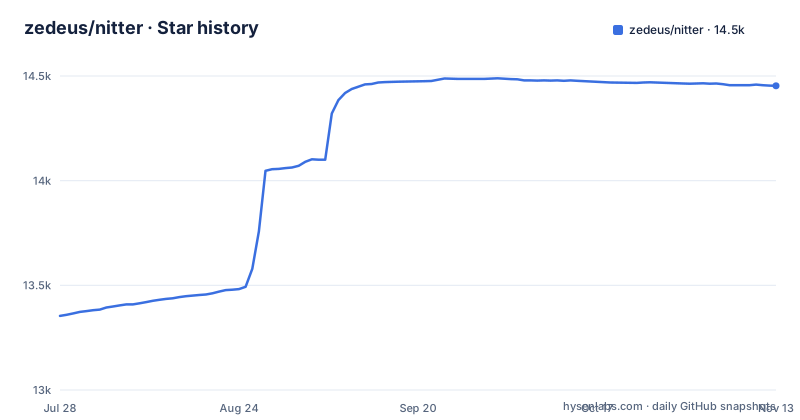
Star history
- zedeus/nitter14,453 ★ · +1,099
| Repository | 2026-07-28 | 2026-11-13 |
|---|---|---|
| zedeus/nitter | 13.4k | 14.5k |
1,099 Stars in the last 108 days, measured from the daily GitHub snapshot. Compare with other projects
Editorial analysis
The instance process is the only thing that talks to Twitter
The privacy claim is architectural rather than a setting. Every request goes through the backend, the client never talks to Twitter, and the frontend needs no JavaScript at all. Data comes from Twitter's unofficial API, so no developer account is required, although the compose setup mounts a sessions.jsonl file of credentials produced by get_sessions.py. What that design does not give you is redundancy. One instance process serves every reader, so an instance that is unavailable takes the frontend down with it, and the mitigation lives outside the code, in a wiki list of instances and a wiki list of browser extensions, both maintained by the community. The pages are also far smaller than the ones they replace: the project states Nitter is around 15 times lighter than Twitter on average with timelines loading 2 to 4 times faster, and gives one concrete figure, 60KB for the @nim_lang page against 784KB from twitter.com.
RSS is per instance, and operators switch it off
RSS feeds appear in the feature list with a qualification attached: feeds are instance-specific and often disabled due to abuse. That one qualifier changes how the feature should be used. A feed URL that works on one instance is no evidence that another instance serves one, and an operator can turn feeds off without any change to the software you run. If a script or a reader polls an account through a feed, you are depending on someone else's configuration decision, and the symptom is a missing or empty feed rather than an error in your own setup. The rendered timeline pages carry the same content, so RSS is a convenience layer over the frontend rather than the only path to an account's posts.
The https setting decides whether cookies work at all
The native install asks you to set a hostname, a port, an HMAC key, https, and Redis info in nitter.conf, and one of those carries a warning that is easy to skim past: https must be correct for cookies. Redis is the other half of the same config: it is required for caching and, as the README puts it, in the future for account info. Because Redis stopped being open source in 2024, the Valkey fork is the recommendation, and the default port on localhost is what the shipped config expects.
Docker turns a missing config file into a directory
The documented failure in the Docker path is specific and easy to hit on a fresh machine. The Docker commands mount the config from the directory you run them in, and if a mounted file does not exist, Docker silently creates a directory in its place, so the container fails with not a directory: Are you trying to mount a directory onto a file. The fix is ordering. Create the file on the host first, which from a clone is one copy command:
cp nitter.example.conf nitter.confIf you use the prebuilt image without a clone, download nitter.example.conf and save it as nitter.conf instead. The compose file needs a second file in the same way: sessions.jsonl is mounted next to the config, with a comment pointing at get_sessions.py for the credentials. Both have to exist as files before you start, or the same mount error is what you get, and the fix is to remove the directory Docker left behind and create the file.
The compose file binds loopback and drops every capability
The shipped compose.yml is where the project's posture is visible. Nitter publishes 127.0.0.1:8080:8080 on the host, with a comment telling you to replace it with 8080:8080 if you have no reverse proxy, runs as a numeric non-root user, mounts both files read only, sets read_only, adds no-new-privileges, and drops all capabilities with cap_drop. Redis runs as a second container from redis:6-alpine with its own non root user, a healthcheck of redis-cli ping, and persistence set to save 60 1. Nitter's own healthcheck spiders a status URL inside the container. One consequence is immediate: loopback binding means nothing reaches the port from outside the host until you either edit that mapping or put a reverse proxy in front, which the native install path also asks for with Nginx or Apache. Another is that the sessions file is prepared outside the container, which is what lets the filesystem stay read only. Starting both containers also needs one edit to your config, changing redisHost from localhost to nitter-redis, and then:
docker-compose up -dThe published image and your local build use different flags
A binary you compile yourself is not the binary in the container, and the difference is in the compile line. Locally the project is built with danger mode on and the refc memory manager, with the scss and md outputs produced by separate tasks afterwards. The Dockerfile uses the same two flags but adds lto and strip on top, and it builds against nimlang/nim:2.2.6-alpine-regular after installing libsass-dev and pcre. So the nim version behind your build is whatever you installed rather than 2.2.6. The README also names libpcre, libsass and Redis or Valkey as the dependencies, and notes that libsass is libsass-dev on Ubuntu and Debian. The local build sequence, in the order given:
# useradd -m nitter
# su nitter
$ git clone https://github.com/zedeus/nitter
$ cd nitter
$ nimble -l build -d:danger --mm:refc
$ nimble -l scss
$ nimble -l md
$ cp nitter.example.conf nitter.conf
There are no GitHub releases to fall back on, so apart from the prebuilt zedeus/nitter Docker image, that sequence is the path from a clone to something you can put behind a proxy.
AGPLv3 reaches instances, not only distributed copies
The license is AGPL-3.0, and the feature list adds a condition in plain words: no proprietary instances permitted. For a reader who only opens a public instance, nothing changes. For anyone hosting a modified copy or building a service around it, that license is the first thing to read, because its obligations attach to code served over a network and not only to code distributed as a binary, so a hosted fork that carries changes has to offer those changes as source. The project does not license around any of it: LICENSE sits at the top level of the repository next to the Dockerfile, config.nims and nitter.example.conf, and the same AGPL terms also govern anyone who runs an instance for others. Read the LICENSE text for your own obligations before forking the frontend into a product rather than assuming that an open source label settles the question.
Archived repository, no releases, and an unresolved legal demand
The repository is archived and its last push is dated 2026-10-09. There are no GitHub releases, so there is no version to pin from a releases page and no tagged artifact to compare a build against. The README carries a note that explains the date: on 24 August 2026 cease and desist letters were sent by X Corp demanding a permanent takedown of Nitter instances and the project's repository, followed by an update dated 10 October 2026 in which the maintainer says he is seeking funding and legal help, with more details at nitter.net. Three consequences for anyone considering a deployment. An archived repository means upstream will not hand you fixes, so breakage and security work are yours to carry. The legal situation is described as ongoing rather than settled, and nothing in the repository promises that instances stay up. And with RSS already optional per instance, the pieces you would build a dependable workflow on are exactly the pieces an operator can switch off.
Editorial conclusion
Nitter suits a reader who wants a JavaScript-free way to read timelines and accepts that access depends on somebody else's instance, or an operator with a host, a reverse proxy, and the willingness to carry an archived codebase yourself. It does not suit anyone who needs a supported service, a tagged release to pin, or following and chronological timelines, since the account system is still a roadmap item. Before relying on it, check the community instance list for something actually up, confirm nitter.conf sets https correctly so cookies work, and read the AGPL text if you intend to modify and serve the code.
Frequently asked questions
Is Nitter shut down?
The README records that cease and desist letters were sent by X Corp on 24 August 2026 demanding a permanent takedown of Nitter instances and the repository, then adds a 10 October 2026 update saying the maintainer is seeking funding and legal help, with details at nitter.net. The repository itself is archived, with a last push dated 2026-10-09.
What is Nitter and how does it work?
It is an alternative Twitter front-end written in Nim where no JavaScript is required, zero ads are served, and every request goes through the backend so the client never talks to Twitter. Data comes from Twitter's unofficial API, so no developer account is needed, and themes plus responsive design cover mobile.
how to install nitter
Clone the repository, install Nim plus the libpcre, libsass and Redis or Valkey dependencies, then build with nimble and copy nitter.example.conf to nitter.conf. Docker is the other path, and it needs Redis running separately before the container starts, with the config file already present on the host.
is nitter safe
The stated design requires no JavaScript, serves no ads, and routes every request through the backend so the client never contacts Twitter, which the project presents as preventing IP and browser fingerprint tracking. It relies on Twitter's unofficial API and is AGPLv3 licensed with no proprietary instances permitted.
is nitter.net down
No outage information is recorded in the repository. Availability is a per instance matter, with a community maintained list of instances in the wiki, and features such as RSS feeds are instance specific and often disabled because of abuse.
Official sources
Add this badge to your README
If you maintain this project, the badge below links readers to this analysis and shows its maintenance status from the daily GitHub snapshot. Paste the markdown into your README; add ?metric=license or ?metric=stars to the image URL for a different field.

[](https://hysenlabs.com/projects/zedeus-nitter)Star history chart for your README
[](https://hysenlabs.com/projects/zedeus-nitter)Was this useful?