FreeTodo: an AI todo app that is really two services and a Python package
Auto-Manage Your Personal Task Context with AI.
At a glance
- What is it?
- FreeU-group's FreeTodo pairs a FastAPI backend in lifetrace/ with a Next.js frontend, ships an Electron build, and is quietly building toward a lifelog rather than a task list.
- Who is it for?
- FreeTodo is a good fit if you want a self-hosted task list where the AI side actually does work, decomposing a project into subtasks through a questionnaire and pulling todos out of a conversation, and if you are comfortable running a Python service and a Node service side by side.
- Can I use it commercially?
- Check first. The repository uses a licence we do not classify automatically, so read its LICENSE file before any commercial use.
- Is it still maintained?
- Yes. The repository last received commits 163 days ago.
- What is it written in?
- Mainly TypeScript, according to GitHub's language statistics.
Answers come from the project's GitHub data, last synced on October 22, 2026, and from our analysis. They are not legal advice.
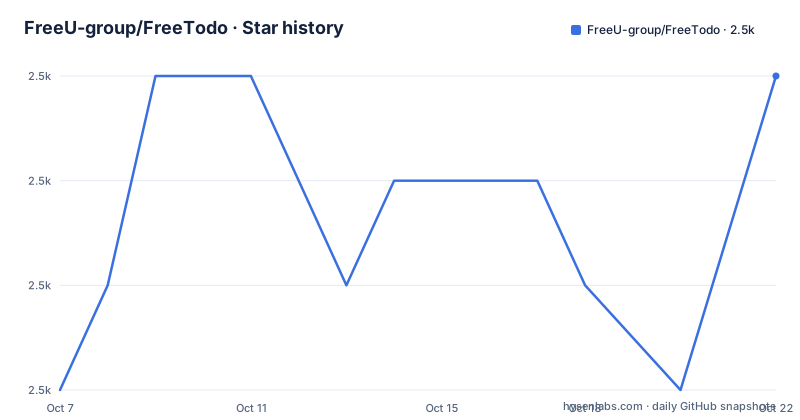
Star history
- FreeU-group/FreeTodo2,500 ★ · +3
| Repository | 2026-10-07 | 2026-10-22 |
|---|---|---|
| FreeU-group/FreeTodo | 2.5k | 2.5k |
3 Stars in the last 15 days, measured from the daily GitHub snapshot. Compare with other projects
Editorial analysis
Two services, three directories, one Python package
FreeU-group/FreeTodo describes itself in one line as an AI todo manager, and the tagline in the README is simply FreeTodo, Just Do It. The architecture underneath is a conventional split: a Python backend living in `lifetrace/`, a Next.js frontend written in React and TypeScript living in `free-todo-frontend/`, and an Electron wrapper that packages the frontend as a desktop application for Windows and macOS. The repository language field says TypeScript, but that only reflects where the visible work is.
The naming is the first thing to notice. The Python project is not named FreeTodo. `pyproject.toml` declares `name = "lifetrace"` at version 0.1.2, with a description about cross-platform screen recording and activity tracking. So the backend package carries an identity from an earlier project in the same family, and FreeTodo is the application built on top of it.
That is not a naming accident. The README's roadmap describes a parent effort called FreeU with two parts: LifeTrace, marked completed at v0.2, which builds personal activity flows from screenshots, and Free Todo, marked as in progress at v0.1. Both ship from one repository and one backend. The repository topics reflect the same blend: agentic-ai, context-engineering, lifelog and todolist.
Starting both services with uv and pnpm
There is no single command that starts FreeTodo. The README describes a two-step developer setup, and the requirement list is specific: Python 3.12 for the backend, Node.js 20 or later and pnpm for the frontend, with optional CUDA support if you want GPU acceleration. The README also links to an INSTALL.md for a one-click path, though that whole block is commented out in the current README, so the manual route is the one that actually works.
The backend uses uv for dependency management, and the sync step is short:
uv sync

# Activate the virtual environment
# macOS/Linux
source .venv/bin/activate
There is a subtlety the README calls out twice, because it reliably trips people up: uv may not be on your PATH right after installation. On Windows the fix is to prepend `$env:USERPROFILE\.local\bin` to `$env:Path`, and on macOS or Linux you can run `exec $SHELL` or simply open a new terminal. Then the server itself is one module invocation:
python -m lifetrace.serverThe frontend is a separate terminal and a separate directory:
cd free-todo-frontend

pnpm install
pnpm dev
Four commands and you have a running todo app. That is a small enough setup that you can evaluate it without committing to anything, which is the strongest argument for this repository.
The frontend finds its own backend through a health check
The detail worth knowing before you start anything is that neither port is fixed. The backend begins scanning at 8001, or 8100 in a packaged build, and walks upward until it finds a free port, printing the one it settled on. The frontend does the same starting at 3001.
Rather than making you copy a port number into a config file, the frontend dev server probes the backend's `/health` endpoint, detects which port the backend actually landed on, and sets up its API proxy to match. The console then shows the real frontend URL and whether the backend connection succeeded. In practice this removes the single most common reason a two-service local project fails to start, which is a hardcoded port that no longer matches.
The API documentation is generated by FastAPI, so the interactive docs land on whatever port was chosen, typically at `/docs`. The same config files matter here: on first run the server creates `config.yaml` from `default_config.yaml` if it is missing, and prompts live separately in `lifetrace/config/prompt.yaml`. So the AI behaviour is tunable without touching code, which matters more in this project than in most todo apps because the prompts are what do the task decomposition.
What the dependency list says the project intends to become
The `pyproject.toml` dependency list is longer than a todo app needs, and it is the clearest statement of direction in the repository. Core service pieces are FastAPI, uvicorn, pydantic, SQLAlchemy and SQLModel, with alembic for schema migrations and icalendar for importing and exporting tasks as .ics files.
Then come the parts that belong to the lifelog rather than the list: `mss` for screen capture, Pillow and imagehash for image handling, opencv-python, and `rapidocr-onnxruntime` with numpy for on-device OCR. Voice is represented too, through `websockets` and a comment naming WhisperLiveKit as the server it connects to, with FunASR commented out as an optional local alternative that needs Visual C++ build tools on Windows.
The AI and search layer is equally broad. `sentence-transformers` and `chromadb` cover embeddings and vector storage, `scipy` and `hdbscan` cover similarity maths and clustering, `agno` is the agent framework, `ddgs` and `tavily-python` are two different web search backends, and both `openai` and `dashscope` are direct API clients, which is how a single configuration can talk to more than one model provider. `apscheduler` handles recurring work and `psutil` handles system inspection.
Read together, this says the todo app is the visible surface of a personal context store: tasks, conversations, and screen activity all indexed into the same vector database so that suggestions have history to draw on. The README's own phrase for the AI assistant, context-aware suggestions based on your current todo context, fits that reading.
Releases, the macOS quarantine flag, and an unfinished README
Three tags have been published, and they tell you where the project is. `0.1.1` went out on 2026-01-12 under the codename Capybara, and its most useful content is a warning rather than a feature list: after dragging FreeTodo into `/Applications` on macOS, you have to run `xattr -dr com.apple.quarantine /Applications/FreeTodo.app`, after which any further warnings can be ignored. That is the standard unsigned-app friction, and the release notes are honest about it.
`0.1.2` followed on 2026-02-06 with a small set of changes: documentation updates, a logo refresh, a CI fix for head installs and a Tauri prebuild, and an onboarding tour added in the earlier patch release. The reference to Tauri alongside the Electron app in the README suggests the desktop wrapper has been in flux.
The third tag is not the app at all. `plugin/media-crawler/v1.0.0` from 2026-02-08 describes a crawler plugin that scrapes seven platforms and summarises the results with AI. A versioned plugin tag inside the app's own repository is a sign of a plugin system being built, not of anything you can install today.
One thing to flag: the README is truncated. The roadmap section ends mid-phrase at the Free Todo entry, with the current focus line cut off after Building th. Everything past that point has to come from `.github/ROADMAP.md` or the documentation site at freeyou.club, not from the README itself.
The tooling files reveal how the project is maintained
The repository tree is unusually transparent about its own process, which is often a better signal of maturity than the star count. There is an `AGENTS.md` at the root and a `.cursor/` directory, so the codebase is being worked on with AI coding tools in the loop and the conventions for that are written down. There is a `.githooks/` directory alongside `.pre-commit-config.yaml`, so hooks are committed rather than left to each developer's local setup.
Static analysis is configured on both sides. `pyrightconfig.json` covers the Python code and `bandit.yaml` configures the security linter, while `biome.json` handles the TypeScript and frontend formatting and linting. `pyproject.toml` pins the Python range tightly to `>=3.12,<3.13`, and `.python-version` records the same choice for version managers. There is a `tests/` directory at the root and a separate `requirements-runtime.txt` for deployment.
That combination, committed hooks, two linters, a type checker and a tests directory, reads like a project taking correctness seriously even at version 0.1.2. The honest counterweight is scale: 2,496 stars, 174 forks and 28 open issues, with the last push dated 2026-05-12. Popularity has outrun the release cadence, and version 0.1.x with a truncated roadmap is where you should expect churn in configuration and layout rather than in the core idea.
Editorial conclusion
FreeTodo is a good fit if you want a self-hosted task list where the AI side actually does work, decomposing a project into subtasks through a questionnaire and pulling todos out of a conversation, and if you are comfortable running a Python service and a Node service side by side. What the project does not settle is the boundary between the todo app and the lifelog, since the same backend package carries the completed LifeTrace screen-capture work, and the README's roadmap section is cut off mid-sentence. Start with `python -m lifetrace.server` plus the frontend dev server on a machine with Python 3.12 and Node 20, read `lifetrace/config/config.yaml` before pointing it at any model API, and judge the roadmap separately once it is written out.
Frequently asked questions
Is FreeTodo free to use and does it cost anything to run?
The code is open source and self-hosted, so the software carries no licence fee, and the README documents a FreeU Community licence file in the repository root. Running it does not mean it is free of dependencies: the backend pulls in model API clients for OpenAI and DashScope, so AI features cost whatever your chosen provider charges once you configure a key.
What does FreeTodo actually do that a normal todo app does not?
Two things, according to the README. The assistant decomposes a complex task into subtasks through a guided questionnaire instead of asking you to write them yourself, and it extracts new todos from its own conversation replies so you do not have to switch to a form afterward. It also offers suggestions based on the todo context already in the system.
How do I start the FreeTodo backend and frontend together?
They are two separate processes. Run `uv sync` and then `python -m lifetrace.server` for the FastAPI backend, then `cd free-todo-frontend` with `pnpm install` and `pnpm dev` in a second terminal. The frontend dev server probes `/health` to find whichever port the backend chose, so you do not have to copy port numbers around.
Is there a desktop version of FreeTodo for Windows or macOS?
Yes, the README lists an Electron app for Windows and macOS with native notifications and system tray support, and the release notes include a macOS fix for the quarantine attribute that unsigned apps trigger. A Tauri prebuild also appears in the 0.1.2 changelog, so the desktop wrapper has been in transition between builds.
Official sources
Add this badge to your README
If you maintain this project, the badge below links readers to this analysis and shows its maintenance status from the daily GitHub snapshot. Paste the markdown into your README; add ?metric=license or ?metric=stars to the image URL for a different field.

[](https://hysenlabs.com/projects/freeu-group-freetodo)Star history chart for your README
[](https://hysenlabs.com/projects/freeu-group-freetodo)