Frenck's Home Assistant config: modular YAML packages with nightly CI against three HA versions
:house: My Home Assistant configuration, a bit different that others :) Be sure to :star2: this repository for updates!
At a glance
- What is it?
- frenck/home-assistant-config is the live personal Home Assistant setup of the project's lead, organized with the packages pattern and validated nightly against stable, beta and dev builds. It is a browsable reference, not an installable package.
- Who is it for?
- Anyone running Home Assistant who wants a modular YAML structure backed by automated testing can learn from this repository's packages approach and linting setup. It is not useful for someone setting up Home Assistant for the first time, since it assumes familiarity with the platform and is organized around one person's specific devices.
- Can I use it commercially?
- Yes. MIT is a permissive licence: you can use, modify and sell software built on it, as long as you keep its copyright and licence notices.
- Is it still maintained?
- Yes. The repository last received commits 4 days ago.
- What is it written in?
- GitHub does not report a main language for this repository.
Answers come from the project's GitHub data, last synced on October 23, 2026, and from our analysis. They are not legal advice.
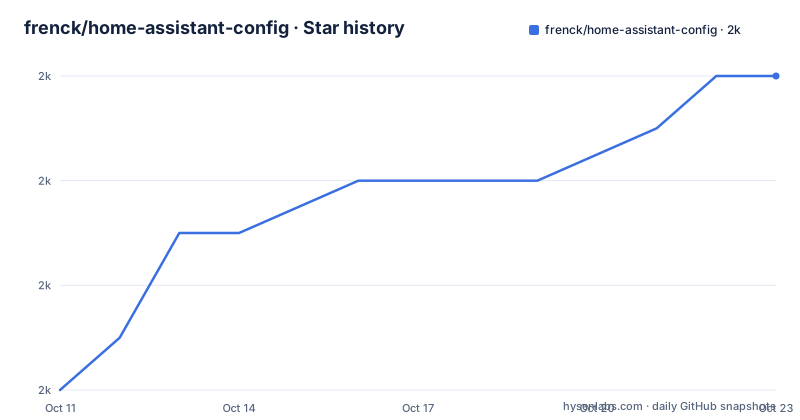
Star history
- frenck/home-assistant-config2,038 ★ · +6
| Repository | 2026-10-11 | 2026-10-23 |
|---|---|---|
| frenck/home-assistant-config | 2k | 2k |
6 Stars in the last 12 days, measured from the daily GitHub snapshot. Compare with other projects
Editorial analysis
A live personal config shared publicly as a reference for Home Assistant users
frenck/home-assistant-config is not a library, a plugin or a framework. It is the working personal Home Assistant configuration of Franck Nijhof, who is identified as the lead of the Home Assistant project and Chair of the Leader Committee at the Open Home Foundation. Seeing how a core contributor organizes their own setup is the main reason to read this repository.
Home Assistant is an open source smart home platform that runs locally on hardware such as a Raspberry Pi and connects to over 2,000 devices and services, from lights and sensors to media players, all without relying on a cloud. Knowing that context places this config repository correctly: it is for people who already run Home Assistant and want patterns to borrow, not for first-time installers.
The repository is shared with a direct invitation to browse, steal ideas, or get inspired. There are no downloadable versioned packages. No install command appears anywhere in the repository. It is browsed and read, not installed or forked wholesale.
How configuration.yaml stays minimal by loading integrations/ as packages
The central design decision in this configuration is using Home Assistant's packages feature to break the top-level `configuration.yaml` into individual files, one per integration. `configuration.yaml` is intentionally minimal: it only loads the `integrations/` directory as packages.
Each device or service integration gets its own YAML file under `integrations/`. Packages let Home Assistant merge multiple YAML files at startup, so splitting by integration changes the human-facing organization without changing how the platform reads the config. The approach is described in the key features section as "clean, organized, easy to find stuff."
The repository tree illustrates the full structure:
.
├── configuration.yaml        # Minimal bootstrap, loads packages
├── integrations/             # Modular integration configs (packages)
├── automations/              # Split automation YAML files
├── scripts/                  # Split script YAML files
├── scenes/                   # Split scene YAML files
├── blueprints/               # Automation & script blueprints
├── esphome/                  # ESPHome device configurations
├── secrets.yaml              # Secrets (not in repo)
└── secrets.fake.yaml         # Fake secrets for CI testing
Automations, scripts and scenes each have their own split directories rather than living inside `configuration.yaml` or inside package files.
Nightly CI validates the config against stable, beta, and dev Home Assistant Core
Among personal Home Assistant configs shared publicly, the automated testing here is unusual. A GitHub Actions workflow runs daily and checks the configuration against 3 distinct Home Assistant Core builds: stable, beta, and dev. The goal is early warning: catching config breakage on the dev or beta build before it reaches a stable installation.
The CI workflow is called home-assistant.yml in the `.github/` directory, and a separate linting workflow is named linting.yaml. Both are visible through GitHub Actions badges in the README. This means the config files are not simply committed and trusted: they go through automated validation on every push and again nightly.
For someone copying patterns from this repository, the practical implication is that the YAML shown has passed the Home Assistant config validator at the time it was committed. A file in `integrations/` or `automations/` that is present in the repository is there because the CI did not reject it. Patterns pulled into a different Home Assistant installation still need validation against the specific HA version running locally.
secrets.fake.yaml makes CI work without exposing real credentials
Home Assistant configurations typically reference values from `secrets.yaml`, which holds API keys, passwords and tokens. That file is intentionally absent from this repository, as the README notes with the annotation "Secrets (not in repo)" next to `secrets.yaml` in the directory tree.
In its place sits `secrets.fake.yaml`, present at the top level alongside `configuration.yaml`. It provides placeholder values for every secret name the configuration references, letting the Home Assistant validator run in CI without encountering undefined variable errors. CI substitutes this file for the real one during validation.
This is a practical answer to a problem every public HA config faces. Without some form of fake secrets, a configuration that references `secrets.yaml` values cannot be validated by an automated pipeline without exposing actual credentials. The fake file approach is explicit in the repository structure rather than hidden in a CI script. Anyone copying automations from this repository that call secrets by name needs a matching entry in their own `secrets.yaml`, or the automation will fail to load.
automations.yaml and the automations/ directory coexist without explanation
The top-level repository has 3 parallel dual structures: automations (automations.yaml and automations/), scripts (scripts.yaml and scripts/), and scenes (scenes.yaml and scenes/). Each has a root-level YAML file alongside a matching directory. Only the directory form is documented in the key features list: "Split automation YAML files," "Split script YAML files," "Split scene YAML files."
In Home Assistant's configuration model, automations can be listed in a single file or split across a directory. Having both the file and the directory present simultaneously is a detail the README does not address. Whether the root-level YAML files serve as stubs that HA reads while the directories carry the actual automation definitions, or the two forms handle different categories, is not documented here.
This detail is easy to miss when reading the section headings in the README. Anyone adopting this repository's structure for their own setup should check both the root-level YAML files and the split directories before assuming one form takes precedence over the other. For automations especially, an unintentional duplication of trigger definitions can cause automation behavior that is hard to trace.
Five linters on every commit: yamllint, remarklint, Prettier, actionlint, and zizmor
The linting setup covers 5 separate tools. yamllint checks YAML syntax and style. remarklint covers Markdown files. Prettier enforces consistent formatting across file types. actionlint validates GitHub Actions workflow YAML. zizmor is a security linter for GitHub Actions workflows specifically.
4 linter configuration files are listed at the top level: `.yamllint`, `.prettierrc.yaml`, `.mdlrc`, and `.pre-commit-config.yaml`. These configuration files define the rules each linter applies and are as useful to copy as the HA configuration files themselves, for anyone who wants to apply the same discipline to their own config.
Running actionlint and zizmor on a personal Home Assistant config is a notable choice. Both tools target GitHub Actions workflow files rather than HA configuration, which means the CI workflows themselves are held to the same standard as the integration YAML. For someone borrowing the linting approach alongside the HA patterns, the `.pre-commit-config.yaml` at the repository root defines the pre-commit hooks that trigger locally before a commit reaches CI.
ESPHome device firmware configs share a directory and CI workflow with the HA config
The `esphome/` directory holds device firmware configuration files for ESPHome-compatible hardware. ESPHome is a separate project that generates firmware for microcontrollers; Home Assistant then reads data from those devices. Having both under the same repository means the ESPHome YAML files that define device behavior and the Home Assistant integration files that consume that device data are in one place.
A dedicated ESPHome CI workflow runs separately from the main Home Assistant validation workflow. The repository therefore has 2 active GitHub Actions CI workflows: home-assistant.yml and a separate one for ESPHome.
The top-level listing includes `esphome/` but gives no count of device configuration files inside it, nor does it name which device types are covered. For readers who want to see end-to-end ESPHome-to-HA integration patterns, the directory exists in the repository, but its depth depends on how many ESPHome devices the author uses. The ESPHome CI workflow provides the same validation guarantee for firmware YAML that the HA workflow provides for integration YAML.
What other public HA configs do differently and what this repo is not for
Other public Home Assistant configurations on GitHub take different approaches to organization. Some keep a flat `configuration.yaml` and use Jinja2 templates for deduplication. Others split by room or by function rather than by integration. This repository uses integration as the organizing unit: one file per integration in `integrations/`, without heavy templating inside the YAML files themselves.
For someone wanting a generic starting template to fork, this is the wrong repository. The entity IDs, device-specific options and service calls throughout the configuration reflect one home's setup. Adapting them to a different installation means reviewing every file in `integrations/` and `automations/` for assumptions about specific device names or service endpoints.
The repository copyright covers 2018 to 2026, with MIT terms. The last push was on 2026-10-05. For someone looking for an actively maintained, widely discussed alternative, the Home Assistant project's own documentation and the community forums both link to example configurations that are intended as starting points rather than personal references.
Editorial conclusion
Anyone running Home Assistant who wants a modular YAML structure backed by automated testing can learn from this repository's packages approach and linting setup. It is not useful for someone setting up Home Assistant for the first time, since it assumes familiarity with the platform and is organized around one person's specific devices. Before copying specific integration YAML files, check whether entity IDs and integration-specific options match your own Home Assistant installation. The `secrets.fake.yaml` file is the key to understanding how CI works without real credentials: any automation you copy that references secrets by name will need a matching entry in your own `secrets.yaml`.
Frequently asked questions
What is frenck/home-assistant-config?
It is the personal Home Assistant configuration of Franck Nijhof (Frenck), the lead of the Home Assistant project. The repository is shared publicly for other HA users to browse, borrow patterns from, and learn the packages-based modular organization approach.
How does the packages pattern work in this Home Assistant config?
The configuration.yaml is kept minimal and only loads the integrations/ directory as Home Assistant packages. Each integration has its own YAML file in that directory, and Home Assistant merges all of them at startup.
Why does this Home Assistant config have a secrets.fake.yaml?
The real secrets.yaml is not committed to the repository because it contains credentials. secrets.fake.yaml provides placeholder values so that CI can run the Home Assistant config validator without encountering undefined secret references.
What linters does frenck/home-assistant-config use?
The README lists five: yamllint, remarklint, Prettier, actionlint, and zizmor. Configuration files for each are included in the repository under .yamllint, .prettierrc.yaml, .mdlrc and .pre-commit-config.yaml.
Can I install this Home Assistant configuration on my own instance?
The repository has no install command or setup script. Browsing and copying individual files into your own configuration is the intended use, with the understanding that entity IDs and integration-specific settings are specific to Frenck's hardware setup.
Official sources
Add this badge to your README
If you maintain this project, the badge below links readers to this analysis and shows its maintenance status from the daily GitHub snapshot. Paste the markdown into your README; add ?metric=license or ?metric=stars to the image URL for a different field.

[](https://hysenlabs.com/projects/frenck-home-assistant-config)Star history chart for your README
[](https://hysenlabs.com/projects/frenck-home-assistant-config)Was this useful?