Website-downloader: a Node wrapper around wget that hands back a zip
💡 Download the complete source code of any website (including all assets). [ Javascripts, Stylesheets, Images ] using Node.js
At a glance
- What is it?
- A small Express application that takes a URL, mirrors it with wget, zips the result with archiver and streams it back over a socket channel, with quota and timeout guards on top.
- Who is it for?
- Website-downloader is at its most useful when you want a browsable copy of a small site rather than a crawl pipeline you have to maintain. The mirror flags come straight from wget, so pages keep working offline with rewritten links and pulled-in stylesheets and images, and the zip arrives in the browser instead of landing in a directory you have to hunt for.
- Can I use it commercially?
- Yes. MIT is a permissive licence: you can use, modify and sell software built on it, as long as you keep its copyright and licence notices.
- Is it still maintained?
- Yes. The repository last received commits 72 days ago.
- What is it written in?
- Mainly HTML, according to GitHub's language statistics.
Answers come from the project's GitHub data, last synced on October 23, 2026, and from our analysis. They are not legal advice.
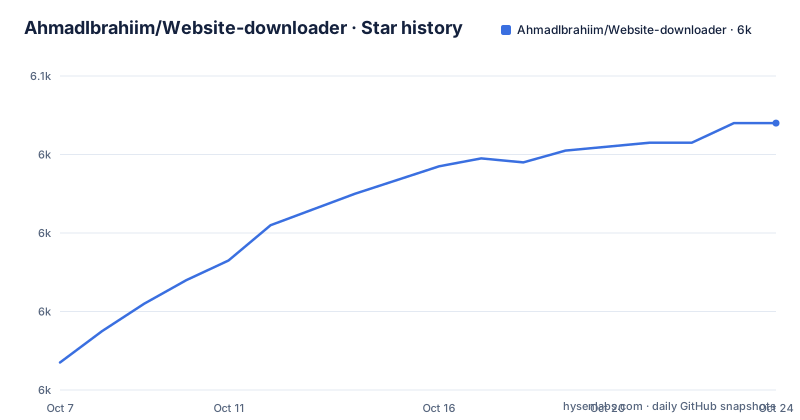
Star history
- AhmadIbrahiim/Website-downloader6,048 ★ · +61
| Repository | 2026-10-07 | 2026-10-23 |
|---|---|---|
| AhmadIbrahiim/Website-downloader | 6k | 6k |
61 Stars in the last 16 days, measured from the daily GitHub snapshot. Compare with other projects
Editorial analysis
What it actually does when you paste a URL
The whole product is one sentence long, and the README states it plainly: the downloader works with `wget` and `archiver` to download all website assets, compress them, and send the archive back to the user through a socket channel. There is no crawler of its own, no headless browser, and no JavaScript rendering step. The interesting engineering is in the wiring around a single well-known Unix tool.
The mirror command it builds is the stock recursive wget invocation:
wget --mirror --convert-links --adjust-extension --page-requisites --no-parent http://example.orgEach flag does one job, and the README explains all five. `--mirror` makes the download recursive. `--convert-links` rewrites links, including ones inside stylesheets, so they are relative and the copy works offline. `--adjust-extension` picks `.html` or `.css` based on content type. `--page-requisites` pulls in the stylesheets and images a page needs to display properly. `--no-parent` stops the recursion from climbing above the starting path, which is what keeps a request for one directory from turning into a mirror of an entire domain.
The dependency set and what it tells you
`package.json` is short enough to read in one glance, and it describes the shape of the application better than any prose would. The runtime is `node ./bin/www`, with a `dev` script that sets `NODE_ENV=Development` before starting.
"scripts": {
  "start": "node ./bin/www",
  "dev": "export NODE_ENV=Development && npm start"
}
The dependencies tell the same story. Express and hbs handle the HTTP surface and the Handlebars views, morgan does request logging, cookie-parser and http-errors are Express defaults, and socket.io plus its client are how the finished archive travels back to the browser. `archiver` produces the zip and `jszip` is available for the same job on the client side. Everything is a plain web app with no database, no queue and no build step.
The versions are the notable part. Express sits at `~4.19.2`, socket.io at `^2.5.0` and archiver at `^3.1.1`, so this code was written against an older generation of Express and an older socket protocol. That is a maintenance consideration rather than a defect, and it is worth knowing before you build on top of it.
The two guards that decide whether a request is safe
Running an arbitrary mirror on a server the moment a stranger types a URL is a bad idea, and the README documents the three settings that make it survivable. `PORT` defaults to 3000. `DOWNLOAD_QUOTA` defaults to `100m` and is passed to wget as a size ceiling, so one request cannot fill the disk. `DOWNLOAD_TIMEOUT_MS` defaults to 300000, five minutes, and stops a single download that runs long.
Those two guards are the difference between a demo and something you would leave running. The quota caps bytes, the timeout caps wall clock time, and together they bound the worst case for a single request. What they do not do is bound concurrency: two heavy requests at once still means two mirrors at once, and neither setting is a rate limit. If you deploy this, rate limiting has to come from somewhere else.
The tree also explains how the download is assembled. There is a `wget/` directory for the crawl itself, an `archiver/` directory for the zip, a `socket/` directory for the return trip, plus `routes/`, `views/`, `public/`, `bin/` and `app.js` at the top level. Splitting the crawl out of the HTTP layer is the reason the quota and timeout settings can be threaded through cleanly.
Running it locally and the wget requirement
The local setup is four commands. Node.js 16 or newer is the only software requirement besides wget itself, and the README is unusually direct about the second one: `wget` must be on the PATH because the app shells out to it, and nothing will download without it.
git clone https://github.com/AhmadIbrahiim/Website-downloader.git
cd Website-downloader
npm install
npm start
With the server up, the app is at `http://localhost:3000/`. The README also lists the platform package commands for getting wget: `apt install wget` on Debian and Ubuntu, `brew install wget` on macOS, and `winget install JernejSimoncic.Wget` on Windows. A hosted demo lives at `https://website-downloader.onrender.com`.
Deployment is a badge rather than a guide. The README links one-click deploy targets for Replit, Glitch, Railway, Cyclic, Koyeb and Render, which tells you the app is a single Node process with no persistent state and therefore fits a free or trial hosting tier. It does not tell you how those platforms handle long-running subprocesses, which is exactly the part that matters when the subprocess is a wget mirror with a five minute ceiling.
Where this sits against the alternatives
The honest comparison is with wget itself. Running the mirror command by hand gives you the same output with none of the browser interface, none of the zip, and full control over flags. What the web version adds is the delivery: the archive comes back to you, and a non-technical user can trigger it without a terminal.
Against dedicated tools such as HTTrack or a browser extension, the difference is that this one is yours to host. There is no extension to install, no account, and no per-file ceiling from a third party. Against a headless-crawler stack it is far simpler, and correspondingly weaker, since JavaScript-rendered pages will come back as whatever wget saw in the HTML.
The topic tags say assets, downloader, offline-web-pages and scraper, which is an accurate description of a mirror utility rather than a scraping framework. There is no release history on the repository, so version tracking comes from `package.json` alone, where the package sits at 0.0.1. The last push was on 2026-08-12 and the repository is not archived.
Reading the code before you rely on it
This is a repository you can read in an afternoon, and that is its main appeal for anyone considering whether to fork it. `app.js` holds the Express application, `routes/` the URL submission path, `socket/` the hand-back of the finished file, and `wget/` the process invocation with the quota and timeout flags applied.
Forking is the obvious move if you want to change any of that. The project asks for issues with bugs and pull requests when they add value, and it is MIT licensed, so there is no obstacle to doing the work yourself and shipping it under your own name. The contact details in the README point to `[email protected]` and a personal site.
Two things to decide before you build on it. First, the stack is old enough that moving to a current Express and socket.io release is a real piece of work rather than a version bump. Second, wget has no built-in politeness, so mirroring a site that dislikes it needs rate limiting and a user agent you have not added yet. Neither is a reason to avoid the project, but both are decisions rather than surprises.
Editorial conclusion
Website-downloader is at its most useful when you want a browsable copy of a small site rather than a crawl pipeline you have to maintain. The mirror flags come straight from wget, so pages keep working offline with rewritten links and pulled-in stylesheets and images, and the zip arrives in the browser instead of landing in a directory you have to hunt for. The limits are visible in the code: express 4, socket.io 2 and archiver 3 are all several major versions behind, the quota and timeout defaults protect the server rather than the user, and there is no queue or retry logic for a site that rate-limits. For archiving your own documentation or a small reference site it is hard to argue with, and for anything at scale you would be writing that layer yourself. Start by cloning it, running `npm install` and `npm start` on port 3000, then read `app.js` and the `wget/` directory, where the actual crawl behaviour lives.
Frequently asked questions
How can I download a website?
This project does it for you in a browser: paste a URL, the server mirrors it with wget using `--mirror --convert-links --adjust-extension --page-requisites --no-parent`, and the zipped result is streamed back over a socket channel. Run it locally on port 3000 or use the hosted demo.
Can I download an entire website?
Yes, recursively, with one caveat. `--mirror` makes the download recursive and `--convert-links` rewrites the links so the copy browses offline, but `--no-parent` restricts recursion to the portion of the site you started from, which is deliberate so one request cannot mirror a whole domain.
Does it need wget installed to work?
Yes. The app shells out to wget and the README says nothing will download without it on the PATH, so install it with `apt install wget`, `brew install wget` or `winget install JernejSimoncic.Wget` before starting the server. Node.js 16 or newer is the other requirement.
Official sources
Add this badge to your README
If you maintain this project, the badge below links readers to this analysis and shows its maintenance status from the daily GitHub snapshot. Paste the markdown into your README; add ?metric=license or ?metric=stars to the image URL for a different field.

[](https://hysenlabs.com/projects/ahmadibrahiim-website-downloader)Star history chart for your README
[](https://hysenlabs.com/projects/ahmadibrahiim-website-downloader)Was this useful?