fresh builds your shell config from other people's dotfile repositories
Keep your dotfiles fresh.
At a glance
- What is it?
- fresh is a Ruby tool that treats dotfiles as dependencies: you declare in a freshrc file which files to take from which GitHub repository, and fresh clones, builds, filters and symlinks them into place. It is a different model from keeping one dotfiles repo of your own, and the trade is that your configuration is assembled at run time from sources that other people control.
- Who is it for?
- fresh is a good fit for a developer who likes the idea of composing a shell setup out of small public repositories, who wants one command to refresh them, and who is comfortable with a build step between a clone and a working prompt. It is a poor fit for a machine where you need a known, frozen configuration, because by default the sources move under you, and the `--ref` option exists precisely because that is a problem.
- Can I use it commercially?
- Not without permission. GitHub finds no licence file in the repository, and without a licence all rights are reserved by default: you may read the code but not reuse it. Check the README, or ask the authors, before using it.
- Is it still maintained?
- Yes. The repository last received commits 137 days ago.
- What is it written in?
- Mainly Ruby, according to GitHub's language statistics.
Answers come from the project's GitHub data, last synced on November 7, 2026, and from our analysis. They are not legal advice.
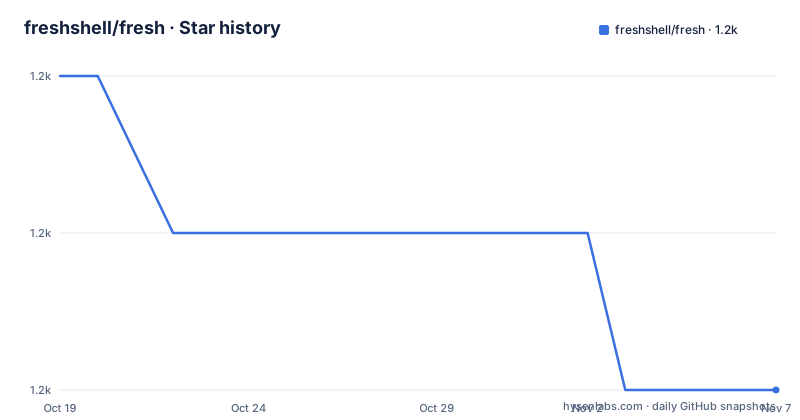
Star history
- freshshell/fresh1,226 ★ · -2
| Repository | 2026-10-19 | 2026-11-07 |
|---|---|---|
| freshshell/fresh | 1.2k | 1.2k |
-2 Stars in the last 19 days, measured from the daily GitHub snapshot. Compare with other projects
Editorial analysis
Dotfiles treated as dependencies rather than copied files
The tool describes itself as a way to source shell configuration, aliases and functions, from other people into your own configuration files, and it extends beyond shell files to things like ackrc and gitconfig. The framing in the documentation is that you should think of it as Bundler for your dot files. That analogy carries the whole design. Instead of copying a snippet into your own dotfiles repository and then maintaining the copy, you declare which file should come from which upstream repository, and fresh fetches it, assembles the pieces and puts the result where your tools expect it. The alternative approach is the familiar one of keeping a single dotfiles repository of your own and copying fragments out of other people's repositories by hand, which works until the upstream changes and you have no record of what you took. fresh makes the upstream the source of truth and your own files a build output.
A freshrc line is a source spec, an action and a destination
The configuration file is `~/.freshrc`, and each line carries three things: where the file comes from, which path inside that source you want, and what fresh should do with it. The documented example file shows the range:
# handles updating fresh
fresh freshshell/fresh bin/fresh --bin

# links your local ~/.dotfiles/gitconfig to ~/.gitconfig (you can change your local directory by setting $FRESH_LOCAL)
fresh gitconfig --file

# builds jasoncodes' aliases into ~/.fresh/build/shell.sh
fresh jasoncodes/dotfiles shell/aliases/\*

# builds the shell/aliases/git.sh file into ~/.fresh/build/shell.sh
fresh twe4ked/dotfiles shell/aliases/git.sh

# links the config/ackrc file to ~/.ackrc
fresh twe4ked/dotfiles config/ackrc --file

# builds config/notmuch-config.erb with erb and links it to ~/.notmuch-config
fresh neersighted/dotfiles config/notmuch-config.erb --file=~/.notmuch-config --filter=erb

# links the gemdiff file to ~/bin/gem-diff
fresh jasoncodes/dotfiles bin/gemdiff --bin=~/bin/gem-diff

# builds the aliases/github.sh file locked to the specified git ref
fresh twe4ked/dotfiles aliases/github.sh --ref=bea8134
Sources come in three flavours. A path on its own is looked up relative to `~/.dotfiles/`, so `fresh shell/aliases/git.sh` finds that file in your own local directory. A name in the form `username/repo` is fetched from GitHub, and a full git clone URL is used for anything else, for example `fresh git://example.com/path/to/repo.git example.sh`. The action is either a build into `~/.fresh/build/shell.sh` for shell files, or a symbolic link with `--file` for configuration files, or a link into a bin directory with `--bin`.
Installing is a curl script, a clone and one line in your shell config
The documented install runs a shell script from the project's own site:
bash -c "`curl -sL https://get.freshshell.com`"That script creates a `~/.fresh` directory, clones the latest version of fresh into `~/.fresh/source/freshshell/fresh`, and writes a `~/.freshrc` file. One step is left to you, and the documentation is explicit about it: you have to add `source ~/.fresh/build/shell.sh` to your shell config manually. If you would rather not run a remote script, the manual equivalent is short:
git clone https://github.com/freshshell/fresh ~/.fresh/source/freshshell/fresh
echo "fresh freshshell/fresh bin/fresh --bin" >> ~/.freshrc
~/.fresh/source/freshshell/fresh/bin/fresh # run fresh
That last line matters more than it looks. The first line of the freshrc example is the mechanism that lets fresh update itself, and running fresh is what builds your configuration and creates the symbolic links. So the model is a build step you trigger, not a package manager daemon watching your disk, and the same build command is what a `fresh search` query uses to find fresh lines that others have added to the directory of shared configurations.
Shell files get joined, config files get linked
The distinction between the two actions is the practical heart of the tool. With no options, fresh joins the named shell files together into `~/.fresh/build/shell.sh`, and because the source can be a glob, several files from several repositories can end up in one output. The documented example joins `shell/aliases/git.sh` from one repository with the `shell/aliases/*` files from another. Config files behave differently: `fresh twe4ked/dotfiles config/ackrc --file` links the upstream file to `~/.ackrc`, and the destination can be named explicitly with `--file=~/.pryrc`. A single config file can also be assembled from more than one source, so tmux configuration can be built from two repositories together into one `~/.tmux.conf`. There is a third mode for tools that need a directory structure rather than a single file, which is what `--file` with a trailing slash or a relative path inside the build directory is for. That is how a zsh plugin gets built into `~/.fresh/build/vendor/` and sourced from your main shell config, rather than linked into place.
Pinning a commit, marking sections and filtering through erb
Three options handle the situations that would otherwise make the model unusable. The first is pinning, because a source that moves is a source that can change under you:
fresh twe4ked/dotfiles aliases/github.sh --ref=bea8134The documentation says any Git reference works, so branches, commit hashes and tags are all valid, and a pinned line is locked to that commit rather than to the branch head. The second is marking, which annotates compiled output so you can see where a section came from; shell files include comments before each section automatically, and `--marker` adds the same kind of annotation to config files, for example `fresh twe4ked/dotfiles 'vim/*' --file=~/.vimrc --marker='"'`. The third is filtering, which runs the source file through arbitrary commands at build time, for example `fresh neersighted/dotfiles config/muttrc.erb.asc --file=~/.muttrc --filter="gpg | erb"` for a file that needs decrypting and template expansion before it is useful.
fresh-options and .fresh-order cut down on repetition and guesswork
Two smaller mechanisms deal with the parts of a configuration that would otherwise get noisy. The first is option blocks, so that a group of lines in the freshrc file that share the same options does not have to repeat them. The documented form opens a block with `fresh-options` carrying the options, lists the lines that inherit them, and closes with a bare `fresh-options`. The documentation notes that a new call overrides any previous one and that passing no arguments resets to the default, which is what makes the block safe to nest in a file that is edited by other people. The second is ordering, because globbing a directory reads the files in alphabetical order, which is rarely the order you want for shell fragments. The fix is a `.fresh-order` file in the directory being globbed, containing an ordered list of the files to read first.
A Ruby project with a Docker image and a small test suite
The repository behind the tool is a Ruby project, and the tree shows a conventional layout: a `Gemfile` and `Gemfile.lock`, an `install.sh`, a `bin/` directory, a `spec/` directory with an `.rspec` file, a `CHANGELOG.markdown`, a `contrib/` directory and a `.buildkite/` directory for continuous integration. The Makefile exposes two targets, `test` which runs the RSpec suite, and `install` which runs the install script. There is also a containerised build, with a Dockerfile based on a slim Ruby 3.4.7 image, a `.tool-versions` file whose Ruby version is checked at build time, and a Compose file that defines a single service built from the project. Two things a reader should note before depending on this. The repository states no licence, and the upstream dotfile repositories you source from carry their own terms, which matters for a tool whose whole job is running other people's shell code on your machine. And the last push was on 2026-06-24 with no published releases, so there is no tagged version to pin the tool itself to.
Editorial conclusion
fresh is a good fit for a developer who likes the idea of composing a shell setup out of small public repositories, who wants one command to refresh them, and who is comfortable with a build step between a clone and a working prompt. It is a poor fit for a machine where you need a known, frozen configuration, because by default the sources move under you, and the `--ref` option exists precisely because that is a problem. Before you install it, check three things: that the `~/.freshrc` file you write can pin every source you care about with `--ref`, that the scripts you pull in are ones you have read, since fresh sources other people's shell files into your session, and the licensing position, because the repository states no licence and the upstream sources carry their own terms, with the last push to the repository on 2026-06-24 and no tagged releases.
Frequently asked questions
How do I install fresh?
The documented route is `bash -c "`curl -sL https://get.freshshell.com`"`, which creates a `~/.fresh` directory, clones fresh into `~/.fresh/source/freshshell/fresh` and writes a `~/.freshrc` file. You then add `source ~/.fresh/build/shell.sh` to your shell config yourself, and the manual steps in the documentation show the equivalent commands without the remote script.
What is the difference between --file and --bin in fresh?
With `--file` a source is linked as a configuration file to a destination such as `~/.ackrc`, and with `--bin` it is linked into a bin directory such as `~/bin/gem-diff`. Shell files need neither, since with no options they are joined together into `~/.fresh/build/shell.sh`.
Can I pin a fresh source to a specific version?
Yes. The `--ref` option locks a source to a Git reference, and the documentation gives the example `fresh twe4ked/dotfiles aliases/github.sh --ref=bea8134`. Any Git reference is accepted, including branches, commit hashes and tags.
How do I build a config file that needs erb or gpg?
Use the `--filter` option, which runs the file through arbitrary commands at build time. The documented example is `fresh neersighted/dotfiles config/muttrc.erb.asc --file=~/.muttrc --filter="gpg | erb"`.
Where do fresh sources come from?
From three places: a path on its own is resolved relative to `~/.dotfiles/`, a name written as username/repo is fetched from GitHub, and a full git clone URL is used for other hosts, for example `fresh git://example.com/path/to/repo.git example.sh`.
Official sources
Add this badge to your README
If you maintain this project, the badge below links readers to this analysis and shows its maintenance status from the daily GitHub snapshot. Paste the markdown into your README; add ?metric=license or ?metric=stars to the image URL for a different field.

[](https://hysenlabs.com/projects/freshshell-fresh)Star history chart for your README
[](https://hysenlabs.com/projects/freshshell-fresh)Was this useful?