Cheetah Grid: Canvas Data Tables for JavaScript
The fastest open-source data table for web.
At a glance
- What is it?
- Cheetah Grid is an MIT-licensed JavaScript grid engine that renders data tables on canvas. It suits applications that need configurable columns, frozen columns, editable cells, and specialized column types, but its canvas model requires deliberate handling of accessibility and application data.
- Who is it for?
- Adopt Cheetah Grid when a JavaScript application needs a canvas-based table with built-in editing and column configuration. Do not choose it solely because the README calls it fast, since it includes no benchmark results, and do not use it when native HTML table semantics or established accessibility requirements take priority.
- Can I use it commercially?
- Yes. MIT is a permissive licence: you can use, modify and sell software built on it, as long as you keep its copyright and licence notices.
- Is it still maintained?
- Yes. The repository last received commits 80 days ago.
- What is it written in?
- Mainly JavaScript, according to GitHub's language statistics.
Answers come from the project's GitHub data, last synced on November 7, 2026, and from our analysis. They are not legal advice.
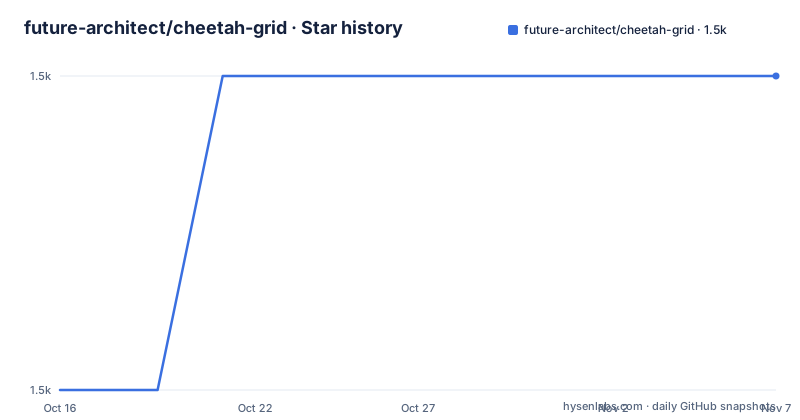
Star history
- future-architect/cheetah-grid1,542 ★ · +1
| Repository | 2026-10-16 | 2026-11-07 |
|---|---|---|
| future-architect/cheetah-grid | 1.5k | 1.5k |
1 Stars in the last 22 days, measured from the daily GitHub snapshot. Compare with other projects
Editorial analysis
Cheetah Grid's Canvas Table Model
Cheetah Grid addresses a specific problem in web applications: displaying and interacting with large or configuration-heavy tables without constructing a conventional DOM element for every cell. The repository `package.json` describes the project as a high-performance grid engine that works on canvas, while the README calls it a data table for the web. Its intended users are JavaScript developers building spreadsheet-like interfaces, operational tables, or applications in which many cells need a predictable table surface.
The rendering model differs from an HTML table built with `table`, `div`, or `span` elements. Cheetah Grid draws its grid through a canvas-based engine. That architecture is relevant when an application wants to control column configuration and grid rendering rather than rely on the browser's native table layout. The repository layout includes packages, documentation, examples, images, and build scripts, confirming that this is a library repository rather than a complete application.
The core entry point shown in the README is `cheetahGrid.ListGrid`. A `ListGrid` receives a parent element, column definitions, and an array of records. The parent element places the grid in the page. The header definition controls field mapping, captions, widths, column types, styles, and actions. The constructor example also accepts `frozenColCount`, which fixes the first two columns in the sample. Because the README does not show the generated cell DOM, application code should not assume that an individual cell can be selected with a normal HTML table-cell query without checking the API documentation.
Records, Columns, and Editing in Cheetah Grid
Cheetah Grid's configuration model is centered on the `header` property of `cheetahGrid.ListGrid`. The README requires this property to be an array of objects. Each column normally contains a `field`, which names a record property or a function used to obtain the displayed value, and a `caption`, which supplies the header text. A column can also define `width`, `columnType`, `style`, and `action`.
The documented column types cover several common table presentations. The `none` type draws text, `'number'` draws a number with comma separators, `'check'` draws a checkbox, `'button'` draws a button, `'image'` draws an image, and `'multilinetext'` draws multiline text. Advanced column types can be defined with class instances, with details delegated to the linked column type documentation. This provides a documented set of common choices without presenting those choices as the only extension points.
Column actions are separate from column types. The documented `'check'` action makes a checkbox clickable, while `'input'` makes a cell enterable. That separation matters because a column can use a specialized visual representation without making every column automatically editable. The README also documents hierarchical headers through a header object containing a `columns` array. Its example groups first and last name beneath a `Name` caption.
Records remain the caller's responsibility. The constructor accepts an array, but the README does not document record normalization, asynchronous loading, pagination, sorting, validation, or persistence in the shown example. This makes Cheetah Grid a grid engine rather than a complete data layer. Before adopting it, an application should confirm how changed cell values are exposed through the event API and how those changes are written back to its records.
Installing Cheetah Grid and Creating the First Grid
The README provides both CDN and npm installation paths. For a browser page, it points to the package through `unpkg`. The npm path installs the `cheetah-grid` package and imports the main stylesheet and JavaScript module.
Install the package with the documented npm command:
npm install -S cheetah-gridThen import the package and its stylesheet in a JavaScript application:
import "cheetah-grid/main.css";
import * as cheetahGrid from "cheetah-grid";
The CDN form shown in the README is:
<script src="https://unpkg.com/[email protected]"></script>For a first use, create a parent element and initialize `cheetahGrid.ListGrid`. The `records` variable in this example must already contain objects with the fields named in the column configuration.
<div id="sample" style="height: 300px; border: solid 1px #ddd;"></div>
<script>
  const grid = new cheetahGrid.ListGrid({
    parentElement: document.querySelector("#sample"),
    header: [
      { field: "check", caption: "", width: 50,
        columnType: "check", action: "check" },
      { field: "personid", caption: "ID", width: 100 },
      { field: "fname", caption: "First Name", width: 200 },
      { field: "lname", caption: "Last Name", width: 200 },
      { field: "email", caption: "Email", width: 250 }
    ],
    records,
    frozenColCount: 2
  });
</script>
The configured grid should occupy the 300-pixel-high parent element, and `frozenColCount: 2` requests two fixed columns. The README does not provide a server-rendering example or a bundler-specific setup beyond these imports, so those application details need separate verification.
Building the Cheetah Grid Workspace
The repository can also be cloned and built locally. The README gives the GitHub repository URL, followed by dependency installation and a build command. It says the built file is created under `./packages/cheetah-grid/dist`. This route is for contributors or users who need to build from the source tree rather than consume the npm package.
Clone the repository as documented:
git clone https://github.com/future-architect/cheetah-grid.gitFrom the cloned directory, install dependencies and build the project:
npm install
npm run build
The root `package.json` names the private workspace manager `cheetah-grid-manager`. It identifies `[email protected]` as the package manager and includes `pnpm-workspace.yaml` at the repository root. Its scripts build and test packages recursively through pnpm, while `check` runs `node ./scripts/check_readme.js`. The source layout therefore includes release tooling, documentation checks, linting, and package-level workspaces rather than only a browser bundle.
The npm install command in the README is the documented developer entry point even though the root metadata uses pnpm internally. Contributors should inspect package-level scripts before assuming that a root command performs the same operation as an individual workspace command. The README excerpt does not include the complete workspace dependency graph or the output of a build, so it cannot establish bundle size, startup time, or rendering throughput.
Cheetah Grid Release and Upgrade Boundaries
The repository is not archived. Its last push was on 2026-08-20, and the latest listed release, `[email protected]`, was published on the same date. A separate package named `cheetah-grid-playwright` was also listed at version `0.1.0`. This records recent development activity, but it does not by itself establish a support policy, compatibility matrix, or guaranteed migration schedule.
An upgrade can involve more than replacing the package version. Applications may configure custom column types and actions, rely on canvas-generated interactions, or use one of the separate framework packages. The README directs Vue users to `vue-cheetah-grid` and React users to `react-cheetah-grid`. Those are separate packages from the core `cheetah-grid` library, so their version compatibility and migration instructions must be checked independently.
The root package metadata provides release and maintenance scripts. The `version` script runs `changeset version`, updates documentation, and updates the lockfile. The `release` script builds, tests, prepares publishing, and runs `changeset publish`. This indicates a change-driven release process, but the README does not document the semantic versioning policy or migration guarantees. For a production application, the first upgrade check should therefore be the release notes for the exact core or framework package in use.
Canvas Rendering Versus Native and Framework Tables
The central trade-off is between a canvas grid engine and the browser's native table model. Canvas rendering gives the application a dedicated drawing surface, while an HTML table exposes native elements, attributes, and relationships to the browser. The repository confirms the canvas approach, but the README does not state whether Cheetah Grid emits a parallel accessibility tree, how focus is managed, whether cells are keyboard navigable, or how screen readers identify grid content. Those behaviors should not be assumed.
Cheetah Grid is also a library-level component rather than a full data-management product. It accepts records and configuration, but the basic README example does not provide fetching, caching, pagination, server-side sorting, validation, error states, or persistence. A data-grid framework that includes those services may be a better fit when they dominate the application. Cheetah Grid is more relevant when the application already manages records and needs direct control over column types, actions, and canvas rendering.
Compared with a hand-built canvas renderer, Cheetah Grid supplies documented column definitions, built-in types, editable actions, frozen columns, and hierarchical headers. Compared with a native HTML table, it offers a different rendering architecture but does not establish an accessibility replacement through the README. The README also uses the phrase "fastest open-source data table for web," but it publishes no dataset size, browser version, operation definition, or benchmark result. Performance claims therefore need verification against the application's own workloads before adoption.
Cheetah Grid License and Adoption Checks
The repository declares the MIT license in its metadata, and the repository contains a `LICENSE` file. That designation is favorable for teams reviewing source-available business software because it identifies a permissive license, but the license text should be reviewed directly for its notice, warranty, and liability provisions. This article does not replace that review or provide legal advice.
The core npm package is named `cheetah-grid`. The README shows version `2.2` in CDN and source URLs, while the recent releases list includes `[email protected]`. Applications need to avoid assuming that the versions used by `vue-cheetah-grid` or `react-cheetah-grid` match the core package automatically. Each wrapper has its own package identity and should be checked for the framework version it targets.
The best fit is a JavaScript application that needs a configurable canvas grid and already owns its data-loading and persistence layers. It is a poor fit when native table semantics are non-negotiable or when the team requires documented screen-reader and keyboard behavior before selecting a library. Adoption should begin with the exact `2.2.0` API documentation, a small proof using production-shaped records, and an explicit check of editable-cell events and accessibility behavior.
Editorial conclusion
Adopt Cheetah Grid when a JavaScript application needs a canvas-based table with built-in editing and column configuration. Do not choose it solely because the README calls it fast, since it includes no benchmark results, and do not use it when native HTML table semantics or established accessibility requirements take priority. Before adoption, verify how records are shaped, how cell edits are captured, and how the selected version supports keyboard and assistive-technology use.
Frequently asked questions
How do I install Cheetah Grid with npm?
Run `npm install -S cheetah-grid`, then import `cheetah-grid/main.css` and `cheetah-grid` from JavaScript. The README also provides a CDN script URL using `https://unpkg.com/[email protected]`.
Does Cheetah Grid render tables with canvas?
Yes. The repository `package.json` describes Cheetah Grid as a high-performance grid engine that works on canvas, and the README uses `cheetahGrid.ListGrid` for its basic grid example.
Can Cheetah Grid make cells editable?
Yes. According to the README, setting a column's `action` to `'input'` makes the cell enterable, while the `'check'` action makes a checkbox clickable.
Does Cheetah Grid include Vue and React components?
The README directs users to the separate `vue-cheetah-grid` and `react-cheetah-grid` npm packages. It does not present those wrappers as part of the core package.
Official sources
Add this badge to your README
If you maintain this project, the badge below links readers to this analysis and shows its maintenance status from the daily GitHub snapshot. Paste the markdown into your README; add ?metric=license or ?metric=stars to the image URL for a different field.

[](https://hysenlabs.com/projects/future-architect-cheetah-grid)Star history chart for your README
[](https://hysenlabs.com/projects/future-architect-cheetah-grid)Was this useful?