Pico Universal Flash Nuke: One UF2 to Clear RP2040 and RP2350 Boards
pico-universal-flash-nuke
At a glance
- What is it?
- A single .uf2 file that detects the attached flash size on RP2040 and RP2350 boards and erases it. The project is a practical fix for a common annoyance, though its simplicity hides a few caveats.
- Who is it for?
- Adopt Pico Universal Flash Nuke if you regularly reset RP2040 or RP2350 boards and want one file that works across both. Do not use it if you need selective erasure or if your board has unusual flash wiring that the size detection might misread.
- Can I use it commercially?
- Yes. BSD-3-Clause is a permissive licence: you can use, modify and sell software built on it, as long as you keep its copyright and licence notices.
- Is it still maintained?
- Activity is slowing. The repository last received commits 8 months ago.
- What is it written in?
- Mainly C, according to GitHub's language statistics.
Answers come from the project's GitHub data, last synced on October 4, 2026, and from our analysis. They are not legal advice.
Star history
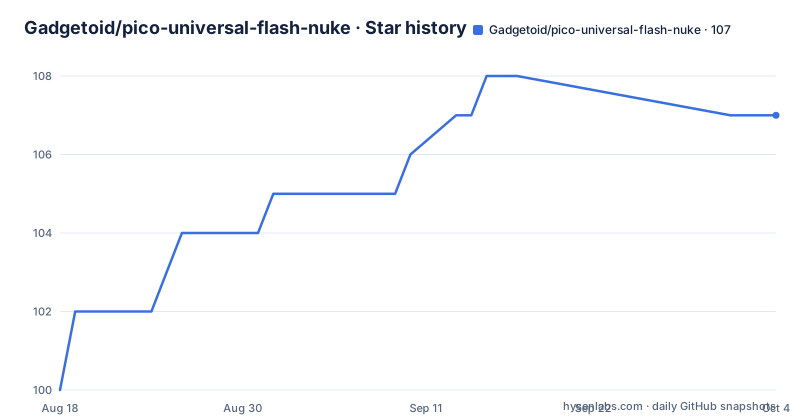
- Gadgetoid/pico-universal-flash-nuke107 ★ · +7
| Repository | 2026-08-18 | 2026-10-04 |
|---|---|---|
| Gadgetoid/pico-universal-flash-nuke | 100 | 107 |
7 Stars in the last 47 days, measured from the daily GitHub snapshot. Compare with other projects
Editorial analysis
The Problem: Flash Nuke Files Are Board Specific
Raspberry Pi Pico boards and their clones ship with a bootloader that accepts a .uf2 file for flashing. To wipe the flash entirely, you normally need a special flash_nuke.uf2 tailored to the exact board. The RP2040 and RP2350 use different flash configurations, and boards from different vendors may have different flash sizes. Hunting for the right file is a real chore, especially when you have a drawer full of Pico variants. This project collapses that search into one file. The intended user is anyone who resets Pico boards regularly: hobbyists, makers, and engineers who reflash devices many times and want a single, predictable erase step.
How It Works: Size Detection and a Cat-Combined UF2
The core mechanism is flash size detection. The .uf2 file contains code that runs on the Pico's microcontroller, queries the attached SPI flash chip, reads its size, and erases the entire flash accordingly. This is what makes it universal across boards with different flash capacities. The README also reveals a clever packaging trick: the .uf2 was assembled by concatenating files with the `cat` command. That is not a joke. The author describes it as 'incredibly delicately combined', which suggests the UF2 format tolerates this kind of concatenation because the bootloader reads the block headers and skips padding. The result is a single file that works on both RP2040 and RP2350, as long as the flash chip responds to the size query. If the chip does not respond, or reports an unexpected size, the erase may fail silently.
Getting It Running: Download, Drag, Drop
There is no build step required for the end user. You download the latest release from the GitHub releases page. The README links directly to the latest release. Once downloaded, you put the Pico into bootloader mode by holding the BOOTSEL button while plugging it into USB. The board appears as a mass storage device. You drag the .uf2 file onto it. The board reboots and the flash is erased. No command line, no configuration. The only thing to check is which release you grab. Version 1.1.0 is built against Pico SDK 2.2.0, while earlier releases used an older SDK. If you are also building your own firmware with a different SDK version, the nuke file should still work, but there is no harm in matching the SDK generation.
Limitations: When It Might Be the Wrong Tool
The README says the tool 'should' work with both RP2040 and RP2350. That word is doing a lot of work. If a board uses a non-standard flash chip that does not report its size in the expected way, the erase could target the wrong region. Also, this nukes everything. There is no way to preserve a bootloader, a unique serial number, or any calibration data that might live in flash. For a normal Pico, that is fine. For a custom board that stores factory data in a reserved sector, this tool is too blunt. It also does not verify the erase. You get no confirmation that the flash is blank, only the absence of an error. If you need a guaranteed wipe or a partial erase, look elsewhere.
Alternatives: Official Nukes and Full SDK Workflows
The Raspberry Pi Pico SDK includes its own flash_nuke.uf2 for each supported board. Those files are board-specific. They come from the official SDK repository and are guaranteed to match the flash configuration of the reference boards. The difference is that you must pick the correct file for your exact Pico variant, which is exactly the hassle this project removes. Another alternative is to use the SDK's programming interface to erase flash over SWD with a debug probe like a Picoprobe or a Raspberry Pi Debug Probe. That approach gives you fine control over which sectors to erase, but it requires extra hardware and software setup. Pico Universal Flash Nuke trades that control for convenience.
Maintenance and License: Small Project, Clear Terms
The project is small and the maintenance burden is low. The last push was January 2026, with version 1.1.0 released on the same day. The main risk is that the Pico SDK changes the flash detection API, which would require a new release. The author is active, given the release cadence, but this is a one-person project with no dedicated support channel. The license is BSD-3-Clause, which means you can use, modify, and redistribute the code with attribution. For a tool this simple, that is more permissive than you need. If you embed the same logic into your own firmware, you must keep the copyright notice, but you are not forced to share your changes. That is a practical license for a utility that lives on a release page.
Editorial conclusion
Adopt Pico Universal Flash Nuke if you regularly reset RP2040 or RP2350 boards and want one file that works across both. Do not use it if you need selective erasure or if your board has unusual flash wiring that the size detection might misread. Before relying on it, verify that the release you download matches the Pico SDK version your toolchain expects, and test it on each distinct board model you own, since the README only promises that it 'should' work.
Frequently asked questions
What is Pico Universal Flash Nuke and how do I get it?
It is a single .uf2 that erases the attached flash on a Pico, Pico W or Pico 2 W, detecting the flash size at runtime so one file covers both RP2040 and RP2350. You download it from the repository's releases page and copy it to the board in BOOTSEL mode.
Do I need to build Pico Universal Flash Nuke from source?
No. The documented workflow is to take the compiled .uf2 from the releases page. The repository does contain the C sources, nuke.c and flash.c, plus a CMakeLists.txt and pico_sdk_import.cmake, and release v1.1.0 is titled as the build against Pico SDK 2.2.0.
What chip does Pico Universal Flash Nuke work on?
The README says it should work with both RP2040 and RP2350 using the same .uf2, covering the Pico, Pico W and Pico 2 W. Dual-chip support arrived in release v1.1.0 on 2026-01-29, while v1.0.0 and v1.0.1 came out in October 2024.
What licence is Pico Universal Flash Nuke under?
The repository carries a LICENSE file under BSD 3-Clause. The project also lists FUNDING.yml at the root and links Ko-Fi, GitHub Sponsors, Patreon and PayPal in the README.
Can Pico Universal Flash Nuke read or back up flash contents?
The documented behaviour is erasing only, with no read-back, partial erase or sector selection described. If you need to inspect what a board holds before destroying it, or preserve a configuration, this tool does not cover that.
What other Pico tools does the author maintain?
dir2uf2 packs a directory and appends it to a MicroPython uf2, py_decl is Python code for reading the Pico's binary declaration format, and there is a Pico pinout reference site. All are linked from the README.
Official sources
Add this badge to your README
If you maintain this project, the badge below links readers to this analysis and shows its maintenance status from the daily GitHub snapshot. Paste the markdown into your README; add ?metric=license or ?metric=stars to the image URL for a different field.

[](https://hysenlabs.com/projects/gadgetoid-pico-universal-flash-nuke)Star history chart for your README
[](https://hysenlabs.com/projects/gadgetoid-pico-universal-flash-nuke)