ChuanhuChatGPT: A Gradio Front End for Many LLM Backends
GUI for ChatGPT API and many LLMs. Supports agents, file-based QA, GPT finetuning and query with web search. All with a neat UI.
At a glance
- What is it?
- ChuanhuChatGPT is a Python and Gradio web interface that puts OpenAI, Azure, Gemini, Claude, local ChatGLM and LLaMA deployments, and several Chinese model APIs behind one chat UI. The appeal is breadth and file-based question answering; the cost is a GPL-3.0 licence, a config-file setup, and a dependency list you will be reinstalling often.
- Who is it for?
- Adopt ChuanhuChatGPT if you want one self-hosted page that reaches OpenAI, Azure, Gemini, Claude, Ollama-style local endpoints and Chinese model APIs, and you accept GPL-3.0 and a config.json you edit by hand. Do not adopt it if you need per-seat SaaS billing, a stable plugin API, or a licence that permits closed redistribution.
- Can I use it commercially?
- Yes, with conditions. GPL-3.0 is a copyleft licence: if you distribute software that includes it, you must release that software's source code under the same licence. Running it internally without distributing it does not trigger that obligation.
- Is it still maintained?
- Yes. The repository last received commits 59 days ago.
- What is it written in?
- Mainly Python, according to GitHub's language statistics.
Answers come from the project's GitHub data, last synced on November 14, 2026, and from our analysis. They are not legal advice.
Star history
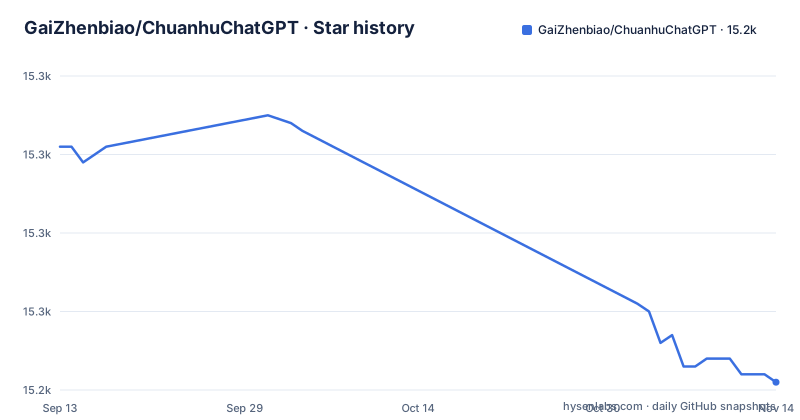
- GaiZhenbiao/ChuanhuChatGPT15,241 ★ · -30
| Repository | 2026-09-13 | 2026-11-14 |
|---|---|---|
| GaiZhenbiao/ChuanhuChatGPT | 15.3k | 15.2k |
-30 Stars in the last 62 days, measured from the daily GitHub snapshot. Compare with other projects
Editorial analysis
The problem: too many model APIs, too many chat windows
Anyone who uses more than one LLM provider ends up with a browser full of tabs. OpenAI has its own interface, Azure OpenAI has another endpoint and key format, Gemini and Claude each have their own, and a locally served ChatGLM or LLaMA model usually means a bare script or a separate Gradio demo. Conversation history is scattered across all of them. ChuanhuChatGPT targets exactly that fragmentation: one web page, one history sidebar, one place to paste keys. The README describes it as a lightweight web GUI for ChatGPT and other LLMs, and the supported-model table lists API models (ChatGPT including GPT-5, GPT-4, GPT-4o and o1, Azure OpenAI, Google Gemini, DeepSeek, iFlytek Spark, Inspur Yuan 1.0, MiniMax, XMChat, Midjourney, Claude, DALL-E 3) alongside locally deployed ones (ChatGLM, ChatGLM2, ChatGLM3, LLaMA with LoRA support, StableLM, MOSS, Qwen). The audience is developers and technically comfortable end users who are willing to run a Python process and edit a JSON file. It is not aimed at someone who wants a hosted product with a signup flow.
How the pieces fit: Gradio on top, provider adapters underneath
The repository is Python with Gradio as the UI layer, which the README confirms with a Base-Gradio badge. The entry point is ChuanhuChatbot.py, and behaviour is driven by a config.json copied from config_example.json. The features listed in the README map onto that architecture. File-based QA and the knowledge base feature feed document content into the prompt path. Web search augments a request before it reaches the model. The Chuanhu Assistant is described as AutoGPT-like, meaning it runs a multi-step loop rather than a single completion. The README also notes that XMChat and Midjourney do not support streaming, which tells you the request layer is not uniform across providers: some paths stream tokens back into the Gradio component, others return a complete response. That is a real design consequence, not a cosmetic detail, because it changes how the UI behaves mid-request depending on which model you selected.
Getting it running: four commands and one JSON file
The README gives a short quick-start. Clone the repository, enter the directory, install dependencies, copy the example config, fill in your API key, then run the app:
git clone https://github.com/GaiZhenbiao/ChuanhuChatGPT.git cd ChuanhuChatGPT pip install -r requirements.txt python ChuanhuChatbot.py
Before that last command you copy config_example.json to config.json and put your API-Key and other settings in it. The README states that a browser window opens automatically. Deployment settings live in the same file: set "server_name": "0.0.0.0" and "server_port": <your port> to expose it on a server, and set "share": true to get a public link, with the caveat that the process must be running for that link to work. For Hugging Face Spaces, the README recommends duplicating the Space rather than using the shared one, because the app may respond a little faster that way. There is also a documented troubleshooting routine: pull the latest code, either by downloading the ZIP and overwriting or with git pull https://github.com/GaiZhenbiao/ChuanhuChatGPT.git main -f, then reinstall dependencies with pip install -r requirements.txt. The README says this resolves many issues because new dependencies are sometimes introduced between versions.
Where it breaks down: config files, dependency drift and missing streaming
The setup model is the first limitation. Configuration is a JSON file you edit by hand, which means API keys sit in plaintext on disk and every deployment becomes a snowflake. The troubleshooting section is itself evidence of the second problem: the project's own advice for unexplained failures is to force-pull main and reinstall requirements. That is a workable habit for a solo user on a laptop and a poor one for a shared internal service, because a force pull can overwrite local changes and a requirements reinstall can move dependency versions under a running deployment. Third, streaming is not universal. The README explicitly marks XMChat and Midjourney as not supporting streaming, so a user switching models sees different response behaviour. Fourth, the project is a chat interface, not an orchestration platform. Finally, the release cadence is uneven: 20250815, then 20241204, then 20240919-4, which is labelled "Safety patches". Long gaps followed by large jumps suggest you should read the changelog before upgrading rather than assuming a smooth path.
Licence and upgrade economics under GPL-3.0
ChuanhuChatGPT is GPL-3.0. For an individual running it locally, that is close to a non-issue. For a company embedding it in a product, it is the deciding factor: GPL-3.0 is a copyleft licence, and distributing a modified version generally obliges you to make the corresponding source available under the same terms. The README links to a wiki page titled "二次开发许可" (secondary development permission) and a citation page, which implies the author has thought about reuse and expects people to read those pages before forking. This article cannot give legal advice, and the wiki page is the authoritative place to check your specific scenario. On upgrade cost: because configuration lives in config.json and the code is pulled from main, an upgrade is a git pull plus a pip install plus a possible config migration if new keys appear. The README's own troubleshooting steps formalise that. Budget for it. Every provider you add (a new Claude model, a new Gemini version) is another surface that can break when the upstream API changes, and this project's job is to absorb those changes for you, which it can only do if you keep pulling.
What a plain Gradio script or a hosted client does differently
The obvious alternative is writing your own Gradio app. A minimal script that calls the OpenAI Python client and renders a chat component is perhaps a few dozen lines, and it gives you total control: your own auth, your own logging, your own deployment. The difference in approach is scope. ChuanhuChatGPT has already built the parts that are tedious to redo: a history sidebar with search (the README says regular expressions are supported), automatic history naming via the model, multi-user history isolation, LaTeX and table rendering, code highlighting, light and dark themes, mobile layout including camera cutouts, and PWA installation. Reimplementing that set is weeks of work, not an afternoon. The other alternative is a hosted client such as the official ChatGPT interface or a commercial multi-model desktop app. Those cost nothing to run and require no server, but they keep your prompts on someone else's infrastructure and generally do not let you point the client at a locally served ChatGLM or a LoRA-tuned LLaMA. If your requirement is "talk to my own GPU box and my OpenAI key from the same window," the hosted route cannot do it and a hand-rolled script will take longer than the clone-install-run sequence above.
Who should adopt it, and what to check first
Adopt it if you are a developer or a small team who wants a self-hosted page covering OpenAI, Azure, Gemini, Claude and local models, and you are comfortable with a JSON config and a Python process. The file-based QA and web search features are the practical reasons to pick this over a bare script, since they are already wired into the chat flow. Do not adopt it if you need a supported commercial product with an SLA, if GPL-3.0 conflicts with how you ship software, or if you expect streaming from every provider, because the README itself flags XMChat and Midjourney as non-streaming. Before you commit, verify three things in order. First, confirm your target provider appears in the supported-model table and that its row does not carry a limitation note. Second, run the clone and pip install on the actual machine you intend to use, since a dependency set this broad is where installs fail. Third, read the wiki page on secondary development permission if you plan to modify and redistribute, and check whether the Hugging Face Space you intend to duplicate is the one you want, because the README recommends duplicating rather than sharing.
Editorial conclusion
Adopt ChuanhuChatGPT if you want one self-hosted page that reaches OpenAI, Azure, Gemini, Claude, Ollama-style local endpoints and Chinese model APIs, and you accept GPL-3.0 and a config.json you edit by hand. Do not adopt it if you need per-seat SaaS billing, a stable plugin API, or a licence that permits closed redistribution. Before committing, run the clone and pip install from the README on your target machine, confirm that your chosen provider appears in the supported-model table, and read the wiki page on secondary development permissions.
Frequently asked questions
How do I run Chuanhu Chat?
Clone the repository, change into the directory and run pip install -r requirements.txt. Then copy config_example.json to config.json and fill in your API key and settings. Start it with python ChuanhuChatbot.py, at which point a browser window opens automatically. Detailed tutorials are on the project wiki.
Which models does Chuanhu Chat support?
Through API calls it lists ChatGPT including GPT-5, GPT-4o, GPT-4 and o1, Azure OpenAI, Google Gemini, Claude, DeepSeek, iFlytek Spark, Inspur Yuan, MiniMax, XMChat, Midjourney and DALL·E 3, with notes that XMChat and Midjourney do not support streaming. For local deployment it lists ChatGLM, LLaMA with Lora support, StableLM, MOSS and Qwen.
What port does Chuanhu Chat run on?
The Dockerfile exposes port 7860, which is Gradio's default, and sets a dockerrun variable so the application knows it is containerised. The README's own server instructions are different: set server_name to 0.0.0.0 and server_port to your chosen port in config.json.
Where do I put my API keys for Chuanhu Chat?
In config.json, which you create by copying config_example.json from the repository root and filling it in. The README also lists load balancing across several API keys as a supported feature, alongside changing the api-host and setting a custom proxy.
Official sources
Add this badge to your README
If you maintain this project, the badge below links readers to this analysis and shows its maintenance status from the daily GitHub snapshot. Paste the markdown into your README; add ?metric=license or ?metric=stars to the image URL for a different field.

[](https://hysenlabs.com/projects/gaizhenbiao-chuanhuchatgpt)Star history chart for your README
[](https://hysenlabs.com/projects/gaizhenbiao-chuanhuchatgpt)Was this useful?