AutoClip: turning one video link into platform-ready short clips, with paid model calls behind it
AutoClip: AI-powered video clipping and highlight generation, a tool for creating derivative highlight-reel edits.
At a glance
- What is it?
- zhouxiaoka/autoclip takes a link to a long video and produces short clips, covers and post copy for Douyin, Xiaohongshu, TikTok, Reels, YouTube Shorts, Bilibili and YouTube, rendering on your own machine. The app itself is free and ships as desktop, CLI and MCP builds, but every run spends cloud model credits, and the Docker setup needs a closer look before it goes on a shared host.
- Who is it for?
- AutoClip suits creators and editors who repurpose long interviews or podcasts into vertical clips and are willing to pay per use for a cloud model such as DashScope, OpenAI, Gemini or SiliconFlow. It does not suit anyone who needs a fully offline pipeline or who cannot hold an API key.
- Can I use it commercially?
- Yes. MIT is a permissive licence: you can use, modify and sell software built on it, as long as you keep its copyright and licence notices.
- Is it still maintained?
- Yes. The repository last received commits 4 days ago.
- What is it written in?
- Mainly Python, according to GitHub's language statistics.
Answers come from the project's GitHub data, last synced on November 14, 2026, and from our analysis. They are not legal advice.
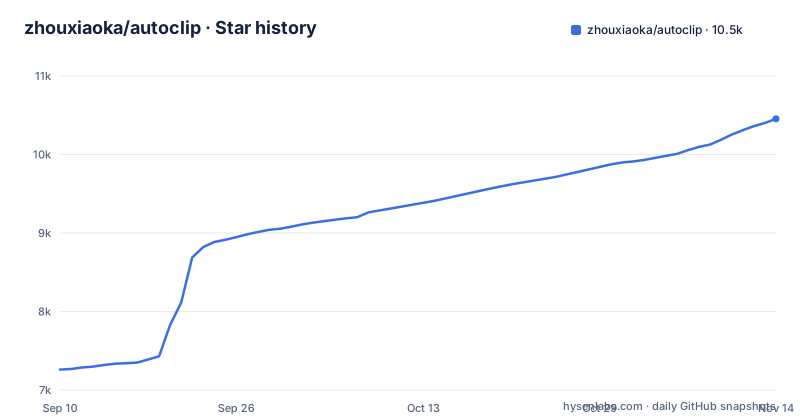
Star history
- zhouxiaoka/autoclip10,455 ★ · +3,195
| Repository | 2026-09-10 | 2026-11-14 |
|---|---|---|
| zhouxiaoka/autoclip | 7.3k | 10.5k |
3,195 Stars in the last 65 days, measured from the daily GitHub snapshot. Compare with other projects
Editorial analysis
One link in, a video, a cover and post copy out
AutoClip's workflow starts from a URL. You paste a link, choose the target platform, and it generates the clip itself, a cover image and the publishing caption, formatted for Douyin, Xiaohongshu, TikTok, Reels, YouTube Shorts, Bilibili or YouTube. Editing and rendering happen on your computer, and an editor is available when the automatic cut needs adjusting. The showcase shows two layouts for vertical output, an interview style and a full-screen podcast style, plus a horizontal mode that keeps the original frame for Bilibili. Sample clips run from 0:43 to 2:02 and carry subtitles in Chinese or English, cut from long interviews such as Bill Gates, Andrej Karpathy and Jensen Huang conversations. The changelog for recent releases mentions subtitle paging, framing on the speaker, and fixes for the long-video queue. The project describes itself as a tool for derivative highlight-reel edits, and each showcase clip links back to its original source.
The software is free, the model calls are billed per use
AutoClip costs nothing to download, but the clipping pipeline calls cloud language models, and those are billed per use by the provider. There is no bundled local model for this step. requirements.txt pins SDKs for OpenAI (openai==3.8.0), Google (google-genai==2.22.0) and Alibaba's DashScope, and the Docker configuration also passes through a SiliconFlow key. Defaults favor DashScope: LLM_PROVIDER falls back to dashscope and API_MODEL_NAME to qwen-plus. The consequence for a new user is that holding only an OpenAI or Gemini key is not enough; you also have to switch LLM_PROVIDER, or the first run asks a provider you have no account with. OPENAI_BASE_URL and DASHSCOPE_BASE_URL can redirect requests to a different endpoint. Budget for model spend on every long video you process, since each one goes through the provider.
Desktop, CLI and MCP ship under one version number
Releases are tagged as AutoClip Desktop and come quickly: v1.5.6 on October 9, v1.5.7 on October 24 and v1.5.8 on November 2, 2026, with the last push the same day. The desktop app is built with Tauri, which is why src-tauri/ sits in the repository. The CLI and MCP server are updated in lockstep with it, and the authoritative version comes from the CLI or from the MCP get_version call:
autoclip --versionThe Python distribution is named autoclip-mcp, version 1.5.8, requiring Python 3.10 or newer. It installs two entry points, autoclip mapped to backend.cli:main and autoclip-mcp mapped to backend.mcp_server:main. Because the distribution and the server share a name, uv can fetch and start it in one step:
uvx autoclip-mcpThe wheel carries prompt templates, fonts, ONNX models, compressed lexicons, outro clips and render templates as package data.
Exact pins exist because the desktop build once shipped broken
requirements.txt pins every direct dependency with ==, and its header explains why: an unpinned yt-dlp or openai upgrade is how works-on-my-machine reports turn into broken releases. CI, the Docker image and the desktop bundle all install that same file. Transitive dependencies are left to pip so one file resolves both on Linux with Python 3.11, used by CI and Docker, and on the macOS and Windows portable runtime with Python 3.13. The pinned set is the one the Backend tests and docker-smoke jobs installed on September 6, 2026. The provider SDKs are bundled for a concrete reason: they used to come from a separate, unpinned installer, the portable desktop build shipped without them, and every provider call failed. If you install from source, run pip install -r requirements.txt on Python 3.10 or newer rather than picking packages by hand.
YouTube links depend on the yt-dlp version AutoClip pins
Video download goes through yt-dlp, pinned at yt-dlp[default]==2026.8.19. The [default] extra matters: it pulls in yt-dlp-ejs, the YouTube JavaScript challenge solver, along with brotli, mutagen and pycryptodomex. Without ejs, YouTube links fail with the error The page needs to be reloaded. A source install that drops the extra, or swaps in a plain yt-dlp, hits exactly that failure. The exact pin has a second consequence. When a video site changes in a way the pinned yt-dlp cannot handle, AutoClip cannot pick up a newer yt-dlp on its own; the fix arrives when the project bumps the pin and ships a release. Given the release pace, that wait has been short, but a pipeline that depends on a single platform should plan for occasional download failures until an update lands. AUTOCLIP_YT_SUBTITLE_LANGS controls which YouTube subtitle languages are requested.
The Docker stack publishes Redis on port 6379
docker-compose.yml runs a redis:7-alpine container and the AutoClip application, and a comment notes that four services share one image, autoclip:local, so it is built once. The app publishes port 8000 for the backend API and 3000 for the frontend, mounts ./data, ./logs and ./uploads from the host, and stores its database in SQLite at data/autoclip.db. Task queuing goes through Celery on Redis. Redis is mapped to host port 6379, and its command line in the compose file sets only --appendonly yes. On a laptop that is harmless. On a VPS or any machine reachable from a network, it exposes the queue port on the host, so remove the mapping or put a firewall in front before deploying. LLM keys reach the container through variable substitution from a .env file in the project root; the compose file notes that before this passthrough was added, the API_DASHSCOPE_API_KEY users set per DOCKER.md never reached the container.
Sentry and an analytics event catalog ship inside the package
Two packaging details are worth knowing before deploying AutoClip where data handling matters. sentry-sdk==2.69.2 is one of the pinned runtime dependencies. setup.py also overrides the build step to copy docs/analytics/event_catalog.json into every wheel as backend/core/event_catalog.json, described in the file as copying the tracking plan without keeping a second registry. Neither fact says on its own what is sent or when, so anyone with privacy requirements should read the event catalog and the backend configuration before the first run instead of assuming the tool stays silent. Upload-related settings, UPLOAD_POST_API_KEY and UPLOAD_POST_USER, are also passed into the container, and AUTOCLIP_ALLOWED_ORIGINS limits which browser origins may call the API. Leaving the origins variable empty in an exposed deployment is the kind of default to revisit.
Editorial conclusion
AutoClip suits creators and editors who repurpose long interviews or podcasts into vertical clips and are willing to pay per use for a cloud model such as DashScope, OpenAI, Gemini or SiliconFlow. It does not suit anyone who needs a fully offline pipeline or who cannot hold an API key. Before relying on it, confirm which LLM_PROVIDER your key matches, check that YouTube fetching works with the pinned yt-dlp, and close or firewall port 6379 if you run the Docker stack on a reachable machine.
Frequently asked questions
How does AutoClip work?
You paste a video link and pick a platform; AutoClip downloads the video with yt-dlp, uses a cloud language model to pick and package the highlights, and renders the clip, cover and caption on your computer. An editor is available for manual adjustments.
How do I install AutoClip?
Download the desktop build from the GitHub releases page, run the CLI and MCP server with uvx autoclip-mcp, start the Docker Compose stack, or install from source with pip install -r requirements.txt on Python 3.10 or newer.
Can AutoClip auto clip your videos into Reels?
Yes. AutoClip targets Reels along with TikTok, YouTube Shorts, Douyin, Xiaohongshu, Bilibili and YouTube, producing the clip, a cover and post copy for the platform you choose.
Official sources
Add this badge to your README
If you maintain this project, the badge below links readers to this analysis and shows its maintenance status from the daily GitHub snapshot. Paste the markdown into your README; add ?metric=license or ?metric=stars to the image URL for a different field.

[](https://hysenlabs.com/projects/zhouxiaoka-autoclip)Star history chart for your README
[](https://hysenlabs.com/projects/zhouxiaoka-autoclip)Was this useful?