eslint-plugin-jsdoc makes the docblock rules a config decision, not a codebase argument
JSDoc specific linting rules for ESLint.
At a glance
- What is it?
- eslint-plugin-jsdoc is a JSDoc linting plugin for ESLint with a large rule set, nine recommended flat configs covering plain JavaScript, TypeScript, TypeScript flavoured JSDoc and TSDoc, and a settings layer for your own structured tags. It is MIT-like in spirit but ships a custom licence, and it releases patch versions frequently.
- Who is it for?
- eslint-plugin-jsdoc suits a JavaScript or TypeScript codebase that documents with JSDoc, wants the tag conventions enforced automatically, and has a large enough surface that the rule set pays for its setup cost.
- Can I use it commercially?
- Check first. The repository uses a licence we do not classify automatically, so read its LICENSE file before any commercial use.
- Is it still maintained?
- Yes. The repository last received commits 1 day ago.
- What is it written in?
- Mainly JavaScript, according to GitHub's language statistics.
Answers come from the project's GitHub data, last synced on November 7, 2026, and from our analysis. They are not legal advice.
Star history
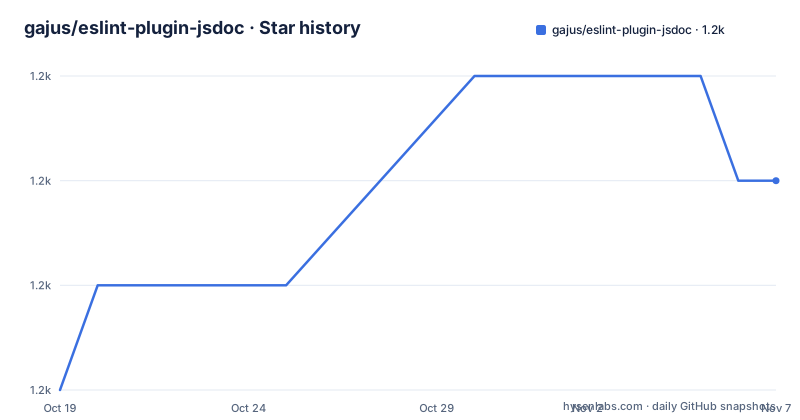
- gajus/eslint-plugin-jsdoc1,235 ★ · +2
| Repository | 2026-10-19 | 2026-11-07 |
|---|---|---|
| gajus/eslint-plugin-jsdoc | 1.2k | 1.2k |
2 Stars in the last 19 days, measured from the daily GitHub snapshot. Compare with other projects
Editorial analysis
A rule set for docblocks, not a documentation generator
eslint-plugin-jsdoc does one thing: it provides ESLint rules that inspect JSDoc comment blocks. The package description is a single line, JSDoc linting rules for ESLint, and the plugin adds to a normal ESLint setup rather than replacing it.
The problem it addresses is specific. A codebase that uses JSDoc as its documentation format accumulates conventions over time. Some tags require a type, some do not. Some tags only make sense with a name. A @license tag should say MIT or ISC rather than something invented. None of that is checkable by the JavaScript parser, because it is all inside comment blocks, so without a plugin it is enforced by whoever reviews the pull request, which is to say inconsistently.
The audience is therefore a team with an existing JSDoc practice that wants it enforced, and the payoff is that the rules are configurable rather than fixed. The plugin ships a large rule catalogue, and the recommended configs are described as enforcing proper tag values, that common tags exist, and that tags are formatted and styled consistently.
One structural note about the implementation, because it explains the dependency list. The rules are not implemented with a hand written comment parser. The dependencies include @es-joy/jsdoccomment, which does the JSDoc parsing, comment-parser, and @typescript-eslint/utils, which gives the rules access to the type aware parts of the TypeScript ESLint ecosystem. The plugin also pulls in espree and esquery for source analysis, spdx-expression-parse for licence expressions, semver, are-docs-informative, to-valid-identifier and html-entities. That is a substantial dependency list for a lint plugin, and it is the price of handling every dialect of JSDoc, TypeScript and TSDoc in one place.
Nine recommended configs, and the dialect is the real choice
The flat config presets are listed in the README, and reading the list tells you that the first decision an adopter makes is which documentation dialect the project uses.
The base is flat/recommended, described as recommended starting rules for enforcing proper tag values, that common tags exist, and that tags are formatted and styled consistently. Next to it is flat/recommended-error, the same rules reporting as failing errors instead of warnings, which is the difference between a lint rule that informs and one that blocks a commit.
Then the variants. flat/recommended-typescript is a similar list adjusted for projects using TypeScript syntax, and not just the typescript mode setting, with its own error variant. flat/recommended-typescript-flavor is for projects that use JavaScript syntax, source files that are still .js, but use TypeScript flavour within JSDoc, which is the default typescript mode in the plugin, again with an error variant.
And flat/recommended-tsdoc is like the TypeScript preset but with require-throws-type, require-yields-type and require-next-type turned off, for use with TSDoc, for example with TypeDoc, with its own error variant. Finally flat/recommended-mixed combines the TypeScript flavour and TypeScript lists with automatic assignment of the subconfig based on file extension, matching .js, .jsx, .cjs and .mjs to one and .ts, .tsx, .cts and .mts to the other.
The mixed preset is the most interesting for a real codebase, because a repository with both JavaScript and TypeScript files otherwise needs per-file overrides. The TSDoc preset is the one to read carefully, because it exists to resolve a genuine conflict: TSDoc and JSDoc type requirements are not the same, and a project using TypeDoc wants the plugin to stop insisting on JSDoc's rules.
The procedural jsdoc() call is the recommended flat config path
For flat config, the README calls the procedural approach currently recommended, besides the array based examples, default-expressions and examples-and-default-expressions configs. It is a single call that produces a config object:
import {jsdoc} from 'eslint-plugin-jsdoc';

export default [
  jsdoc({
    config: 'flat/recommended',
  })
];
The point of the function is that you can pass rules and settings in the same call rather than spreading the preset and then overriding it. Here is the same call with a rule override and settings:
jsdoc({
  config: 'flat/recommended',
  rules: {
    'jsdoc/check-values': [
      'error',
      {
        allowedLicenses: [
          'MIT', 'ISC',
        ],
      },
    ],
  },
  settings: {
    structuredTags: {
      see: {
        name: 'namepath-referencing',
        required: [
          'name',
        ],
      },
    },
  }
})
The check-values rule with allowedLicenses is a good example of a rule that encodes a house policy rather than a syntax rule. Every licence string in the repository must be one of two values, which is exactly the sort of thing that is tedious to check by hand and trivial to check by a rule.
There are three details in the API that are easy to miss. A plugins property can be supplied to merge with the resulting jsdoc plugin. Other config properties such as files and ignores are copied over, though if the specified config produces an array they will not currently function. And the settings object is merged recursively with the config's own settings by default, with a mergeSettings option to turn that off, which matters when you are trying to remove a setting rather than add one.
Structured tags carry the conventions your project invents
The settings layer is where a project encodes the docblock conventions that the standard tags do not cover, and structuredTags is the main mechanism.
A structured tag is one with extra requirements. The example configures a see tag with a name of namepath-referencing and a required list containing name, which means a @see tag in this codebase has to point at something by name, and a @see with no target is a lint error. The commented block in the README shows the same mechanism applied to next and rejects tags, each with a required type, and the note explains the merging: because the recommended config has been chosen, the settings above are merged with the following ones by default.
That is a well thought out small design. Most docblock conventions in a real codebase are of exactly this shape. A project might require a type on @param, a description on @returns, and a particular kind of reference on @see, and encoding those three rules in settings means new contributors get them checked rather than told.
The declarative flat config path is also supported for teams that prefer to compose objects rather than call a function:
import jsdoc from 'eslint-plugin-jsdoc';

export default [
  jsdoc.configs['flat/recommended'],
  {
    files: ['**/*.js'],
    plugins: {
      jsdoc,
    },
    rules: {
      'jsdoc/require-description': 'warn'
    }
  }
];
And for projects already on the defineConfig helper, the README shows a variant that spreads the recommended rules into a named configuration block, with a name that is useful with eslint --inspect-config, which is a nice touch for a large config where knowing which block produced a warning matters.
Forbidding structures is the advanced door
Beyond the presets and the settings, the README points at an extraRuleDefinitions.forbid option, with the details in the advanced documentation under creating your own rules and forbidding structures.
The idea is that a rule normally says something is missing or malformed. Forbidding is the opposite: it says a structure must not appear. In a docblock context that covers cases like a function that must not have a @returns tag, a class that must not be documented at all, or a parameter that must not appear. A convention such as that is not expressible with the standard rules, because those rules validate rather than prohibit.
The phrase in the README is that the plugin is extensible and that a plugins property can be supplied to merge with the resulting jsdoc plugin, and the extraRuleDefinitions option is the documented way to add your own rule definitions. The advanced documentation is the place to read, because the README deliberately does not duplicate it.
The legacy eslintrc configuration style is still supported, so a project that has not migrated to flat config is not blocked, although the guidance in the README is clearly aimed at flat config, and it says so explicitly for the procedural approach.
Install it and turn on one preset
The installation is the familiar two steps. ESLint itself, locally or globally:
npm install --save-dev eslintAnd then the plugin, with the note that if you installed ESLint globally you must install the JSDoc plugin globally too, and otherwise to install it locally:
npm install --save-dev eslint-plugin-jsdocThen add the preset to your config and run lint. The smallest useful configuration is the three line procedural call shown earlier, with config set to flat/recommended, which reports problems as warnings.
The migration from a hand enforced convention to an enforced rule is not free, and the honest first step is to run the recommended preset in warning mode and read the output before switching on the error variants. A codebase that has been consistent for years will surface a long list of small mismatches, tag ordering differences and missing descriptions, and turning those into errors on day one is a good way to make the team disable the plugin.
The gradual path the presets support is: start with flat/recommended, fix the categories that matter to you, move the rules you agree with to error individually, and consider flat/recommended-error only once the remaining warnings are ones you actually want to block.
Frequent releases, a workspace build and a non standard licence
The release cadence is the first thing an adopter should look at, and it is unusual. The recent releases are v65.3.6 and v65.3.5 on the same day, 2026-10-15, with v65.3.4 the day before, and the last push to the repository is on 2026-10-19. Three patch releases in two days is a project that ships changes as they land rather than batching them into a monthly release, which for a lint plugin is a reasonable choice and for a project that pins its version is a decision to make deliberately.
The major version is at 65, which tells you the rule set has changed shape many times. A project adopting this plugin should expect to read the changelog when it upgrades across a major, because the rule names and defaults are the plugin's public interface and they have clearly moved before.
The build is a pnpm workspace, with pnpm-lock.yaml and pnpm-workspace.yaml at the root, and the development stack is Babel based, with.babelrc.json, tsconfig files for production and general builds, a typings/ directory, husky for git hooks, semantic-release for versioning and publishing, and Mocha with Chai and c8 for the tests. The @arethetypeswrong/cli dependency is there to check the published type declarations, which matters for a plugin that consumers load through ESLint's plugin resolution.
The licence is the last detail and it needs attention, because the repository is classified as using a custom licence that GitHub cannot categorise, with the terms in the LICENSE file. For a plugin whose only job is to sit in a developer toolchain and never ships to end users, that is usually a low-stakes question, but it is still a question to answer before it lands in a commercial repository, and the file is there to be read.
Editorial conclusion
eslint-plugin-jsdoc suits a JavaScript or TypeScript codebase that documents with JSDoc, wants the tag conventions enforced automatically, and has a large enough surface that the rule set pays for its setup cost. It does not suit a project that documents with TypeScript types and TSDoc comments and no JSDoc, where the recommended-tsdoc preset exists precisely because the two conventions conflict, and it is a poor fit for a small codebase that would rather argue about a doc convention in review than encode it in lint output. Verify first that your docblock dialect matches the preset you choose, since the TypeScript, TypeScript flavour and TSDoc presets differ in which type requirements they enforce, and read the custom LICENSE file, because the plugin's licence is not one of the standard identifiers.
Frequently asked questions
How do I install eslint-plugin-jsdoc?
Install ESLint with npm install --save-dev eslint and the plugin with npm install --save-dev eslint-plugin-jsdoc. If ESLint was installed globally, the plugin has to be installed globally too.
Which recommended config should I use in flat config?
The README calls the procedural jsdoc({config: 'flat/recommended'}) approach the currently recommended one for flat configs. The presets also cover the TypeScript, TypeScript flavour, TSDoc and mixed dialects, each with an error reporting variant.
What is the difference between flat/recommended and flat/recommended-error?
They enforce the same rules, but the error variant reports with failing errors instead of warnings, so the recommended variant informs while the error variant can block a commit.
Can I require types on my own custom JSDoc tags?
Yes, through the settings object, using structuredTags to declare a tag's name and its required properties, and by default those settings are merged recursively with the ones from the chosen config, with a mergeSettings option to change that.
Does eslint-plugin-jsdoc support the legacy eslintrc configuration?
Yes, the README keeps an eslintrc section alongside the flat config options, so a project that has not moved to flat config can still configure the plugin.
Official sources
Add this badge to your README
If you maintain this project, the badge below links readers to this analysis and shows its maintenance status from the daily GitHub snapshot. Paste the markdown into your README; add ?metric=license or ?metric=stars to the image URL for a different field.

[](https://hysenlabs.com/projects/gajus-eslint-plugin-jsdoc)Star history chart for your README
[](https://hysenlabs.com/projects/gajus-eslint-plugin-jsdoc)Was this useful?