Kiri: A Rust CLI That Maps Local Development Ports to Processes, Logs, and Orphans
See through the fog of local development ports. Platform Support Platform | Status | - | - | MacOS arm64/x64 | Supported | Linux x64 | Supported | Windows x64 | Supported | Linux arm64 / Windows arm64 | Planned | On MacOS, Kiri uses lsof, ps, tail, MacOS log commands, and optional Docker metadata.
At a glance
- What is it?
- Kiri is a cross-platform CLI for developers who want a clearer view of which local services are running, which ports they occupy, and which processes have become orphans. It uses native OS tools to gather port, process, and log data, and it adds status labels that distinguish healthy, orphaned, and zombie processes.
- Who is it for?
- Adopt Kiri if you regularly juggle multiple local development services and need a fast, terminal-based way to see which process owns a port, follow its logs, and kill it when it misbehaves. Its orphan detection is especially useful for developers who close IDE tasks or AI coding sessions but leave child servers running.
- Can I use it commercially?
- Yes. Apache-2.0 is a permissive licence: you can use, modify and sell software built on it, as long as you keep its copyright and licence notices.
- Is it still maintained?
- Yes. The repository last received commits 93 days ago.
- What is it written in?
- Mainly Rust, according to GitHub's language statistics.
Answers come from the project's GitHub data, last synced on November 15, 2026, and from our analysis. They are not legal advice.
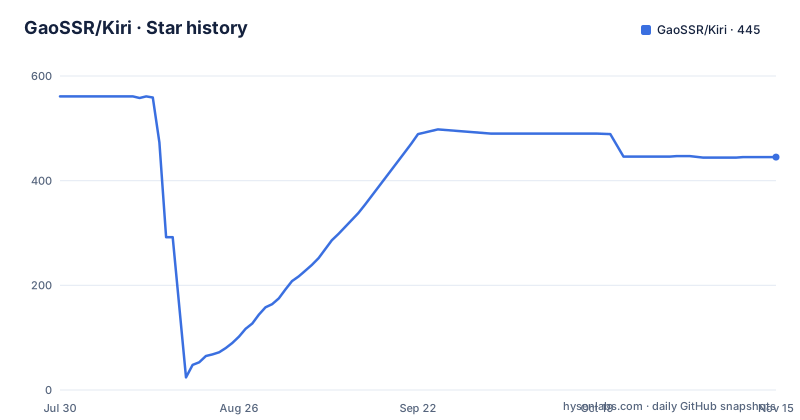
Star history
- GaoSSR/Kiri445 ★ · -116
| Repository | 2026-07-30 | 2026-11-15 |
|---|---|---|
| GaoSSR/Kiri | 561 | 445 |
-116 Stars in the last 108 days, measured from the daily GitHub snapshot. Compare with other projects
Editorial analysis
The Problem: Local Ports Are a Fog of PIDs and Silent Failures
Every developer who runs a few services locally has hit the same wall: a port is occupied, but by what? The default tools, lsof on macOS, ss on Linux, Get-NetTCPConnection on Windows, give you a PID and a socket, but not the project name, the framework, or whether the process is still attached to a parent that matters. Kiri solves this by presenting a focused table of local development services, with columns for port, process, PID, memory usage, project name, detected framework, uptime, and health status. The audience is developers who run multiple servers, API mocks, or AI coding tool daemons and need to answer one question quickly: what is on this port, and can I kill it safely?
How Kiri Gathers Data: Native Commands, Not a Daemon
Kiri does not run a background agent. It shells out to the operating system's own tools on each invocation. On macOS it uses lsof, ps, tail, and the macOS log command, with optional Docker metadata. On Linux it uses ss, ps, and /proc. On Windows it uses PowerShell/CIM and Get-NetTCPConnection. This design keeps the binary small and avoids requiring root privileges, but it means Kiri's accuracy depends on what those native commands expose. For example, on Windows, process working directories are best-effort from executable paths, so project name detection may be weaker there. Docker is optional; if Docker is not running, Kiri continues without container mappings, which is a sensible fallback but means containerized services may not show their project name unless Docker metadata is available.
The ports Command: A Focused Table with Status Labels
Running `ports` shows a table of local development services. The README shows an ASCII logo of a cat-like character that says "Kiri is watching 5 ports, 5 ports active" above the table. The table includes a Mem column, so you can spot memory hogs without switching to a separate process viewer. The status labels are the most distinctive feature: `healthy` means the process is running and still has a normal parent process; `orphaned` means the process is alive and may still be listening, but its original parent has exited; `zombie` means the process has exited but the OS still has a reaped record. This distinction is practical. After you close a terminal or an IDE task, a child server can keep running. Kiri tells you that the process is an orphan, not a zombie, so you know it is still consuming resources and can be killed or kept.
Killing and Following Logs: The Two Commands That Matter
The `ports kill <port>` command terminates the process behind a port, which is the usual remedy for a stuck dev server. The `ports logs <port|pid> -f` command follows the logs of the process listening on a port. Kiri adds ANSI colors to common development log formats, including Java, Python, Go, Node.js, logfmt, and JSON logs. The README notes that for services started through a terminal, a stable file-backed log such as `.dev-logs/service.log` lets `ports logs` follow output from another process. That is a key constraint: if the process writes logs only to stdout and the terminal is closed, Kiri may not be able to follow them. The `--lines` flag lets you show a specific number of recent lines and exit, which is useful for a quick check without entering follow mode.
Installation and Platform Coverage: Prebuilt Binaries, Not a Compile
Kiri ships prebuilt release artifacts for macOS arm64/x64, Linux x64, and Windows x64. You can install it via npm with `npm install -g @gaossr/kiri@latest`, via Homebrew with `brew install gaossr/tap/kiri` (recommended on macOS), or via a curl install script on macOS/Linux. Windows users run a PowerShell one-liner. The README stresses that npm and the install scripts use prebuilt native binaries and do not compile Rust locally, so installation is fast and does not require a Rust toolchain. Linux arm64 and Windows arm64 are planned but not yet supported, which is a real gap for users on Apple Silicon Linux VMs or ARM Windows devices. The development section lists commands for maintainers, including `cargo fmt`, `cargo test`, `cargo clippy --all-targets -- -D warnings`, and `scripts/perf-smoke.sh`, but those are for source builds, not end users.
Limitations and Wrong-Tool Cases
Kiri is not a process manager. It does not start, stop, or restart services; it only views and kills. For developers who need to manage long-lived services with dependencies, a tool like `foreman` or `overmind` is more appropriate. Also, Kiri's log following depends on the process writing to a file that Kiri can tail. If a process logs only to stdout and you close the terminal, `ports logs` may show nothing. The README suggests using a stable file-backed log for that reason, but it is a workaround, not a built-in feature. Another limitation is that Kiri's process detection is best-effort on Windows, and Docker metadata is optional, so containerized services may not show project names unless Docker is running. Finally, the ASCII logo and ANSI colors are on by default, which some users may find noisy in a CI or non-interactive shell; the README does not mention a `--no-color` flag, so you may need to pipe output or set environment variables to suppress it.
Alternatives: port-whisperer and the Native Toolchain
Kiri's README credits port-whisperer as an inspiration, specifically the idea of making local development ports easier to see and clean up. port-whisperer is a different project, but it shares the same goal: a CLI that shows what is on a port. The difference is that Kiri adds a broader feature set: orphan detection, log following with ANSI coloring, and a `ps` view for background processes like MCP servers. If you need only a quick port-to-process lookup, the native tools themselves, `lsof -i :3000` on macOS or `ss -tulpn` on Linux, are free and always available. But those tools do not give you project names, framework detection, or the orphaned label. Kiri's value is in the aggregation and the semantic status labels, which the native tools do not provide.
Maintenance and Licensing
Kiri is licensed under Apache-2.0, which is permissive for both personal and commercial use. The repository has a CHANGELOG, a CONTRIBUTING guide, and a SECURITY policy, which suggests the project is maintained with a release process. The latest release at the time of writing is v0.1.24, with v0.1.23 and v0.1.22 in the preceding weeks, indicating active development. The maintenance cost for users is low because the tool is a single binary and does not require a runtime. However, because it relies on native commands that change across OS versions, you may need to update Kiri to keep up with platform changes. The development scripts, such as `scripts/verify-release.sh`, suggest the maintainers have a release verification process, but there is no information about long-term support or a roadmap beyond the planned ARM64 support.
Editorial conclusion
Adopt Kiri if you regularly juggle multiple local development services and need a fast, terminal-based way to see which process owns a port, follow its logs, and kill it when it misbehaves. Its orphan detection is especially useful for developers who close IDE tasks or AI coding sessions but leave child servers running. Do not adopt it if you need deep container orchestration or cross-platform ARM support today, since Linux arm64 and Windows arm64 are still planned. Before relying on it in production-like workflows, verify that your platform's native commands (lsof, ss, Get-NetTCPConnection) are present and that your log files are in a stable, file-backed location if you want to follow logs reliably. Kiri is a focused tool, not a process manager, so treat it as a complement to your existing workflow rather than a replacement.
Frequently asked questions
What does Kiri install and which command do I run?
The package is kiri, published on npm as @gaossr/kiri and on Homebrew as gaossr/tap/kiri, but the binary it installs is named ports. Every documented command starts with ports, for example ports, ports --all, ports ps and ports logs <port|pid> -f.
How do I install Kiri on macOS, Linux and Windows?
With npm install -g @gaossr/kiri@latest, with brew install gaossr/tap/kiri which is the recommended route on macOS, with the shell install script on macOS and Linux, or with the PowerShell one-liner on Windows. All four install prebuilt native binaries and none compiles Rust locally.
What do the healthy, orphaned and zombie labels mean in Kiri?
healthy means the process is running with a normal parent. orphaned means it is still alive and may still be listening on a port, but the parent that started it has already exited, which is an orphan rather than a zombie. zombie means the process has exited and the operating system still holds an unreaped record.
Which platforms does Kiri support?
macOS on both arm64 and x64, Linux x64, and Windows x64. Linux arm64 and Windows arm64 are listed as planned, so the tool currently does not run on ARM Linux build servers even though Apple Silicon is covered.
Official sources
Add this badge to your README
If you maintain this project, the badge below links readers to this analysis and shows its maintenance status from the daily GitHub snapshot. Paste the markdown into your README; add ?metric=license or ?metric=stars to the image URL for a different field.

[](https://hysenlabs.com/projects/gaossr-kiri)Star history chart for your README
[](https://hysenlabs.com/projects/gaossr-kiri)Was this useful?