zeroclaw is one config file and one binary wrapped around your model provider
Fast, small, and fully autonomous AI personal assistant infrastructure, any OS, any platform, deploy anywhere, swap anything.
At a glance
- What is it?
- ZeroClaw is a Rust agent runtime that keeps its whole configuration in a single TOML file, mirrors every key into environment variables, and defaults to supervised autonomy with approval gates. It suits someone who wants to own the process and the keys, and it punishes anyone who wants a finished product rather than a runtime they must operate.
- Who is it for?
- Adopt it if you want a self hosted agent loop you can pin, audit and switch providers on, and read the autonomy and sandbox settings before the first run rather than after it. Do not adopt it expecting a finished assistant, because the safety tiers, the channel set and the container images are all yours to configure, and a single binary is what ships, not what you get to skip.
- Can I use it commercially?
- Yes. Apache-2.0 is a permissive licence: you can use, modify and sell software built on it, as long as you keep its copyright and licence notices.
- Is it still maintained?
- Yes. The repository received new commits within the last day.
- What is it written in?
- Mainly Rust, according to GitHub's language statistics.
Answers come from the project's GitHub data, last synced on November 13, 2026, and from our analysis. They are not legal advice.
Star history
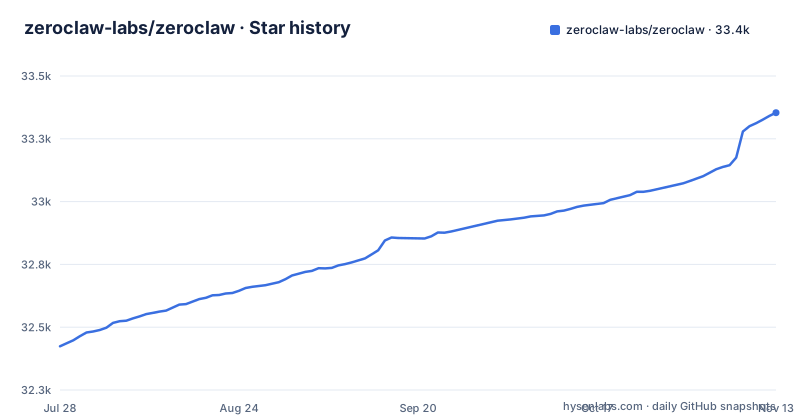
- zeroclaw-labs/zeroclaw33,354 ★ · +930
| Repository | 2026-07-28 | 2026-11-13 |
|---|---|---|
| zeroclaw-labs/zeroclaw | 32.4k | 33.4k |
930 Stars in the last 108 days, measured from the daily GitHub snapshot. Compare with other projects
Editorial analysis
The recommended install pipes a script from master straight into sh
The install path a Unix user is pointed at fetches a shell script from the default branch and hands it to sh, then invokes the binary from a Cargo style bin directory:
curl -fsSL https://raw.githubusercontent.com/zeroclaw-labs/zeroclaw/master/install.sh | sh
"${CARGO_HOME:-$HOME/.cargo}/bin/zeroclaw" quickstart
The default branch is master and the URL names that branch, not a tag, so what you execute is the tip of the branch rather than the v0.8.7 release published on 2026-10-27. The second line also assumes the binary landed in the default Cargo location, so a custom CARGO_HOME changes the path you have to invoke. The README block containing these commands is marked as generated by a cargo command and not to be edited, and the complete flag reference lives behind `./install.sh --help`. Windows is handled differently: the guide there points at a prebuilt PowerShell path that needs no Rust toolchain, installs the current release, updates PATH, and runs Quickstart.
YOLO mode sits one link away from the approval gates
Autonomy is a setting, and the default is called supervised: medium risk operations require approval and high risk ones are blocked. Around that sit workspace boundaries, a command policy, OS level sandboxes through Landlock, Bubblewrap, Seatbelt or Docker, and cryptographic tool receipts written on every action. The same document then offers a YOLO mode for trusted development boxes that skips the safety gates. The consequence is that the guardrails are a configuration decision rather than a property of the binary, and the binary will run shell, browser, HTTP, hardware and custom MCP server tools when told to.
Every key has an environment mirror and the old fallbacks were deleted
As of v0.8.0 there is a single environment override grammar, `ZEROCLAW_<dotted_path_with_double_underscores>=<value>`, where each doubled separator is one step of the path and the tail repeats the TOML path in order. The provider specific fallbacks and the earlier generic ones, including `API_KEY`, `ANTHROPIC_API_KEY`, `OPENAI_API_KEY`, `PROVIDER` and `ZEROCLAW_MODEL`, were removed outright. The example file keeps its entries commented out, with an alias that contains one, a model, and a key:
# ZEROCLAW_providers__models__openrouter__prod_v2__model=anthropic/claude-sonnet-4-6
# ZEROCLAW_providers__models__openrouter__prod_v2__api_key=sk-or-...
So a deployment carrying an old environment file no longer gets its credentials from those variables. The separator rule is also worth reading twice: one underscore inside a field name joins snake case into the schema's kebab case form, while underscores inside an alias are literal characters, which is why `api_key` and the alias `prod_v2` appear in the same block. The compose file wires the same grammar as a live variable, `ZEROCLAW_providers__models__openrouter__default__api_key=${OPENROUTER_API_KEY:-}`, and runtime knobs follow the same path, with `ZEROCLAW_gateway__request_timeout_secs=120` and its long running counterpart at 900.
A working V3 config is four section headers, not one key
Configuration lives in one TOML file at `~/.zeroclaw/config.toml`, and the project says a V3 config has at least four section headers, each shaped as type and alias: a provider entry, an agent that references it, and a risk profile that agent gates against. The first four commands are what turn that structure into a running loop:
zeroclaw quickstart               # one-shot setup: pick a provider, write a working config
zeroclaw agent -a <alias>         # interactive chat using the [agents.<alias>] entry
zeroclaw service install          # register as systemd/launchctl/Windows Service
zeroclaw service start            # run it always-on in the background
Because the agent references the provider by alias, the name is a live link rather than decoration, so renaming a provider alias means editing the agent that points at it. The service pair is also the difference between a tool you run and a resident process that answers on its own.
Codex auth is a stored profile, not an api_key on the entry
Subscription style authentication takes a different shape from a plain key, and Quickstart will write the provider entry for you:
zeroclaw auth login --model-provider openai-codex --import ~/.codex/auth.json  # if already signed in with Codex CLI
zeroclaw quickstart --model-provider openai-codex --model gpt-5.4
The entry it produces looks like this, with type and alias you choose yourself:
[providers.models.openai.coding]   # type = openai; alias = coding (you choose)
model = "gpt-5.4"
wire_api = "responses"
requires_openai_auth = true
The notes are explicit that normal Codex auth uses stored auth profiles and not an api_key on the provider entry, while Claude Max setup token auth stays on the Anthropic slot: you run `claude setup-token`, pick `setup_token` in Quickstart, and paste the result into the prompt. Two providers, two auth shapes, and an agent entry pointing at the alias with `model_provider = "openai.<alias>"`.
The distroless image exits immediately on ARM64
The published compose file runs `ghcr.io/zeroclaw-labs/zeroclaw:latest`, and its own comments say that on ARM64 environments the distroless image exits immediately, with the Debian compatibility image given as the switch. The trade off is the one the file states: the distroless variant has no shell at all, while the Debian variant includes bash, git and curl. Building locally is offered both ways, once from the distroless Dockerfile and once from `Dockerfile.debian`. Two more details catch people out. The gateway listens on port 42617, and the comment explains that Docker bridge traffic never reaches container loopback, so a config that persisted `host = "127.0.0.1"` stays unreachable unless the process listens on the container interface. A bind address that works on the host is therefore a real failure mode in the container.
Base images are pinned by digest and the dashboard builds off platform
The Dockerfile does not name base images directly. Each one arrives as a build argument with a digest already baked in, generated from a manifest in the dev and CI directory by a cargo command, so the defaults are node:24-bookworm-slim, rust:1.98-slim, debian:trixie-slim and a distroless cc image on the nonroot user. The frontend stage is pinned to the build platform rather than the target, with a comment explaining that the dashboard bundle is architecture independent, which keeps node and the web build running natively instead of under emulation on a multi platform build.
One shipped binary, thirty workspace members, and two licences
The overview calls ZeroClaw a single Rust binary, and that describes the artefact you install rather than the tree you clone. The workspace lists 42 members, about 28 of them excluding test fixtures, among them crates for providers, memory, channels, tools, plugins, the SOP graph, the gateway, hardware, TLS and the runtime, plus three applications named zerorelay, zerocode and a Tauri app. Alongside them sit fuzz, benches, evals, firmware, deploy-k8s, dist and dev directories, so the release pipeline and its checks are part of the repository. Licensing is worth reading twice as well: the repository is recorded as Apache-2.0, while the workspace manifest declares `MIT OR Apache-2.0` and the root carries both a LICENSE-APACHE and a LICENSE-MIT file. If you intend to vendor or redistribute any of it, that is the line to check rather than the badge.
Editorial conclusion
Adopt it if you want a self hosted agent loop you can pin, audit and switch providers on, and read the autonomy and sandbox settings before the first run rather than after it. Do not adopt it expecting a finished assistant, because the safety tiers, the channel set and the container images are all yours to configure, and a single binary is what ships, not what you get to skip.
Frequently asked questions
What does zero claw do?
It is an agent runtime, a single Rust binary you configure and run. It talks to Anthropic, OpenAI, Ollama and about twenty other model providers, answers over thirty channels including Discord, Telegram, Matrix, email, voice and webhooks, and acts through shell, browser, HTTP, hardware and custom MCP server tools.
what is zero claw used for
It is meant to run always on your own machine with your own keys in your own workspace, registered as a systemd, launchctl or Windows service. It also drives event triggered SOPs over MQTT, webhook, cron or peripheral events, exposes an HTTP and WebSocket gateway with a web dashboard, and speaks the Agent Client Protocol over stdio for IDE integration.
how to install zero claw
On Unix the documented path is the generated install script fetched from the master branch and piped to sh, followed by the quickstart command. Platform notes are linked separately for Linux, macOS, Windows, FreeBSD, NixOS and Docker, and `./install.sh --help` holds the full installer flag reference.
how to install zeroclaw on windows
The recommended Windows path is Rust free: a prebuilt PowerShell route in the Windows setup guide that installs the current release, updates PATH, and runs Quickstart. Source builds, app and feature selection, and PATH behaviour are compared on the installation paths page.
is zero claw free
The code is published under Apache-2.0 in the repository, with the workspace manifest offering MIT OR Apache-2.0. Model usage is separate, because the runtime calls whichever provider you configure, from Anthropic and OpenAI down to a local Ollama endpoint, using your own keys.
is zeroclaw better than openclaw
No head-to-head comparison is made here. What the README states about itself is ownership of the agent, the data and the machine, one TOML config at `~/.zeroclaw/config.toml`, and a supervised autonomy default where medium risk operations need approval and high risk ones are blocked.
Official sources
Add this badge to your README
If you maintain this project, the badge below links readers to this analysis and shows its maintenance status from the daily GitHub snapshot. Paste the markdown into your README; add ?metric=license or ?metric=stars to the image URL for a different field.

[](https://hysenlabs.com/projects/zeroclaw-labs-zeroclaw)Star history chart for your README
[](https://hysenlabs.com/projects/zeroclaw-labs-zeroclaw)Was this useful?