next-seo: JSON-LD components for Next.js, and nothing else
Next SEO is a plug in that makes managing your SEO easier in Next.js projects.
At a glance
- What is it?
- An MIT licensed TypeScript package that renders Schema.org structured data as React components, leaving meta tags to Next.js's own metadata API.
- Who is it for?
- The clearest way to understand next-seo is that it stopped trying to own page metadata. The README tells you to use Next.js's `generateMetadata` for meta tags and titles, and the package keeps only structured data, which is a smaller surface with fewer ways to conflict with the framework.
- Can I use it commercially?
- Yes. MIT is a permissive licence: you can use, modify and sell software built on it, as long as you keep its copyright and licence notices.
- Is it still maintained?
- Yes. The repository last received commits 86 days ago.
- What is it written in?
- Mainly TypeScript, according to GitHub's language statistics.
Answers come from the project's GitHub data, last synced on October 23, 2026, and from our analysis. They are not legal advice.
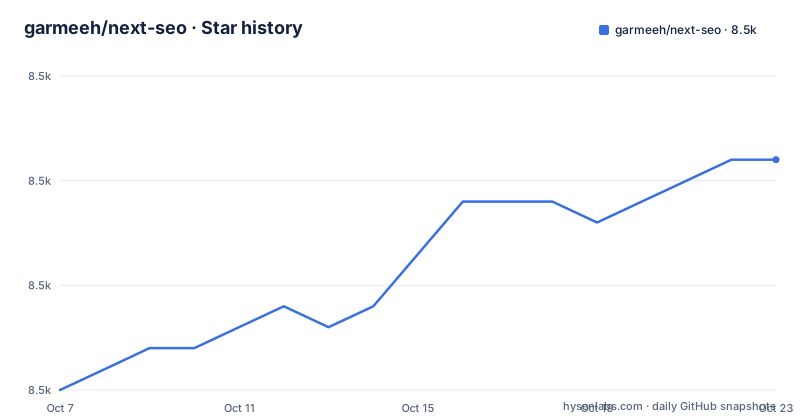
Star history
- garmeeh/next-seo8,531 ★ · +11
| Repository | 2026-10-07 | 2026-10-23 |
|---|---|---|
| garmeeh/next-seo | 8.5k | 8.5k |
11 Stars in the last 16 days, measured from the daily GitHub snapshot. Compare with other projects
Editorial analysis
A narrow job, stated in one sentence
The README describes Next SEO as a plugin that makes managing SEO easier in Next.js projects, and then narrows that immediately: it provides components for structured data, JSON-LD, that help search engines understand your content better.
That narrowing is the most important sentence in the document, and there is a note attached to it. For standard meta tags such as `<meta>` and `<title>`, the README tells you to use Next.js's built in `generateMetadata` function instead. The package is not competing with the framework's metadata API. It is filling a gap the framework does not cover, which is schema.org markup expressed as typed React props rather than hand written objects.
The scale fits the scope. 8,513 stars and 458 forks on a repository with only 7 open issues at its last push on 2026-07-29. That combination says a lot of people depend on it and few of them are filing problems, which is what you would expect from a package with a narrow contract and a large install base.
The README's front matter is worth mentioning too, because it tells you about the project's ecosystem. Above the actual documentation sit sections promoting a commercial tool for backlinks and SEO content, and a separate skill product described as the only SEO skill your agent needs, with a linked newsletter. The open source package is free and MIT licensed; the README is doing some selling above it.
Installation, and two entry points
Installation is one command, with the four common package managers spelled out:
npm install next-seo
# or
yarn add next-seo
# or
pnpm add next-seo
# or
bun add next-seo
Then there is the routing question, and the README answers it directly. If you are on the Pages Router, import components from `next-seo/pages` rather than the root entry point. That is not a stylistic preference, it is a separate published entry point, which the package manifest confirms by declaring an exports map with a `./pages` condition alongside the root condition.
The manifest also says `"sideEffects": false`, which lets a bundler drop components you do not import. The published files array is just `dist`, and there are three artifacts per entry point: CommonJS at `./dist/index.js`, ES modules at `./dist/index.mjs`, and declarations at `./dist/index.d.ts`. The build uses `tsup`, and the type checking, linting and test scripts are all wired into a single `test` entry point that runs type checking and linting before telling you which test commands to run next.
The README carries two pointers for people arriving from older versions. Documentation for v6 lives on a separate branch, and documentation for the `NextSeo` component used with the Pages Router lives at `src/pages/README.md`. Both matter if you are reading a tutorial written years ago and wondering why the component names do not match.
Article markup as JSX props
The basic usage example is short enough to read as documentation of the API rather than as a tutorial:
import { ArticleJsonLd } from "next-seo";

export default function BlogPost() {
  return (
    <ArticleJsonLd
      headline="Getting Started with Next SEO"
      datePublished="2024-01-01T08:00:00+00:00"
      author="John Doe"
      image="https://example.com/article-image.jpg"
      description="Learn how to improve your Next.js SEO"
    />
What this buys over hand writing JSON is type checking. The props table for `ArticleJsonLd` gives the `type` prop as a union of `Article`, `NewsArticle`, `BlogPosting` and `Blog`, defaulting to `Article`, and marks `headline` as required while everything else is optional. Author accepts a string, a `Person`, an `Organization`, or an array of any of those, which is the sort of thing that is tedious to express correctly in a hand rolled object.
The advanced examples show the same idea under load. One demonstrates multiple authors as an array that mixes objects and plain strings, several image URLs at different aspect ratios, and a nested publisher object with a logo. Another sets `type` to `BlogPosting`, passes an author as an Organization, passes an image as an ImageObject with width, height and caption, and supplies `mainEntityOfPage` as a WebPage with an `@id`.
The nonce problem and a v7.3 addition
The newest feature in the package exists because of how JSON-LD is delivered. Every JSON-LD component renders an inline `<script type="application/ld+json">` tag. If a site sends a strict Content Security Policy header such as `script-src 'nonce-{RANDOM}'`, that inline script is blocked unless it carries a matching nonce.
The fix in 7.3.0 is an optional `nonce` prop on every JSON-LD component, forwarded to the rendered script tag:
import { headers } from "next/headers";
import { ArticleJsonLd } from "next-seo";

export default async function BlogPost() {
  const nonce = (await headers()).get("x-nonce") ?? undefined;
The nonce has to be generated per request and match the value in your CSP header, which is why the example reads it from request headers. The README points at the Next.js Content Security Policy guide for generating one in middleware and exposing it to pages, and adds the reassurance that omitting the prop renders no attribute at all, so existing usage is unaffected.
This is a small change with a large practical reach. Strict CSP adoption has been growing, and a package that emits inline scripts is exactly the kind of dependency that gets in the way of turning it on. Version 7.3.0 was published on 2026-07-29 and is the current manifest version, so the prop is available now rather than pending.
What v7 added and what the tree reveals
Three releases are in the repository, all minor, and each adds a component or a prop rather than changing existing behaviour. Version 7.1.0 on 2026-01-27 added `HowToJsonLd`, following the Schema.org HowTo specification, with support for HowToStep, HowToSection, HowToDirection and HowToTip types, plus HowToSupply and HowToTool for materials and equipment, ISO 8601 duration properties for prep, perform and total time, `estimatedCost` as either a string or a MonetaryAmount object, `yield` as a string or QuantitativeValue, and video support through VideoObject.
Version 7.2.0 on 2026-02-15 added `review` and `aggregateRating` props to the `OrganizationJsonLd` component, matching support that already existed in `LocalBusinessJsonLd`, with both processed using shared utilities. That phrasing is a small sign of code health: the two components share processing rather than duplicating it.
The repository tree explains how a package this size stays maintainable. There is a `src/` directory, `tests/`, and an `examples/app-router-showcase/` directory, which is the App Router example the scripts refer to. Tooling is split by purpose: `vitest.config.ts` and `playwright.config.ts` for unit and end to end tests, `tsup.config.ts` for the build, `eslint.config.mjs` for linting, `.husky/` for git hooks, and a `test:sweep` script that chains build, typecheck, lint, example lint and typecheck, and both test suites together.
Release notes are generated by changesets, which is what the `.changeset/` directory is for. There is also an `AGENTS.md`, a `CLAUDE.md`, a `repomix.config.json`, a `LIST.md`, and `ADDING_NEW_COMPONENTS.md` plus `CUSTOM_COMPONENTS.md`, the last two being the maintainer's own guidance for extending the package. `pnpm-workspace.yaml` and `pnpm-lock.yaml` confirm pnpm as the package manager of the repository itself.
Editorial conclusion
The clearest way to understand next-seo is that it stopped trying to own page metadata. The README tells you to use Next.js's `generateMetadata` for meta tags and titles, and the package keeps only structured data, which is a smaller surface with fewer ways to conflict with the framework. It publishes as `next-seo` with a `./pages` subpath for the Pages Router, ships type declarations, and reached 7.3.0 on 2026-07-29. The README is the only documentation in the repository, and its length depends on how many components you need, so read the section for your schema type rather than end to end. The `examples/app-router-showcase/` directory is the fastest way to see the components wired into a real route.
Frequently asked questions
What does the next-seo package actually do in a Next.js app?
It provides React components that render schema.org JSON-LD as inline script tags, one component per schema type such as ArticleJsonLd, HowToJsonLd and OrganizationJsonLd. For ordinary meta tags and title elements the README directs you to Next.js's built in generateMetadata function instead, so the package covers structured data rather than page metadata.
How do I install next-seo and import it in the App Router?
Run npm install next-seo, or use yarn, pnpm or bun. Import from the package root for the App Router, for example importing ArticleJsonLd from next-seo. On the Pages Router you import from next-seo/pages instead, which is a separate entry point declared in the package manifest exports map.
Does next-seo work with a strict Content Security Policy?
Yes, as of version 7.3.0 published on 2026-07-29. Every JSON-LD component accepts an optional nonce prop that is forwarded to the rendered script tag, so you can read the per request nonce from headers and pass it through. If you omit the prop, no nonce attribute is rendered and existing usage is unchanged.
Which schema.org types does next-seo support?
The README documents ArticleJsonLd in detail, with the type prop accepting Article, NewsArticle, BlogPosting or Blog, and the release notes add HowToJsonLd in 7.1.0 and review and aggregateRating props on OrganizationJsonLd in 7.2.0. The repository also carries ADDING_NEW_COMPONENTS.md describing how components are added.
Is next-seo still maintained?
Yes. Version 7.3.0 was published on 2026-07-29, matching the last push to the repository, and the current manifest version is 7.3.0. The repository had only 7 open issues at that point against more than 8,500 stars, and carries a CHANGELOG.md and an MIT license.
Official sources
Add this badge to your README
If you maintain this project, the badge below links readers to this analysis and shows its maintenance status from the daily GitHub snapshot. Paste the markdown into your README; add ?metric=license or ?metric=stars to the image URL for a different field.

[](https://hysenlabs.com/projects/garmeeh-next-seo)Star history chart for your README
[](https://hysenlabs.com/projects/garmeeh-next-seo)Was this useful?