gdamore/tcell: a pure Go cell-based terminal package for TUIs
Tcell is an alternate terminal package, similar in some ways to termbox, but better in others.
At a glance
- What is it?
- Tcell is a Go library that draws a cell-based view onto text terminals and returns keyboard, mouse, paste and resize events. Version 3 breaks compatibility with versions 1 and 2, and this article covers what it does, how to install it, and where it stops being the right tool.
- Who is it for?
- Adopt tcell if you are writing a Go text interface that needs grapheme-aware drawing, mouse tracking or 24-bit color, and you are willing to target the current or previous Go release. Do not adopt it for a one-shot CLI that prints and exits, or if you must stay on an older Go toolchain, since go.mod requires Go 1.26.0.
- Can I use it commercially?
- Yes. Apache-2.0 is a permissive licence: you can use, modify and sell software built on it, as long as you keep its copyright and licence notices.
- Is it still maintained?
- Yes. The repository last received commits 6 days ago.
- What is it written in?
- Mainly Go, according to GitHub's language statistics.
Answers come from the project's GitHub data, last synced on November 15, 2026, and from our analysis. They are not legal advice.
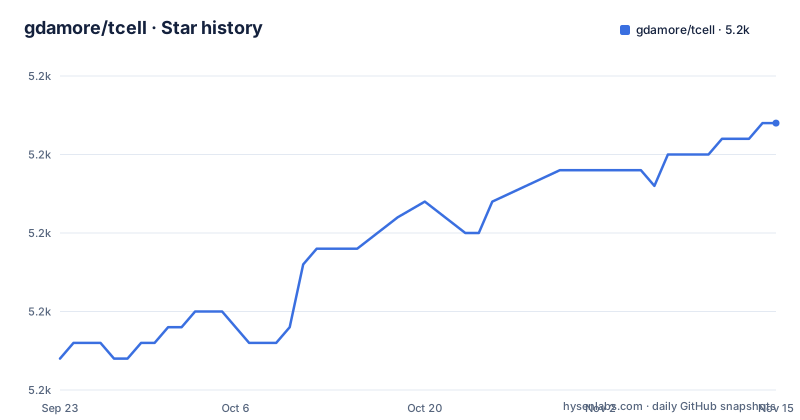
Star history
- gdamore/tcell5,237 ★ · +15
| Repository | 2026-09-23 | 2026-11-15 |
|---|---|---|
| gdamore/tcell | 5.2k | 5.2k |
15 Stars in the last 53 days, measured from the daily GitHub snapshot. Compare with other projects
Editorial analysis
What tcell solves, and who it is for
A Go program that wants a full-screen text interface has to do three unglamorous things: draw characters into fixed cells, read raw input bytes from a terminal that speaks an unknown dialect, and react when the window changes size. Tcell packages all three. The README describes it as "a cell based view for text terminals, like XTerm", inspired by termbox but with additional improvements. The audience is Go developers building editors, dashboards, log viewers or interactive installers, not people writing scripts that print lines and exit. The repository ships a TUTORIAL.md walkthrough, a demos directory, a _demos directory, and a wiki gallery, so there is material to read before writing your own screen loop. The repository also carries platform-specific notes in README-windows.md, README-plan9.md and README-wasm.md, which tells you the maintainers expect the same API to be used on Windows, Plan 9 and WebAssembly rather than only on Linux.
How tcell draws cells and reads input
The core is a Screen interface in screen.go. Drawing goes through Put(), which the README says takes a string of legal UTF-8 and displays the first grapheme cluster, returning the width actually displayed so you can advance the column for the next grapheme. PutStr() and PutStrStyled() draw a single line and clip it at the screen edge. Input arrives as events: event.go, key.go, mouse.go, paste.go, resize.go and focus.go each cover a family, so a program polls or waits for events rather than parsing escape sequences itself. Style and color live in style.go and color.go, with a color subdirectory. Internally the library is UTF-8, matching Go, and it converts to and from other character sets through the golang.org/x/text/encoding packages. That conversion is opt-in: the README states your application must supply the encodings, because bundling the most common ones adds about 2 MB to the binary, and an encoding subdirectory exists if you want them all anyway. The dependency list in go.mod is small and pure Go, with no CGO: clipperhouse/displaywidth, gdamore/encoding, lucasb-eyer/go-colorful, golang.org/x/sys, golang.org/x/term, golang.org/x/text and clipperhouse/uax29.
Installing tcell and drawing your first cell
Tcell is a library, not a binary, so installation is a Go module fetch. The module path in go.mod is github.com/gdamore/tcell/v3, and the README notes that version 2 remains importable as github.com/gdamore/tcell/v2 while version 1 is unmaintained and should not be used. Add the module with:
go get github.com/gdamore/tcell/v3The next step is the tutorial and the demonstration programs. The README says a brief, still somewhat rough, tutorial is available in TUTORIAL.md, and that there are demonstration programs in the ./demos directory as well as some in ./_demos. Start from a demo rather than from a sketch, because the exported names and their order matter.
If you are migrating an existing version 2 program, read CHANGESv3.md first: the README states version 3 has breaking changes relative to versions 1 and 2, and version 1 is unmaintained.
Terminal overrides when negotiation goes wrong
The interesting part of tcell's design is that it negotiates terminal capabilities at startup instead of trusting TERM alone. The README is candid that this path fails on some emulators: "some terminal emulators answer those queries incorrectly." Four environment variables are documented as escape hatches. TCELL_KEYBOARD_PROTOCOL accepts auto, legacy, kitty, win32 or xterm and forces the keyboard reporting protocol. TCELL_NEGOTIATE accepts auto or disable and turns off startup negotiation when terminal responses themselves are the problem. TCELL_MOUSE accepts auto or disable. TCELL_ESCDELAY sets how long tcell waits for a possible escape sequence after Escape, 50 ms by default (125 ms on Windows). These matter because the keyboard story is where tcell claims an advantage: the README says it can discriminate between CTRL-I and TAB and support a rich set of modifiers, but only if the terminal emulator implements one of the modern keyboard protocols. On an older emulator the library falls back, and your key bindings may collapse. Setting TCELL_KEYBOARD_PROTOCOL=legacy forces the legacy keyboard reporting protocol. The same pattern applies to color: COLORTERM=truecolor forces 24-bit color, a TERM suffix of -truecolor or -direct implies it, Windows assumes it, and TCELL_TRUECOLOR=disable turns it off.
Where tcell is the wrong choice
Two limits are explicit in the README. First, the Go support policy: tcell officially supports only the current stable Go release and the one immediately prior, and go.mod declares go 1.26.0. If your project is pinned to an older toolchain, upgrading tcell may force a toolchain upgrade with it. Second, the wide-character rule. Put() returns the width displayed, and the README warns that if a second character is displayed immediately in the cell adjacent to a wide character, offset by one instead of by two, "the results are undefined." Any code that computes column positions by counting runes rather than using the returned width is exposed to that. There is also a size trade-off you accept or avoid deliberately: the README says the full set of common encodings bloats the program by about 2 MB, which is why you must supply them yourself. Finally, tcell is a rendering and input library, not a widget toolkit. It gives you cells, styles and events; layout, scrolling and focus handling are yours to write. If you want buttons and forms out of the box, this is the wrong layer.
How tcell differs from termbox and from higher-level toolkits
The README itself frames the comparison: tcell was inspired by termbox but "includes many additional improvements." The concrete differences it lists are grapheme cluster handling, wide and combining characters, conversion to and from non-UTF-8 locales, richer special-key and modifier support, and enhanced mouse tracking with motion, click-drag and wheel events. Termbox's model is a flat cell buffer with a simpler event set, which is easier to reason about but leaves wide-character placement and modern keyboard protocols to you. The other direction is a widget toolkit layered on top of a terminal library. That choice trades control for speed of development: you get ready-made components but less say over exactly which cell gets which rune. Tcell sits in the middle, and the repository layout reflects that. There is a color subdirectory for palette handling and an encoding subdirectory for character sets, but no widgets directory, because widgets are not the project's job.
Maintenance, licensing and upgrade cost
The repository is not archived, and the last push was on 2026-10-30, with releases v3.6.0 on 2026-10-11, v3.5.0 on 2026-09-11 and v3.4.2 on 2026-08-20. The release titles describe v3.6.0 as a feature release, v3.5.0 as a feature and bug-fix release and v3.4.2 as a bug-fix release. The licence is Apache-2.0, which permits commercial and closed-source use and includes a patent grant; the LICENSE file is in the repository root. That is a description of the licence text, not legal advice, and if you redistribute a modified tcell you should read the notice and attribution clauses yourself. The real upgrade cost is version 3's break from versions 1 and 2. The README states plainly that there are breaking changes, that version 2 stays importable at github.com/gdamore/tcell/v2, and that version 1 is unmaintained. CHANGESv2.md and CHANGESv3.md exist precisely to document those transitions, so budget time to read them before bumping the import path.
Editorial conclusion
Adopt tcell if you are writing a Go text interface that needs grapheme-aware drawing, mouse tracking or 24-bit color, and you are willing to target the current or previous Go release. Do not adopt it for a one-shot CLI that prints and exits, or if you must stay on an older Go toolchain, since go.mod requires Go 1.26.0. Before writing code, read TUTORIAL.md and the CHANGESv3.md migration notes, because the README states there are breaking changes relative to versions 1 and 2.
Frequently asked questions
What is tcell?
Tcell is a Go package that provides a cell-based view for text terminals such as XTerm. It was inspired by termbox and adds support for Unicode grapheme clusters, wide characters, richer keyboard and mouse events, and 24-bit color.
How do I install tcell in a Go project?
It is a Go module, not a standalone program, so you add it with go get github.com/gdamore/tcell/v3. The module path in go.mod is github.com/gdamore/tcell/v3, and go.mod declares go 1.26.0.
Does tcell require CGO or a C compiler?
No. The README states that tcell is pure Go, without any need for CGO, and that it works with mainstream systems officially supported by golang.
How do I force 24-bit color in tcell?
Set the COLORTERM environment variable to truecolor, or use a TERM value with the -truecolor or -direct suffix. You can turn it off with TCELL_TRUECOLOR=disable. On Windows, 24-bit color support is assumed.
What should I do if tcell misreads my terminal's capabilities?
The README documents user escape hatches for emulators that answer capability queries incorrectly: TCELL_NEGOTIATE=disable turns off startup negotiation, TCELL_KEYBOARD_PROTOCOL forces a keyboard reporting protocol, and TCELL_MOUSE=disable turns off mouse handling.
Official sources
Add this badge to your README
If you maintain this project, the badge below links readers to this analysis and shows its maintenance status from the daily GitHub snapshot. Paste the markdown into your README; add ?metric=license or ?metric=stars to the image URL for a different field.

[](https://hysenlabs.com/projects/gdamore-tcell)Star history chart for your README
[](https://hysenlabs.com/projects/gdamore-tcell)Was this useful?