Gentleman.Dots: a guided installer for Neovim, shells and terminal tools
My personal configuration for LazyVim !
At a glance
- What is it?
- Gentleman.Dots is a TUI-guided installer for a complete development environment covering Neovim, three shells, four terminal multiplexers and four terminal emulators, for macOS, Linux, Windows WSL and Android. A companion project, gentle-ai, adds AI agent configuration on top.
- Who is it for?
- Use Gentleman.Dots if you want a ready-made development environment for Neovim, Fish or Zsh, and Tmux or Zellij, and you are comfortable adopting someone else's configuration as a starting point. Skip it if you have a heavily customized existing setup, since the installer is designed to configure from scratch rather than to merge into what you already have.
- Can I use it commercially?
- Yes. Apache-2.0 is a permissive licence: you can use, modify and sell software built on it, as long as you keep its copyright and licence notices.
- Is it still maintained?
- Yes. The repository last received commits 12 days ago.
- What is it written in?
- Mainly Shell, according to GitHub's language statistics.
Answers come from the project's GitHub data, last synced on October 23, 2026, and from our analysis. They are not legal advice.
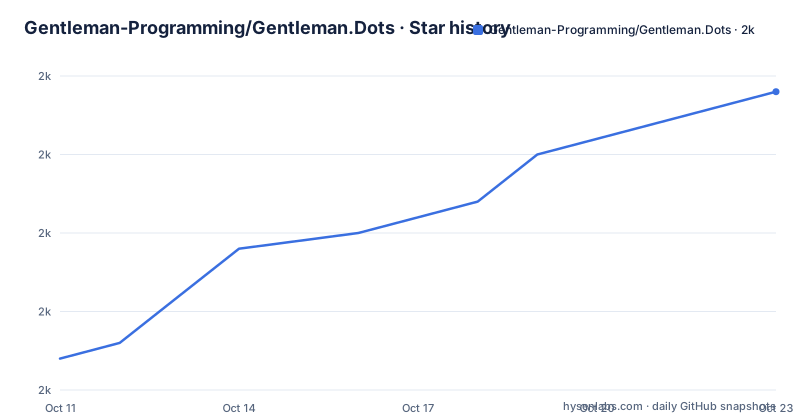
Star history
- Gentleman-Programming/Gentleman.Dots2,044 ★ · +17
| Repository | 2026-10-11 | 2026-10-23 |
|---|---|---|
| Gentleman-Programming/Gentleman.Dots | 2k | 2k |
17 Stars in the last 12 days, measured from the daily GitHub snapshot. Compare with other projects
Editorial analysis
What the project installs and why the repository description undersells it
Gentleman.Dots is described in the repository as "My personal configuration for LazyVim!" but the project covers substantially more than that short description. It is a complete development environment installer with five categories: Neovim (with LazyVim, LSP, autocompletion and AI integration), three shells (Fish, Zsh and Nushell), four terminal multiplexers (Tmux, Zellij, Herdr and a None option), four terminal emulators (Alacritty, WezTerm, Kitty and Ghostty), and CLI installers for Claude Code and OpenCode.
A TUI (text user interface) guides the installation, letting users choose which tools to install rather than taking the whole configuration. That selectivity separates this from a single monolithic dotfiles repository where every change affects every tool at once.
A companion project, gentle-ai at github.com/Gentleman-Programming/gentle-ai, handles the AI development layer separately. Gentleman.Dots installs the editor, shells and terminals; gentle-ai adds agent configuration, persistent memory and workflow on top. Install order is fixed: Gentleman.Dots first, then gentle-ai. Shell is the primary language listed in the repository metadata, covering the installer scripts; the configuration files themselves use Lua for Neovim and shell-specific syntax for Fish, Zsh and Nushell.
Homebrew install and what the TUI guides you through
Homebrew is the recommended install path. Two commands complete the installation:
brew install Gentleman-Programming/tap/gentleman-dots
gentleman-dots
Running `gentleman-dots` opens the TUI, which walks through tool selection and handles all configuration automatically. During multiplexer selection, the options are Tmux, Zellij, Herdr or None. Fish, Zsh and Nushell are patched during installation to auto-start the chosen multiplexer on fresh interactive shells, with logic that avoids starting a nested session inside an already-running multiplexer. Choosing None disables both the auto-start and the nesting guard.
Tmux users have one manual step after the installer finishes: open tmux and press `prefix + I` (capital I) to install plugins through TPM (Tmux Plugin Manager). Without that step, the theme and plugins do not load correctly. No equivalent post-install step is listed for Zellij or Herdr in the README.
The docs/tui-installer.md file covers the interactive installer in detail, including backup and restore functionality.
Direct download for four platforms and the WSL requirement on Windows
Direct download is available for four targets: macOS Apple Silicon (darwin-arm64), macOS Intel (darwin-amd64), Linux x86_64 (linux-amd64) and Linux ARM64 (linux-arm64). Each curl command downloads the installer binary from the latest GitHub release, makes it executable and runs it:
# Linux x86_64
curl -fsSL https://github.com/Gentleman-Programming/Gentleman.Dots/releases/latest/download/gentleman-installer-linux-amd64 -o gentleman.dots
chmod +x gentleman.dots
./gentleman.dots
Linux distributions in the platform table include Ubuntu/Debian, Fedora/RHEL and Arch. Fedora/RHEL uses dnf rather than Homebrew as the package manager. Windows requires WSL to be set up before running the installer; the README links to docs/manual-installation.md for that process.
Android (Termux, ARM64) is supported but requires building the installer locally from source. No pre-built binary is available for Termux, and the README links to docs/manual-installation.md#termux for those steps. Seven platforms in total appear in the supported platform table.
gentle-ai: the 24-skills AI layer with per-agent multi-agent limits
gentle-ai installs via a separate Homebrew tap and must run after Gentleman.Dots:
brew install Gentleman-Programming/tap/gentle-ai
gentle-ai
It configures six components: Engram (a persistent memory MCP server across sessions), SDD Workflow (Spec-Driven Development with orchestrated sub-agents), Skills (24 coding pattern libraries covering React 19, Next.js 15, TypeScript and Tailwind 4), Context7 (library documentation via MCP), a Gentleman-style teaching persona and security-first permission defaults for all agents.
Five agents are listed as supported: Claude Code, OpenCode, Gemini CLI, Cursor and VS Code Copilot. A closer reading of the agent support table reveals an asymmetry: Claude Code, OpenCode and Gemini CLI show checkmarks for both single-agent and multi-agent modes. Cursor and VS Code Copilot show a checkmark for single-agent only and a dash for multi-agent. The prose introduction names all five agents without distinguishing this limit, but the multi-agent SDD workflow, where a dedicated sub-agent handles each phase with individual model routing, is available for only three of the five.
The multi-agent description gives a concrete example: Claude Opus for design, Gemini for specs and GPT for verification.
Multiplexer auto-start logic and what the shell patches do
Shell integration is the mechanism that connects multiplexer choice to daily use. Each of the three shells (Fish, Zsh and Nushell) is patched during installation to detect the chosen multiplexer and start it automatically when a fresh interactive shell opens. The patch also checks whether a multiplexer session is already running before starting another, preventing nested layers.
The four multiplexer options represent different tradeoffs. Tmux is the most established, with a plugin ecosystem through TPM. Zellij is a newer Rust-based multiplexer with a different layout model. Herdr appears as a directory (herdr/) and a Nix configuration file (herdr.nix) at the repository root, with Nix packaging listed alongside the others; its wider adoption is not described in the README. None leaves shell sessions unattached to any multiplexer.
Choosing the wrong multiplexer at install time is not necessarily permanent: the TUI can be re-run to change the selection, though the README does not document what happens to existing multiplexer configuration files during a re-run.
The Vim Mastery Trainer: 7 modules, 15 lessons each and boss fights
Bundled with the installer is a Vim Mastery Trainer described as an RPG-style interactive learning tool. Seven modules cover distinct editing areas: Horizontal Movement (w, e, b, f, t, 0, $, ^), Vertical Movement (j, k, G, gg, {, }), Text Objects (iw, aw, i", a(, it, at), Change and Repeat (d, c, dd, cc, D, C, x), Substitution (r, R, s, S, ~, gu, gU, J), Macros and Registers (qa, @a, @@, "ay, "+p) and Regex and Search (/, ?, n, N, *, #, \v).
Each module includes 15 progressive lessons, a practice mode with intelligent exercise selection, boss fights and XP tracking. Launch it through the main installer menu under Vim Mastery Trainer.
For developers already fluent in Vim, the trainer is optional and adds nothing to the environment itself. For those coming from VS Code or another modal-less editor, it provides structured Vim practice without requiring a separate resource. Nothing in the README explains what the boss fights require or what XP unlocks.
Repository layout: one directory per tool and what that implies for piecemeal adoption
Each configured tool lives in its own top-level directory: GentlemanFish/, GentlemanNushell/, GentlemanZsh/, GentlemanNvim/, GentlemanTmux/, GentlemanZellij/, GentlemanGhostty/ and GentlemanKitty/. That separation makes it possible to read one tool's configuration in isolation without navigating a single large dotfiles file.
Whether the individual directories can be applied manually without running the full installer is not documented in the README. That question is relevant for anyone who wants only the Neovim configuration or only the Tmux setup. The docs/manual-installation.md file is where that process would be covered, but its content is not included in the repository material.
A Dockerfile.test at the repository root points to installer testing in a container. A skills/ directory also appears at the top level; the README does not describe its contents in the excerpt, though it is separate from the skills that gentle-ai configures. The docs/ directory contains four documentation pages linked from the README: TUI Installer Guide, Manual Installation, Neovim Keymaps and AI Configuration.
When Gentleman.Dots is the wrong choice
Gentleman.Dots is built around Neovim as the primary editor. Engineers who prefer Helix, Zed, Emacs or VS Code as their main editor find nothing here for their editor configuration; the shell, multiplexer and terminal emulator configs could still be useful, but adopting those without the Neovim setup means working around what the project was built for.
The project is Apache-2.0 licensed, the last push was on 2026-09-29, and three releases appeared in July 2026: v2.12.0 and v2.12.1 on 2026-07-02 and v2.12.2 on 2026-07-04.
Upgrade cost is a real consideration with a personal configuration. When the author updates their setup, those changes ship in new versions. For users who have made local modifications after installing, re-running the installer may overwrite those changes. The TUI Installer Guide at docs/tui-installer.md covers backup and restore, but the README does not describe which files are overwritten and which are preserved. A user maintaining a long-running modified installation needs to read that documentation before every update.
Editorial conclusion
Use Gentleman.Dots if you want a ready-made development environment for Neovim, Fish or Zsh, and Tmux or Zellij, and you are comfortable adopting someone else's configuration as a starting point. Skip it if you have a heavily customized existing setup, since the installer is designed to configure from scratch rather than to merge into what you already have. Before running the installer, read docs/tui-installer.md for the backup and restore options, and check the companion project at github.com/Gentleman-Programming/gentle-ai if you want AI agent integration on top of the dev environment.
Frequently asked questions
What is Gentleman.Dots?
Gentleman.Dots is a TUI-guided installer that sets up a complete development environment including Neovim, shells (Fish, Zsh, Nushell), terminal multiplexers (Tmux, Zellij, Herdr) and terminal emulators (Alacritty, WezTerm, Kitty, Ghostty). It covers macOS, Linux, Windows WSL and Android Termux.
How do I install Gentleman.Dots?
The recommended path is Homebrew: run `brew install Gentleman-Programming/tap/gentleman-dots` followed by `gentleman-dots` to launch the TUI installer. Direct download is available for macOS and Linux via curl from the GitHub releases page.
What is gentle-ai and how does it relate to Gentleman.Dots?
gentle-ai is a separate companion project at github.com/Gentleman-Programming/gentle-ai that adds an AI development layer: agent configuration for Claude Code, OpenCode and Gemini CLI, persistent memory via Engram, 24 coding skills libraries and a Spec-Driven Development workflow. Gentleman.Dots must be installed first.
Does Gentleman.Dots work on Windows?
Windows is supported through WSL. The README requires setting up WSL before running the installer and links to docs/manual-installation.md for the steps. Direct download is the install method; Homebrew is not listed for the Windows path in the platform table.
Does Gentleman.Dots work on Linux?
Yes. Ubuntu/Debian, Fedora/RHEL and Arch are listed in the platform table. Homebrew and direct download both work on Linux; Fedora/RHEL uses dnf as the package manager. ARM64 (including Raspberry Pi) is supported via the linux-arm64 binary.
Official sources
Add this badge to your README
If you maintain this project, the badge below links readers to this analysis and shows its maintenance status from the daily GitHub snapshot. Paste the markdown into your README; add ?metric=license or ?metric=stars to the image URL for a different field.

[](https://hysenlabs.com/projects/gentleman-programming-gentleman-dots)Star history chart for your README
[](https://hysenlabs.com/projects/gentleman-programming-gentleman-dots)Was this useful?