Peon-ping hooks a coding agent's finish line to a Warcraft voice line
Warcraft III Peon voice notifications (+ more!) for Claude Code, Codex, IDEs, and any AI agent. Stop babysitting your terminal. Employ a Peon today.
At a glance
- What is it?
- peon-ping is a shell project that makes AI coding agents audible, playing character voice lines and a screen banner when the agent finishes or asks for permission. It reaches you through Claude Code, Amp, Copilot, Codex, Cursor, Windsurf, an MCP server, or plain adapters, and the install route you pick decides how much you get to read before it runs.
- Who is it for?
- peon-ping is worth installing on the machine where you actually watch agents finish, not on the one where they run. The Homebrew tap and the curl script cover macOS and Linux in one step, WSL2 needs its audio backend sorted out first, and the Windows installer flags decide whether hooks land in your project or your home directory.
- Can I use it commercially?
- Yes. MIT is a permissive licence: you can use, modify and sell software built on it, as long as you keep its copyright and licence notices.
- Is it still maintained?
- Yes. The repository last received commits 7 days ago.
- What is it written in?
- Mainly Shell, according to GitHub's language statistics.
Answers come from the project's GitHub data, last synced on November 13, 2026, and from our analysis. They are not legal advice.
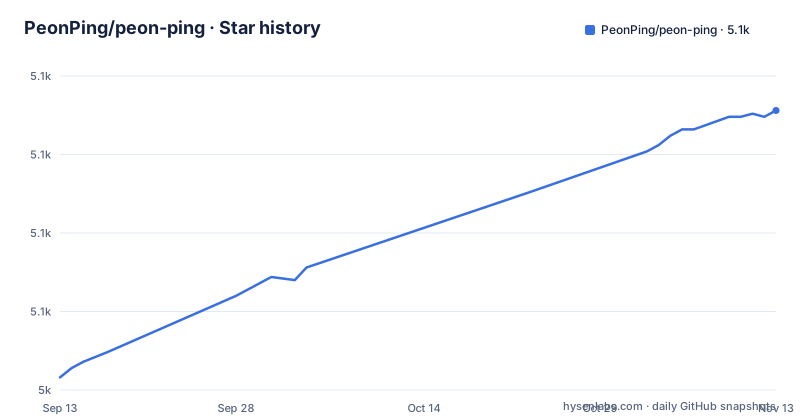
Star history
- PeonPing/peon-ping5,114 ★ · +85
| Repository | 2026-09-13 | 2026-11-13 |
|---|---|---|
| PeonPing/peon-ping | 5k | 5.1k |
85 Stars in the last 61 days, measured from the daily GitHub snapshot. Compare with other projects
Editorial analysis
Five install routes with five different footprints
The documented install routes differ. Homebrew is the recommended path and covers macOS and Linux:
brew install PeonPing/tap/peon-pingAfterwards you run `peon-ping-setup`, which is the step that registers the hooks and downloads sound packs. That split matters: the formula puts a binary on your PATH, and nothing is wired into your agent until the setup command runs, so an install that stops after the brew step leaves you with a working binary and no notifications. The curl route hands a remote script to bash in one line:
curl -fsSL https://raw.githubusercontent.com/PeonPing/peon-ping/main/install.sh | bashThat one works on macOS, Linux, and WSL2, and it is also the route where you commit to code you have not opened. The clone route exists precisely for people who want to read the installer first:
git clone https://github.com/PeonPing/peon-ping.git
cd peon-ping
./install.sh
Nix can run it from source without installing anything at all. Picking between these is mostly picking how much you inspect before the hooks touch your editor settings.
The Windows installer flags decide where hooks and packs land
Windows has its own script, and it takes flags that the Unix install does not:
Invoke-WebRequest -Uri "https://raw.githubusercontent.com/PeonPing/peon-ping/main/install.ps1" -OutFile ".\install.ps1" -UseBasicParsing
powershell -ExecutionPolicy Bypass -File .\install.ps1
A first run installs a curated starter set of packs; re-running updates while preserving config and state. `-All` takes every pack, `-Packs peon,sc_kerrigan` takes named ones, `-Lang en,fr` filters by language, and the interesting one is `-Local`, which installs packs, config, hooks, and skills into `./.claude/` for the current project instead of your home directory. `-Local` does not install the global `peon` CLI shim and does not touch your user `PATH`, and hooks are registered in `./.claude/settings.json` with absolute paths so they fire from any working directory inside the project. `-InitLocalConfig` writes only `./.claude/hooks/peon-ping/config.json`.
WSL2 audio breaks on Windows 11 24H2 and the fallback is WAV only
Under WSL2, peon-ping plays sound on the Windows side. On first run it probes your Windows host once and caches the answer per Windows build. Below Windows 11 24H2 it uses WPF MediaPlayer directly, which handles native MP3 and WAV with nothing extra installed. On 24H2 and later (build 26100 and up) Microsoft removed legacy Windows Media Player from the OS, WPF MediaPlayer fails with `MILAVERR_INVALIDWMPVERSION`, and the fallback is `System.Media.SoundPlayer` over the Win32 `PlaySound` API. That fallback works everywhere but is WAV only, so MP3 packs need ffmpeg to transcode on the fly:
sudo apt update; sudo apt install -y ffmpegYou can override the probe with `PEON_WSL_AUDIO_BACKEND=auto|mediaplayer|soundplayer`. The middle value fails silently on 24H2 and later, which is the trap: pick it by hand and you may get no sound and no error.
Nix and Home Manager move the whole config into a flake
The Nix route skips installation entirely:
nix run github:PeonPing/peon-ping -- status
nix run github:PeonPing/peon-ping -- packs install peon
`nix profile install github:PeonPing/peon-ping` puts it in your profile, and `nix develop` gives you a shell with bats, shellcheck, and nodejs. For reproducible setups the flake exports a Home Manager module, and the settings you would otherwise write by hand appear as Nix values: `default_pack = "glados"`, `volume = 0.7`, `enabled = true`, `desktop_notifications = true`, plus a nested categories table whose keys begin with `session`. Setting `programs.peon-ping.claudeCodeIntegration = true;` installs the hook scripts under `~/.claude/hooks/peon-ping/` and merges the standard entries into `~/.claude/settings.json`. The `installPacks` option takes either plain names fetched from the og-packs repository or a `name` and `src` pair, where `src` can be any fetcher result such as `pkgs.fetchFromGitHub` with an empty `sha256` left in place first so Nix tells you the correct hash.
What the repository actually contains
The top level explains the shape of the project better than any feature list. `peon.sh` and `relay.sh` sit at the root as the shell entry points, `install.sh` and `install.ps1` are the two installers, and `uninstall.sh` and `uninstall.ps1` are the two exits. `adapters/` holds the per-tool glue, and the Nix package spells out one concrete case as `share/peon-ping/adapters/cursor.sh`. `mcp/` is the MCP server that lets the agent choose its own sound, `skills/` and `trainer/` cover the agent-facing and training pieces, and `completions.bash`, `completions.fish`, and `completions.zsh` mean tab completion exists for all three shells. `config.json` sits at the root next to `.env.example`, and `tests/`, `docs/`, `plans/`, `video/`, `vercel.json`, `.devcontainer/`, and `.envrc` fill out the rest. A `.claude/` directory is checked in at the top level beside CLAUDE.md and GEMINI.md. VERSION, CHANGELOG.md, and RELEASING.md sit next to each other for the tagged release flow, and LICENSE is MIT. The primary language is Shell, which is the strongest argument for reading install.sh before running it.
Authoring a pack needs a transcription key
Installing packs and creating them are separate problems. Installing is a name: in the Home Manager `installPacks` option a plain string such as `"peon"` is fetched from the og-packs repository, the Windows flags `-Packs peon,sc_kerrigan` and `-Lang en,fr` narrow the same set, and packs listed on openpeon.com are also what the Home Manager custom source path points at, since it wants the GitHub repository behind a pack. Creating one is where a dependency appears. `.env.example` in the repository root carries a single setting:
DEEPGRAM_API_KEY=your_key_hereThat key is consumed by `scripts/create-pack.sh` to auto-transcribe and split audio, and a free one is available from the Deepgram console. Nothing in the install path asks for it, so a fresh install stays key free, but anyone cutting their own lines out of game audio needs the key, a network round trip to the transcription service, and a shell script that does the splitting.
What peon-ping will not do for you
Read the mechanism carefully and the limits are obvious. This is a notification layer: it makes a sound and a banner when an agent finishes or needs permission, and the premise is that agents do not tell you, so you tab away, lose focus, and spend fifteen minutes getting back into flow. It does not act on your behalf, does not schedule work, does not evaluate the agent's output. Remote development over ssh, devcontainers, and Codespaces has its own README section, alongside mobile notifications, the Peon Trainer, sound packs, creating packs, debugging, uninstall, requirements, and how it works. A `relay.sh` at the root hints that audio has to travel from wherever the agent runs to wherever you can hear it, and neither the install section nor the flags explain how that hop is configured, which is the gap to close before you adopt it as your only alert path. Release v2.37.0 shipped on 2026-08-26 after v2.36.0 on 2026-08-10, and the last push to the default branch landed on 2026-10-19.
Editorial conclusion
peon-ping is worth installing on the machine where you actually watch agents finish, not on the one where they run. The Homebrew tap and the curl script cover macOS and Linux in one step, WSL2 needs its audio backend sorted out first, and the Windows installer flags decide whether hooks land in your project or your home directory. Before running any of them, read install.sh, decide project level against global with the -Local flag, and confirm which agent hook files you are willing to let it rewrite. Then turn the volume down before the first notification, because the point of the project is that it is loud.
Frequently asked questions
What is peon-ping?
It is a shell project that adds voice lines and an on-screen banner when an AI coding agent needs attention, for example when it finishes a task or asks for permission. The lines come from Warcraft, StarCraft, Portal, Zelda, and other games, and the hooks attach to Claude Code, Amp, GitHub Copilot, Codex, Grok Build, Cursor, OpenCode, Kilo CLI, Kiro, Kimi Code, Windsurf, Trae, ECA, and any MCP client.
Is peon-ping safe to run on a work machine?
The installer registers hook scripts and merges entries into settings files: claudeCodeIntegration installs them under ~/.claude/hooks/peon-ping/ and writes into ~/.claude/settings.json, and the Windows -Local mode registers hooks in ./.claude/settings.json with absolute paths. The curl route executes a remote script directly, while the git clone route lets you open install.sh before running it. In the Home Manager module, plain pack names are fetched from the og-packs repository, so that needs network access.
Does peon-ping replace VS Code or the editor you already use?
It sits next to your tools rather than replacing them. Per-tool glue lives in adapters/, with adapters/cursor.sh shipped in the Nix package, and the README names Cursor, Kiro IDE, Trae, and Windsurf beside the command line agents. An MCP client can also be supported through the MCP server, which lets the agent pick its own sound.
What is an alternative to peon-ping?
What the README covers is breadth of hooks plus five install routes: a Homebrew tap, a curl installer for macOS, Linux, and WSL2, a Windows PowerShell installer, a clone and inspect route, and Nix with a Home Manager module. The table of contents also lists sound packs, the Peon Trainer, remote development, and mobile notifications.
Official sources
Add this badge to your README
If you maintain this project, the badge below links readers to this analysis and shows its maintenance status from the daily GitHub snapshot. Paste the markdown into your README; add ?metric=license or ?metric=stars to the image URL for a different field.

[](https://hysenlabs.com/projects/peonping-peon-ping)Star history chart for your README
[](https://hysenlabs.com/projects/peonping-peon-ping)Was this useful?