alsa-scarlett-gui for Linux Focusrite Control Panels
alsa-scarlett-gui is a Gtk4 GUI for the ALSA controls presented by the Linux kernel Focusrite USB Drivers
At a glance
- What is it?
- alsa-scarlett-gui is a GTK4 control panel for supported Focusrite Scarlett, Clarett, and Vocaster interfaces on Linux. It exposes routing, mixing, DSP, presets, meters, and firmware updates, although the current release is still labeled 1.0 beta.
- Who is it for?
- This project suits Linux users who want graphical control of a supported Focusrite interface and can work with a beta-stage release. It is less suitable for people requiring stable 1.0 documentation, an unsupported model, or a documented firmware rollback process.
- Can I use it commercially?
- Not without permission. GitHub finds no licence file in the repository, and without a licence all rights are reserved by default: you may read the code but not reuse it. Check the README, or ask the authors, before using it.
- Is it still maintained?
- Yes. The repository last received commits 2 days ago.
- What is it written in?
- Mainly C, according to GitHub's language statistics.
Answers come from the project's GitHub data, last synced on November 7, 2026, and from our analysis. They are not legal advice.
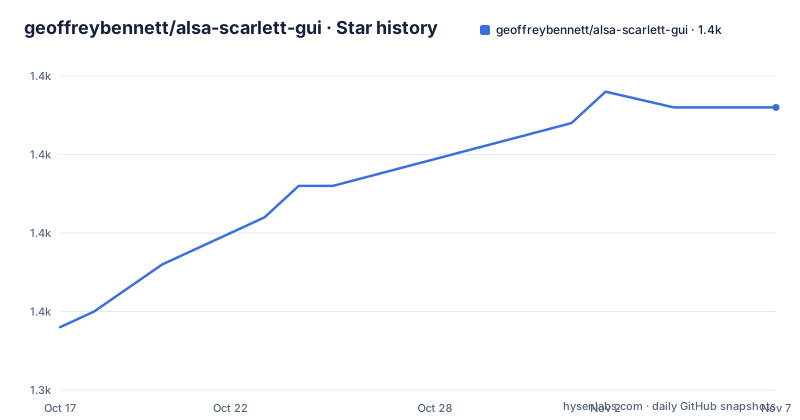
Star history
- geoffreybennett/alsa-scarlett-gui1,363 ★ · +14
| Repository | 2026-10-17 | 2026-11-07 |
|---|---|---|
| geoffreybennett/alsa-scarlett-gui | 1.3k | 1.4k |
14 Stars in the last 21 days, measured from the daily GitHub snapshot. Compare with other projects
Editorial analysis
What problem alsa-scarlett-gui addresses for Linux users
alsa-scarlett-gui addresses the gap between having a Linux driver for a Focusrite interface and having a useful graphical control panel for that interface. The README describes it as the Linux equivalent of Focusrite Control, Scarlett MixControl, and Vocaster Hub. Its intended audience is Linux users working with Scarlett, Clarett, and Vocaster USB audio interfaces, including people who need to adjust routing, levels, mixing, or processing without relying on text-based ALSA controls.
The project covers a broad control surface rather than only basic playback settings. According to the README, users can configure routing, mixing, input and output levels, DSP processing, port names, stereo linking, port visibility, autogain targets, monitor groups, presets, level meters, and firmware updates. The interface is implemented as a GTK4 GUI, which places it in desktop workflows where visual control matters, such as connecting microphones, selecting monitor sources, balancing signals, or saving a setup for later use.
The supported hardware list is broad, but it is bounded by named models. The README lists Scarlett generations 1 through 4, Clarett and Clarett+ USB interfaces, and Vocaster One and Two. Features are not uniform across all of those devices. Monitor groups are identified as being for large fourth-generation devices, and the DSP window is identified as being for Vocaster. A buyer or adopter should therefore check both the hardware model and its model-specific documentation before assuming that a feature shown elsewhere in the application will be available.
This is a focused tool rather than a general-purpose audio workstation. It does not claim to replace a DAW or provide a complete system mixer for every Linux sound card. Its purpose is to control the features presented by the Linux kernel Focusrite USB Drivers for the supported Focusrite interfaces. That scope makes it a plausible candidate for a Linux studio setup, but it also means users of other audio hardware should not expect comparable controls.
The GTK4 control flow behind routing and mixing
The repository layout describes a native C application with source code under `src/`, build instructions in the top-level `Makefile`, and model-specific documentation under `docs/`. The README gives the user-facing architecture in terms of graphical control elements rather than exposing a separate network service or command-line configuration layer. The central UI is the routing matrix, where channels can be arranged visually and adjusted through drag-and-drop operations.
Routing controls are accompanied by real-time signal level glow and level meters. This matters because a route can be enabled while the application also shows whether signal is present at the relevant point. The README describes the mixer as a matrix mixer with per-crosspoint gain dials and post-gain metering. In practical terms, the user can select a source and destination, set the gain at that connection, and inspect the resulting signal level from the same interface.
The project also exposes model-specific control areas. The configuration documentation covers custom port names, stereo linking, port visibility, and autogain targets. Large fourth-generation Scarlett devices have Main and Alt output groups, with per-output source and trim controls. Vocaster devices have an interactive parametric EQ and compressor with a draggable response graph. These are not generic controls layered onto every device. They are presented as features tied to particular hardware families.
The data path described by the project is interface hardware, Linux kernel driver, and GTK4 control application. The README does not document an internal API, persistence schema, or synchronization protocol in enough detail to reproduce the implementation. For adoption purposes, the useful architecture fact is the division of responsibility: the kernel driver presents the supported controls, while alsa-scarlett-gui gives them a graphical desktop interface. The application should not be treated as a driver replacement or as an independent audio engine.
Supported Focusrite hardware and model-specific limits
The model list is one of the strongest adoption signals in this repository because it is specific rather than based on a broad device-family claim. The README includes first-generation Scarlett 6i6, 8i6, 18i6, 18i8, and 18i20 models. It includes second-generation Scarlett 6i6, 18i8, and 18i20, plus third-generation Solo, 2i2, 4i4, 8i6, 18i8, and 18i20. Fourth-generation devices listed are Solo, 2i2, 4i4, 16i16, 18i16, and 18i20.
The Clarett entries include Clarett 2Pre, 4Pre, and 8Pre USB interfaces, as well as Clarett+ versions of the same product names. Vocaster One and Vocaster Two are listed separately. Because naming overlaps across generations, the exact model and generation matter. A search for a Scarlett model name alone may not tell the user whether the control surface and documentation match the device connected to the computer.
The documentation is organized around that distinction. The repository includes `docs/iface-1st-gen.md`, `docs/iface-small.md`, `docs/iface-large.md`, `docs/iface-4th-gen-small.md`, `docs/iface-4th-gen-big.md`, and `docs/iface-vocaster.md`. These files are the appropriate place to determine which controls are available for a particular unit. The README also points to `docs/digital-io-availability.md` for digital I/O availability, which is another device-dependent constraint.
A real limitation follows from this model-specific design. The presence of a feature in the README does not prove that every supported interface exposes it. In particular, the DSP controls are identified as Vocaster functionality, while monitor groups are identified for large fourth-generation devices. An engineer adopting the project for a studio with several interfaces should map each physical unit to its documentation file instead of installing once and assuming identical behavior everywhere.
Building and launching the GTK4 application
The README directs users to `docs/INSTALL.md` for prerequisites and the complete build, install, and run procedure. The repository's top-level Makefile gives a shorter source-build path. This is the build sequence printed by the project:
cd src
make -j$(shell nproc)
sudo make install
The first command changes into the source directory, the second builds the application using the available processor count, and the third installs it with administrator privileges. The README points users to `docs/INSTALL.md` for the prerequisites that must be satisfied before those commands, including any GTK4 and audio-related dependencies.
The top-level Makefile also exposes packaging targets: `make tar`, `make rpm`, `make deb`, and `make arch`. The source instructions are more useful for a first use because they do not require choosing a distribution package format first. The Debian package target, for example, invokes a build under `src/`, creates a package layout, copies the binary and desktop assets, and builds a `.deb` file. The README does not provide the resulting command for launching the application, so no launcher command should be inferred from the repository files.
A first real use should begin after the documented prerequisites are installed and the program is launched through the procedure in `docs/INSTALL.md`. Connect one of the supported interfaces, then inspect the routing matrix and level meters before changing monitor groups or DSP settings. The exact controls shown for that first check depend on the interface generation. This order limits the chance of confusing a hardware-specific control issue with a general GUI problem.
Presets, configuration files, and firmware updates
Presets are a central convenience for repeatable studio setups. The README says the application supports quick save and load of named configurations, as well as file-based save and load. The repository contains demonstration `.conf` and `.state` files for several supported interfaces, including Clarett Plus, Scarlett Gen 1, Scarlett Gen 2, and Scarlett Gen 3 models. Their presence indicates that configuration data is associated with interface families rather than being described as one universal file format.
That distinction matters when sharing a preset. A user should consult `docs/presets.md` and the relevant interface documentation before assuming that a file created for one Scarlett generation will load correctly on another. The README does not document automatic conversion between model formats, nor does it state that all controls are portable across devices. It also does not document rollback behavior for firmware updates.
Firmware update support is listed as an integrated feature, so it belongs in the evaluation of the project. At the same time, the absence of a documented rollback procedure is a concrete operational constraint. Users who cannot risk an interrupted firmware operation should look for an answer in `docs/USAGE.md`, the model-specific documentation, or `RELEASE-NOTES.md` before proceeding. The README confirms firmware upgrade support, but it does not make broad promises about migration, compatibility, or recovery.
The right comparison is not simply whether presets and firmware buttons exist. The question is whether the project documents the format and device boundaries needed for the intended studio workflow. The repository provides documentation paths for that check, but the README does not establish cross-generation preset compatibility or a firmware rollback guarantee.
Where alsa-scarlett-gui is the wrong tool
This project is the wrong tool for a Linux user whose audio interface is not in the supported list. The README limits the scope to named Scarlett, Clarett, and Vocaster models. It does not claim support for generic ALSA devices, arbitrary USB audio interfaces, or every Focusrite product. Installing the GUI can still be useful for comparison, but it should not be treated as evidence that an unsupported interface will expose equivalent controls.
It is also a poor fit when a stable, fully documented 1.0 release is a requirement. The README labels the current release `1.0 beta`, says it is better than 0.5 but not quite 1.0, and states that the documentation still needs updating. That is a direct statement about the project's release stage. It does not mean the application is unusable, but it does mean documentation completeness is part of the adoption risk.
The GUI is also not the best choice for every automated Linux environment. The documented build produces a desktop application, and the feature set centers on interactive GTK4 controls. The README does not describe a headless control mode, a scripting interface, or a complete command-line alternative. An engineer who needs unattended provisioning should investigate the underlying ALSA and kernel controls separately rather than assuming the GUI can be embedded in automation.
Finally, users who need documented firmware rollback or a formal preset migration path should not infer either capability from the feature list. The README confirms firmware updates and file-based presets, but it does not confirm those recovery and compatibility guarantees.
Editorial conclusion
This project suits Linux users who want graphical control of a supported Focusrite interface and can work with a beta-stage release. It is less suitable for people requiring stable 1.0 documentation, an unsupported model, or a documented firmware rollback process. Check the matching file under `docs/`, the prerequisites in `docs/INSTALL.md`, and known issues in `docs/USAGE.md` before installing. The project-specific judgement is clear: use it when the exact interface appears in the supported list, but first confirm that its documented controls match the hardware in use.
Frequently asked questions
Which Focusrite interfaces does alsa-scarlett-gui support?
The README lists Scarlett generations 1 through 4, Clarett and Clarett+ USB interfaces, and Vocaster One and Two, with specific models listed for each family. Check the exact model because features such as DSP and monitor groups are documented as model-specific.
How do I build and install alsa-scarlett-gui from source?
The top-level Makefile instructs users to run `cd src`, `make -j$(shell nproc)`, and `sudo make install`. The README also directs users to `docs/INSTALL.md` for prerequisites, build, installation, and run instructions.
Can alsa-scarlett-gui update firmware and save presets?
The README states that the GUI includes firmware upgrade support and named configuration presets, including file-based save and load. It does not document firmware rollback or cross-model preset compatibility, so those points require checking the project documentation before relying on them.
Official sources
Add this badge to your README
If you maintain this project, the badge below links readers to this analysis and shows its maintenance status from the daily GitHub snapshot. Paste the markdown into your README; add ?metric=license or ?metric=stars to the image URL for a different field.

[](https://hysenlabs.com/projects/geoffreybennett-alsa-scarlett-gui)Star history chart for your README
[](https://hysenlabs.com/projects/geoffreybennett-alsa-scarlett-gui)Was this useful?