SyncTrayzor v2 wraps Syncthing on Windows and takes over its GUI address and API key
Windows tray utility / launcher for Syncthing (v2 continued)
At a glance
- What is it?
- GermanCoding/SyncTrayzor is the continuation of the discontinued SyncTrayzor by Antony Male. It hosts Syncthing inside a Windows tray program with a built-in browser, and it overrides two Syncthing settings to do so.
- Who is it for?
- SyncTrayzor suits Windows 10 or newer users who want Syncthing to behave like a normal desktop program with a tray icon, conflict tools and start on login. It does not suit anyone on 32-bit Windows, macOS or Android, or anyone who needs to keep Syncthing's own GUI address and API key untouched.
- Can I use it commercially?
- Yes. MIT is a permissive licence: you can use, modify and sell software built on it, as long as you keep its copyright and licence notices.
- Is it still maintained?
- Yes. The repository last received commits 3 days ago.
- What is it written in?
- Mainly C#, according to GitHub's language statistics.
Answers come from the project's GitHub data, last synced on November 25, 2026, and from our analysis. They are not legal advice.
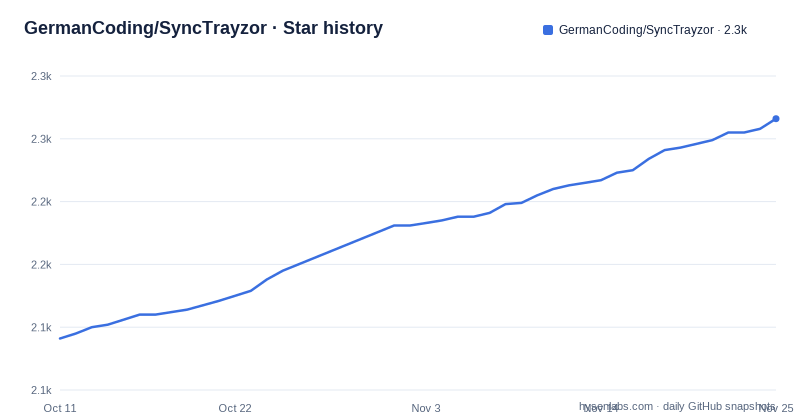
Star history
- GermanCoding/SyncTrayzor2,266 ★ · +175
| Repository | 2026-10-11 | 2026-11-25 |
|---|---|---|
| GermanCoding/SyncTrayzor | 2.1k | 2.3k |
175 Stars in the last 45 days, measured from the daily GitHub snapshot. Compare with other projects
Editorial analysis
SyncTrayzor hosts Syncthing, so connection faults belong upstream
SyncTrayzor is a tray utility for Syncthing on Windows. It hosts and wraps Syncthing, so the sync engine and the web interface are Syncthing's and SyncTrayzor supplies the window, menus and tray icon around them. The v2 line is a continuation of the discontinued original by Antony Male, known as canton7, and the repository is not archived.
That split decides where to report problems. If devices will not connect, files will not synchronize or the console area shows error messages, the project says to raise an issue with Syncthing or post on the Syncthing forums. If SyncTrayzor is not talking to Syncthing, shows error dialogs or does not auto-start, raise an issue with SyncTrayzor. If you cannot tell which, open a new discussion topic and someone will point you to the right place. This is also the short answer to what separates the two: Syncthing is the file synchronization program, and SyncTrayzor is the Windows front end.
The feature list is about native behaviour, not sync features
Nothing in SyncTrayzor changes how files synchronize. The additions are around the edges. It has a built-in web browser, so you do not need an external one. It can start on login, which removes the need to set Syncthing up as a service. It has a drop-box style file download and progress window, and the tray icon indicates when synchronization is occurring.
Alerts cover file conflicts, a folder that is out of sync, folders finishing a sync, and devices connecting or disconnecting. A tool helps you resolve file conflicts. Devices can be paused on metered networks so Syncthing does not transfer data over a mobile connection or a wifi hotspot. Translations exist for many languages, and the Weblate badge in the README links the project's localization page. The README does not give a count of languages or any measure of how complete each one is.
Installer, portable zip and three package managers, 64-bit only
SyncTrayzor is packaged as both an installer and a standalone zip and runs on Windows 10 or newer. Three package managers carry it:
winget install GermanCoding.SyncTrayzor
choco install synctrayzor
scoop install extras/synctrayzor
The installer comes as SyncTrayzorSetup-x64.exe or SyncTrayzorSetup-arm64.exe from the latest release, and running it over an existing install updates it. The standalone build is SyncTrayzorPortable-x64.zip or SyncTrayzorPortable-arm64.zip: unzip and run SyncTrayzor.exe.
Two cautions follow. 32-bit builds are no longer offered, and anyone with a 32-bit install should uninstall it first. When updating a standalone copy you must copy the data folder across from the previous installation, or the new copy starts without your configuration.
It overrides Syncthing's GUI Listen Address and API Key
SyncTrayzor overrides the GUI Listen Address and API Key in Syncthing's configuration. It needs to fully control those values to be sure it can talk to Syncthing. If you want your own values, you can set them in File, Settings.
The practical effect is on setups where something else reads those values. A script that calls Syncthing's REST API with a stored key, or a bookmark to a fixed GUI address, stops matching once SyncTrayzor has rewritten them. The README also suggests a custom home path for Syncthing, set under Settings, Syncthing, Advanced, Syncthing Custom Home Path, if you want to keep the copy managed by SyncTrayzor separate from another copy running on the same machine. Running two Syncthing instances against one default database folder is the case that setting exists to prevent.
Installed and portable builds put files in different places
The installed version goes into C:\Program Files\SyncTrayzor for all users, or %LocalAppData%\Programs\SyncTrayzor for the current user. SyncTrayzor puts its own configuration in C:\Users\<You>\AppData\Roaming\SyncTrayzor and lets Syncthing use its default folder for its database, C:\Users\<You>\AppData\Local\Syncthing.
On first run it creates a registry key at HKEY_CURRENT_USER\Software\Microsoft\Windows\CurrentVersion\Run\SyncTrayzor so it can start at login. Unchecking Automatically start on login in the settings deletes that key. The auto-update mechanism may download updates to %TEMP%\SyncTrayzor, and that location is periodically cleared out. The portable build puts its configuration in SyncTrayzorPortable\data. The truncated README text available here does not finish the portable description, so check the project page for where Syncthing's own database goes in that mode.
Every update check tells the author's server your version, package and IP
The auto-update mechanism periodically calls a script, server/version_check.php, hosted on a server run by the author. It discloses your current SyncTrayzor version and the package you downloaded, installer or portable and x64 or x86. It also reveals your IP address, which the README calls unavoidable. Usage information and details of your computer, network or Syncthing setup are not reported.
You can turn off auto-updates in the Settings, and then you are responsible for checking for updates yourself. On the question of downloading a virus, the author offers two routes: build everything from source after auditing it, or follow the steps in the security README in the repository to verify that the GitHub account has not been compromised and that Syncthing's developers trust the author. The repository carries a security directory and a chocolatey directory for the package.
Releases arrive every few months, and the platform is Windows only
Recent releases are 2.0.4 on 2025-10-15, 2.1.0 on 2025-12-17 and 2.2.0 on 2026-07-18, and the last push to main was on 2026-10-25. The project is written in C# and the license is MIT. A CHANGELOG.md sits in the repository root, and DONATING.md covers donations.
Searches ask about SyncTrayzor on Android and Mac. The README describes a Windows utility that runs on Windows 10 or newer, with x64 and arm64 builds, and mentions neither platform. The same goes for the searches comparing it with Syncthing: the README treats SyncTrayzor as a wrapper that runs Syncthing, not as a rival, so the real decision is whether you want the tray program around Syncthing or Syncthing on its own.
Editorial conclusion
SyncTrayzor suits Windows 10 or newer users who want Syncthing to behave like a normal desktop program with a tray icon, conflict tools and start on login. It does not suit anyone on 32-bit Windows, macOS or Android, or anyone who needs to keep Syncthing's own GUI address and API key untouched. Before installing, decide whether to leave auto-update on, since each check discloses your version, package type and IP address to the author's server.
Frequently asked questions
What does SyncTrayzor do?
It is a tray utility for Syncthing on Windows. It hosts and wraps Syncthing so it behaves more like a native Windows application, with a built-in browser, start on login and tray alerts.
What is the difference between Syncthing and SyncTrayzor?
Syncthing is the file synchronization program with a web interface. SyncTrayzor is the Windows tray utility that wraps it and shows Syncthing's web interface in its own window.
How to install SyncTrayzor?
Download SyncTrayzorSetup-x64.exe or SyncTrayzorSetup-arm64.exe from the latest release, or run winget install GermanCoding.SyncTrayzor. choco and scoop packages also exist.
What is SyncTrayzor v2?
SyncTrayzor v2 is a continuation of the discontinued original SyncTrayzor by Antony Male. It is maintained in the GermanCoding/SyncTrayzor repository and runs on Windows 10 or newer.
Official sources
Add this badge to your README
If you maintain this project, the badge below links readers to this analysis and shows its maintenance status from the daily GitHub snapshot. Paste the markdown into your README; add ?metric=license or ?metric=stars to the image URL for a different field.

[](https://hysenlabs.com/projects/germancoding-synctrayzor)Star history chart for your README
[](https://hysenlabs.com/projects/germancoding-synctrayzor)Was this useful?