pelican: a Python static site generator with a plugin ecosystem and an AGPL licence
Static site generator that supports Markdown and reST syntax. Powered by Python.
At a glance
- What is it?
- Thirteen thousand stars, twenty years of Python releases, themes built on Jinja2, and a content pipeline that still imports from WordPress and Dotclear. What Pelican does well and where it starts to show its age.
- Who is it for?
- Pelican earns its place for people who want their writing in plain text files and their output to be files they can host anywhere, and it does that with fewer moving parts than most static site generators. The plugin ecosystem is large enough that the core stays small, Jinja2 themes make customisation ordinary rather than a fork, and the import paths from WordPress or an RSS feed mean migrating in is a real project rather than a fresh start.
- Can I use it commercially?
- Yes, with strict conditions. AGPL-3.0 is a network copyleft licence: if people use a modified version over a network, for example as a hosted service, you must offer them its source code under the same licence.
- Is it still maintained?
- Yes. The repository last received commits 10 days ago.
- What is it written in?
- Mainly Python, according to GitHub's language statistics.
Answers come from the project's GitHub data, last synced on October 23, 2026, and from our analysis. They are not legal advice.
Star history
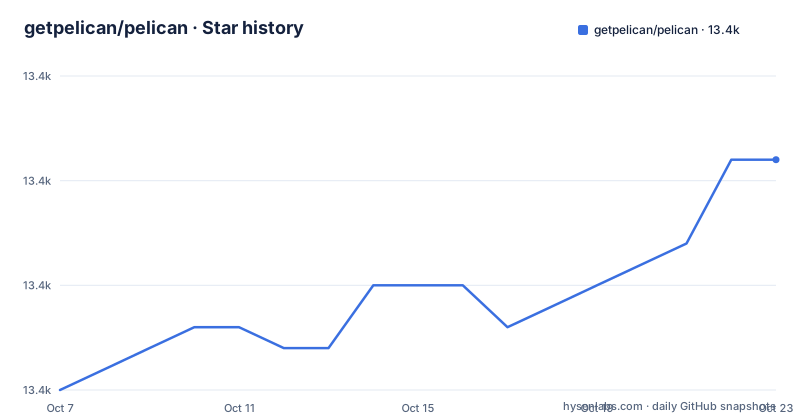
- getpelican/pelican13,361 ★ · +11
| Repository | 2026-10-07 | 2026-10-23 |
|---|---|---|
| getpelican/pelican | 13.4k | 13.4k |
11 Stars in the last 16 days, measured from the daily GitHub snapshot. Compare with other projects
Editorial analysis
Text files in, static HTML out
Pelican is a static site generator written in Python that builds websites from text files in Markdown, reStructuredText or HTML. The framing in the README is that you create sites without worrying about databases or server-side programming, and the output is static files served by any web server or hosting service.
The feature list is deliberately boring in the way a mature tool is. Chronological content such as articles alongside static pages. Atom and RSS feed generation. Code syntax highlighting through Pygments. Site themes created with Jinja2 templates. Publication in multiple languages. Import of existing content from WordPress, Dotclear or RSS feeds. Integration with external services, and an interface designed to work with version control and web hooks.
Two of those are load-bearing. Multi-language publication means translations are a first-class concept in the data model rather than something bolted on. And importing from WordPress or an RSS feed is what makes this a migration tool as much as an authoring tool.
The last feature worth naming is fast rebuilds through content caching and selective output writing, which is the difference between a site you can iterate on and one you wait for.
The project is AGPLv3, has 13339 stars and 1822 forks, and is not archived. The last push was on 2026-04-20, matching the 4.12.0 release published the same day.
The dependency list is the honest architecture
The pyproject is more informative about what Pelican actually does than the feature list is. The runtime dependencies are:
dependencies = [
    "blinker>=1.7.0",
    "docutils>=0.22.0",
    "feedgenerator>=2.1.0",
    "jinja2>=3.1.2",
    "ordered-set>=4.1.0",
    "pygments>=2.16.1,<2.20.0",
    "python-dateutil>=2.8.2",
    "rich>=13.6.0",
    "unidecode>=1.3.7",
    "watchfiles>=0.21.0",
]
Read left to right, that is a signal library for plugin events, a reStructuredText parser, a feed writer, a template engine, a set implementation, a syntax highlighter, date handling, a terminal library for output, a transliteration library, and a file watcher for the autoreload mode. No database, no ORM, no HTTP framework. Everything heavy is either optional or absent.
Two details stand out. `unidecode` is there for transliterating non-ASCII characters into slugs, which is the unglamorous work that makes multilingual publishing actually usable. And `pygments` carries both a lower bound and an upper bound, `>=2.16.1,<2.20.0`, because the 4.11.0 release pinned `Pygments <2.19` to hold off an upstream change. That pin is the clearest signal in the whole repository about the maintenance trade-off: keeping a stable ecosystem across four Python versions means accepting a little friction when a dependency moves.
Markdown itself is optional, listed separately as `markdown>=3.1`, so reStructuredText works without it.
Release 4.12 raised the floor on everything
The 4.12.0 notes are a good snapshot of what maintaining a project at this age involves. Two entries are hard floors: Docutils 0.22 or newer and Sphinx 9.0 or newer. One requires Python 3.11 and above, and adds 3.14 to the test matrix, so 3.8 and 3.9 are now unsupported.
That is a substantial narrowing for anyone on an older interpreter, and it happened because the dependencies moved rather than because the project wanted fewer users.
The rest of the release is ordinary maintenance done carefully. Dark mode was added to the `notmyidea` template. The Simple theme supports the `CSS_FILE` setting and its template inheritance was improved, which is about making third-party themes easier to write. Table-of-contents elements are stripped from article summaries so they do not leak into feed readers, and slugs are used in category and tag feed titles. `FEED_DOMAIN` now falls back to `SITEURL` and stops emitting a warning when it is set.
Two fixes are more revealing than the rest. One stops exceptions being raised on filtered logs, and one fixes JavaScript MIME detection on Windows, which is the kind of platform bug that only appears with a large user base. The installation instructions were overhauled to mention `pipx` and `uv`, which tracks the way Python tooling moved on while Pelican kept working.
Earlier releases follow the same shape. 4.11.0 added Python 3.13 to the matrix and dropped 3.8, added blocks to the Simple theme's base template, made autoreload ignore hidden files, and started reading the current year from `SOURCE_DATE_EPOCH` when set, which is a detail that matters for reproducible builds.
Themes are Jinja2 templates, and two of them are the defaults
Themes are Jinja2 templates, and the default names give the design philosophy away: `notmyidea` and `simple`. A tool whose flagship theme is literally named notmyidea is signalling that it expects you to replace the presentation layer, and the Simple theme is the supported base for doing that.
The 4.11.0 release made that explicit by adding more blocks to the Simple theme's base template, described as making it easier to create new themes by inheriting from it. That is the difference between a theme system and a template you copy, and it is the kind of change that only makes sense in a project old enough to have accumulated a decade of forked themes.
The repository carries sample themes and configurations to work from: `samples/theme_standard/`, `samples/kinda/`, `samples/very/`, and configuration files `samples/pelican.conf.py` and `samples/pelican.conf_FR.py`. The French one is the multilingual story made concrete, and `samples/content/` shows the directory layout Pelican expects.
The samples named `kinda` and `very` are worth noticing as a naming convention: they suggest a deliberate spectrum from minimal to elaborate, which is more useful than a single reference example when you are deciding how much structure your own site wants.
The plugin ecosystem is where the extensibility lives
Pelican's extension story is delegated to a separate organisation, the pelican-plugins repository, rather than bundled. The core stays small and the ecosystem carries the variety.
`blinker` in the dependency list is the mechanism that makes this work. Blinker provides signals, and signals are the natural fit for a generator whose phases are distinct: something can observe content generation, or writing, or finalisation without the core knowing who is listening. A plugin that wants to transform content or run after output exists attaches to an event instead of requiring a fork.
This is the design decision that explains both the size of the ecosystem and the stability of the core. Forks of a static site generator rot quickly, because every upstream change has to be merged by hand. Plugins on a signal API do not rot that way.
The repository tree supports the picture of a well-equipped project: a `.pre-commit-config.yaml`, a `tox.ini`, a `.coveragerc`, a `.vale.ini` for prose linting, a `.mailmap`, a `requirements/` directory, and `tasks.py` for invoke tasks. A `.git-blame-ignore-revs` is there too, which means the project has done large mechanical reformats and deliberately kept history readable instead of rewriting it.
Where Pelican fits against its alternatives
The honest comparison is with other static site generators rather than with dynamic ones. Against a framework-plus-database setup such as WordPress, the argument is entirely about ownership: your content is files in a repository, your history is git history, and deploying means copying a directory rather than operating a stack.
Against newer JavaScript-first generators, Pelican's advantages are a mature plugin ecosystem, first-class reStructuredText, and multilingual publishing that has been a documented feature rather than a plugin. Its disadvantage is Python, which means your toolchain for publishing is tied to an interpreter whose support window the project now tracks explicitly.
The import path from WordPress, Dotclear or an RSS feed is what tips the decision for many people. Migrating a decade of posts is the hard part of moving to any generator, and having it as a built-in feature removes the main objection.
One more piece of the README deserves quoting because it is a good name: Pelican is an anagram of calepin, which means notebook in French. Given that the tool is built around writing text in files, that is a better origin story than most.
The documentation at docs.getpelican.com is where the settings reference, the internals documentation and the tutorial content live, none of which is in the repository.
Editorial conclusion
Pelican earns its place for people who want their writing in plain text files and their output to be files they can host anywhere, and it does that with fewer moving parts than most static site generators. The plugin ecosystem is large enough that the core stays small, Jinja2 themes make customisation ordinary rather than a fork, and the import paths from WordPress or an RSS feed mean migrating in is a real project rather than a fresh start. The costs are equally clear in the 4.12 release notes: Docutils 0.22 and Sphinx 9 as hard floors, a Windows MIME detection fix, and Typogrify and Pygments version pinning to stop upstream churn leaking into your build. Write in Markdown or reStructuredText, start from the Simple theme, and use a plugin only once you have felt the specific absence it fills.
Frequently asked questions
What is Pelican and how does it build a website?
It is a static site generator written in Python that turns text files in Markdown, reStructuredText or HTML into static HTML, CSS and JavaScript. You regenerate the site with a command line tool, and the output can be served by any web server or hosting service without a database.
How do I migrate an existing WordPress blog to Pelican?
Import from WordPress is a documented built-in feature, alongside import from Dotclear and from RSS feeds. Pelican's README lists it among the feature highlights, so a move from an existing blog does not require writing a converter yourself.
Can Pelican publish a site in more than one language?
Yes, publication of articles in multiple languages is a listed feature. The samples directory includes a French configuration file alongside the default one, which shows the settings involved.
What are Pelican's themes based on, and which one should I use?
Themes are created using Jinja2 templates. Two themes ship by default, `notmyidea` and `simple`, and version 4.11.0 added more blocks to the Simple theme's base template specifically to make it easier to build new themes by inheriting from it.
What licence is Pelican released under and what Python does it need?
It is licensed under AGPLv3, the GNU Affero General Public License v3 or later. Version 4.12.0 requires Python 3.11 or above and adds 3.14 to the test matrix, so older interpreters are no longer supported.
Official sources
Add this badge to your README
If you maintain this project, the badge below links readers to this analysis and shows its maintenance status from the daily GitHub snapshot. Paste the markdown into your README; add ?metric=license or ?metric=stars to the image URL for a different field.

[](https://hysenlabs.com/projects/getpelican-pelican)Star history chart for your README
[](https://hysenlabs.com/projects/getpelican-pelican)Was this useful?