jc: Turning Command Output into JSON for Shell Scripts and Python
CLI tool and python library that converts the output of popular command-line tools, file-types, and common strings to JSON, YAML, or Dictionaries. This allows piping of output to tools like jq and simplifying automation scripts.
At a glance
- What is it?
- jc parses the output of tools like dig, ping and ls into JSON, YAML or Python dictionaries. It is a thin adapter between the Unix text pipeline and structured data, and its value depends on whether a parser already exists for your command.
- Who is it for?
- Adopt jc when the command you already run has a listed parser and the output is currently being sliced with awk or sed. Skip it when the tool offers native JSON output, or when the parser you need is not in the list.
- Can I use it commercially?
- Yes. MIT is a permissive licence: you can use, modify and sell software built on it, as long as you keep its copyright and licence notices.
- Is it still maintained?
- Yes. The repository last received commits 1 day ago.
- What is it written in?
- Mainly Python, according to GitHub's language statistics.
Answers come from the project's GitHub data, last synced on November 14, 2026, and from our analysis. They are not legal advice.
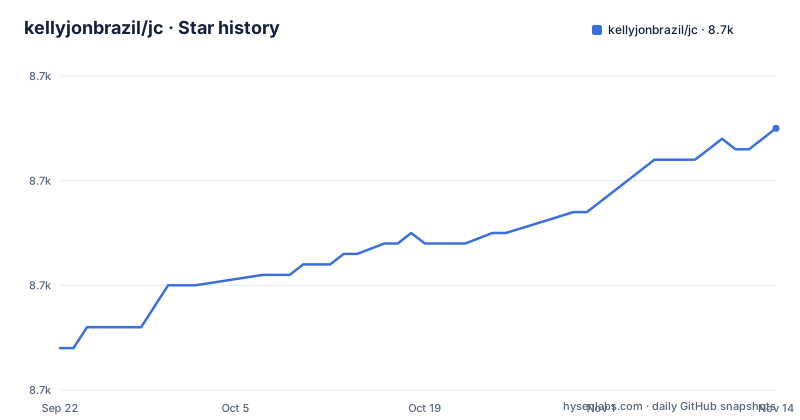
Star history
- kellyjonbrazil/jc8,705 ★ · +21
| Repository | 2026-09-22 | 2026-11-14 |
|---|---|---|
| kellyjonbrazil/jc | 8.7k | 8.7k |
21 Stars in the last 53 days, measured from the daily GitHub snapshot. Compare with other projects
Editorial analysis
The problem jc solves, and who has it
Most command-line tools were written to print text for a human. The output is aligned columns, headers, units and prose. A shell script that needs one field from that output ends up with awk, cut, sed or a regular expression, and every one of those breaks when the tool changes its formatting or when a value contains a space.
jc sits in the middle. It reads the text output of a supported command, a file type or a common string, and emits JSON, YAML or a Python dictionary. The README states the purpose plainly: it JSONifies the output of many CLI tools, file-types and common strings for easier parsing in scripts. The intended user is someone writing bash, Ansible, Saltstack or Nornir automation who wants the same data as a structure rather than as a column offset.
The project is a single Python package, MIT licensed, with a console entry point named jc and a library module of the same name. It does not replace the tools it parses. It does not wrap them, either. The command still runs, still writes text, and jc converts what comes out.
How the parser dispatch and the two output schemas work
The CLI has two invocation styles. The first is a pipe: the command's stdout is fed to jc with a parser flag. The second is the magic syntax, where jc runs the command itself and captures its output. The README shows both forms producing identical results.
Internally, each supported command, file type or string has a parser module under the jc package. The flag you pass, such as --dig, selects the parser. When jc runs the command for you, it maps the command name to a parser without an explicit flag. This is why the magic form works for known commands and why an unknown command in that form has nothing to dispatch to.
The output schema is the part worth reading before you build on it. The README describes two representations. The default uses a strict schema per parser, converts known numbers to int or float JSON values, converts certain known values of None to JSON null, converts known booleans, and in some cases adds extra semantic context fields. The raw representation, reached with the -r flag on the CLI or raw=True in parse(), gives the pre-processed JSON instead.
That distinction matters in practice. The default schema is a contract: field names, types and the added context fields are documented per parser. The raw form is closer to a direct transcription, so it is less convenient to consume. If your script reads a typed integer today, it is reading the default schema, and a change to that schema is a change to your script.
Installing jc and parsing your first command
The README lists several installation routes: pip, OS package repositories, precompiled binaries from the Releases page, and an Ansible filter plugin in the community.general collection. The pip route is the one that works the same on macOS, Linux, Unix and Windows.
pip3 install jcAfter that, jc is on your PATH as a console script. The simplest first use is the pipe form, where you keep running the command you already know and hand its output to jc with the matching flag. The README uses dig as the example.
dig example.com | jc --digThe documentation states that the result is a JSON array containing one object, with keys such as status, question, answer, query_time and server. The answer key holds the records, each with name, class, type, ttl and data. Piping that into jq selects the address.
dig example.com | jc --dig | jq -r '.[].answer[].data'The README gives the expected output as the resolved address on its own line, 93.184.216.34 in the example. The magic syntax skips the explicit flag because jc runs the command itself.
jc dig example.com | jq -r '.[].answer[].data'If you would rather not shell out, the library form returns Python objects instead of JSON text. The README shows subprocess.check_output feeding jc.parse with the parser name and the captured string, after which data[0]['answer'] is a list of dictionaries. That list-of-dictionaries shape is the same data the CLI serializes, so a script can move between the two without reshaping anything.
Where jc stops being the right tool
The first limitation is coverage. jc only understands the commands, file types and strings that have a parser. If your tool is not in the list, the magic syntax has no dispatch entry for it, and the flag form has no flag to pass.
The second is that a parser is a model of someone else's output format. When the upstream tool changes its text, the parser can be wrong before anyone notices, and the failure is silent in the sense that jc still emits JSON. The strict default schema is the mitigation and the risk at the same time: typed fields are easier to consume, but a field that changes type or disappears breaks the consumer. The raw form with -r is the escape hatch when you would rather own the interpretation.
The third is dependency weight for a shell tool. The package declares ruamel.yaml, xmltodict and Pygments as install requirements, and setup.py gives python_requires as >=3.6. If you are writing a small bash script that needs one field from one command, a single awk expression has no install step at all, and jc is the heavier choice. It earns its place when you are parsing several commands, or when the same parsing logic is repeated across scripts and you want one tested implementation instead of five fragile ones.
Alternatives and how their approach differs
The closest comparison is a tool that already speaks JSON. Some commands have a native JSON flag, and when one exists, using it removes the parsing step entirely and removes the risk of a text format drifting under you. jc is for the tools that never added that flag.
yq and dasel are aimed at querying and converting structured data, and yq in particular is associated with YAML and JSON documents on the command line. The difference in approach is the direction of the conversion. jc's job is to get you from unstructured text to a structure; yq and dasel assume you already have a structure and help you query, filter or re-serialize it. In a pipeline they are complementary rather than competing, which is why the README's examples hand jc's output to jq rather than trying to do selection inside jc.
The other alternative is staying in text. awk, cut and sed require nothing installed and are already on the machine. They are the right answer for a one-line extraction from a stable format. They become the wrong answer when the format has optional fields, quoted values containing spaces, or nested sections, which is exactly the shape of output from tools like dig.
Maintenance, releases and licence
The repository is not archived and the last push was on 2026-10-30. The release history shows v1.26.2 on 2026-10-29, v1.26.1 on 2026-10-18 and v1.26.0 on 2026-09-19.
Upgrade cost is mostly about the schema. Because the default output is a strict per-parser schema, a version bump can change field types or add context fields. The practical approach is to pin the version in your requirements file and read the release notes before moving, since those notes are where parser changes are recorded. The -r option gives you a way to compare the raw and default output for the parser you depend on before and after an upgrade.
The licence is MIT, declared in setup.py and in the repository's LICENSE.md. That is a permissive licence, and the usual obligations about preserving the copyright and licence text apply when you redistribute it. This is a description of what the repository states, not legal advice; if you are embedding jc in a product, have your own counsel read the licence text.
Editorial conclusion
Adopt jc when the command you already run has a listed parser and the output is currently being sliced with awk or sed. Skip it when the tool offers native JSON output, or when the parser you need is not in the list. Before depending on it, pin the version in your requirements file, check the schema for the specific parser in the docs directory, and confirm that the fields you read survive a raw versus default comparison with the -r option.
Frequently asked questions
How do I install jc?
The README gives pip as the cross-platform route with pip3 install jc, and also lists OS package repositories including apt-get, dnf, zypper, pacman, brew and others. Precompiled binaries are available from the Releases page for architectures not covered by a package.
Does jc work as a Python library as well as a CLI?
Yes. The README shows importing jc and calling jc.parse with a parser name and the captured command output, which returns a Python dictionary or a list of dictionaries instead of JSON text. The CLI and the library expose the same parsed data.
What is the difference between the default output and the -r option in jc?
The default uses a strict schema per parser, converts known numbers to int or float, maps certain values to null and boolean, and can add semantic context fields. The -r flag, or raw=True in parse(), returns the raw pre-processed JSON instead.
Official sources
Add this badge to your README
If you maintain this project, the badge below links readers to this analysis and shows its maintenance status from the daily GitHub snapshot. Paste the markdown into your README; add ?metric=license or ?metric=stars to the image URL for a different field.

[](https://hysenlabs.com/projects/kellyjonbrazil-jc)Star history chart for your README
[](https://hysenlabs.com/projects/kellyjonbrazil-jc)Was this useful?