Vision Agents: Wiring Realtime Video Into LLM Pipelines
Open Vision Agents by Stream. Build voice and vision agents quickly with any model or video provider. Uses Stream's edge network for ultra-low latency.
At a glance
- What is it?
- Stream's Apache-2.0 Python framework connects WebRTC video, pluggable vision processors and realtime speech models into a single agent loop. It is aimed at builders who already have a video edge and want to attach models to it, not at teams looking for a managed end-to-end product.
- Who is it for?
- Adopt Vision Agents if you already run WebRTC video and want a Python process that joins the call, runs a YOLO or Roboflow processor over the frames, and hands the result to Gemini Live or OpenAI Realtime. Skip it if you need a managed service with a support contract, or if your video never leaves a browser and a plain WebSocket would do.
- Can I use it commercially?
- Yes. Apache-2.0 is a permissive licence: you can use, modify and sell software built on it, as long as you keep its copyright and licence notices.
- Is it still maintained?
- Yes. The repository received new commits within the last day.
- What is it written in?
- Mainly Python, according to GitHub's language statistics.
Answers come from the project's GitHub data, last synced on November 14, 2026, and from our analysis. They are not legal advice.
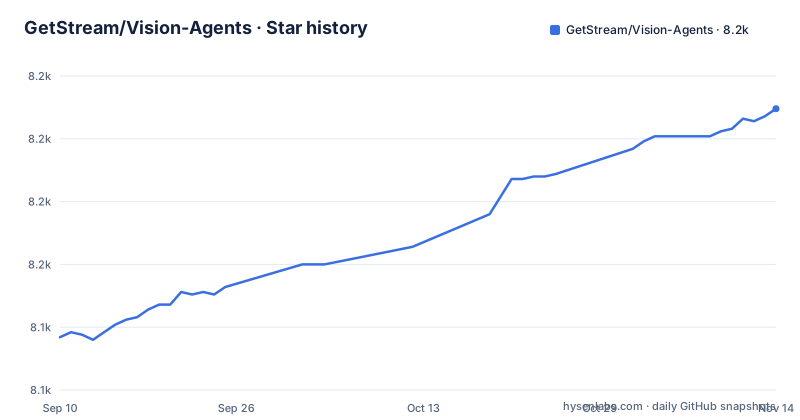
Star history
- GetStream/Vision-Agents8,212 ★ · +91
| Repository | 2026-09-10 | 2026-11-14 |
|---|---|---|
| GetStream/Vision-Agents | 8.1k | 8.2k |
91 Stars in the last 65 days, measured from the daily GitHub snapshot. Compare with other projects
Editorial analysis
The gap Vision Agents fills between WebRTC and a model API
Most realtime agent demos start with a microphone. Vision Agents starts with a call. The README describes it as building blocks for "intelligent, low-latency video experiences powered by your models, your infrastructure, and your use cases", and the example it ships is a golf coach that runs a pose model over a video stream while a realtime LLM talks to the player. That combination is the actual target: situations where a model has to react to something happening in a live video feed within the same conversational turn.
The people who need this are engineers who already have video flowing somewhere. A sports coaching app, a physical therapy session, a drone feed, a workout game. They do not need Stream to give them a video product. They need a Python process that can join an existing call, pull frames, run a detector, and feed text or audio back into the conversation without the round trip becoming noticeable. Vision Agents is that process, packaged with adapters for the model vendors you would otherwise wire up by hand.
It is not for someone who wants a hosted agent endpoint. You run the Python.
How the Agent, Edge and processor pipeline fit together
The README's golf example is the clearest statement of the architecture. An Agent is constructed with four things: an edge, an agent_user, instructions, and an llm, plus a list of processors.
The edge is the transport. In the example it is getstream.Edge(), which the README ties to Stream's edge network and the claim of joining in about 500ms with audio and video latency under 30ms. Those numbers are the project's own marketing figures. The README also states the framework "works with any video edge network", which matters because it means the edge is an interface you can implement rather than a hard dependency baked into the agent loop.
The llm field is not limited to text models. In the example it is gemini.Realtime(fps=10), so the realtime model itself is configured with a frame rate. That is the design decision worth noticing: vision frames are not only consumed by separate processors, they can also be streamed directly to a multimodal realtime model. The README calls this "Real-time WebRTC: Stream video directly to model providers for instant visual understanding."
processors is the second path for vision. The example passes ultralytics.YOLOPoseProcessor(model_path="yolo11n-pose.pt", device="cuda"), a local model running on a GPU. The README describes this as a "pluggable processor pipeline for YOLO, Roboflow, or custom PyTorch/ONNX models before/after LLM calls". So a frame can go through a cheap local detector first and only the derived signal reaches the expensive realtime model, or the reverse. That ordering is where most of the cost and latency tuning will happen in practice.
Around that core sit the supporting pieces the README lists: turn detection with VAD and diarization, tool calling including MCP servers, Twilio or Telnyx for phone audio, RAG against TurboPuffer or Qdrant or Gemini FileSearch, and memory across sessions via Stream Chat. Each is an integration, not a built-in algorithm.
Installing it and picking your extras
The install path is short. The README gives two commands:
uv add vision-agents
and, for integrations:
uv add "vision-agents[getstream, openai, elevenlabs, deepgram]"
The extras list is the real configuration surface. Because the framework supports a long vendor list (OpenAI, Gemini, xAI, OpenRouter, Hugging Face, Kimi, MiniMax, Telnyx for LLMs; OpenAI Realtime, Gemini Live, AWS Nova Sonic, Qwen, Inworld for realtime; Deepgram, AssemblyAI, Fast-Whisper, Fish Audio, Wizper, Mistral Voxtral for STT; ElevenLabs, Cartesia, Deepgram, AWS Polly, Pocket, Kokoro, Inworld, Fish Audio for TTS; Ultralytics, Roboflow, Moondream, TwelveLabs, NVIDIA, Decart for vision), you install only what you use. The README's install command shows only four extras names, so expect to check the integration pages at visionagents.ai for the exact token for anything outside the four shown.
Step 3 is credentials. The README says to get a free API key from Stream and states developers receive 333,000 participant minutes per month plus extra credits through the Maker Program. Participant minutes are the unit to watch here.
The Agent constructor is the other config surface. From the example: edge, agent_user, instructions, llm, processors. instructions can point at a file, as in "Read @golf_coach.md", which suggests prompt content is kept outside the code. The README lists the HTTP server, Prometheus metrics and Kubernetes deployment under the "Production Ready" feature row, and the examples directory includes 06_prometheus_metrics_example and 07_k8s_deploy_example.
Where the abstraction leaks
The honest limitation is that Vision Agents is a glue layer, and glue layers inherit every problem from the things they glue. The README promises "Native SDK methods from OpenAI (create response), Gemini (generate), and Claude (create message)" so you "always access the latest LLM capabilities". That is a deliberate trade: you get vendor fidelity instead of a normalized interface. It also means a change in a vendor's SDK can reach your agent code, and the framework cannot smooth it over without giving up the thing it advertises.
The processor pipeline has a similar shape. Running YOLO on device="cuda" means you need a GPU where the agent process runs, or the frames have to travel to one. The README's golf example uses a small pose model. How frames get from the edge to the processor, what the queue depth looks like under load, and what happens when the processor falls behind the stream decide whether a vision agent holds up in production.
Latency claims deserve the same skepticism. The 500ms join and sub-30ms audio/video figures are attributed to Stream's edge network, and the README states the framework works with any edge. If you bring your own edge, those numbers do not transfer.
Finally, the feature table lists memory, RAG, phone integration and MCP as capabilities without describing their failure modes. A memory layer backed by Stream Chat means your agent's recall is tied to that product. That is fine if you are already there and awkward if you are not.
Pipecat and LiveKit Agents take a different position on the same problem
The closest comparisons are Pipecat and LiveKit Agents, both Python frameworks for realtime voice and multimodal agents. The difference is where each one puts the transport.
LiveKit Agents is built around LiveKit's own WebRTC infrastructure. If you are already on LiveKit, the agent runs inside that room model and the integration is tight. Vision Agents inverts the relationship: the README states it is "Built by Stream, but works with any video edge network", so the edge is a pluggable component and Stream's network is one implementation among several. If your video already flows through something that is not Stream and not LiveKit, that inversion is the reason to pick Vision Agents over LiveKit Agents.
Pipecat is closer in spirit to Vision Agents in that it also emphasizes a pipeline of swappable services. The main distinction is the processor stage. Vision Agents puts explicit vision processors (Ultralytics, Roboflow, Moondream, TwelveLabs, NVIDIA, Decart) in the pipeline alongside the LLM, and its headline example runs a local pose model on a GPU next to a realtime multimodal model. If your problem is "understand what is in this video frame and talk about it", Vision Agents has the more direct story.
None of this makes one strictly better. It makes the choice depend on whether your constraint is the transport you already own or the vision stage you need to add.
Version cadence, licence and what you are signing up for
The release history shows v0.6.7 in mid-July 2026, v0.6.8 in late July, and v0.6.9 in mid-August, with the repository last pushed in November 2026. That is a fast cadence for a pre-1.0 library, which cuts both ways. You get integrations added quickly. You also get a moving target, and the 0.x version number is the project telling you the API is not frozen.
The licence is Apache-2.0, which permits commercial use, modification and redistribution, and includes a patent grant. It does not obligate the maintainers to support you, and it does not cover the third-party services the framework connects to. Your OpenAI, Gemini, ElevenLabs, Deepgram, Twilio and Stream accounts each carry their own terms and their own bills. The framework being free says nothing about the cost of running an agent that holds a video call open.
Maintenance cost is mostly integration drift. Every vendor in that list ships SDK changes, and the README's promise of native SDK methods means those changes are closer to your code than they would be behind a normalized abstraction. Budget for periodic dependency bumps and for re-testing whichever realtime model you depend on. The release cadence suggests active work.
What to verify before adopting: confirm the edge and processor classes for your specific providers exist in the repository, install the extras you need on your Python version, and read the current pricing terms for participant minutes rather than relying on the 333,000 figure, which is a promotional statement in a README and not a contract.
Editorial conclusion
Adopt Vision Agents if you already run WebRTC video and want a Python process that joins the call, runs a YOLO or Roboflow processor over the frames, and hands the result to Gemini Live or OpenAI Realtime. Skip it if you need a managed service with a support contract, or if your video never leaves a browser and a plain WebSocket would do. Before you commit, verify three things: that the edge and processor classes for your chosen provider exist under plugins/ in the repository, that the vision-agents extras you need install cleanly on your Python version, and what Stream's free tier actually covers once your participant minutes run past the published allowance.
Frequently asked questions
How do I install Vision Agents?
With uv: `uv add vision-agents` for the framework, or `uv add "vision-agents[getstream, openai, elevenlabs, deepgram]"` to pull the extras the first agent needs. Each integration is a separate workspace package, so the extras are what turn the plugin table into one install line.
Which models and providers does Vision Agents support?
LLMs include OpenAI, Gemini, xAI, OpenRouter, Hugging Face, Kimi AI and MiniMax, with a separate realtime category covering OpenAI Realtime, Gemini Live, AWS Nova Sonic, Qwen and Inworld. Speech-to-text lists Deepgram, AssemblyAI, Fast-Whisper, Wizper, Mistral Voxtral, Fish Audio and Telnyx, and vision lists Ultralytics, Roboflow, Moondream, TwelveLabs, NVIDIA and Decart.
Do I have to use Stream's network to run Vision Agents?
No. The README says it is built by Stream but works with any video edge network, the Agent constructor takes an edge as a pluggable argument, and the examples directory contains 10_local_transport_example. The shipped .env.example points at Stream's demo service through EXAMPLE_BASE_URL, so that is the path a first run takes.
What do the Vision Agents examples demonstrate?
There are eleven numbered examples: a simple agent, golf coaching with YOLO pose and Gemini Live, phone and RAG, a football commentator, a security camera, Prometheus metrics, a Kubernetes deploy, an agent server, a sales assistant, a local transport and moderation. The README also lists drone fire detection, sports coaching, physical therapy and dance games as target use cases.
Official sources
Add this badge to your README
If you maintain this project, the badge below links readers to this analysis and shows its maintenance status from the daily GitHub snapshot. Paste the markdown into your README; add ?metric=license or ?metric=stars to the image URL for a different field.

[](https://hysenlabs.com/projects/getstream-vision-agents)Star history chart for your README
[](https://hysenlabs.com/projects/getstream-vision-agents)Was this useful?