ghosh/uiGradients: a gradients.json file, a Vue viewer, and what that means for your build
🔴 Beautiful colour gradients for design and code
At a glance
- What is it?
- uiGradients is a community-contributed list of multi-colour gradients stored in a single JSON file, plus a Vue 2 site that renders them. The data is easy to reuse; the site itself is harder to run than you might expect.
- Who is it for?
- Adopt uiGradients if you need a ready-made list of named hex gradients and you are happy to fetch a single JSON file from raw.githubusercontent.com, or to vendor it. Do not adopt it if you need a supported API, a versioned release, or an actively maintained front end: the last push was 2026-03-16 and there are no releases.
- Can I use it commercially?
- Yes. MIT is a permissive licence: you can use, modify and sell software built on it, as long as you keep its copyright and licence notices.
- Is it still maintained?
- Activity is slowing. The repository last received commits 8 months ago.
- What is it written in?
- Mainly Vue, according to GitHub's language statistics.
Answers come from the project's GitHub data, last synced on November 15, 2026, and from our analysis. They are not legal advice.
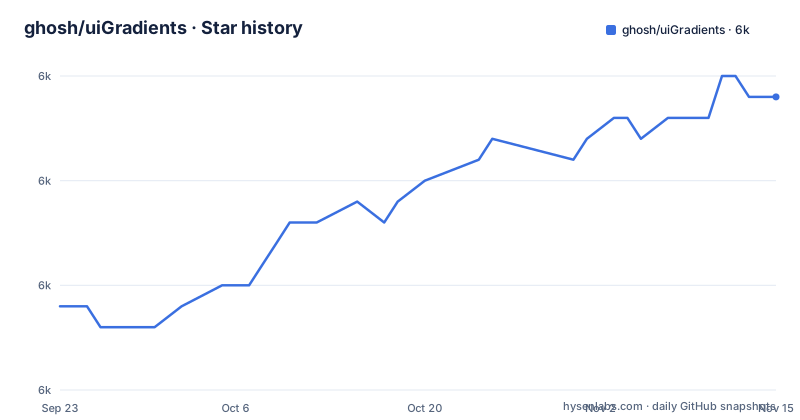
Star history
- ghosh/uiGradients6,034 ★ · +10
| Repository | 2026-09-23 | 2026-11-15 |
|---|---|---|
| ghosh/uiGradients | 6k | 6k |
10 Stars in the last 53 days, measured from the daily GitHub snapshot. Compare with other projects
Editorial analysis
The problem uiGradients solves, and the one it does not
Picking a two-colour or three-colour background is a small decision that eats a disproportionate amount of time. Designers cycle through previews; developers need the hex values in a form they can paste. uiGradients addresses the second half of that loop. The README describes it as "a community contributed collection of beautiful multi-color gradients", and the whole collection lives in one file, gradients.json, at the repository root. Each entry pairs a name with an array of hex colours, as in the README's own example where "Career" maps to ["#cb202d", "#dc1e28", "#3366cc"].
That is the entire data model. There is no palette metadata, no contrast ratio, no suggested text colour, no light and dark variant. If you need a gradient that is accessible against white text, nothing in the file tells you whether it qualifies. You either check it yourself or you accept whatever the contributor submitted. This is a curation project with a thin schema, and the thinness is the point: it is what makes contributions a matter of appending an object.
The audience is correspondingly narrow. It suits someone who wants a named, human-readable set of gradients to embed in a stylesheet, a design tool, or a small app. It does not suit anyone who needs generated gradients, interpolation between arbitrary colours, or a service with an uptime commitment.
How the data and the Vue site fit together
Two things live in this repository and they have very different lifespans. The first is gradients.json. The second is a Vue 2 single-page application that renders the collection at uigradients.com. The package.json names the project uigradients at version 2.0.0, declares vue ^2.5.9 as the single runtime dependency, and marks the package private. Everything else in the dependency list is build tooling: webpack loaders, Babel presets, Karma and Chai for unit tests, avoriaz for component testing, eslint with airbnb-base, and clipboard for the copy-to-clipboard interaction.
The build uses a webpack template layout. build/dev-server.js starts the development server, build/build.js produces the production bundle, and config/ holds the webpack configuration. Tests split into test/unit with a Karma config and test/e2e with a runner script. The repository also carries a wrangler.json, which points at Cloudflare Workers, and a bustcache script that runs cfcli purge. The deploy script is gh-pages-deploy, so the static output has historically gone to GitHub Pages as well.
That mix is worth noticing before you clone. A Vue 2.5 application with Babel 6 era presets is not the stack most teams are starting new work on, and the two deployment paths (GitHub Pages and Cloudflare) suggest the site has been moved rather than rebuilt. The JSON file has no such baggage. If you only want the gradients, ignore src/ entirely.
Installing it and getting gradients into your project
There is no package on npm for this project and the README does not offer an install command. What it does document is a data fetch. The README gives this example, and it is the shortest path to the actual content:
curl -i https://raw.githubusercontent.com/ghosh/uiGradients/master/gradients.jsonThe response is the JSON array. Note the branch in that URL: the README points at master, while the repository's default branch is main. If the raw URL returns a 404, that mismatch is the first thing to check.
If you want to run the site locally instead, the package.json defines the scripts. The start script delegates to dev, which runs node build/dev-server.js:
bun install
bun run start
The repository includes a bun.lock, and the test script is written in terms of bun run unit, bun run e2e and bun run lintjson, so the lockfile is the intended install path.
One script is worth knowing about because it guards the data file rather than the application code. The lintjson script runs eslint gradients.json. Because the collection is hand-edited JSON, a missing comma or a stray bracket breaks the site, and this script is the check that catches it. If you fork the repository to add gradients, run it before opening a pull request:
bun run lintjsonContributing a gradient, and the constraint that comes with it
The README is explicit about the contribution path: fork the repository, append your gradient to the end of gradients.json with a name and hex colours, and open a pull request. It also asks that gradient submissions and bug fixes arrive in separate pull requests, which is a reasonable request given that a data diff is trivial to review and a code diff is not.
The constraint is that the file is append-only in practice. Every gradient is loaded and rendered from that single file, so there is no per-gradient module, no lazy loading, and no way for a consumer to fetch one entry. A client that wants three gradients downloads the whole array. For a stylesheet build step that is fine. For a runtime fetch in a mobile app it is a payload you cannot trim without writing your own extraction script.
The other constraint is naming. Entries are identified by a human-readable name string, not an id. The README's example uses "Career". Nothing in the documented schema prevents two contributors from submitting the same name, and nothing gives a consumer a stable key to reference. If your code stores a gradient by name and a contributor renames or removes an entry, your reference breaks silently. Pinning to a commit hash of gradients.json is the only defence the project's structure offers.
Where uiGradients is the wrong tool
The README states plainly that there is no official API. Everything the project offers as a service is a static file served by GitHub's raw content host. That has consequences. There is no rate-limit agreement, no versioning, no deprecation policy, and no status page. A build that fetches the JSON at deploy time depends on raw.githubusercontent.com being reachable from your CI runner.
There is also no release history to pin against. There are no GitHub releases, so the only version signal is the 2.0.0 string in package.json, which describes the site rather than the data. If your process requires a tagged artefact, this project does not produce one.
Use it as a starting library, not as a dependency. The sensible pattern is to fetch gradients.json once, commit the result into your own repository, and treat it as vendored data you now own. That removes the network dependency and the silent-rename risk in one move. It also means you stop receiving new gradients, which for most projects is an acceptable trade.
Finally, the front end is a poor fit for anyone wanting a maintained web application to extend. Vue 2.5 reached the end of its support window long before the last push, and the webpack and Babel versions in devDependencies are from the same era. Running it works; modernising it is a project in itself.
Alternatives and how they differ
uiGradients ships a JSON array and expects you to generate the CSS. If your build already reads a data file and emits styles, uiGradients slots in.
The other category is gradient generators, which compute a gradient from parameters you supply rather than selecting one from a curated list. A generator will give you any two colours you name; uiGradients will give you the ones contributors liked. Those are different products. A generator has no curation and therefore no taste; uiGradients has curation and therefore a fixed set. If your requirement is "the brand colour at one end", you want a generator. If your requirement is "something that looks good and I do not want to decide", the curated list is the better fit.
The project's own README lists several ports built on top of it, including UIColor-uiGradientsAdditions for iOS, NilColorKit for Swift, a styled-components package, an SCSS port, and a Handlebars helper. Those exist precisely because the JSON is easy to consume, and they are a more honest signal of the data's usefulness than the site's code.
Maintenance, licence and what upgrading costs
The last push to the default branch was on 2026-03-16. The repository is not archived, so it remains readable and forkable, but there is no release and no changelog. Treat the data as stable and the application as frozen.
The licence is MIT, declared in LICENSE.md and repeated in the README badge. For the JSON data that means you can copy, modify and redistribute the gradient list, including commercially, provided the copyright notice and permission notice travel with it. The practical implication is that vendoring gradients.json into your repository is permitted, and you should carry the licence text alongside it. This is a description of what the licence says, not legal advice; check your own obligations if you redistribute the file inside a product.
Upgrade cost is asymmetric. Updating the data costs nothing: re-fetch the file, re-run your extraction, done. Updating the application means moving Vue 2.5 to a supported major, replacing the webpack configuration with something current, and migrating Babel 6 presets. The test suite is Karma-based, which is another piece of the stack that has moved on. None of that is required if you only want gradients, and that is the strongest argument for consuming the file and ignoring the site.
Editorial conclusion
Adopt uiGradients if you need a ready-made list of named hex gradients and you are happy to fetch a single JSON file from raw.githubusercontent.com, or to vendor it. Do not adopt it if you need a supported API, a versioned release, or an actively maintained front end: the last push was 2026-03-16 and there are no releases. Before you commit, verify that the colour pairs you pick survive your own contrast checks, and confirm the gradients.json schema still matches the shape your code expects, since the file is the only contract the project offers.
Frequently asked questions
What is uiGradients?
It is a community-contributed collection of multi-colour gradients, stored as a single gradients.json file at the repository root, with a Vue 2 site that renders them at uigradients.com. Each entry has a name and an array of hex colours.
How do I use uiGradients in a project?
The README documents fetching the data directly, for example with curl against the raw gradients.json URL on GitHub. There is no official API and no npm package, so most consumers fetch the file once and vendor it.
Is uiGradients free to use?
It is released under the MIT licence, declared in LICENSE.md. That permits copying, modification and redistribution, including commercial use, as long as the copyright and permission notice are included.
Official sources
Add this badge to your README
If you maintain this project, the badge below links readers to this analysis and shows its maintenance status from the daily GitHub snapshot. Paste the markdown into your README; add ?metric=license or ?metric=stars to the image URL for a different field.

[](https://hysenlabs.com/projects/ghosh-uigradients)Star history chart for your README
[](https://hysenlabs.com/projects/ghosh-uigradients)Was this useful?