Tilt.js: a jQuery-only parallax hover effect with a 2017 release tag and a 2026 push
A tiny 60+fps parallax tilt hover effect for jQuery.
At a glance
- What is it?
- gijsroge/tilt.js adds a mouse-driven 3D tilt to any element carrying a data-tilt attribute. It needs jQuery, ships one 1.71kb gzipped file, and its GitHub release list stops in 2017.
- Who is it for?
- Use Tilt.js if your page already loads jQuery and you want a hover tilt on a handful of cards or images, driven by one data-tilt attribute and a short options object. Pass on it if your front end is React, Angular or plain modules without jQuery, because the README points those projects to separate forks.
- Can I use it commercially?
- Yes. MIT is a permissive licence: you can use, modify and sell software built on it, as long as you keep its copyright and licence notices.
- Is it still maintained?
- Yes. The repository last received commits 22 days ago.
- What is it written in?
- Mainly JavaScript, according to GitHub's language statistics.
Answers come from the project's GitHub data, last synced on November 7, 2026, and from our analysis. They are not legal advice.
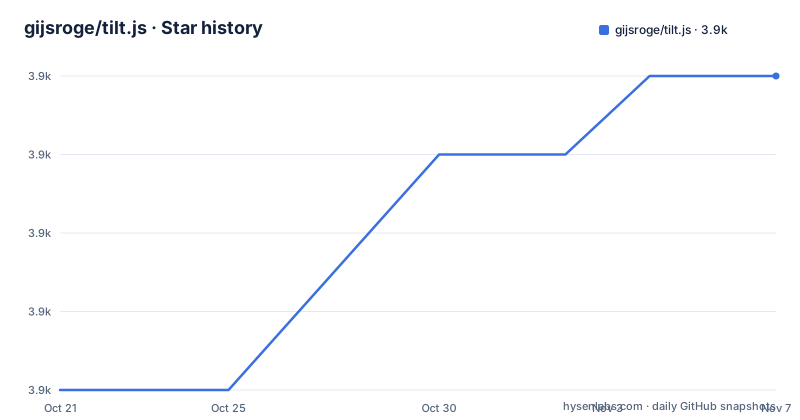
Star history
- gijsroge/tilt.js3,858 ★ · +4
| Repository | 2026-10-21 | 2026-11-07 |
|---|---|---|
| gijsroge/tilt.js | 3.9k | 3.9k |
4 Stars in the last 17 days, measured from the daily GitHub snapshot. Compare with other projects
Editorial analysis
One data-tilt attribute and jQuery loaded first
Tilt.js is a jQuery plugin. The README describes it as a requestAnimationFrame powered, 60+fps parallax tilt effect that weighs 1.71kb gzipped. Elements opt in through a data-tilt attribute in the markup, and the script order matters because jQuery has to load before the library.
<!DOCTYPE html>
<body>
    <div data-tilt></div> <!-- Tilt element -->
    <script src="jquery.js" ></script> <!-- Load jQuery first -->
    <script src="tilt.js"></script> <!-- Load Tilt.js library -->
</body>
The package.json lists jquery ^3.1.1 under dependencies, so jQuery is not optional and not bundled into the plugin. A page without jQuery cannot use this library at all. Any page that does load jQuery gets the effect with no JavaScript written beyond the attribute.
Nine options, and perspective is the one that changes the feel
Behaviour is tuned through an options object with nine keys. maxTilt defaults to 20. perspective defaults to 1000, and the README notes that a lower value makes the tilt more extreme. scale defaults to 1, where 2 means 200% and 1.5 means 150%, so a hover can also enlarge the element.
speed (300) and easing (cubic-bezier(.03,.98,.52,.99)) control the enter and exit transition. transition turns that transition on or off. reset decides whether the element returns to rest when the mouse leaves, and setting it to false leaves the element frozen at its last angle.
disableAxis accepts X or Y and locks the tilt to a single direction. glare is off by default, and maxGlare takes a number from 0 to 1 to set how strong the highlight gets once glare is enabled.
The README gives no way to pass these options through attributes. The only option syntax it shows is the defaults block itself, so check the demo folder before assuming you can set them per element in markup.
Three events and three methods, all called through the jQuery object
Calling tilt() on a selection returns the jQuery object, and events attach to that object.
const tilt = $('.js-tilt').tilt();
tilt.on('change', callback);  // parameters: event, transforms
tilt.on('tilt.mouseLeave', callback); // parameters: event
tilt.on('tilt.mouseEnter', callback); // parameters: event
The change event passes the event and the transforms, which is the hook for syncing something else on the page to the tilt angle. The two mouse events pass only the event.
The method syntax is unusual. Destroy, getValues and reset are invoked as tilt.tilt.destroy.call(tilt), tilt.tilt.getValues.call(tilt) and tilt.tilt.reset.call(tilt). getValues returns an array of objects, one per matched element. Anyone expecting a conventional $(el).tilt('destroy') call will not find it documented. The README does not say whether destroy removes the listeners it added or what state the element is left in.
The release list ends at 1.1.19 while the package says 1.2.1
GitHub shows three releases: 1.1.9 as the initial release on 29 January 2017, 1.1.13 on 20 February 2017, and 1.1.19 on 2 May 2017. Nothing newer has been tagged.
Meanwhile package.json carries version 1.2.1, and both CDN URLs in the README point at 1.2.1: the cdnjs link ends in tilt.js/1.2.1/tilt.jquery.min.js and the unpkg link is [email protected]/dest/tilt.jquery.min.js. So the code that the README tells you to load is newer than the newest release page.
The repository is not archived, and the last push was on 17 October 2026. The README does not explain what changed between 1.1.19 and 1.2.1, so a reader comparing versions has to read the commit history.
Install from npm or yarn, or link the CDN build directly
Two package managers are documented, and either one is a single command.
yarn add tilt.js
npm install --save tilt.js
The package.json points main at ./src/tilt.jquery.js, which is the source file, while the CDN links serve dest/tilt.jquery.min.js, the built and minified output. Importing the package through a bundler therefore resolves to unminified source, and a script tag on the CDN gets the minified build.
The files field is set to */**, so the published package carries the folders in the repository. The README does not mention an ES module export, a CommonJS example or TypeScript types, and none is visible in the top-level file list.
A 2016 toolchain: gulp 3.9.1, PhantomJS tests and jshint
The development setup is dated. package.json pins gulp 3.9.1, gulp-babel ^6.1.2, babel-preset-env, gulp-sass ^3.1.0 and browser-sync 2.16.0. The test script runs jshint over src/tilt.jquery.js and then runs gulp test, which relies on node-qunit-phantomjs and qunitjs ^2.0.1.
The repository root also holds .travis.yml and a Travis CI badge sits at the top of the README. Building from source means installing that old gulp 3 chain, and the README does not document a build command. Someone who wants to patch the plugin should expect to work through gulpfile.js and the gulp/ directory to find the tasks.
The demo/ folder holds index.html and a scss/ directory, and the landing page at gijsroge.github.io/tilt.js is where the README sends you for live demos.
Every other framework is a separate repository
Tilt.js does not cover non-jQuery projects. The README lists alternatives by framework: vanilla-tilt.js for plain JavaScript, react-tilt, react-tilty and react-parallax-tilt for React, polymer-tilt for Polymer, preact-tilt for Preact and angular-tilt for Angular. Each is a different repository with its own maintainer.
The README names react-tilt by jonathandion as the React version of this plugin and links it next to two live sites: madewithlove.be and unisocks.exchange. A third example in the wild is creativetheory.agency.
The README does not compare these forks on size, features or upkeep. If you work outside jQuery, the choice between them is made by reading each project, not this one.
Editorial conclusion
Use Tilt.js if your page already loads jQuery and you want a hover tilt on a handful of cards or images, driven by one data-tilt attribute and a short options object. Pass on it if your front end is React, Angular or plain modules without jQuery, because the README points those projects to separate forks. Before adopting it, decide which version you are on: GitHub lists 1.1.19 as the newest release, while package.json and both CDN links say 1.2.1.
Frequently asked questions
What does Tilt.js do?
Tilt.js is a jQuery plugin that adds a parallax tilt hover effect to elements marked with a data-tilt attribute. It is powered by requestAnimationFrame and weighs 1.71kb gzipped.
Does Tilt.js work without jQuery?
No. The package depends on jquery ^3.1.1, and the usage example loads jQuery before tilt.js. For other frameworks the README links separate projects such as vanilla-tilt.js and react-tilt.
How do you install Tilt.js from npm?
Run npm install --save tilt.js, or yarn add tilt.js. The README also lists cdnjs and unpkg links for version 1.2.1.
Official sources
Add this badge to your README
If you maintain this project, the badge below links readers to this analysis and shows its maintenance status from the daily GitHub snapshot. Paste the markdown into your README; add ?metric=license or ?metric=stars to the image URL for a different field.

[](https://hysenlabs.com/projects/gijsroge-tilt-js)Star history chart for your README
[](https://hysenlabs.com/projects/gijsroge-tilt-js)Was this useful?