go-telegram/bot has no third-party dependencies
Telegram Bot API Go framework
At a glance
- What is it?
- The Go Telegram Bot framework is listed by Telegram itself as a Go sample, tracks Bot API 10.3, and has no dependencies at all. That means every method is written out in methods.go by hand, and the naming convention is mechanical enough to read the Telegram docs as Go documentation.
- Who is it for?
- Adopt go-telegram/bot if you want a Telegram bot in Go without taking on a dependency tree, or if you want the framework's naming to mirror the Telegram Bot API documentation exactly so you can translate a method from the docs mechanically.
- Can I use it commercially?
- Yes. MIT is a permissive licence: you can use, modify and sell software built on it, as long as you keep its copyright and licence notices.
- Is it still maintained?
- Yes. The repository last received commits 15 days ago.
- What is it written in?
- Mainly Go, according to GitHub's language statistics.
Answers come from the project's GitHub data, last synced on October 23, 2026, and from our analysis. They are not legal advice.
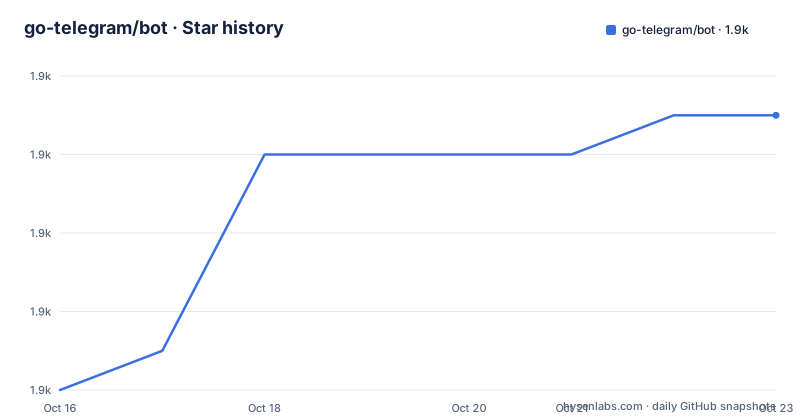
Star history
- go-telegram/bot1,867 ★ · +7
| Repository | 2026-10-16 | 2026-10-23 |
|---|---|---|
| go-telegram/bot | 1.9k | 1.9k |
7 Stars in the last 7 days, measured from the daily GitHub snapshot. Compare with other projects
Editorial analysis
An empty go.mod, and what it forces on the design
The dependency story is the first thing to understand because it explains everything else. The `go.mod` is:
module github.com/go-telegram/bot

go 1.18
No require block. The README calls it a Go zero-dependencies telegram bot framework, and the module declaration backs that up.
That constraint shapes the implementation. With no HTTP client library and no JSON convenience package, the repository does its own work: `raw_request.go` and `build_request_form.go` handle transport and form encoding, `methods.go` and `methods_params.go` hold the generated-style API surface, and `models/` holds the types. Each of those has a matching `_test.go` file at the root, which is a sign of how much of the work is plumbing that has to be verified rather than assumed.
The trade is honest in both directions. You get a dependency tree you do not have to audit, and you get a module that will not conflict with anything else in your build. What you give up is the ecosystem of Telegram-specific helpers that a heavier framework would bundle, and you write that glue yourself.
Recognition is not self-claimed. The README carries a checkmark line saying it is present in the list of libraries at core.telegram.org/bots/samples#go, so Telegram itself names it as a Go sample. Licence is MIT, and the last push was on 2026-10-08.
Bot API 10.3, and a release cadence that tracks it
The README states which Bot API version is supported: 10.3, from August 24, 2026, linking to the Telegram API changelog entry for that date.
For a bot framework, the API version is the single most important compatibility fact, because Telegram adds methods and fields continuously and a client that has not been regenerated will not compile against new features or will silently drop new fields.
The release history shows how that is handled. Recent tags are v1.27.0 and v1.26.0, both published on 2026-09-11 eight minutes apart, and v1.25.0 from 2026-09-01. Two minor versions minutes apart suggest a mechanical API-surface update: a small part of the library gets a new version, and the rest stays.
Go version is 1.18, which is also in the module declaration, so the floor has not moved. That is worth noting in a language where the floor usually climbs with each major release.
The repository layout reinforces that this is a faithful client rather than a framework with opinions. `methods.go`, `methods_params.go` and `models/` are the API, `get_updates.go` and `wait_updates.go` are the polling machinery, `webhook_handler.go` is the HTTP path, `process_update.go` dispatches, `handlers.go` holds the handler types, `options.go` the configuration, and `errors.go` the error surface. There is also a `CHANGELOG.md` at the root, which is where you look when a Telegram release adds something and you need to know which framework version carries it.
Every method follows one naming rule
The Available methods section states the convention and then gets out of the way. Every method is named as in the official Telegram documentation but with a capital first letter, so `SendMessage` rather than `sendMessage`.
The signature is uniform: `(ctx context.Context, params <PARAMS>) (<response>, error)`, with the exceptions of `GetMe`, `Close` and `Logout`, which take no params. Params are structs with fields corresponding to the Bot API parameters, named after the method with a `Params` suffix, and they are passed by pointer:
bot.SendMessage(ctx, &bot.SendMessageParams{...})The result is that the documentation is usable as API reference. If you know the method name from core.telegram.org, you know the Go method name, and if you know the method you know the params struct. There is no abstraction to learn and no naming that disagrees with upstream, which is the specific thing that trips people up when moving between Telegram frameworks.
The minimal bot is short enough to read in full, and it shows the two things you always need: a context that cancels on interrupt, and a default handler.
ctx, cancel := signal.NotifyContext(context.Background(), os.Interrupt)
defer cancel()

opts := []bot.Option{
    bot.WithDefaultHandler(handler),
}

b, err := bot.New("YOUR_BOT_TOKEN_FROM_BOTFATHER", opts...)
if err != nil {
    panic(err)
}

b.Start(ctx)
A detail in `bot.New` worth knowing: on creation the bot calls `getMe` with a five second timeout and returns an error if that fails. So a bad token fails at startup rather than on the first update, which is the behaviour you want. If you need to change that timeout there is `bot.WithCheckInitTimeout`, and `bot.WithSkipGetMe()` skips the call entirely.
Routing is by field and match type, not by command
The handler system is not a command dispatcher. It matches on specific update fields, which is a different and more flexible model than most bot frameworks use.
There are five handler types, each bound to one field of an update. `HandlerTypeMessageText` for `Update.Message.Text`. `HandlerTypeCallbackQueryData` for `Update.CallbackQuery.Data`. `HandlerTypeCallbackQueryGameShortName` for `Update.CallbackQuery.GameShortName`. `HandlerTypePhotoCaption` for `Update.Message.Caption`. `HandlerTypeInlineQuery` for `Update.InlineQuery.Query`.
Registration pairs a handler type with a pattern and a match type:
b.RegisterHandler(bot.HandlerTypeMessageText, "/start", bot.MatchTypeExact, myStartHandler)The pattern is matched against the field, so `/start` here is a message text, not a registered command. Anything that does not match falls through to the default handler, which is how a bot handles its own conversation while forwarding the rest.
The same handlers can be attached at construction time instead, through `WithMessageTextHandler`, `WithCallbackQueryDataHandler` and `WithPhotoCaptionHandler`, each taking a pattern, a match type and a handler.
For inline queries there is one deviation worth noting: `RegisterHandlerInlineQuery` handles all inline queries including empty ones, whereas the field-matched path matches on the query string.
If you want matching beyond exact and prefix, the examples directory includes a `handler_match_func` example, so the pattern matching is extensible rather than fixed at two modes.
Webhooks, middlewares, and the concurrency options
The webhook path is a different entry point rather than a flag on the polling one. You call `bot.StartWebhook` instead of `bot.Start`, and you pass `bot.WebhookHandler()` as your HTTP handler:
opts := []bot.Option{
    bot.WithDefaultHandler(handler),
    bot.WithWebhookSecretToken(os.Getenv("EXAMPLE_TELEGRAM_WEBHOOK_SECRET_TOKEN")),
}

b, _ := bot.New(os.Getenv("EXAMPLE_TELEGRAM_BOT_TOKEN"), opts...)

go b.StartWebhook(ctx)

http.ListenAndServe(":2000", b.WebhookHandler())
The comments in that example mark the lifecycle steps around it: call `methods.SetWebhook` if needed before starting, and `methods.DeleteWebhook` when shutting down.
`WithWebhookSecretToken` is the security-relevant option. It sets the X-Telegram-Bot-Api-Secret-Token header value Telegram sends so you can confirm an incoming request is really from Telegram. Without it, anyone who learns your URL can post fake updates to your bot.
For people who already have an HTTP server and want to handle the body themselves, `ProcessUpdate` takes an update you decoded yourself:
update := models.Update{}

json.NewDecoder(req.Body).Decode(&update)

b.ProcessUpdate(ctx, &update)
That is the integration point if you are behind a framework that owns the request lifecycle.
Three concurrency options are worth reading together. `WithWorkers` sets the number of workers processing the updates channel and defaults to 1, so handlers run one at a time unless you raise it. `WithNotAsyncHandlers` allows handlers to run in the main goroutine, which inverts the default. `WithUpdatesChannelCap` sets the updates channel capacity, 1024 by default, which is what you raise when a burst of updates would otherwise block polling.
The other options cover the edges: `WithHTTPClient` for a custom client and poll timeout, `WithServerURL` for a self-hosted Bot API server, `WithAllowedUpdates` to narrow what `getUpdates` returns, `WithInitialOffset` to set a starting offset, `WithErrorsHandler` and `WithDebugHandler` for observability, `WithDebug` for debug mode, `UseTestEnvironment` for Telegram's test environment, and `WithMiddlewares` for wrapping handlers.
Where it is the wrong choice
The clearest wrong case is a bot with an AI-heavy or stateful workflow where you want higher-level abstractions. This is a client. There is no session store, no conversation model, no dialog framework and no persistence. Multi-turn conversations are yours to build, and with a single worker by default you will be writing concurrency control yourself the moment a handler needs to await something slow.
The second wrong case is assuming no dependencies means no work. With no HTTP library, the form encoding and request construction are the library's code rather than a battle-tested third party's. That is fine for the API surface Telegram actually uses, and it is also a place where edge cases around multipart uploads and large files live. The examples directory includes `send_photo_upload`, `send_document`, `send_media_group` and `send_paid_media`, which is where you would look to see what has been exercised.
The third is long polling for a busy bot. `getUpdates` polling with a 1024-capacity channel and one worker means throughput is bounded by your slowest handler. `WithWorkers` and `WithUpdatesChannelCap` exist precisely because the defaults are conservative, and tuning them is expected rather than optional.
On the security side, `WithSkipGetMe()` removes the startup validation call. That is the option to be careful with, since it means a wrong token surfaces later as silent polling failures rather than as an error from `bot.New`.
For running the examples, the README asks you to set `EXAMPLE_TELEGRAM_BOT_TOKEN` with your bot token, and the webhook example reads `EXAMPLE_TELEGRAM_WEBHOOK_SECRET_TOKEN` as well. The example directories cover commands, middleware, inline keyboards, payments and media, which is a useful way to see how a specific API shape is meant to be used.
Editorial conclusion
Adopt go-telegram/bot if you want a Telegram bot in Go without taking on a dependency tree, or if you want the framework's naming to mirror the Telegram Bot API documentation exactly so you can translate a method from the docs mechanically. Do not adopt it for a long-lived production bot without reading the concurrency options first, because `WithWorkers` defaults to 1 and `WithNotAsyncHandlers()` moves handlers into the main goroutine, both of which change how updates are processed. Before you deploy, decide between long polling via `bot.Start` and webhooks via `bot.StartWebhook`, and set `WithWebhookSecretToken` if you use webhooks so Telegram sends the X-Telegram-Bot-Api-Secret-Token header on each request.
Frequently asked questions
How do I install and start a bot with go-telegram/bot?
Install with `go get -u github.com/go-telegram/bot`, then create the bot with `bot.New("YOUR_BOT_TOKEN_FROM_BOTFATHER")` and start it with `b.Start(context.TODO())`. Go version 1.18 is required, and the framework supports Bot API version 10.3.
Does go-telegram/bot have any dependencies?
No. The README calls it a zero-dependencies telegram bot framework, and the go.mod contains only the module path and `go 1.18` with no require block. The transport, form encoding and API surface are implemented in the repository itself.
How do I use webhooks instead of long polling?
Call `bot.StartWebhook` instead of `bot.Start`, pass `b.WebhookHandler()` to your HTTP server, and set `WithWebhookSecretToken` so Telegram sends the X-Telegram-Bot-Api-Secret-Token header. Call `methods.SetWebhook` before starting and `methods.DeleteWebhook` when shutting down.
How do I register a handler for a specific message text?
Use `RegisterHandler` with a handler type, a pattern, a match type and the handler, for example `b.RegisterHandler(bot.HandlerTypeMessageText, "/start", bot.MatchTypeExact, myStartHandler)`. Unmatched updates fall through to the handler set with `WithDefaultHandler`. Other handler types cover callback query data, game short names, photo captions and inline queries.
How many workers process updates in go-telegram/bot?
One by default, set through `WithWorkers`. The updates channel capacity defaults to 1024 and is changed with `WithUpdatesChannelCap`. `WithNotAsyncHandlers` allows handlers to run in the main goroutine instead.
Official sources
Add this badge to your README
If you maintain this project, the badge below links readers to this analysis and shows its maintenance status from the daily GitHub snapshot. Paste the markdown into your README; add ?metric=license or ?metric=stars to the image URL for a different field.

[](https://hysenlabs.com/projects/go-telegram-bot)Star history chart for your README
[](https://hysenlabs.com/projects/go-telegram-bot)Was this useful?