gocsv: CSV serialization driven by Go struct tags and reflection
The GoCSV package aims to provide easy CSV serialization and deserialization to the golang programming language
At a glance
- What is it?
- gocsv turns a struct with csv tags into a CSV file and back again, using MarshalCSV and UnmarshalCSV methods for the fields the standard library cannot convert on its own.
- Who is it for?
- gocsv maps CSV data to Go structs using tags and custom converters. Verify headers, conversion and error handling with representative files; use `SimpleDecoder` with `UnmarshalDecoderToChan` or `UnmarshalDecoderToCallback` for row-by-row processing, and measure memory usage for your workload.
- Can I use it commercially?
- Yes. MIT is a permissive licence: you can use, modify and sell software built on it, as long as you keep its copyright and licence notices.
- Is it still maintained?
- Yes. The repository last received commits 4 days ago.
- What is it written in?
- Mainly Go, according to GitHub's language statistics.
Answers come from the project's GitHub data, last synced on November 25, 2026, and from our analysis. They are not legal advice.
Star history
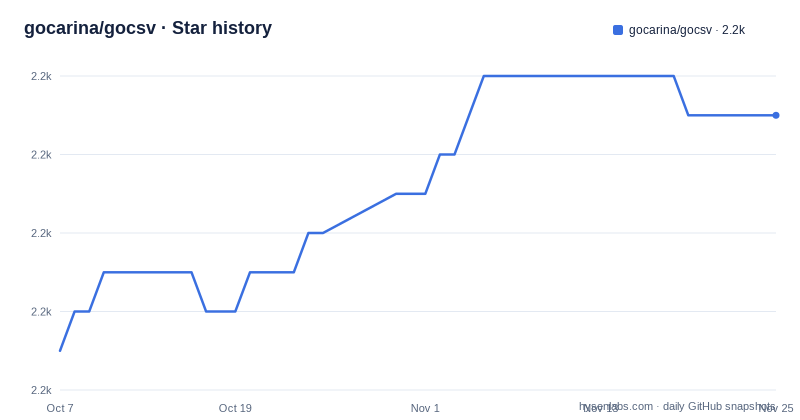
- gocarina/gocsv2,203 ★ · +6
| Repository | 2026-10-07 | 2026-11-25 |
|---|---|---|
| gocarina/gocsv | 2.2k | 2.2k |
6 Stars in the last 49 days, measured from the daily GitHub snapshot. Compare with other projects
Editorial analysis
Installing gocsv and what the module file says about age
Installation is a single line, taken straight from the README:
go get -u github.com/gocarina/gocsvThe API and the techniques are described in the README as inspired by gopkg.in/mgo.v2, which is worth knowing because that library's struct tag style is where the `csv:"field_name"` convention comes from.
The module file is short and informative:
module github.com/gocarina/gocsv

go 1.13
The `go` directive records the module's declared Go version; it does not prove compatibility with every newer toolchain, adoption or dependency policy. Check the selected revision's module file and test it with your Go version. Git tags, module pseudo-versions and commits can identify versions even when GitHub releases are absent.
The repository tree separates the concern the package name suggests. `decode.go` and `encode.go` are the two directions of the conversion, `reflect.go` holds the struct walking, `types.go` defines the interface a custom type has to satisfy, and `safe_csv.go` is a separate writer that defers error reporting rather than panicking on the first bad record. Test files sit next to each of them, plus `callback_error_test.go` and `custom_extra_columns_test.go` for behaviours that are easy to get wrong.
Binding columns to fields with the csv struct tag
The README's full example starts from a plain CSV file with a `client_id`, `client_name`, `client_age` header and three data rows, then maps it onto a struct. The struct in the example is where the whole design sits:
type Client struct { // Our example struct, you can use "-" to ignore a field
	Id            string `csv:"client_id"`
	Name          string `csv:"client_name"`
	Age           string `csv:"-"`
	NotUsedString string `csv:"-"`
	NotUsedStruct NotUsed `csv:"-"`
}
Three things are happening there. A `csv` tag names the column, so `client_id` in the file reaches the `Id` field even though the Go name is different. A `-` tag excludes a field in both directions, and the README notes you can use that on a whole struct as well as a string. In this displayed example `Age` is also tagged `-`, so it is ignored; it does not demonstrate parsing a missing numeric age.
For optional numeric data, test missing columns, empty cells and zero values separately with the selected version; use pointers or custom conversion when your application must distinguish them.
The read and write calls are ordinary functions. `gocsv.UnmarshalFile` takes an `io.ReadSeeker` and a pointer to a slice; `gocsv.MarshalString` returns the CSV as a string, and `gocsv.MarshalFile` writes it back to the same handle. The example seeks back to offset zero before writing. Seeking does not truncate a longer existing file: use a safe replacement or truncate as appropriate, and check write and close errors.
Custom converters for types the standard library cannot handle
A `time.Time` field is the case where the built-in conversion gives up, and the README's answer is a pair of methods on your own type. The example defines a `DateTime` wrapper and shows custom CSV conversion methods, including:
func (date *DateTime) MarshalCSV() (string, error) {
	return date.Time.Format("20060201"), nil
}

func (date *DateTime) UnmarshalCSV(csv string) (err error) {
	date.Time, err = time.Parse("20060201", csv)
	return err
}
The layout string `20060201` is the unusual part and it is worth pausing on. Go layouts use the reference date January 2, 2006: `20060201` means year-day-month, so August 25, 2026 formats as `20262508`. For year-month-day without separators use `20060102`. It is a legitimate choice for fixed-width export, but it is a choice that changes the shape of your data files, and you should treat the README example as a demonstration of the interface rather than a recommendation.
The `String()` method in the example is labelled redundant in the README's own comment, which is a useful signal about how the resolution order works: the precise conversion precedence depends on the interfaces implemented; consult the version's API and test round trips.
Because the contract is just two methods, the pattern extends past dates. A money type, an enum stored as a code, or a type that must serialize as a nested object all fit the same shape. `types.go` in the repository is the file to read when you want the exact interface signatures rather than the example.
Nested structs get prefixed columns unless you say otherwise
Struct fields that are themselves structs are flattened into columns, and the README documents the naming rule precisely. Given a `Foo` with a `Bar` field and an `X int`, and a `Bar` with `A` and `B`, the default output columns are `B.a, B.b, x`. The parent's field name becomes a prefix.
You override that with a dot in the tag, which inlines the nested struct's own field names:
type Foo struct {
	B Bar `csv:"."`
	X int `csv:"x"`
}
which produces columns `a, b, x`. The distinction between the two forms matters more than it looks, because it is the difference between a file other tools can read and a file that has invented column names in it.
The README is also candid about pointer allocation here. When decoding nested pointer structs, gocsv allocates the pointers needed to reach each field, and an `omitempty` field still omits an empty leaf pointer value on output while not preventing allocation of the enclosing structs. In other words, `omitempty` controls what gets written, not what gets allocated on the way in. If your model has deep nesting and you care about allocation, that sentence is the one to design around.
Swapping the reader and writer for a different dialect
gocsv does not parse CSV itself, so changing the dialect means handing it a differently configured `encoding/csv` reader. The README shows this through `gocsv.SetCSVReader`, and three variants appear in the example, all returning a `gocsv.CSVReader`:
func main() {
	...

	gocsv.SetCSVReader(func(in io.Reader) gocsv.CSVReader {
		r := csv.NewReader(in)
		r.Comma = '|'
		return r // Allows use pipe as delimiter
	})

	...
}
Setting `Comma` to a pipe makes that the delimiter. Setting `LazyQuotes` to true with a dot delimiter handles files where quoting is inconsistent, which is common in exports written by older tools. A third option returns `gocsv.LazyCSVReader` directly, which allows quotes inside unquoted fields without configuring anything.
The writer has the mirror hook, `gocsv.SetCSVWriter`, which takes an `io.Writer` and returns a `*gocsv.SafeCSVWriter`. The Safe variant is what the returned type tells you: it wraps a CSV writer with synchronized access and exposes errors. The standard `encoding/csv.Writer` returns write errors and buffers output; callers must flush and check `Error()` rather than assuming it panics on malformed records.
One design consequence worth naming: these are package level functions, not options on a call. They set global state for the process, so configuring the dialect once in an initialiser is the sane pattern, and changing it concurrently or between operations can affect other users of the package. Configure it before concurrent use, or investigate the reader/writer-specific APIs for separate dialects.
Editorial conclusion
gocsv maps CSV data to Go structs using tags and custom converters. Verify headers, conversion and error handling with representative files; use `SimpleDecoder` with `UnmarshalDecoderToChan` or `UnmarshalDecoderToCallback` for row-by-row processing, and measure memory usage for your workload. For custom dialects, configure the reader or writer carefully and check the current API documentation.
Frequently asked questions
How can I read a CSV file in Golang?
The standard library reads CSV through encoding/csv, and gocsv builds on that by adding struct binding on top. You declare a struct with `csv:"column_name"` tags on the fields you want, then call gocsv.UnmarshalFile with a pointer to a slice of that struct.
How do I convert a custom type such as a date to a CSV string?
Implement the converter methods on your type, as the README's DateTime example does: a MarshalCSV returning a string and an UnmarshalCSV that parses one. gocsv checks for these methods on any field type, so the pattern extends to money types, enums and nested values.
Can gocsv handle CSV files that use a different delimiter?
Yes. `SetCSVReader` can configure an `encoding/csv.Reader`, including its delimiter and `LazyQuotes`; `SetCSVWriter` supplies a writer. These setters affect package-level configuration, so configure them deliberately and check errors when writing and flushing.
What license is gocsv released under?
The repository is MIT licensed. Check the license text and the selected module version or commit when evaluating use or redistribution.
Official sources
Add this badge to your README
If you maintain this project, the badge below links readers to this analysis and shows its maintenance status from the daily GitHub snapshot. Paste the markdown into your README; add ?metric=license or ?metric=stars to the image URL for a different field.

[](https://hysenlabs.com/projects/gocarina-gocsv)Star history chart for your README
[](https://hysenlabs.com/projects/gocarina-gocsv)Was this useful?