fscrypt encrypts individual directories with the kernel's own API, and it tells you what that does not hide
Go tool for managing Linux filesystem encryption
At a glance
- What is it?
- A Go tool for managing Linux native filesystem encryption, which wraps the kernel fscrypt API with key protectors, a PAM module and a recovery path. The README is unusually good at describing its own limits, from unencrypted metadata to the V1 versus V2 policy split with systemd-homed.
- Who is it for?
- Adopt fscrypt if you need to encrypt specific directories on a Linux host rather than a whole block device, for example a project directory or a set of credentials, and your filesystem supports the kernel's native encryption API.
- Can I use it commercially?
- Yes. Apache-2.0 is a permissive licence: you can use, modify and sell software built on it, as long as you keep its copyright and licence notices.
- Is it still maintained?
- Yes. The repository last received commits 59 days ago.
- What is it written in?
- Mainly Go, according to GitHub's language statistics.
Answers come from the project's GitHub data, last synced on November 7, 2026, and from our analysis. They are not legal advice.
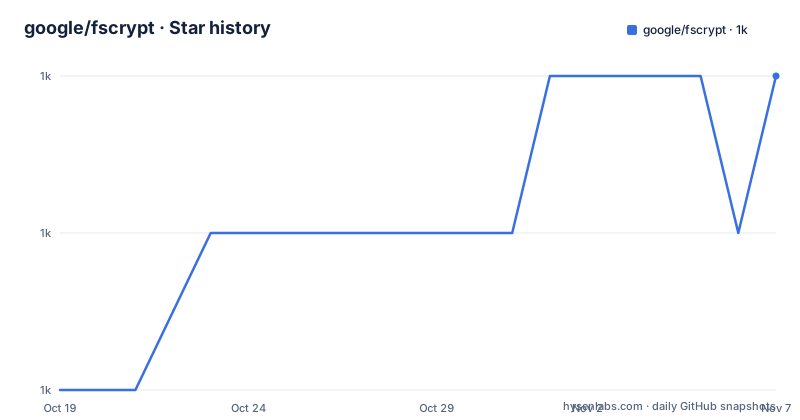
Star history
- google/fscrypt1,040 ★ · +2
| Repository | 2026-10-19 | 2026-11-07 |
|---|---|---|
| google/fscrypt | 1k | 1k |
2 Stars in the last 19 days, measured from the daily GitHub snapshot. Compare with other projects
Editorial analysis
Filesystem level, per directory, and metadata stays readable
fscrypt is a high-level tool for the management of Linux native filesystem encryption, the kernel API also sometimes called fscrypt, which the documentation deliberately calls Linux native filesystem encryption to avoid the confusion between the tool and the API. It manages metadata, key generation, key wrapping, PAM integration, and provides a uniform interface for creating and modifying encrypted directories.
The scope is precise and it is worth being precise about it in your own threat model. The README explains that filesystem level solutions work at either the filesystem or block device level, and that Linux native filesystem encryption is filesystem level, encrypting individual directories. Only file contents and filenames are encrypted. Non-filename metadata, such as timestamps, the sizes and number of files, and extended attributes, is not encrypted.
That last sentence is the one to internalise. An attacker looking at the filesystem still learns how many files exist in a directory, how large they are, when they were modified and what extended attributes they carry. Only the names and the contents are hidden. Whether that is acceptable depends entirely on what you are protecting, and for a credential store or a private document directory it usually is, while for a directory whose file count is itself sensitive it is not.
The other structural point is that users choose which directories are encrypted and with what keys. Unlike full disk encryption, nothing is encrypted until you say so, and that granularity is the reason the tool exists.
The alternatives section is the best part of the README
Before telling you what fscrypt does, the README tells you when not to use it, and the alternatives section is unusually well argued.
dm-crypt and LUKS are block device level. They encrypt an entire block device, and therefore an entire filesystem, with one key, and unlocking that key unlocks the whole device. They are usually configured with cryptsetup. If your threat model is a lost laptop, that is usually the right answer.
systemd-homed is the closer comparison, because it uses the same kernel API. But the README is careful about the differences that matter. Directories set up using systemd-homed cannot be managed by fscrypt and vice versa. systemd-homed has better integration with systemd. And as of systemd v255, systemd-homed uses the V1 Linux kernel encryption API while fscrypt prefers the V2 API, which causes known issues with some processes being unable to access unlocked encrypted files, and migrating systemd-homed to the V2 API is tracked in an upstream systemd issue. The README points users with systemd-homed problems to the systemd developers rather than absorbing them.
eCryptfs is the third alternative, a stacked filesystem that sits on top of a real filesystem rather than being integrated into it. The integrated kernel API avoids a stack of your own.
For a small low-level tool that directly sets policies, the README points to fscryptctl. So there is a division of labour: fscrypt is the high-level manager with key protectors and PAM, fscryptctl is the low-level policy setter.
The repository also has a `security/` directory at the root, which suggests the threat model and security documentation live in the tree rather than only in the README.
Key protectors are the model, and PAM is how unlocking happens
The mechanism that makes the tool usable day to day is the key protector. A policy is protected by one or more protectors, each of which wraps the file encryption key under a secret you know.
The example usage in the README covers the shapes that matter. You can protect a directory with your login passphrase, change a custom passphrase, use a raw key protector, and use multiple protectors for a single policy. Multiple protectors is the important one for operational reality, because it means a directory can be unlocked by the login passphrase in normal use and by a recovery key when the login passphrase is not available.
The PAM module is the other half. There is a `pam/` directory and a `pam_fscrypt/` directory in the repository, and the PAM module is what lets a directory protected by your login passphrase unlock automatically at login rather than requiring a manual `fscrypt unlock`. The README documents enabling the module per distribution, with separate instructions for Debian or Ubuntu, for Arch Linux and for other distributions, and a section on allowing fscrypt to check your login passphrase.
There is also a section on securing your login passphrase, which tells you the chain of trust this design depends on: if your login passphrase is weak, every directory protected by it is weak, and the passphrase is now doing double duty.
The keyring code lives in a `keyring/` directory, and the key wrapping in `crypto/`, which uses golang.org/x/crypto, and the topic list names argon2, so the passphrase stretching is the standard one. The `metadata/` directory holds the per-filesystem policy and protector records, which are stored on the filesystem itself, and the `filesystem/` directory holds the code that talks to the kernel.
The Makefile builds a PAM module, and the tests need a real filesystem
The build is where you see that this is a tool with system level side effects.
The Makefile defines the version as v0.3.7, matches the current release tag, and computes the PAM module name as `pam_$(NAME)`, so `pam_fscrypt`. The installation paths are configurable, with a default prefix of `/usr/local`, a binary directory at `$(PREFIX)/bin`, a PAM module directory at `$(PREFIX)/lib/security` and a PAM config directory at `$(PREFIX)/share/pam-configs`. The PAM config is only installed when that path is not empty, which is the hook for distributions that manage PAM configuration themselves.
The test story is the part to understand before you trust it. The Makefile takes a `MOUNT` variable, defaulting to `/mnt/fscrypt_mount`, and the help text describes a `test-setup` target that creates a test filesystem at that location and a `test-teardown` that cleans it up. Integration tests run on that filesystem, which can be an existing one or one created by the setup target.
That is a real filesystem with encryption support, not a mock. The `cli-tests/` directory at the root and the `filesystem/` package underneath it mean the tests exercise the kernel interface end to end. This is the right way to test a tool like this, and it also means the test suite needs privileges and a prepared filesystem, so a contributor without that setup will not be able to run the full suite.
The remaining directories map to the features: `cmd/` for the command line, `metadata/` for the policy records, `crypto/` for key wrapping, `keyring/` for the keyring plumbing, `pam/` and `pam_fscrypt/` for the module, `cgroup/` for a cgroup related helper, `actions/` for integration with the actions framework, `bin/` for build output, and `security/` for the security material. The `go.mod` requires Go 1.25.0, and the CLI is built on urfave/cli v1.
The licence is Apache-2.0, and the author credit in the Makefile header is Joe Richey at Google.
Backup, recovery and the troubleshooting list as an honest index
Encryption tools earn trust in their recovery documentation, and this one has a whole section on backup, restore and recovery, plus a troubleshooting list that reads like a list of real support tickets.
The troubleshooting entries are the clearest statement of the tool's rough edges. Changing your login passphrase leaves all directories inaccessible unless you rewrap the keys, and there is a dedicated section for that. Directories protected by the login passphrase stop unlocking automatically, and the fix is the PAM integration. Getting an encryption not enabled error on ext4 means the filesystem was created without the encryption feature, which is the one mistake that is genuinely hard to undo because it needs a new filesystem. A user keyring not linked into session keyring error is the same class of problem in the keyring plumbing. Operation not permitted when moving files into an encrypted directory comes from the key not being available to the moving process. Package not installed when using an encrypted directory means the helper tools are missing. Some processes cannot access unlocked encrypted files, and users can access other users' unlocked encrypted files, which is a genuine property of the design and a genuine reason to be careful with shared machines. Backing up locked encrypted files fails with required key not available. And the reported size of encrypted symlinks is wrong, which is a small honest admission about how the encryption of symlink targets affects stat output.
That last cluster of entries is the real cost of this approach, and it is exactly what the V1 versus V2 API split in the alternatives section is about. The older API causes known issues with some processes being unable to access unlocked encrypted files.
A section on encrypting existing files is also there, and the example usage walks through setting up fscrypt on a directory, locking and unlocking it, protecting one with the login passphrase, changing a custom passphrase, using a raw key protector and using multiple protectors.
The release history is modest but current. v0.3.7 was published on 2026-08-22, v0.3.6 on 2025-11-05 and v0.3.5 on 2025-02-12, and the last push to the repository was on 2026-09-10. The project is not archived, and the release notes live in a NEWS.md file at the root.
Editorial conclusion
Adopt fscrypt if you need to encrypt specific directories on a Linux host rather than a whole block device, for example a project directory or a set of credentials, and your filesystem supports the kernel's native encryption API. Do not adopt it if you need metadata such as timestamps, file sizes or extended attributes to be hidden, because only file contents and filenames are encrypted, and do not mix it with systemd-homed, since the two are mutually exclusive for the same directories. Verify first that your filesystem has encryption support enabled, that your kernel supports the V2 policy API, and that you have tested the restore path from a recovery key on a scratch directory before you protect anything you cannot lose.
Frequently asked questions
What does fscrypt encrypt and what does it leave readable?
It is a filesystem level tool that encrypts individual directories, and only file contents and filenames are encrypted. Non-filename metadata such as timestamps, file sizes, file counts and extended attributes is not encrypted, and users choose which directories are encrypted and with what keys.
Which filesystems can I use fscrypt on?
Only filesystems that support the Linux native filesystem encryption API, such as ext4 and f2fs. The README points to the runtime dependencies section for the full list and for how to enable encryption support on each one.
What is a key protector in fscrypt?
A key protector wraps the file encryption key of a policy under a secret you know, such as your login passphrase or a raw key. A policy can have multiple protectors, which lets a directory be unlocked by the login passphrase normally and by a recovery key when needed.
How does fscrypt differ from dm-crypt and LUKS?
dm-crypt and LUKS encrypt an entire block device and therefore an entire filesystem with a single key, so unlocking it unlocks everything. fscrypt is filesystem level and encrypts individual directories with per-directory keys, so you choose what is encrypted.
Can I use fscrypt and systemd-homed on the same directories?
No. Directories set up using systemd-homed cannot be managed by fscrypt and vice versa. systemd-homed has better systemd integration but as of systemd v255 uses the V1 kernel encryption API, while fscrypt prefers the V2 API.
Official sources
Add this badge to your README
If you maintain this project, the badge below links readers to this analysis and shows its maintenance status from the daily GitHub snapshot. Paste the markdown into your README; add ?metric=license or ?metric=stars to the image URL for a different field.

[](https://hysenlabs.com/projects/google-fscrypt)Star history chart for your README
[](https://hysenlabs.com/projects/google-fscrypt)Was this useful?