Finch: the virtual machine is not a security boundary
The Finch CLI is an open source client for container development
At a glance
- What is it?
- A thin Go client over nerdctl, containerd and BuildKit, all inside a Lima virtual machine, packaged so macOS and Windows users get one installer. Simple, and explicit that it is a developer tool only.
- Who is it for?
- Finch is a good fit on a laptop for someone who wants a container toolchain without installing Docker Desktop or assembling nerdctl, containerd, BuildKit and a virtual machine by hand, because that is exactly what the installer does. It is a poor fit for a shared build server or anything multi-tenant, for the reason the project states in its own callout: the virtual machine creates no security boundary.
- Can I use it commercially?
- Yes. Apache-2.0 is a permissive licence: you can use, modify and sell software built on it, as long as you keep its copyright and licence notices.
- Is it still maintained?
- Yes. The repository last received commits 1 day ago.
- What is it written in?
- Mainly Go, according to GitHub's language statistics.
Answers come from the project's GitHub data, last synced on November 15, 2026, and from our analysis. They are not legal advice.
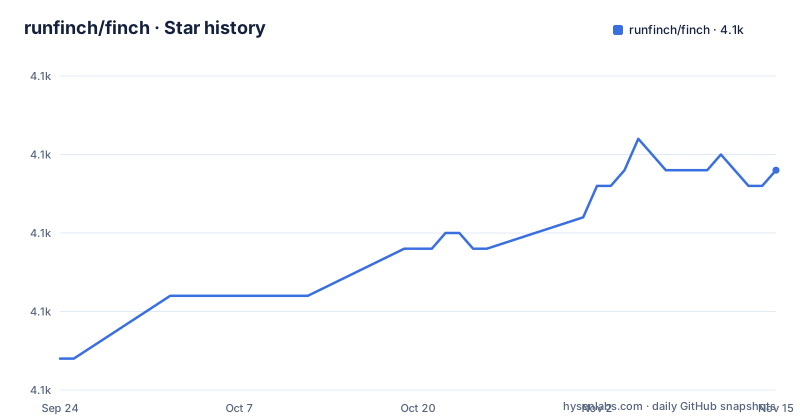
Star history
- runfinch/finch4,079 ★ · +12
| Repository | 2026-09-24 | 2026-11-15 |
|---|---|---|
| runfinch/finch | 4.1k | 4.1k |
12 Stars in the last 52 days, measured from the daily GitHub snapshot. Compare with other projects
Editorial analysis
Finch is a client, not a container runtime
Nothing in Finch is original container technology, and the README says so plainly. The native binary is a client integrated with nerdctl, which handles the core build, run, push and pull commands. nerdctl in turn works with containerd for container management and with BuildKit for OCI image builds. All of that runs inside a virtual machine managed by Lima. The stated goal is not to add another choice but to remove one, promoting other projects by making them easy to install and tying them together with a single client. That framing explains both the appeal and the limits. You get a working toolchain from one installer, and you also get a thin layer whose commands are a subset of nerdctl's, which is why the nerdctl command reference is offered as the documentation to read. Volume and network management and Compose support are among the commands covered.
finch run --rm public.ecr.aws/finch/hello-finchThe README opens with a warning that the VM is not a boundary
There is a callout marked important before the installation instructions, and it is the sentence to read first. Finch is a developer tool and is not meant for use in production environments, especially one running multi-tenant workloads. The virtual machine that Finch manages on macOS and Windows does not create a security boundary and exists for the sole purpose of running Linux containers on macOS and Windows. That is a precise and unusual admission. The VM exists to work around the absence of a Linux kernel on those platforms, not to contain anything hostile, so anything running inside it is running with the privileges of the person who started it. If you are evaluating Finch for a shared runner or a CI box where other people's code executes, that line is the answer, and it is the project's own answer rather than an inference.
finch vm init is a one-time step that takes about a minute
On Windows the installer is an MSI and there is one extra step afterwards. The prerequisites are Windows 10 version 2004 or higher, meaning build 19041 or higher, an AMD64 based system, and WSL 2 installed. After the install, `finch vm init` is required once to set up the underlying system, and the documented output shows the shape of it, a couple of progress dots and then a line reporting the virtual machine started successfully, typically arriving in about sixty-seven seconds of the sample log. That is the whole cost, paid once, and it is the step people skip when they see a command that is not in the quickstart. The macOS path has no equivalent because the packaged installer handles it, which is the second platform difference worth knowing before you write a setup script that has to work on both.
Linux is the platform without an installer
The Linux instructions are a paragraph about other distributions. The stated prerequisite is a system capable of running containerd 1.7.x, which generally means a kernel of at least 4.x. Installers are packaged and distributed on Amazon Linux, and if that is not your distribution you download the binary from the releases page and install the dependencies yourself, following the convention in the RPM spec file under contrib/packaging/rpm. Detailed instructions live on the project's documentation site under the Linux installation section. In other words the platform where containers are native is the one with the least automated setup, which is a deliberate consequence of the design rather than an oversight: everything else exists to make up for a missing kernel. There is a [email protected] systemd unit at the top of the tree, so the Linux path expects a daemon-managed install.
--platform handles the architecture translation for you
Running an x86 container on Apple silicon is the problem Finch solves most visibly, and the demonstration is worth reading because it shows exactly what happens. On an M1 the host reports Darwin arm64. Running a container with the platform flag set to amd64 and asking it to report its own architecture returns Linux x86_64, which is the expected result but not one you get for free on a different toolchain. The same option works on build, which is what makes multiplatform images practical rather than theoretical: you can produce an image for more than one architecture in one command. The image list is available through the images command, so locally pulled and built images are visible in the same place. Note that the pulled test image comes from the public ECR registry under the finch namespace, so a first run needs network access before anything local happens.
Both lima v1 and lima v2 are in the module graph
The dependency list explains the scale of what the installer actually pulls in. go.mod names go 1.25.7 and requires nerdctl v2, docker and docker cli, containerd packages, aws-sdk-go-v2, cobra for the command line, ginkgo and gomega for the end-to-end tests, testify for unit tests, go-licenses for producing a licence report, and both lima and lima/v2 at once, which tells you a migration is in progress rather than finished. On Windows the indirect list pulls in hcsshim, the Docker engine's Windows container layer, and the build tooling includes go-winres for compiling Windows binaries with icon and version resources. Logging goes through logrus with lumberjack for rotation. The presence of a NOTICE file and a copyright_header alongside the Apache 2.0 licence is the Amazon provenance made visible, and the Makefile opens with the Amazon.com copyright line.
Three Makefiles, three builder directories, one injected checksum set
The build system is more interesting than a typical single Makefile, mostly because of how much is computed at build time. There are Makefile, Makefile.darwin and Makefile.windows, so each platform gets its own path. The version string comes from git describe against the v-prefixed tags with a dirty suffix, and the commit from git rev-parse HEAD with a modified marker appended when the tree is dirty, both injected into pkg/version through linker flags. Architecture is derived from uname -m and compared against a supported list. The interesting part is the soci version block: the Makefile includes a file from the finch-core dependency directory and injects not only a soci version string but a separate AMD64 and ARM64 SHA256 digest for it, so the artefact that ends up on a machine is checked against a value compiled in rather than one discovered at install time. Minimum macOS is pinned at 11.0 in the Makefile, later than the 10.15 the README mentions.
Releases are cut by release-please, three builders ship the artefacts
How the artefacts get made is visible in the top-level directory listing. There is an installer-builder/ for the macOS path, an msi-builder/ for Windows, and a winres/ directory holding the Windows resource definitions, alongside config.yaml and networks.yaml at the repository root for Finch's own defaults and a finch.yaml.d/ directory for dropped-in overrides. Documentation lives in docs/, and the header links to a benchmark site hosted under the project's gh.io dev path, which reads as a generated comparison rather than a published paper. Releases are automated: a release-please-config.json and a .release-please-manifest.json sit next to a CHANGELOG.md, so the version bump, the changelog entry and the tag are one pipeline. The tag history shows recent cadence, v1.17.2 on 30 June 2026, v1.18.0 on 20 August and v1.19.0 on 16 September, with the last push to main on 29 September 2026.
Editorial conclusion
Finch is a good fit on a laptop for someone who wants a container toolchain without installing Docker Desktop or assembling nerdctl, containerd, BuildKit and a virtual machine by hand, because that is exactly what the installer does. It is a poor fit for a shared build server or anything multi-tenant, for the reason the project states in its own callout: the virtual machine creates no security boundary. Three things to check first. Linux has no real installer, since packages exist only for Amazon Linux and everything else means following an RPM spec by hand. Finch does not implement every nerdctl command, so verify the one you need against the upstream reference rather than assuming. And the benchmark link in the README header points at a site under the gh.io dev path, which is a build-time comparison page rather than a published result you can rely on.
Frequently asked questions
What is the Finch CLI?
Finch is an open source client for container development. It provides a minimal native client integrated with nerdctl, which works with containerd for container management and BuildKit for OCI image builds, and all of it runs inside a virtual machine managed by Lima.
Is Finch safe for production use?
No. The README states that Finch is a developer tool not meant for production environments, especially multi-tenant ones, and that the virtual machine it manages on macOS and Windows does not create a security boundary and exists only to run Linux containers on those platforms.
What do I need to install Finch on Windows?
Windows 10 version 2004 or higher, which is build 19041 or higher, an AMD64 based system, and WSL 2 installed with wsl --install. Download the MSI from the GitHub releases page, then run finch vm init once, which usually takes about a minute.
How do I install Finch on macOS?
You need macOS Catalina 10.15 or higher on Intel or Apple Silicon M1, with a recommended minimum of 2 CPUs and 4 GB of memory. Download the release package for your architecture and double-click it, or install with brew install --cask finch.
Can I install Finch on Linux?
Installers are packaged and distributed on Amazon Linux only. On other distributions you download the binary from the GitHub releases page and install the dependencies yourself, following the convention in contrib/packaging/rpm/finch.spec. You need a system capable of running containerd 1.7.x.
Does Finch support every nerdctl command?
No. The README says Finch does not implement 100% of the upstream commands but that the most common ones are in place and working, and points to the nerdctl command reference for documentation. Volume and network management and Compose support are covered.
Official sources
Add this badge to your README
If you maintain this project, the badge below links readers to this analysis and shows its maintenance status from the daily GitHub snapshot. Paste the markdown into your README; add ?metric=license or ?metric=stars to the image URL for a different field.

[](https://hysenlabs.com/projects/runfinch-finch)Star history chart for your README
[](https://hysenlabs.com/projects/runfinch-finch)Was this useful?