git-appraise: code reviews as git objects, no server required
GitHub describes it as Distributed code review system for Git repos. The repository metadata lists Go as its primary language. The metadata lists the Apache-2.0 license. This article stays within the project description and details documented in the GitHub repository README.
At a glance
- What is it?
- git-appraise stores reviews, comments, and CI results as git notes, so review history lives inside the repository and syncs with ordinary push and pull. It suits teams that want review data to travel with the code, but its last release was in April 2021 and its last push in August 2023.
- Who is it for?
- Adopt git-appraise if your team already uses git everywhere, wants review history to live inside the repository, and can tolerate a tool whose last release was in April 2021 and last push in August 2023. Do not adopt it if you need a hosted review UI, real-time notifications, or active maintenance.
- Can I use it commercially?
- Yes. Apache-2.0 is a permissive licence: you can use, modify and sell software built on it, as long as you keep its copyright and licence notices.
- Is it still maintained?
- Probably not. The repository last received commits 39 months ago, on August 12, 2023.
- What is it written in?
- Mainly Go, according to GitHub's language statistics.
Answers come from the project's GitHub data, last synced on November 15, 2026, and from our analysis. They are not legal advice.
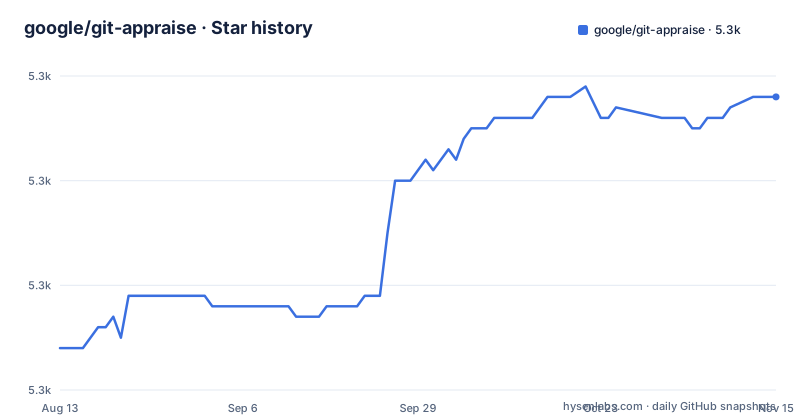
Star history
- google/git-appraise5,328 ★ · +24
| Repository | 2026-08-13 | 2026-11-15 |
|---|---|---|
| google/git-appraise | 5.3k | 5.3k |
24 Stars in the last 94 days, measured from the daily GitHub snapshot. Compare with other projects
Editorial analysis
What problem it solves and who it is for
git-appraise solves the problem of code review metadata being locked inside a central service. In a typical review tool, comments and approvals live in a database controlled by the server. That server is a single point of failure and a barrier to contribution. git-appraise removes that barrier by storing all review data as git objects. The README calls the system distributed and explains that every developer has their own copy of the review history, which they can push or pull. The intended user is a developer or a small team that already uses git as the source of truth and wants review data to follow the same model. It is not for teams that need a web-based review dashboard or a centralized audit trail. The tool is a command line client, and it expects the git command line tool to be installed and configured with credentials for remote operations.
The mechanism: git notes and JSON lines
The core design is simple but unusual. Review data is stored in git notes, which are refs that annotate commits without changing the commit itself. The README specifies four refs under refs/notes/devtools/: reviews, ci, analyses, and discuss. Each note is a single line of JSON, and the tool writes at most one item per line. That choice enables automatic merging using the cat_sort_uniq strategy. When you pull from a remote, the tool merges the notes from the remote with your local notes, sorting and deduplicating lines. This approach means conflicts are rare, because lines are independent JSON records. The version field, named v, defaults to 0 if absent, which is a forward-compatibility hook. The schema files in the repository define the exact structure for requests, CI results, robot comments, and human comments. This is a deliberate trade-off: the data is machine-readable but not human-friendly, so the refs are prefixed with devtools to signal that they are not meant for manual editing.
Getting it running: install and first commands
Installation requires Go tools. The README gives the command go install github.com/google/git-appraise/git-appraise@latest. After that, you either add ${GOPATH}/bin to your PATH or create a git alias. The alias command is git config --global alias.appraise '!'"${GOPATH}/bin/git-appraise" on Unix, and a variant with %GOPATH% on Windows. The tool expects to run inside a git repository, and it needs the git command line tool in PATH. The basic workflow is short. To request a review, run git appraise request. To push reviews to a remote, run git appraise push [<remote>]. To pull, run git appraise pull [<remote>]. Listing open reviews is git appraise list, and showing a review with comments is git appraise show. Commenting uses git appraise comment -m "<message>" [-f <file> [-l <line>]] [<review-hash>]. Accepting is git appraise accept, and submitting is git appraise submit with either --merge or --rebase. The tutorial in docs/tutorial.md provides a longer walkthrough, but the commands above are enough to start.
Where it breaks: limitations and failure modes
The most obvious limitation is that the project has had no release since April 2021, and its last push was in August 2023. The last release, v0.7, is a rollup of the version as of that date. That means any bug fixes or compatibility updates for newer git versions are absent. A second point is that the tool depends on git notes; the README says this design removes the need for server-side setup, so the tool can work with any git hosting provider. Another failure mode is the merge strategy. The cat_sort_uniq strategy works only if each line is truly unique. If two developers write identical JSON lines, they will be deduplicated, which could lose a duplicate comment or CI result. The README notes that review requests are sorted by timestamp and the final one wins, so re-running request updates the review. That works, but it also means concurrent updates to the same review can silently overwrite each other. Finally, the tool is command line only. There is a web UI project, git-appraise-web, but it is a separate project and not part of this repository.
The alternative: a centralized review server
The direct alternative is a centralized code review system like Gerrit or a hosted service such as GitHub Pull Requests. The difference in approach is fundamental. Gerrit provides a server-side review workflow with push refs and change IDs; its NoteDb stores change metadata in Git refs. GitHub Pull Requests store comments and reviews in GitHub's infrastructure rather than in the ordinary cloned repository history. git-appraise takes the opposite stance: the repository is the database. That has a clear advantage for offline work and for teams that want to archive review history with the code. But it also means you lose the server's conveniences: a web interface for browsing reviews, email notifications, permission management, and a central source of truth for review state. The README lists mirrors to GitHub Pull Requests and Phabricator Revisions, which suggests that some teams use git-appraise locally and then export the data to a centralized system. That hybrid approach may be the most practical use today.
Maintenance and upgrade cost
The maintenance cost is low in terms of daily operations, because the tool is a single binary and requires no daemon or database. The upgrade cost is a different matter. Since the project is effectively dormant, you cannot rely on regular releases. The v0.7 release is a rollup as of April 2021, and the last push was in August 2023. That means you are on your own if git changes its notes behavior or if a new git version breaks the tool. The license is Apache-2.0, which permits commercial use and modification, so you can fork and patch it if needed. That is a real option, but it places the maintenance burden on you. The repository includes schema files in JSON, and the metadata format is versioned, so an upgrade path exists if someone resumes development. However, you should verify that the tool works with your git version before committing to it, and you should budget time for potential fixes.
The ecosystem around it
The README lists several integrations that extend the tool beyond the command line. There is a Go library in the review package, and a Rust implementation called git-appraise-rs. For graphical use, there is git-appraise-web, which is a separate project. The Jenkins plugin, google-git-notes-publisher-plugin, suggests that CI systems can write results into the notes refs. Mirrors exist for GitHub Pull Requests and Phabricator Revisions, which means you can export reviews to other systems. This ecosystem is a strength, but it is also a double-edged sword. Each integration is a separate project with its own maintenance status. The core tool's dormancy does not guarantee that these integrations are maintained. If you rely on the web UI or the Jenkins plugin, you need to check each one separately. The existence of these projects shows that the design is sound enough to attract integrations, but it does not indicate active support.
Editorial conclusion
Adopt git-appraise if your team already uses git everywhere, wants review history to live inside the repository, and can tolerate a tool whose last release was in April 2021 and last push in August 2023. Do not adopt it if you need a hosted review UI, real-time notifications, or active maintenance. Before adopting, verify that your git hosting provider handles refs/notes/devtools/* correctly, and test how the cat_sort_uniq merge strategy behaves when multiple developers push reviews simultaneously.
Frequently asked questions
What does git-appraise do?
It is a command line tool for performing code reviews on git repositories. Reviews are stored inside the repository as git objects, so every developer has their own copy of the review history that they can push or pull.
How do I install git-appraise?
With the Go tools installed, run go install github.com/google/git-appraise/git-appraise@latest, then put ${GOPATH}/bin on your PATH or add the alias with git config --global alias.appraise. A Windows variant of the alias command uses %GOPATH%/bin/git-appraise.exe.
Where does git-appraise store its review data?
In git notes under refs that start with refs/notes/devtools: reviews for review requests, ci for build and test results, analyses for robot comments from static analysis, and discuss for comments written by people. Each item is a single line of JSON.
What does git-appraise need from git?
Three things: the git command line tool installed and on the PATH, a working directory inside a git repo, and git configured with the credentials it needs to push to and pull from the remote repos.
Can I review code in a browser with git-appraise?
Not from the client itself. Git-Appraise-Web is a separate repository for the browser interface, and mirrors exist for GitHub pull requests and Phabricator revisions, so a graphical workflow means running those projects alongside the client.
Official sources
Add this badge to your README
If you maintain this project, the badge below links readers to this analysis and shows its maintenance status from the daily GitHub snapshot. Paste the markdown into your README; add ?metric=license or ?metric=stars to the image URL for a different field.

[](https://hysenlabs.com/projects/google-git-appraise)Star history chart for your README
[](https://hysenlabs.com/projects/google-git-appraise)Was this useful?