Guesstimate: Monte Carlo Estimates in a Spreadsheet, Without the Statistics Degree
Create Fermi Estimates and Perform Monte Carlo Estimates
At a glance
- What is it?
- Guesstimate replaces single-number cells with ranges and distributions, then runs 5000 samples through your formulas to produce confidence intervals. It is a Next.js app with Auth0 and Algolia bolted on, and it is honest about what it does not do.
- Who is it for?
- Adopt Guesstimate if your estimates are chains of uncertain quantities and you want the arithmetic done for you without leaving a spreadsheet mental model. Do not adopt it if you need private models, multi-user editing, or reusable metric libraries; the README lists all three as current limitations.
- Can I use it commercially?
- Yes. MIT is a permissive licence: you can use, modify and sell software built on it, as long as you keep its copyright and licence notices.
- Is it still maintained?
- Yes. The repository last received commits 12 days ago.
- What is it written in?
- Mainly TypeScript, according to GitHub's language statistics.
Answers come from the project's GitHub data, last synced on November 7, 2026, and from our analysis. They are not legal advice.
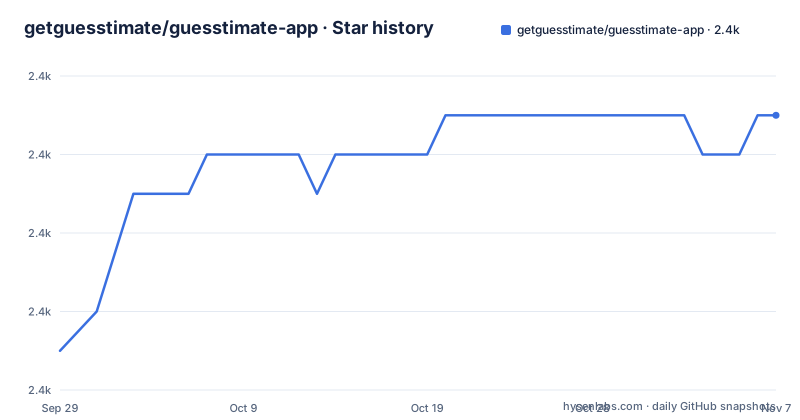
Star history
- getguesstimate/guesstimate-app2,395 ★ · +6
| Repository | 2026-09-29 | 2026-11-07 |
|---|---|---|
| getguesstimate/guesstimate-app | 2.4k | 2.4k |
6 Stars in the last 39 days, measured from the daily GitHub snapshot. Compare with other projects
Editorial analysis
The problem Guesstimate solves: ranges that stay ranges through the math
A conventional spreadsheet forces you to collapse uncertainty before you calculate. You pick 30 as your best guess for one input, 12 for another, multiply, and get a single number that hides how shaky the inputs were. Guesstimate keeps the uncertainty in the cell. A metric can hold an interval such as [25,35], which the README describes as a 90% confidence interval between 25 and 35, and other metrics can perform mathematical operations on that cell. The audience is anyone doing Fermi estimation: cost models, capacity planning, project timelines, market sizing. The tool is aimed at people who think in ranges but do not want to write a Monte Carlo harness themselves. The README frames the comparison directly: it can be used similarly to Excel, but provides the option of providing ranges and distributions as values instead of individual points.
How the sampling loop works: 5000 draws per edit, Math.js for the arithmetic
The mechanism is stated plainly in the README. After each new input is added or changed, a set of 5000 samples is randomly generated from each input and goes through the specified operations to produce confidence intervals in the output. So editing one cell triggers resampling of the whole graph of dependent metrics, not just the cell you touched.
Two details shape how you build a model. First, ranges are converted into normal distributions by default, with uniform distributions available as an alternative. That default matters: if you enter [25,35] expecting every value in between to be equally likely, you are getting a bell curve centered on 30 unless you change the distribution type. Second, function inputs are marked with a leading = sign, the same convention as Excel and Google Sheets. Each metric gets a variable name made of two randomly chosen letters, and you can either type a metric's symbol into a function or click the metric to insert it. The expressions themselves are processed using Math.js, so the constants and functions documented on mathjs.org are available inside your formulas.
The README also documents a performance lever that is easy to miss. Metric visualizations come in Normal, Basic, Scientific and Debugging modes. Basic is the same as Normal but without the distribution image, and the README says this helps speed up calculations. On a model with many metrics, switching to Basic is the difference between a responsive editor and a wait. Arrows between metrics follow a similar logic: they show by default when a model has fewer than 20 metrics and are hidden above that, because the README concedes that the arrow layout adds complication to the UI and may improve significantly in the future.
Running Guesstimate locally with pnpm
The README gives a four-command path to a local instance, assuming git and node are already installed. Clone the repository, install dependencies with pnpm, and start the Next.js dev server:
git clone https://github.com/getguesstimate/guesstimate-app.git
cd guesstimate-app
pnpm install
pnpm dev
package.json pins the package manager to [email protected], so pnpm is the expected client rather than npm or yarn. The scripts block defines dev as next dev, start as next start, test as jest, and lint as eslint . --quiet.
The important caveat is what you can do without the third-party services. The README states that everything will still work with just guesstimate-app, as long as you don't try to log in or save. In practice you can edit any model on the site but cannot save it. That is enough for evaluating the sampling engine and the formula language, and not enough for keeping work.
If you want your local instance to talk to the hosted backend instead of a local one, the README documents a single environment variable:
NEXT_PUBLIC_API_ENV=production pnpm devSetting NEXT_PUBLIC_API_ENV to production points the local frontend at the production APIs. The README does not document what the non-production value does, so treat that as the default path rather than a documented alternative.
What Guesstimate refuses to do: public models, single-writer collections, isolated metrics
The limitations section is unusually direct, and three of its four entries are structural rather than cosmetic.
Everything is public. There is no private model tier described in the README. If your estimate involves headcount, contract terms, or anything you would not put on a public URL, Guesstimate is the wrong tool as documented.
Only the creator of a collection is allowed to save edits to that collection. You can open and edit someone else's model, and the frontend will happily recompute it, but the save will not stick for you. This makes review-and-suggest workflows awkward: a colleague cannot fix a typo in your assumptions and commit the change.
Metrics can't be shared between collections. Every model starts its own metric namespace. If you maintain a standard distribution for, say, a conversion rate, you will re-enter it in each collection rather than importing a shared definition. That is a real cost for anyone building a library of recurring assumptions.
The fourth limitation is about expressiveness: distribution types are limited to normal, uniform, and a few discrete types with math.js functions. There is no lognormal, no beta, no empirical distribution loaded from data. For skewed quantities such as task durations or long-tailed losses, fitting them into a normal or uniform range is a modeling compromise you have to accept consciously. The README says these things will be improved, which is a statement of intent rather than a schedule.
Guesstimate versus a Python Monte Carlo script
The obvious alternative is writing the simulation yourself with NumPy or a similar library: define arrays, draw samples, apply vectorized operations, and read off percentiles. The difference in approach is where the work lives. A script gives you any distribution scipy provides, reproducible seeds, version control over the model definition, and no dependency on a hosted service. What it does not give you is the editing loop. Changing one assumption in a script means editing code and re-running; in Guesstimate it means typing in a cell and watching the output distribution redraw.
That trade favors Guesstimate for exploratory modeling, where you are still deciding which inputs matter and you want to see the output move as you adjust them. It favors the script once the model stabilizes, when you want the assumptions in a diffable file and the run in CI. The two are not exclusive: the README's description of the sampling scheme, 5000 samples per input per edit, is simple enough to reimplement if you decide to port a finished Guesstimate model into code.
Maintenance, licence and the cost of self-hosting
The repository is not archived, and the last push was on 2026-09-11, which is recent. The release tags tell a different story: the most recent listed release is v1.0.1 from 2016-10-06, while package.json carries version 0.5.0. Releases have not tracked the code for years, so the tag list is not a useful signal of what the current main branch contains. Read the source and the dependency versions instead.
The licence is MIT, which is permissive and places few obligations on how you reuse or redistribute the code. That is a statement about the licence text, not legal advice; check it against your own situation.
The real self-hosting cost is not the app. It is Auth0 for authentication, wired through next-auth, and Algolia for search and indexing. The README notes that both are free for moderate use and recommends both, while admitting that the Algolia setup was a bit hacky. There is also a small Rails server holding two models, users and spaces, which is not on GitHub because the author wanted to work on security first. So a full private deployment means either rebuilding that piece or pointing at the production API. Upgrade cost is mostly the usual JavaScript churn: Next.js, React 19 types, TypeScript 5.3.3 and Tailwind are all in the dependency tree, and the README itself warns that installs often produce errors depending on what is already on the machine.
Editorial conclusion
Adopt Guesstimate if your estimates are chains of uncertain quantities and you want the arithmetic done for you without leaving a spreadsheet mental model. Do not adopt it if you need private models, multi-user editing, or reusable metric libraries; the README lists all three as current limitations. Before you commit, open src/ and confirm the Math.js function surface covers the operations you plan to use, and decide whether you can live with the Auth0 and Algolia dependencies, since the Rails backend that stores spaces is not on GitHub.
Frequently asked questions
What is the difference between a guess and a guesstimate in Guesstimate?
In Guesstimate a guess is a metric value you enter directly, and it can be a single number or a range such as [25,35]. The tool then treats that input as a distribution and samples from it, so the estimate you read off the output is a confidence interval rather than a point value.
Can you give an example of a guesstimate question?
The README's own example is entering [25,35] as a 90% confidence interval between 25 and 35, then having other metrics perform mathematical operations on that cell. A typical model chains several such ranges together with = functions to produce an output interval.
How do I run the Guesstimate app locally?
Clone the repository, run pnpm install, then pnpm dev, per the README's How to run section. The frontend works without logging in or saving, and setting NEXT_PUBLIC_API_ENV=production points it at the production APIs instead of local ones.
Does Guesstimate support distributions other than normal?
The README lists normal, uniform, and a few discrete types available through math.js functions. Ranges are converted into normal distributions by default, but the distribution type can be changed to uniform.
Can I keep my Guesstimate models private?
No, as documented. The limitations section states that everything is public, and it also notes that only the creator of a collection can save edits to it.
Official sources
Add this badge to your README
If you maintain this project, the badge below links readers to this analysis and shows its maintenance status from the daily GitHub snapshot. Paste the markdown into your README; add ?metric=license or ?metric=stars to the image URL for a different field.

[](https://hysenlabs.com/projects/getguesstimate-guesstimate-app)Star history chart for your README
[](https://hysenlabs.com/projects/getguesstimate-guesstimate-app)Was this useful?