Material Design Lite: A Frozen Vanilla CSS/JS Component Set for Static Sites
GitHub describes it as Material Design Components in HTML/CSS/JS. The repository metadata lists HTML as its primary language. The metadata lists the Apache-2.0 license. This article stays within the project description and details documented in the GitHub repository README.
At a glance
- What is it?
- Google's Material Design Lite delivers Material Design components in plain HTML, CSS, and JS with no framework dependency. It is now in limited support, so adopt it only for static pages that must stay dependency-free and accept the maintenance risk.
- Who is it for?
- Adopt Material Design Lite if you have a static content site, need Material Design styling without a JavaScript framework, and can self-host the v1.3.0 release. Avoid it if you need ongoing development, modern component behavior, or framework integration, since the core team has moved to Material Components for the web.
- Can I use it commercially?
- Yes. Apache-2.0 is a permissive licence: you can use, modify and sell software built on it, as long as you keep its copyright and licence notices.
- Is it still maintained?
- Activity is slowing. The repository last received commits 6 months ago.
- What is it written in?
- Mainly HTML, according to GitHub's language statistics.
Answers come from the project's GitHub data, last synced on November 13, 2026, and from our analysis. They are not legal advice.
Star history
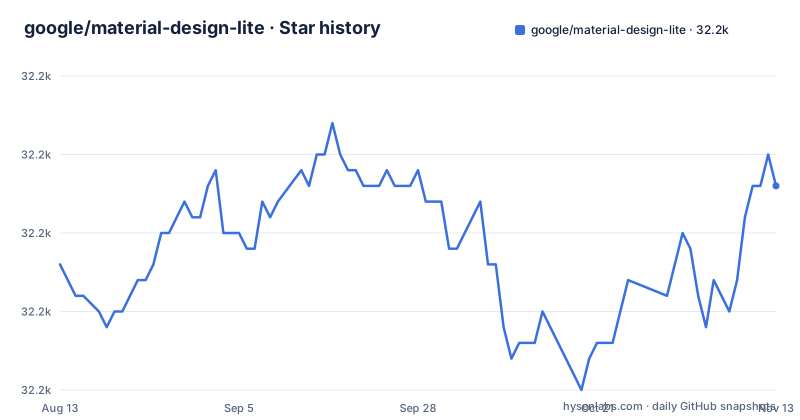
- google/material-design-lite32,193 ★ · +5
| Repository | 2026-08-13 | 2026-11-13 |
|---|---|---|
| google/material-design-lite | 32.2k | 32.2k |
5 Stars in the last 92 days, measured from the daily GitHub snapshot. Compare with other projects
Editorial analysis
A Static-Site Material Design Kit Without a Framework
Material Design Lite solves a narrow but real problem: adding a Material Design look and feel to static content websites without pulling in a JavaScript framework. The README is explicit that it does not rely on any JavaScript frameworks or libraries. It is vanilla CSS, JS, and HTML. The target user is someone building a brochure site, a documentation page, or a simple web app that has no build step and no front-end framework. If you already use React, Angular, or Vue, this project is not aimed at you. The project's own description calls it an implementation of Material Design components in vanilla CSS, JS, and HTML. That is the whole scope. It is not a design system for large applications. It is a drop-in set of styled components for pages that need to look like Material Design without the overhead of a framework.
How the Components Work: CSS Classes and Data Attributes
The mechanism is straightforward. You include the prebuilt CSS and JS files, then add specific class names to your HTML elements. The README lists no individual components. The JavaScript enhances the CSS-only experience. For browsers that do not support the needed features, the project degrades gracefully to a CSS-only experience. The README gives a browser support table: IE9 is B-grade, meaning it gets CSS-only degradation, while IE10, IE11, Chrome, Opera, Firefox, Safari, Chrome for Android, and Mobile Safari are A-grade, fully supported. This is a progressive enhancement model. The JavaScript is not required for basic styling but is needed for interactive components. The exact class names are not in the README, so you would need to consult the source or old documentation to find them. The key point is that you write plain HTML and the library styles it.
Getting It Running: Self-Host, CDNJS, or npm
The README gives three concrete ways to get Material Design Lite. The safest is to self-host the v1.3.0 release. You download the prebuilt CSS and JS from the GitHub release page and serve them from your own origin. The previously recommended getmdl.io-hosted assets are gone, so that path is dead. The second option is a CDN mirror on CDNJS. The package name on CDNJS is material-design-lite. The third option is npm, where the package is still published as material-design-lite. For contributors, the README shows how to clone the repository with git, and it warns that the master branch is unstable and should not be used in production. Use a tagged state, npm, or bower. The README also includes Windows-specific instructions for line endings, setting core.eol to lf and core.autocrlf to input. That is a real configuration step if you compile from source on Windows. For most users, downloading the release files is the simplest path.
The Hard Stop: Limited Support and a Dead Docs Site
The most significant limitation is that the project is in limited support. The README states plainly that no further development is taking place by the core team. They will review pull requests, fix critical bugs, and push out new releases, but they will not accept breaking changes. In practice, this means the component set is frozen as of v1.3.0. The old getmdl.io site is gone, and the documentation and component gallery that lived there are no longer available. That is a serious practical problem for new adopters. You cannot browse the official docs to learn the class names or component markup. You have to inspect the source code or rely on third-party tutorials. The README acknowledges this and says MDL itself still works fine as a vanilla set of files. That is true, but it means a steeper learning curve than a typical maintained library. Also, the project's default branch is mdl-1.x, which is a signal that the 1.x line is the only line. There will be no 2.x from this repository.
When It Is the Wrong Tool: Framework Apps and Modern Needs
Material Design Lite is the wrong choice for any project that uses a JavaScript framework. The README does not say this explicitly, but the entire design, vanilla HTML/CSS/JS with no framework dependency, means you would have to manually wire components into your framework's lifecycle. That is awkward and error-prone. It is also wrong for any site that needs new Material Design components or updated behavior. Since development has stopped, you will not get new components like the latest Material Design spec changes. Another failure mode is browser support. If you need full functionality in IE9, you will only get the CSS-only experience. The README says B-grade browsers gracefully degrade to CSS-only. That means interactive components like menus or dialogs may not work in IE9. If your audience includes a significant number of IE9 users, you need to test carefully. Also, the lack of official documentation is a real blocker for teams that prefer to read docs before writing code. You can work around it, but it is a cost.
The Successor: Material Components for the Web
The README explicitly names the successor: Material Components for the web, which it calls MDL v2. That project is a separate repository, material-components-web. The difference in approach is fundamental. Material Design Lite is a self-contained, framework-agnostic set of static files. Material Components for the web is designed for integration with frameworks and libraries. The README notes that MCW is in early alpha, meaning everything is a moving target and can change at any moment. That is a stark contrast. If you need a stable, frozen component set, MDL v1.3.0 is stable but dead. If you need an actively developed library with framework integration, MCW is alive but unstable. There is no middle ground. The README encourages testing MCW and providing feedback, especially for framework integration. So the choice is not between two equal options. It is between a stable, static, unsupported library and an unstable, dynamic, supported one. That trade-off should drive your decision.
Maintenance and Upgrade Cost: Low Effort, High Risk
The maintenance cost of using Material Design Lite is low in the short term because the project is frozen. You download v1.3.0, serve it, and it will not change. There is no dependency churn, no breaking updates, and no need to track new releases. But that is also the risk. If a critical bug is found, the core team says they will fix it, but there is no guarantee of a timeline. The README says they are happy to review pull requests, so you could fix it yourself, but that requires you to build from source. The upgrade path is effectively nonexistent. There is no v2 in this repository. The only upgrade is to switch to a different project, namely Material Components for the web, which is a different API. The license is Apache-2.0, which is permissive and allows commercial use, modification, and distribution. That is a positive factor for adoption. You do not need to worry about copyleft obligations. But the lack of documentation and the frozen state mean you must be prepared to maintain the code yourself if something breaks. The README warns that the master branch is unstable, so you should never use it in production. Stick to the tagged release.
Editorial conclusion
Adopt Material Design Lite if you have a static content site, need Material Design styling without a JavaScript framework, and can self-host the v1.3.0 release. Avoid it if you need ongoing development, modern component behavior, or framework integration, since the core team has moved to Material Components for the web. Before adopting, verify that the components you need still work in your target browsers, especially IE9, and check whether the CDNJS mirror is acceptable for your latency and availability requirements. The project is frozen, so your first step should be to pin the exact v1.3.0 files and test them against your own content, not to expect any fixes beyond critical bugs.
Frequently asked questions
What is Material Design UI in Material Design Lite?
Material Design Lite is an implementation of Material Design components in vanilla CSS, JS, and HTML. It relies on no JavaScript frameworks or libraries, and adds a Material Design look and feel to static content websites.
Are Material Design icons free to use with Material Design Lite?
Material Design Lite itself is published under the Apache-2 license, copyright Google 2015. The README does not cover Material Design icons or where icon files come from, so that part has to be traced separately.
Is Material Design Lite still used?
It is in limited support, with development moved to Material Components for the web. No further development takes place in MDL by the core team, though pull requests are reviewed, critical bugs get fixed, and new releases are pushed. The styles, scripts, and markup still work as a vanilla set you can drop into any project, and only the hosted docs site was retired.
Who owns Material Design Lite?
The repository sits under the google organization on GitHub, and package.json names Google as the author. MDL is licensed under Apache-2, copyright Google 2015, while its successor MDL v2 is kept in a separate repository.
Official sources
Add this badge to your README
If you maintain this project, the badge below links readers to this analysis and shows its maintenance status from the daily GitHub snapshot. Paste the markdown into your README; add ?metric=license or ?metric=stars to the image URL for a different field.

[](https://hysenlabs.com/projects/google-material-design-lite)Star history chart for your README
[](https://hysenlabs.com/projects/google-material-design-lite)Was this useful?