blessed-contrib: fourteen chart widgets, no test suite, and an ESLint 5 toolchain
Build terminal dashboards using ascii/ansi art and javascript
At a glance
- What is it?
- An MIT-licensed library that adds chart, gauge, map and canvas widgets to the blessed terminal UI kit, with TypeScript typings and a fixed append-before-setData ordering rule. Its test script runs the linter and nothing else, its lint stack is on ESLint 5, it has never published a GitHub release despite sitting at version 4.11.0, and its last push was on 2026-05-01.
- Who is it for?
- Adopt blessed-contrib when you want a terminal dashboard quickly and your audience already lives in an ssh session, since the widget set is broad and the peer dependency is a single extra install. Do not adopt it for a component you must test in isolation, because npm test only runs eslint lib and the repository ships no test suite.
- Can I use it commercially?
- Yes. MIT is a permissive licence: you can use, modify and sell software built on it, as long as you keep its copyright and licence notices.
- Is it still maintained?
- Yes. The repository last received commits 8 days ago.
- What is it written in?
- Mainly JavaScript, according to GitHub's language statistics.
Answers come from the project's GitHub data, last synced on November 14, 2026, and from our analysis. They are not legal advice.
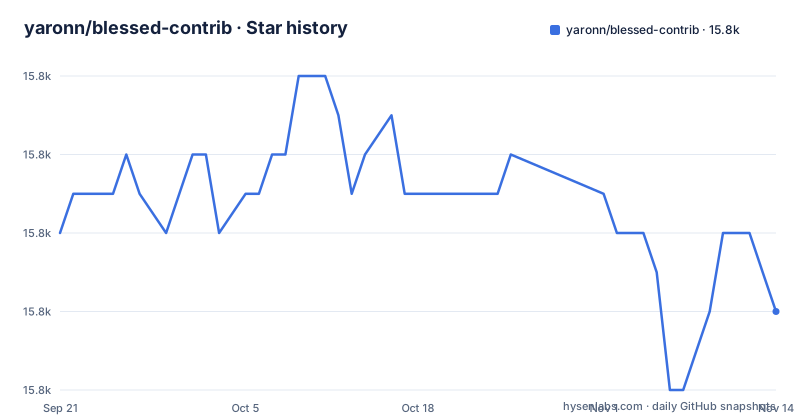
Star history
- yaronn/blessed-contrib15,772 ★ · -2
| Repository | 2026-09-21 | 2026-11-14 |
|---|---|---|
| yaronn/blessed-contrib | 15.8k | 15.8k |
-2 Stars in the last 54 days, measured from the daily GitHub snapshot. Compare with other projects
Editorial analysis
screen.append has to happen before setData, and the README says so twice
The one hard rule in the usage pattern is an ordering constraint, and it appears as a trailing comment on several examples, including the usage pattern and the bar chart:
screen.append(line) //must append before setting data
line.setData([data])
A widget is constructed with its options, appended to the blessed screen, and only then given data. Calling setData first is the mistake the comment warns against.
The pattern is otherwise ordinary JavaScript. You require blessed and blessed-contrib, create a screen, build the widget with an options object, append it, set its data, and register key handling. The key handler is worth noting because it is the only exit path in the example:
screen.key(['escape', 'q', 'C-c'], function(ch, key) {
  return process.exit(0);
Three bindings on one handler, because a terminal dashboard you cannot leave with the keyboard is not usable. Copy that shape into anything you build.
A screen is also required even for a single widget, and the documentation notes that a layout is optional while describing it as useful for dashboards. That is the one piece of advice in the usage section, and it is worth heeding as you add widgets: without a layout, positioning is manual.
npm test is npm run lint, so the package ships no tests
The scripts block is short enough to state in full, and it settles the question:
"test": "npm run lint",
"lint": "eslint lib",
"lint:fix": "eslint lib --fix"
npm test runs the linter. There is no test runner in the dependency list, no test directory at the top level, and no assertion of any kind. The package that provides fourteen chart widgets has no automated verification that any of them render correctly.
That is a materially different situation from a library with a small test suite, and it changes how you should evaluate it. You are not choosing between good coverage and poor coverage; you are choosing no coverage. Every visual property, every option and every edge case is something you find out about by running it and looking.
Two consequences follow. First, the examples directory is the real specification, and reading it is not optional. Second, if a widget misbehaves for you, there is no failing test to point at and no upstream regression suite that would have caught a related change. You are debugging against a dependency whose maintainers verify style, not behaviour.
For a project that intends to ship a dashboard to users, the reasonable response is to treat the library as unverified and write your own checks, even if they amount to snapshotting rendered output at a fixed terminal size.
The lint stack is ESLint 5 on a Standard config from 2018
The development dependencies reveal the age of the toolchain, because the pins are not all recent:
"eslint": "^5.11.0",
"eslint-config-standard": "^12.0.0",
"eslint-plugin-standard": "^4.0.0",
"blessed": "0.1.54"
ESLint 5 and eslint-config-standard 12 are from 2018. The runtime dependencies are not uniformly old, but several are: strip-ansi at ^3.0.0 and chalk at ^1.1.0 are both several major versions behind their current lines, and term-canvas is pinned to the exact version 0.0.5.
This matters for contributors rather than for users of the widgets. Because npm test is the linter, running it on a current Node release against an ESLint 5 install is where friction appears first. ESLint 5 predates the flat config format entirely, so adopting modern ESLint is not a version bump; it means replacing the config, the plugin set and the script wiring together.
The three lint scripts do reflect real care about the source. lint covers the lib directory, lint:fix applies corrections, and eslint-config-standard is among the development dependencies. If you contribute, match that style or the linter will tell you.
One upside is worth noting: with no test suite to break, a passing lint run is a fast gate, and the whole check is a single directory.
blessed is a peer you install yourself, and package.json has no peerDependencies field
The installation section tells you to use the latest stable version of Node.js LTS and to install blessed-contrib together with its peer dependency blessed:
npm install blessed blessed-contribTwo names in one command, deliberately. blessed-contrib extends blessed and does not work without it, and nothing in the manifest will install it for you. There is no peerDependencies field in package.json at all. The word peer appears in the README prose and nowhere in the metadata, which means npm will not warn you about the missing dependency or auto-resolve it the way it does for a declared peer.
If you add only blessed-contrib, your require of blessed fails at runtime rather than at install time. That is a slightly worse experience than a declared peer would give you, and it is why the command is written with both packages on one line.
To run the demo, the path is a clone and four steps:
git clone https://github.com/yaronn/blessed-contrib.git
cd blessed-contrib
npm install
node ./examples/dashboard.js
The dashboard demo is the fastest way to see what the widgets look like, and examples/dashboard.js is the file it runs. The README states the library works on Linux, OS X and Windows, and for Windows it sends you to an external pre-requisites page on a blogspot domain dated 2015. Following a decade-old blog post to get a dashboard running is the weakest link in the setup path.
Fourteen widgets are documented, and the examples directory holds more than that
The README lists fourteen widgets: Line Chart, Bar Chart, Stacked Bar Chart, Map, Gauge, Stacked Gauge, Donut, LCD Display, Rolling Log, Picture, Sparkline, Table, Tree and Markdown.
Now look at the examples directory. It contains bar.js, carousel.js, dashboard-random-colors.js, dashboard.js, donut.js, explorer.js, gauge-list.js, gauge-stack.js, gauge.js, grid-no-border.js, grid.js, lcd.js, log.js, map.js, markdown.js, marked-terminal.js, media/, multi-line-chart.js, picture.js, inline-data/ and five line chart files: line-abbreviate.js, line-fraction.js, line-random-colors.js, line-start-above-zero.js and line-zoomed-in.js.
Several of those have no widget entry in the documentation. carousel.js and grid.js, with a grid-no-border.js variant, correspond to nothing in the fourteen. explorer.js, inline-data/ and media/ do not appear either. gauge-list.js is not the same thing as either documented gauge.
The gap is not a criticism of the library so much as a fact about where the truth lives. Some of these are probably compositions of documented widgets rather than new ones, a grid being a layout of bars, a carousel being an animated sequence. But you cannot tell that from the file names.
So the practical method for evaluating this library is to read the examples, not the widget list. Twenty-three example scripts against fourteen documented widgets is a decent ratio, and they are small, which is what makes it workable. Treat the widget list as an index and the examples as the manual.
Six line chart examples exist because the y axis is where it gets fiddly
The line chart is the most documented widget, and the reason is visible in its option set. The configurable properties are label, style with line, text and baseline colours, xLabelPadding, xPadding, showLegend, and wholeNumbersOnly.
That is a short list, and only one of those options touches the y axis at all. wholeNumbersOnly takes a boolean, where true means do not show a fraction in the y axis.
The examples directory fills the gap by example: line-fraction.js for the fraction case, line-abbreviate.js, line-start-above-zero.js, line-zoomed-in.js and line-random-colors.js, plus multi-line-chart.js for several series. Five variants for one widget, each named after the behaviour it demonstrates.
Read that as a signal about the library's shape. The widgets are small, and the examples directory is where these configurations are demonstrated.
That is a legitimate design, and it keeps the widget code small. Finding out what is configurable means reading the example files alongside the README. Plan for that when you estimate the work.
Two markdown libraries and two memory stream libraries sit side by side
The dependency list contains pairs that do not obviously belong together:
"marked": "^4.0.12",
"marked-terminal": "^5.1.1",
"memory-streams": "^0.1.0",
"memorystream": "^0.3.1",
marked is the general purpose Markdown parser and marked-terminal is its terminal renderer, so that pair is explicable: you parse with one and render with the other. But both are declared as direct dependencies, and there are two example files, markdown.js and marked-terminal.js, which suggests the boundary between them is not entirely settled.
The two memory stream packages are harder to explain. They are differently named, differently versioned and both direct. Whatever each one does, a consumer reading package.json cannot tell which widgets use which, and cannot tell whether one is a leftover.
The rest of the list is more conventional: chalk for colour, lodash, x256 for 256-colour output, ansi-term, strip-ansi, map-canvas, drawille-canvas-blessed-contrib and picture-tuber for the canvas and image widgets, and sparkline. Four of those, ansi-term, drawille-canvas-blessed-contrib, map-canvas and x256, use an open >= range, which gives you no upper bound.
None of this is a reason to avoid the library. It is a reason to run npm ls and look at what actually gets installed before you commit, since the dependency surface is wider than the fourteen widgets suggest.
There are no GitHub releases, so version 4.11.0 has nothing to compare against
The repository has never published a GitHub release. Not one tag with notes, no changelog link, no release page.
What it has is a version field in package.json reading 4.11.0, which is the number you get from npm. The consequence is that when you upgrade, you have nothing to read. There is no changelog telling you a widget changed its option, no release note describing a breaking change, and no tag to diff against to see what moved.
The maintenance picture is otherwise quiet rather than abandoned. The last push to the default branch master was on 2026-05-01, and the default branch is still master. Four contributors are credited, including Yaron Naveh, who is also the package author in the manifest, alongside Chris, Miguel Valadas and Liran Tal. The README also points at WOPR, a separate markup from the same author for terminal reports and presentations, which suggests ongoing work in the general area even where this package is quiet.
Two things to check before you depend on it. First, whether the version you install matches what you tested, given that there is no tag to anchor it to, so pin an exact version rather than a range in anything that matters. Second, the top level carries index.d.ts and the manifest sets types to it, with @types/blessed in the development dependencies, so TypeScript users do get declarations. That is a genuine positive and it is worth confirming in your own build, since a types field pointing at a hand-maintained declaration file is exactly the kind of thing that goes stale quietly.
Editorial conclusion
Adopt blessed-contrib when you want a terminal dashboard quickly and your audience already lives in an ssh session, since the widget set is broad and the peer dependency is a single extra install. Do not adopt it for a component you must test in isolation, because npm test only runs eslint lib and the repository ships no test suite. Pin blessed at 0.1.54 as the devDependency does, and budget for a lint toolchain on ESLint 5. Verify what you installed by version: there are no GitHub releases, so 4.11.0 has no tag or release note to diff against.
Frequently asked questions
How do I install blessed-contrib and get a dashboard running?
Use the latest stable version of Node.js LTS, then run npm install blessed blessed-contrib, since blessed is a peer dependency that package.json does not declare for you. To see the widgets immediately, clone the repository, run npm install, and start it with node ./examples/dashboard.js.
In what order do I append a blessed-contrib widget and set its data?
A widget has to be appended to the screen before you give it data. The README marks that line with the comment must append before setting data in the usage example and the bar chart example.
Does blessed-contrib have automated tests?
No. The test script in package.json is npm run lint, which runs eslint lib, and there is no test runner in the dependencies and no test directory. Verification is style checking only, so the examples directory is the practical specification for how each widget behaves.
Which widgets does blessed-contrib provide?
Fourteen are documented: Line Chart, Bar Chart, Stacked Bar Chart, Map, Gauge, Stacked Gauge, Donut, LCD Display, Rolling Log, Picture, Sparkline, Table, Tree and Markdown. The examples directory contains further files such as carousel.js, grid.js and explorer.js that have no widget entry in the documentation.
How do I configure the y axis of a blessed-contrib line chart?
The line chart exposes label, style colours, xLabelPadding, xPadding, showLegend and wholeNumbersOnly, where true suppresses fractions on the y axis. The examples directory also has line-start-above-zero.js, line-zoomed-in.js and line-abbreviate.js.
Official sources
Add this badge to your README
If you maintain this project, the badge below links readers to this analysis and shows its maintenance status from the daily GitHub snapshot. Paste the markdown into your README; add ?metric=license or ?metric=stars to the image URL for a different field.

[](https://hysenlabs.com/projects/yaronn-blessed-contrib)Star history chart for your README
[](https://hysenlabs.com/projects/yaronn-blessed-contrib)Was this useful?